Authentication and secure hosting
A server on STDIO or a named pipe inherits the identity of whoever launched it, so there is nothing to authenticate. The moment it is reachable over HTTP that stops being true: anyone who can reach the port can call every tool. This guide covers securing an MCP server over HTTP end to end — the OAuth 2.1 model the protocol expects, enforcing bearer tokens on the Streamable HTTP transport, binding a certificate on Windows, running as a service, and fronting the whole thing with IIS. It is cross-cutting by nature: the pieces live in the transport, the server, and the Windows platform, and none of them is sufficient alone.
The model
MCP authorization puts three parties in play, and keeps them separate:
- The MCP client obtains an access token.
- The authorization server issues it — a separate process, typically an existing identity provider.
- The resource server is your MCP server. It accepts the token, validates it, and serves the request.
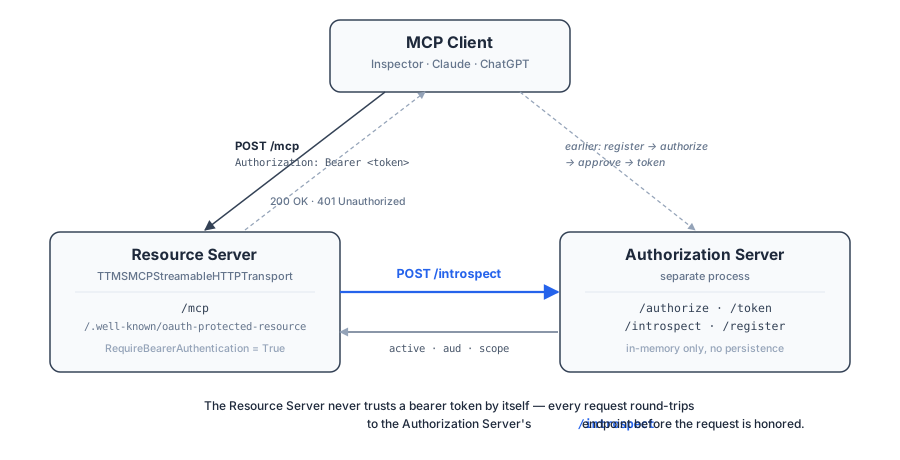
The point worth internalising is that your server does not issue tokens and
should not trust one on sight. In a correct deployment every request triggers a
live validation against the authorization server — RFC 7662 introspection, or
signature and claim checks against its published keys — before the request is
honoured. That is what OnValidateAccessToken is for.
Enforcing bearer tokens
Four properties on the transport turn authentication on, and one event does the actual verifying:
procedure TForm1.StartProductionServer;
var
  Transport: TTMSMCPStreamableHTTPTransport;
begin
  Transport := TTMSMCPStreamableHTTPTransport.Create(Server);
  Transport.Port := 8443;
  Transport.MCPEndpoint := '/mcp';

  { TLS terminated here rather than at the proxy. On Windows, bind the
    certificate to the port with netsh first - see the Authentication guide. }
  Transport.UseSSL := True;
  Transport.CertFile := ConfigPath('server.crt');
  Transport.KeyFile := ConfigPath('server.key');

  { The address clients use, which is not the address we bind. }
  Transport.PublicHost := 'https://mcp.example.com';
  Transport.CORSMaxAgeSeconds := 86400;

  { Session lifetime for the per-client state the server keeps. }
  Transport.SessionTimeoutMs := 600000;
  Transport.CleanupIntervalMs := 60000;

  { OAuth 2.1: advertise discovery, demand a bearer token, and validate it. }
  Transport.EnableOAuthDiscovery := True;
  Transport.RequireBearerAuthentication := True;
  Transport.AuthorizationServers.Add('https://auth.example.com');
  Transport.ResourceScopesSupported.Add('inventory.read');
  Transport.ResourceScopesSupported.Add('inventory.write');
  Transport.RequiredScopes.Add('inventory.read');
  Transport.OnValidateAccessToken := TransportValidateAccessToken;

  Server.Transport := Transport;
  Server.Start;
end;

procedure TForm1.TransportValidateAccessToken(Sender: TObject;
  const AToken, AResourceURI: string; var AValidation: TTMSMCPAccessTokenValidation);
begin
  { Verify the token against the authorization server, then report the
    outcome so the transport can accept or reject the request. }
  AValidation := ValidateWithAuthServer(AToken, AResourceURI);
end;
void __fastcall TForm1::StartProductionServer()
{
  TTMSMCPStreamableHTTPTransport *Transport;

  Transport = new TTMSMCPStreamableHTTPTransport(Server);
  Transport->Port = 8443;
  Transport->MCPEndpoint = "/mcp";

  // TLS terminated here rather than at the proxy. On Windows, bind the
  // certificate to the port with netsh first - see the Authentication guide.
  Transport->UseSSL = true;
  Transport->CertFile = ConfigPath("server.crt");
  Transport->KeyFile = ConfigPath("server.key");

  // The address clients use, which is not the address we bind.
  Transport->PublicHost = "https://mcp.example.com";
  Transport->CORSMaxAgeSeconds = 86400;

  // Session lifetime for the per-client state the server keeps.
  Transport->SessionTimeoutMs = 600000;
  Transport->CleanupIntervalMs = 60000;

  // OAuth 2.1: advertise discovery, demand a bearer token, and validate it.
  Transport->EnableOAuthDiscovery = true;
  Transport->RequireBearerAuthentication = true;
  Transport->AuthorizationServers->Add("https://auth.example.com");
  Transport->ResourceScopesSupported->Add("inventory.read");
  Transport->ResourceScopesSupported->Add("inventory.write");
  Transport->RequiredScopes->Add("inventory.read");
  Transport->OnValidateAccessToken = TransportValidateAccessToken;

  Server->Transport = Transport;
  Server->Start();
}

void __fastcall TForm1::TransportValidateAccessToken(TObject *Sender,
  const System::UnicodeString AToken, const System::UnicodeString AResourceURI,
  TTMSMCPAccessTokenValidation &AValidation)
{
  // Verify the token against the authorization server, then report the
  // outcome so the transport can accept or reject the request.
  AValidation = ValidateWithAuthServer(AToken, AResourceURI);
}
| Property | Role |
|---|---|
RequireBearerAuthentication |
Reject any request without a valid token. |
AuthorizationServers |
The issuers a token may come from. |
ResourceScopesSupported |
Every scope this server understands. |
RequiredScopes |
The scopes a token must carry to be accepted. |
OnValidateAccessToken |
Your verification, filling a TTMSMCPAccessTokenValidation. |
The handler receives the token and the resource URI and reports back Valid,
Subject, ClientId, Scopes, ExpiresAt, and on rejection ErrorCode and
ErrorDescription. The transport enforces RequiredScopes against the Scopes
you report — so returning the token's real scopes matters, not just Valid.
Validate the audience too. A token minted for a different resource is a valid token; accepting it is a confused-deputy bug. The resource identifier to check against is the canonicalised form published in your protected-resource metadata.
Discovery
EnableOAuthDiscovery := True publishes the documents a client needs to find its
way to the authorization server without being configured by hand. An
unauthenticated request then gets a 401 carrying a WWW-Authenticate header
pointing at the protected-resource metadata, the client reads that, discovers the
issuer, and obtains a token.
Three well-known routes are involved, all served by the transport on the same listener as the MCP endpoint:
| Route | Served when | Carries |
|---|---|---|
/.well-known/oauth-authorization-server |
EnableOAuthDiscovery |
The authorization-server metadata. |
/.well-known/openid-configuration |
EnableOAuthDiscovery |
The same document, under the OpenID name some clients look for first. |
/.well-known/oauth-protected-resource[<MCPEndpoint>] |
RequireBearerAuthentication |
The RFC 9728 protected-resource metadata the 401 points at. |
All three are GET-only: another method gets 405, and with discovery off the
first two are not recognised at all and fall through to 404 like any other
unknown path.
OAuthMetadata and ProtectedResourceMetadata accept custom documents — assign
a TJSONObject and it is serialized verbatim, which is how you describe a flow
the defaults do not cover. The transport does not take ownership of either,
so free them yourself. Left unassigned, a minimal authorization_code + PKCE
document is generated on every request from the current server URL, so it always
reflects PublicHost, UseSSL, and Port:
{
  "issuer": "https://mcp.example.com",
  "authorization_endpoint": "https://mcp.example.com/oauth/authorize",
  "token_endpoint": "https://mcp.example.com/oauth/token",
  "response_types_supported": ["code"],
  "grant_types_supported": ["authorization_code"],
  "code_challenge_methods_supported": ["S256"]
}
These properties only publish metadata about an authorization server. They do
not validate anything — token issuance is the authorization server's job, and
enforcement on incoming requests is OnValidateAccessToken's.
Path insertion
One detail of RFC 8414 and RFC 9728 surprises almost everyone, and it only bites when the issuer or resource identifier has a path component. The discovery document does not live nested under that path — it lives at the well-known root with the path appended as a suffix:
Issuer:            https://example.com/mcp/auth
Metadata document: https://example.com/.well-known/oauth-authorization-server/mcp/auth
NOT:               https://example.com/mcp/auth/.well-known/oauth-authorization-server
Behind a proxy this needs its own explicit rewrite rule — it does not fall out of a general "strip the prefix and forward" rule. Mounting at the domain root avoids the whole nuance, because an issuer with no path needs no insertion.
TLS on Windows
The Windows HTTP server talks directly to http.sys, the same kernel-mode component IIS is built on. That is not the Indy/OpenSSL pattern, and the difference is the single most common deployment surprise:
There is no code path on Windows that loads a raw
.crt/.keyPEM pair.CertFileis consulted only as a fallback pointer to a certificate already in the Windows certificate store. PEM files apply to the non-Windows implementation.
Get the certificate into the store, find its thumbprint — not its friendly name — and bind it to the port ahead of time:
Get-ChildItem Cert:\LocalMachine\My | Select-Object Thumbprint, FriendlyName, Subject
netsh http add sslcert ipport=0.0.0.0:9000 certhash=<THUMBPRINT> appid={00112233-4455-6677-8899-AABBCCDDEEFF}
netsh http add urlacl url=https://+:9000/ user=Everyone
Friendly names are not accepted anywhere in this path. IIS Manager lets you pick a certificate by friendly name, but that is an IIS convenience — http.sys itself only understands the thumbprint.
Letting the server do the binding
There is a second route, and it is what CertFile actually points at on
Windows: an INI file naming a certificate that is already in the store.
Point CertFile at a file shaped like this —
[certificate]
Hash=<THUMBPRINT>
StoreName=My
AppID={00112233-4455-6677-8899-AABBCCDDEEFF}
— and on a start where the URL is not yet reserved and no certificate is bound
to the port, the server reads those three values and runs the netsh http add urlacl and netsh http add sslcert pair for you, elevating once through a UAC
prompt. AppID may be omitted; the default GUID above is used.
So the property is not a PEM path and never was: it is a pointer to a
store-resident certificate, either through this INI or not at all. The keys are
read case-insensitively, and StoreName is the store the certificate lives in
(My for the personal store).
Use this for a desktop or interactive deployment, where a one-time UAC prompt is
acceptable. For a service, bind with netsh by hand instead — the reason is the
next paragraph.
Pre-binding also avoids a real failure mode. Without it, the server tries to
reserve the URL ACL itself on first start by elevating through ShellExecuteEx
and waiting on the result. What it reserves is http(s)://+:<Port>/ for
Everyone, so a reservation you make by hand has to name the same port the
transport's Port property carries, or the server reserves a second one anyway. A Windows service has no interactive desktop to show a
UAC prompt on, so depending on the service account that call either fails outright
or hangs until the Service Control Manager's start timeout kills it — which looks
like a crash loop that eventually succeeds. Binding ahead of time sidesteps it.
Running as a Windows service
Three things change when the same server runs as a service:
- Configuration cannot be hardcoded. Ports, issuer URLs, and certificate
thumbprints differ per machine and must come from a file next to the
executable — an
.iniis enough — not from constants. - There is no console. Anything written to standard output disappears. Log to a file or the event log, and note that this is the opposite of the STDIO transport's constraint, where standard output is reserved for protocol traffic.
- Restarts wipe in-memory state. Sessions, and anything else held only in memory, are gone. Anything that must survive a restart has to be persisted.
Behind IIS as a reverse proxy
A common deployment fronts the service with IIS using ARR, terminating TLS at the public host.
First, a one-time prerequisite: enable ARR proxying. It is a server-wide
setting, not a per-site one — IIS Manager → the server node → Application Request
Routing Cache → Server Proxy Settings → tick Enable proxy → Apply. Without
it, a rewrite rule pointing at an absolute http://… URL does not actually proxy:
you get a 404, 502, or IIS's generic 503 instead of a forwarded response, and it
looks for all the world like a broken rewrite rule rather than one unticked
checkbox.
Then four things to get right, each of which has cost people an afternoon:
Set PublicHost to the full public URL. The server generates absolute URLs in
its discovery documents. Without PublicHost it builds them from the address it
bound, leaking an internal host and — because TLS was terminated upstream and its
own UseSSL is False — the wrong scheme. Use the full-URL form here, never the
bare host[:port] form, which derives its scheme from that same UseSSL.
Add the rewrite rules near the top of the site's rule collection. A broad catch-all earlier in the list — a SPA fallback, a CMS permalink rule — silently swallows these paths. The rest of the site keeps working, so nothing looks wrong except that the rules never fire. For a root-mounted layout:
<rule name="Auth Server metadata" stopProcessing="true">
  <match url="^\.well-known/oauth-authorization-server$" />
  <action type="Rewrite" url="http://127.0.0.1:8935/.well-known/oauth-authorization-server" />
</rule>
<rule name="Auth Server endpoints" stopProcessing="true">
  <match url="^(authorize/approve|authorize|register|token|introspect)$" />
  <action type="Rewrite" url="http://127.0.0.1:8935/{R:1}" />
</rule>
<rule name="Resource Server metadata" stopProcessing="true">
  <match url="^\.well-known/oauth-protected-resource(/mcp)?$" />
  <action type="Rewrite" url="http://127.0.0.1:8934/.well-known/oauth-protected-resource{R:1}" />
</rule>
<rule name="Resource Server MCP endpoint" stopProcessing="true">
  <match url="^mcp$" />
  <action type="Rewrite" url="http://127.0.0.1:8934/mcp" />
</rule>
Turn off "reverse rewrite host in response headers". With it on, IIS rewrites
Location: headers coming back from the backend, replacing the backend host with
the site's public one. That is usually desirable for a normal proxy and actively
breaks OAuth: the authorization step redirects to the client's own callback URL
— http://localhost:6274/oauth/callback, or a native app's loopback listener —
which has nothing to do with your site. Rewritten, the browser lands on
https://yoursite.com/oauth/callback and gets a 404. The diagnostic that nails
it: log the URL immediately before redirecting. If your code logs the right value
and the browser ends up elsewhere, the corruption is downstream of you.
Prefer path-relative URLs in server-rendered pages. A root-relative URL
(/authorize/approve) always resolves against the domain root and ignores the
prefix the page was served under. The path-relative form (authorize/approve)
resolves correctly under /mcp/auth/. This is a general web footgun, not an OAuth
one, but a path-prefixed mount is where it shows up.
Troubleshooting
A port that looks open but answers with a canned 503
Worth its own entry because every instinct points the wrong way. If two
http.sys-registered listeners on the same machine claim overlapping URL namespaces
on one port — a leftover IIS site binding, another test process — the port looks
perfectly healthy in netstat but requests come back as IIS/http.sys's own generic
error page:
<HTML><HEAD><TITLE>Service Unavailable</TITLE></HEAD>
<BODY><h2>Service Unavailable</h2><hr><p>HTTP Error 503. The service is unavailable.</p></BODY></HTML>
That is not your application answering — this server returns JSON. http.sys is replying on your service's behalf before the request ever reaches your process.
The diagnostic: netstat -ano | findstr :PORT shows something listening, usually
PID 4 ("System"), which is normal for any http.sys listener and not itself a red
flag. The tell is that a direct call to http://127.0.0.1:PORT/… from the same
machine, bypassing any proxy, still returns that page. If it does, the fix is
almost always to move your service to a genuinely unclaimed port. You can hunt
the conflicting registration with netsh http show urlacl and appcmd list site,
but that is usually more effort than picking a different port.
Everything else
| Symptom | Likely cause |
|---|---|
| Every request rejected, tokens look fine | RequireBearerAuthentication on with no OnValidateAccessToken, so nothing validates. |
| Client cannot discover the authorization server | EnableOAuthDiscovery off, or the metadata rewrite rule missing / shadowed by an earlier rule. |
Discovery document names an internal host or http:// |
PublicHost unset, or set in the bare host[:port] form behind a proxy. |
| Metadata 404s on a path-prefixed mount | Path insertion — the document is at /.well-known/…/<issuer path>, not nested under the prefix. |
| OAuth redirect lands on your own site and 404s | ARR host rewriting on outbound headers. |
| Service crash-loops at start, then succeeds | URL ACL self-registration elevating with no interactive desktop. Pre-bind with netsh. |
| TLS never comes up on Windows | Certificate not bound to the port by thumbprint, or a friendly name used instead. |
| Sessions vanish unexpectedly | SessionTimeoutMs (five minutes by default), or a service restart clearing in-memory state. |
Common mistakes
- Trusting a token without validating it. A bearer token is a claim, not proof. Validate every request against the authorization server.
- Ignoring the audience. A token valid for another resource is still a valid token. Check it was minted for yours.
- Serving plain HTTP outside localhost. Bearer tokens travel in the clear.
- Expecting PEM files to work on Windows. They do not. Bind by thumbprint.
- Hardcoding ports and URLs in a service. They differ per machine; put them in a configuration file.
- Writing diagnostics to standard output in a service. Nothing is listening.
- Assuming in-memory state survives a restart. It does not.
See also
- HTTP transports — the properties this guide configures
- MCP Transports — choosing a transport in the first place
- MCP Server — sessions, which authentication scopes to a user
TTMSMCPStreamableHTTPTransport,TTMSMCPAccessTokenValidation