Web Browser
TMS FNC Core provides TTMSFNCWebBrowser, a framework-neutral web browser control that displays web pages, HTML content, and files such as PDFs. It supports navigation, JavaScript execution, screenshot capture, and a JavaScript bridge for application communication.
Add the appropriate unit to your uses clause:
uses
  FMX.TMSFNCWebBrowser;    // FMX
  VCL.TMSFNCWebBrowser;    // VCL
  WEBLib.TMSFNCWebBrowser;  // WEB Core (displays HTML; navigation not supported)
#include <FMX.TMSFNCWebBrowser.hpp> // FMX
Key classes: TTMSFNCWebBrowser, TTMSFNCEdgeWebBrowser
Platform Setup
iOS and macOS
The browser uses WKWebView. Add the WebKit framework to your iOS/macOS SDK inside the IDE. See the TMS framework setup guide for instructions.
Android
No additional setup is required for basic functionality. If you encounter missing libraries during deployment, see the TMS Android JS guide.
Windows (Edge Chromium)
- Install Microsoft Edge if not already present (Windows 10 with auto-updates includes it).
- Copy
WebView2Loader_x86.dllandWebView2Loader_x64.dllfrom the Edge Support folder in the TMS FNC Core source directory toSystem32andSysWow64. These DLLs are also required during deployment.
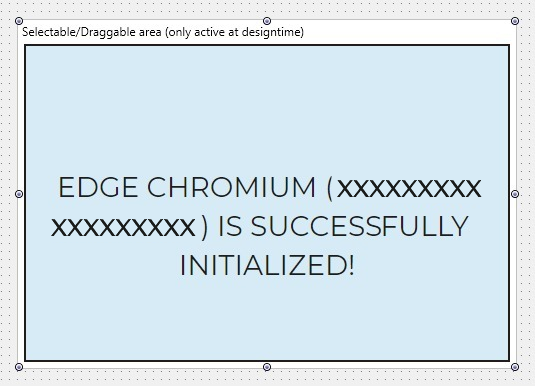
After setup, drop TTMSFNCWebBrowser on a form and the live Edge Chromium instance initializes at design time:
Note
When creating TTMSFNCWebBrowser programmatically, set your OnInitialized event handler before setting the Parent property to ensure consistent behavior across platforms.
Navigation
TMSFNCWebBrowser1.URL := 'https://www.tmssoftware.com';
// or
TMSFNCWebBrowser1.Navigate('https://www.tmssoftware.com');
Loading HTML
TMSFNCWebBrowser1.LoadHTML('<b>This is HTML!</b>');
Loading Files
Load PDF files, images, HTML files, and other supported types:
TMSFNCWebBrowser1.LoadFile('MyPDF.pdf');
Executing JavaScript
TMSFNCWebBrowser1.ExecuteJavascript(
  'function test(param){ return param + "_returned";} test("Hello");',
  procedure(const AValue: string)
  begin
    TTMSFNCUtils.Log(AValue);
  end
);
TMSFNCWebBrowser1->ExecuteJavaScript(
  "function test(param){ return param + \"_returned\";} test(\"Hello\");",
  [](const String AValue)
  {
    TTMSFNCUtils::Log(AValue);
  }
);

Capture Screenshot
TMSFNCWebBrowser1.CaptureScreenshot;
Handle OnCaptureScreenshot to receive the result as a TTMSFNCBitmap.
JavaScript Bridge
Register a bridge object to enable communication between the browser page and your application:
type
  TMyBridgeObject = class(TInterfacedPersistent, ITMSFNCCustomWebBrowserBridge)
  private
    FObjectMessage: string;
    function GetObjectMessage: string;
    procedure SetObjectMessage(const Value: string);
  published
    property ObjectMessage: string read GetObjectMessage write SetObjectMessage;
  end;
class TMyBridgeObject : public TInterfacedPersistent, public ITMSFNCCustomWebBrowserBridge
{
private:
  String FObjectMessage;
  String __fastcall GetObjectMessage();
  void __fastcall SetObjectMessage(const String Value);
__published:
  __property String ObjectMessage = {read=GetObjectMessage, write=SetObjectMessage};
};
procedure TForm1.FormCreate(Sender: TObject);
const
  BridgeName = 'MyBridge';
var
  w: TTMSFNCWebBrowser;
  o: TMyBridgeObject;
  sHTML: string;
begin
  w := TTMSFNCWebBrowser.Create(Self);
  sHTML :=
    '<html><head><script>' +
    w.GetBridgeCommunicationLayer(BridgeName) +
    '</script></head><body>' +
    '<button onclick="send' + BridgeName + 'ObjectMessage(''Hello World!'');">Click</button>' +
    '</body></html>';
  w.Parent := Self;
  o := TMyBridgeObject.Create;
  w.AddBridge(BridgeName, o);
  w.LoadHTML(sHTML);
end;
void __fastcall TForm1::FormCreate(TObject *Sender)
{
  const String BridgeName = "MyBridge";
  TTMSFNCWebBrowser *w = new TTMSFNCWebBrowser(this);
  String sHTML =
    "<html><head><script>" +
    w->GetBridgeCommunicationLayer(BridgeName) +
    "</script></head><body>" +
    "<button onclick=\"send" + BridgeName + "ObjectMessage('Hello World!');\">Click</button>" +
    "</body></html>";
  w->Parent = this;
  TMyBridgeObject *o = new TMyBridgeObject();
  w->AddBridge(BridgeName, o);
  w->LoadHTML(sHTML);
}
ObjectMessage must remain published so internal RTTI can pick it up. Communication always uses string values.
Events
procedure TForm1.TMSFNCWebBrowser1BeforeNavigate(Sender: TObject;
  var Params: TTMSFNCCustomWebBrowserBeforeNavigateParams);
begin
  Params.Cancel := Params.URL.Contains('tmsfnccore.asp');
end;
void __fastcall TForm1::TMSFNCWebBrowser1BeforeNavigate(TObject *Sender,
  TTMSFNCCustomWebBrowserBeforeNavigateParams &Params)
{
  Params.Cancel = Params.URL.Pos("tmsfnccore.asp") > 0;
}
OnBeforeNavigate lets you inspect and cancel navigations. OnNavigateComplete fires when navigation finishes.
TTMSFNCEdgeWebBrowser
TTMSFNCEdgeWebBrowser extends TTMSFNCWebBrowser with Windows Edge-specific features. Platform setup is identical to TTMSFNCWebBrowser.
Note
Currently requires WebView2 version 1.0.1587 or compatible.
Context Menu
By default, the browser shows its native context menu. You can replace or customize it:
- Assign a
TPopupMenuto thePopupMenuproperty to replace the native menu with a framework menu. - Enable
Settings.UsePopupMenuAsContextMenuto render the assignedTPopupMenuas a native context menu. - Handle
OnGetContextMenuto add, remove, or modify individual items.
Only custom context menu items (TTMSFNCWebBrowserCustomContextMenuItem) can have click detection.
procedure TForm1.EdgeWebBrowserGetContextMenu(Sender: TObject;
  ATarget: TTMSFNCWebBrowserTargetItem;
  AContextMenu: TObjectList<TTMSFNCWebBrowserContextMenuItem>);
var
  mi: TTMSFNCWebBrowserCustomContextMenuItem;
begin
  mi := TTMSFNCWebBrowserCustomContextMenuItem.Create;
  mi.Name := 'Go to TMS';
  AContextMenu.Insert(0, mi);
end;
void __fastcall TForm1::EdgeWebBrowserGetContextMenu(TObject *Sender,
  TTMSFNCWebBrowserTargetItem *ATarget,
  TObjectList__1<TTMSFNCWebBrowserContextMenuItem*> *AContextMenu)
{
  TTMSFNCWebBrowserCustomContextMenuItem *mi = new TTMSFNCWebBrowserCustomContextMenuItem();
  mi->Name = "Go to TMS";
  AContextMenu->Insert(0, mi);
}
Chrome DevTools Protocol
Call CallDevToolsProtocolMethod to invoke DevTools API methods and receive the JSON response in OnDevToolsMethodCompleted. Subscribe to events with SubscribeDevtools; results arrive via OnDevToolsSubscribedEvent. Console log events are pre-parsed into OnGetConsoleMessage.
Additional Properties
| Property | Description |
|---|---|
Settings.AdditionalBrowserParameters |
Startup parameters passed to WebView2 |
Settings.AllowExternalDrop |
Allow dropping external files (default: True) |
Settings.EnableAcceleratorKeys |
Enable browser-specific accelerator keys |
Settings.EnableContextMenu |
Show/hide the context menu |
Settings.EnableShowDebugConsole |
Enable the debug console |
Settings.Language |
Browser localization |
Additional Methods
| Method | Description |
|---|---|
GetCookies(AURI) |
Returns cookies for the URI |
AddCookie(ACookie) |
Adds or updates a cookie |
DeleteAllCookies |
Deletes all cookies under the profile |
Print(APrintSettings) |
Prints the current page asynchronously |
PrintToPDF(AFileName, APrintSettings) |
Exports the current page to PDF |
NavigateWithData(AURI, AMethod, ABody, AHeaders) |
Navigates with custom HTTP method and body |
OpenTaskManager |
Opens the browser Task Manager |
Download Events
| Event | Description |
|---|---|
OnDownloadStarted |
Fires when a download starts; set result path, silent/pause/cancel |
OnDownloadStateChanged |
Fires when download state changes |
OnDownloadBytesReceivedChanged |
Periodic progress update |