TMS FNC MapBox Guides
TMS FNC MapBox wraps Mapbox GL features behind the common TMS FNC Maps programming model while keeping provider-specific options reachable when a Mapbox project needs them. Use these guides when the application must control the Mapbox style URL or hosted API version, switch between 2D and 3D map styles, rotate or tilt the camera, make markers draggable, order markers by Z index, react to right-click gestures, or add text labels above the map. The same control still uses the shared map collections for markers, poly elements, and labels, so most workflows combine a provider-specific Options change with common map items.
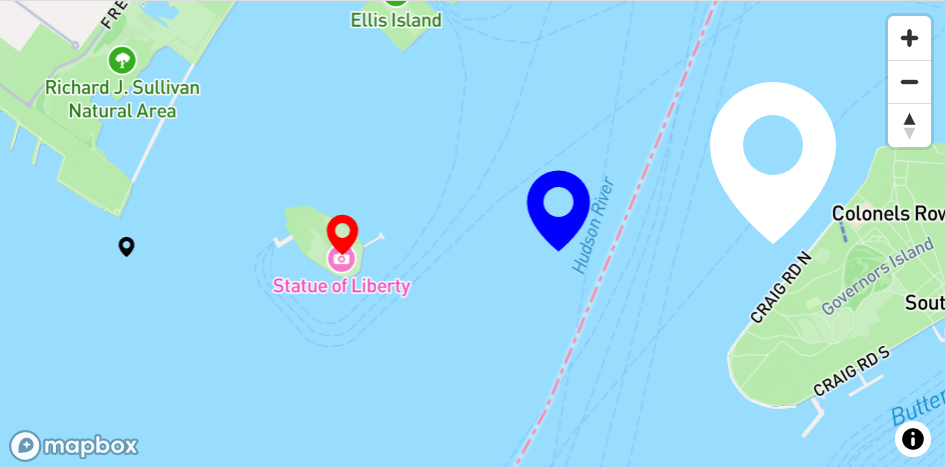
Map Styles And API Version
Mapbox styles determine both the cartography and which provider features are available. The built-in Options.MapStyle values cover common Mapbox styles, while mbsCustom and Options.MapStyleURL let you point at a style from Mapbox Studio. Options.Version controls the Mapbox GL JS API version loaded by the control; set it before the map is initialized when a project has been validated against a specific provider version.
procedure TForm1.ConfigureMapBoxStyleAndCamera;
var
  LLabel: TTMSFNCMapsLabel;
begin
  TMSFNCMapBox1.APIKey := '<your MapBox access token>';

  { API version updated to v3.24.0: pin the provider version you tested. }
  TMSFNCMapBox1.Options.Version := '3.24.0';

  { MapStyles can use a built-in style or a predefined custom style URL. }
  TMSFNCMapBox1.Options.MapStyle := mbsCustom;
  TMSFNCMapBox1.Options.MapStyleURL := 'mapbox://styles/mapbox/streets-v12';

  { Support for 3D Maps. }
  TMSFNCMapBox1.Options.MapStyle := mbs3D;

  { Options TimeOfDay, Tilt and Heading control 3D maps only. }
  TMSFNCMapBox1.Options.TimeOfDay := todDusk;
  TMSFNCMapBox1.Options.Tilt := 60;
  TMSFNCMapBox1.Options.Heading := 35;

  TMSFNCMapBox1.Options.DefaultLatitude := 40.7073;
  TMSFNCMapBox1.Options.DefaultLongitude := -74.0093;
  TMSFNCMapBox1.Options.DefaultZoomLevel := 15;

  { AddLabel adds a coordinate-bound label to the map. }
  LLabel := TMSFNCMapBox1.AddLabel(40.7073, -74.0093, 'Downtown');
  LLabel.LabelType := ltBalloon;
end;
void __fastcall TForm1::ConfigureMapBoxStyleAndCamera()
{
  TMSFNCMapBox1->APIKey = "<your MapBox access token>";

  // API version updated to v3.24.0: pin the provider version you tested.
  TMSFNCMapBox1->Options->Version = "3.24.0";

  // MapStyles can use a built-in style or a predefined custom style URL.
  TMSFNCMapBox1->Options->MapStyle = mbsCustom;
  TMSFNCMapBox1->Options->MapStyleURL = "mapbox://styles/mapbox/streets-v12";

  // Support for 3D Maps.
  TMSFNCMapBox1->Options->MapStyle = mbs3D;

  // Options TimeOfDay, Tilt and Heading control 3D maps only.
  TMSFNCMapBox1->Options->TimeOfDay = todDusk;
  TMSFNCMapBox1->Options->Tilt = 60;
  TMSFNCMapBox1->Options->Heading = 35;

  TMSFNCMapBox1->Options->DefaultLatitude = 40.7073;
  TMSFNCMapBox1->Options->DefaultLongitude = -74.0093;
  TMSFNCMapBox1->Options->DefaultZoomLevel = 15;

  // Labels collection is now accessible.
  TTMSFNCMapsLabel *LLabel = TMSFNCMapBox1->AddLabel(40.7073, -74.0093, "Downtown");
  LLabel->LabelType = ltBalloon;
}
Use the version setting deliberately. Newer Mapbox versions can change style behavior or provider defaults, so treat Options.Version as part of your deployment configuration instead of changing it at runtime for each user action.
3D Camera, Time Of Day, Tilt, And Heading
The 3D MapBox style adds camera controls that are not meaningful on every flat style. Options.Tilt changes the pitch, Options.Heading rotates the map, and Options.TimeOfDay changes the lighting on compatible 3D styles. Keep tilt in the supported 0..90 range; the setter clamps out-of-range values, but explicit bounds make UI controls easier to reason about.
procedure TForm1.ConfigureMapBox3DCamera;
begin
  TMSFNCMapBox1.Options.MapStyle := mbs3D;
  TMSFNCMapBox1.Options.TimeOfDay := todDusk;
  TMSFNCMapBox1.Options.Tilt := 60;
  TMSFNCMapBox1.Options.Heading := 35;
end;
void __fastcall TForm1::ConfigureMapBox3DCamera()
{
  TMSFNCMapBox1->Options->MapStyle = mbs3D;
  TMSFNCMapBox1->Options->TimeOfDay = todDusk;
  TMSFNCMapBox1->Options->Tilt = 60;
  TMSFNCMapBox1->Options->Heading = 35;
}
When a form exposes spin boxes or segmented controls for these values, update the Options properties directly. The control propagates changed options to the browser map once the map is ready.
Markers, Dragging, And Z Index
MapBox markers use the MapBox-specific TTMSFNCMapBoxMarker type, which extends the shared marker model with Draggable and ZIndex. Enable dragging only for markers that represent editable data, and handle OnMarkerDragEnd to persist the final coordinate after the user releases the marker. Use ZIndex when overlapping markers need a predictable drawing order.
procedure TForm1.ConfigureEditableMarkers;
var
  LMainMarker: TTMSFNCMapBoxMarker;
  LSecondaryMarker: TTMSFNCMapBoxMarker;
begin
  LMainMarker := TMSFNCMapBox1.AddMarker(40.7073, -74.0093, 'Editable stop');
  LMainMarker.Draggable := True;
  LMainMarker.ZIndex := 10;

  LSecondaryMarker := TMSFNCMapBox1.AddMarker(40.7061, -74.0115, 'Background stop');
  LSecondaryMarker.Draggable := False;
  LSecondaryMarker.ZIndex := 1;

  TMSFNCMapBox1.OnMarkerDragEnd := TMSFNCMapBox1MarkerDragEnd;
end;

procedure TForm1.TMSFNCMapBox1MarkerDragEnd(Sender: TObject;
  AEventData: TTMSFNCMapsEventData);
begin
  if Assigned(AEventData.Marker) then
    AEventData.Marker.Title := 'Moved stop';
end;
void __fastcall TForm1::ConfigureEditableMarkers()
{
  TTMSFNCMapBoxMarker *LMainMarker = TMSFNCMapBox1->AddMarker(40.7073, -74.0093, "Editable stop");
  LMainMarker->Draggable = true;
  LMainMarker->ZIndex = 10;

  TTMSFNCMapBoxMarker *LSecondaryMarker = TMSFNCMapBox1->AddMarker(40.7061, -74.0115, "Background stop");
  LSecondaryMarker->Draggable = false;
  LSecondaryMarker->ZIndex = 1;

  TMSFNCMapBox1->OnMarkerDragEnd = TMSFNCMapBox1MarkerDragEnd;
}

void __fastcall TForm1::TMSFNCMapBox1MarkerDragEnd(TObject *Sender,
  TTMSFNCMapsEventData *AEventData)
{
  if (AEventData->Marker != nullptr)
    AEventData->Marker->Title = "Moved stop";
}
The marker returned in AEventData.Marker is the same collection item, so do not create or free a replacement marker inside the event. Read the coordinate, update your model, and let the collection continue to own the marker.
Labels
The shared Labels collection is accessible from TTMSFNCMapBox, so you can add text callouts without creating custom HTML overlays. Labels are useful for named locations, route endpoints, and temporary user guidance because they stay anchored to coordinates while the user pans or zooms.
procedure TForm1.AddMapBoxLabel;
var
  LLabel: TTMSFNCMapsLabel;
begin
  LLabel := TMSFNCMapBox1.AddLabel(40.7073, -74.0093, 'Downtown');
  LLabel.LabelType := ltBalloon;
end;
void __fastcall TForm1::AddMapBoxLabel()
{
  TTMSFNCMapsLabel *LLabel = TMSFNCMapBox1->AddLabel(40.7073, -74.0093, "Downtown");
  LLabel->LabelType = ltBalloon;
}
For heavier custom UI, use element containers instead of labels. Labels are best when the content is short, coordinate-bound text.
Right-Click Events
MapBox exposes right-click callbacks for the map surface, markers, and poly elements. Use OnMapRightClick for context menus or "add here" actions, OnMarkerRightClick for item commands, and OnPolyElementRightClick for route or region commands. All three use the shared TTMSFNCMapsBaseEvent signature.
procedure TForm1.ConfigureMapBoxContextEvents;
begin
  TMSFNCMapBox1.OnMapRightClick := TMSFNCMapBox1MapRightClick;
  TMSFNCMapBox1.OnMarkerRightClick := TMSFNCMapBox1MarkerRightClick;
  TMSFNCMapBox1.OnPolyElementRightClick := TMSFNCMapBox1PolyElementRightClick;
end;

procedure TForm1.TMSFNCMapBox1MapRightClick(Sender: TObject;
  AEventData: TTMSFNCMapsEventData);
begin
  { Show a map-level context menu at AEventData.Coordinate. }
end;

procedure TForm1.TMSFNCMapBox1MarkerRightClick(Sender: TObject;
  AEventData: TTMSFNCMapsEventData);
begin
  if Assigned(AEventData.Marker) then
    AEventData.Marker.Title := 'Selected marker';
end;

procedure TForm1.TMSFNCMapBox1PolyElementRightClick(Sender: TObject;
  AEventData: TTMSFNCMapsEventData);
begin
  if Assigned(AEventData.PolyElement) then
    AEventData.PolyElement.DataString := 'Selected poly element';
end;
void __fastcall TForm1::ConfigureMapBoxContextEvents()
{
  TMSFNCMapBox1->OnMapRightClick = TMSFNCMapBox1MapRightClick;
  TMSFNCMapBox1->OnMarkerRightClick = TMSFNCMapBox1MarkerRightClick;
  TMSFNCMapBox1->OnPolyElementRightClick = TMSFNCMapBox1PolyElementRightClick;
}

void __fastcall TForm1::TMSFNCMapBox1MapRightClick(TObject *Sender,
  TTMSFNCMapsEventData *AEventData)
{
  // Show a map-level context menu at AEventData->Coordinate.
}

void __fastcall TForm1::TMSFNCMapBox1MarkerRightClick(TObject *Sender,
  TTMSFNCMapsEventData *AEventData)
{
  if (AEventData->Marker != nullptr)
    AEventData->Marker->Title = "Selected marker";
}

void __fastcall TForm1::TMSFNCMapBox1PolyElementRightClick(TObject *Sender,
  TTMSFNCMapsEventData *AEventData)
{
  if (AEventData->PolyElement != nullptr)
    AEventData->PolyElement->DataString = "Selected poly element";
}
The event data includes the clicked coordinate and, when the provider can resolve it, the marker or poly element. Always check the object reference before reading item-specific state.
Combining Style, Labels, And Interaction
A typical MapBox scene combines provider options with shared overlays: set the API version and 3D style, add labels for persistent context, then make selected markers draggable for user edits. Keeping those steps together in one setup routine makes it clear which provider features are required before interaction starts.
procedure TForm1.BuildMapBoxEditingScene;
var
  LMarker: TTMSFNCMapBoxMarker;
begin
  TMSFNCMapBox1.BeginUpdate;
  try
    TMSFNCMapBox1.APIKey := '<your MapBox access token>';
    TMSFNCMapBox1.Options.Version := '3.24.0';
    TMSFNCMapBox1.Options.MapStyle := mbs3D;
    TMSFNCMapBox1.Options.TimeOfDay := todDay;
    TMSFNCMapBox1.Options.Tilt := 55;
    TMSFNCMapBox1.Options.Heading := 20;
    TMSFNCMapBox1.Options.DefaultLatitude := 40.7073;
    TMSFNCMapBox1.Options.DefaultLongitude := -74.0093;
    TMSFNCMapBox1.Options.DefaultZoomLevel := 15;

    LMarker := TMSFNCMapBox1.AddMarker(40.7073, -74.0093, 'Drag me');
    LMarker.Draggable := True;
    LMarker.ZIndex := 10;

    TMSFNCMapBox1.AddLabel(LMarker.Coordinate.Latitude, LMarker.Coordinate.Longitude, 'Editable MapBox stop');

    TMSFNCMapBox1.OnMarkerDragEnd := TMSFNCMapBox1MarkerDragEnd;
    TMSFNCMapBox1.OnMapRightClick := TMSFNCMapBox1MapRightClick;
  finally
    TMSFNCMapBox1.EndUpdate;
  end;
end;
void __fastcall TForm1::BuildMapBoxEditingScene()
{
  TMSFNCMapBox1->BeginUpdate();
  __try
  {
    TMSFNCMapBox1->APIKey = "<your MapBox access token>";
    TMSFNCMapBox1->Options->Version = "3.24.0";
    TMSFNCMapBox1->Options->MapStyle = mbs3D;
    TMSFNCMapBox1->Options->TimeOfDay = todDay;
    TMSFNCMapBox1->Options->Tilt = 55;
    TMSFNCMapBox1->Options->Heading = 20;
    TMSFNCMapBox1->Options->DefaultLatitude = 40.7073;
    TMSFNCMapBox1->Options->DefaultLongitude = -74.0093;
    TMSFNCMapBox1->Options->DefaultZoomLevel = 15;

    TTMSFNCMapBoxMarker *LMarker = TMSFNCMapBox1->AddMarker(40.7073, -74.0093, "Drag me");
    LMarker->Draggable = true;
    LMarker->ZIndex = 10;

    TMSFNCMapBox1->AddLabel(LMarker->Coordinate->Latitude,
      LMarker->Coordinate->Longitude, "Editable MapBox stop");

    TMSFNCMapBox1->OnMarkerDragEnd = TMSFNCMapBox1MarkerDragEnd;
    TMSFNCMapBox1->OnMapRightClick = TMSFNCMapBox1MapRightClick;
  }
  __finally
  {
    TMSFNCMapBox1->EndUpdate();
  }
}
Common Pitfalls
- Set
APIKey,Options.Version, and style options before the map is first shown when you need deterministic provider loading. - Use
mbsCustomonly together with a validOptions.MapStyleURL; otherwise the provider has no custom style to load. - Do not free markers, labels, or event-data objects returned by the control. The map collections and event dispatcher own them.
- Treat provider API version updates as compatibility work. Validate custom styles, 3D settings, and right-click behavior against the version configured in
Options.Version.