Placement and Visibility
TTMSFNCBadge displays short text or a bitmap over another control. Typical uses include unread counts, warning markers, and feature status indicators.
Attach to a Control
Assign Control so the badge is positioned relative to the target control. Use HorizontalPosition and VerticalPosition for common placements.
procedure TForm1.ConfigureBadge;
begin
  TMSFNCBadge1.Control := TMSFNCButton1;
  TMSFNCBadge1.Text := '3';
  TMSFNCBadge1.AutoSize := True;
  TMSFNCBadge1.HorizontalPosition := bhpRight;
  TMSFNCBadge1.VerticalPosition := bvpTop;
  TMSFNCBadge1.ShowBadge;
end;
Show, Hide, and Update
Call ShowBadge when the badge should be visible and HideBadge when the state clears. AutoSize lets the badge resize as the text changes.
procedure TForm1.UpdateNotificationBadge(ACount: Integer);
begin
  if ACount > 0 then
  begin
    TMSFNCBadge1.Text := ACount.ToString;
    TMSFNCBadge1.ShowBadge;
  end
  else
    TMSFNCBadge1.HideBadge;
end;
Constrain Position Changes
Use OnPositionChange to adjust or reject calculated coordinates before the badge moves.
procedure TForm1.FormCreate(Sender: TObject);
begin
  TMSFNCBadge1.OnPositionChange := TMSFNCBadge1PositionChange;
end;

procedure TForm1.TMSFNCBadge1PositionChange(Sender: TObject; var AX: Integer;
  var AY: Integer; var AAllow: Boolean);
begin
  if AX < 0 then
    AX := 0;

  if AY < 0 then
    AY := 0;
end;
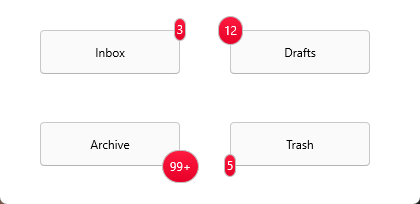
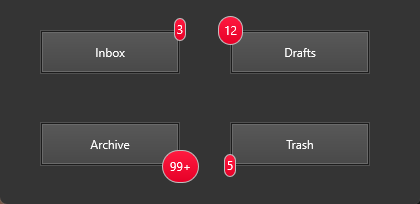
All four corners come from the same two properties: HorizontalPosition
(bhpLeft / bhpRight) and VerticalPosition (bvpTop / bvpBottom).
Combining attachment, visibility, and position constraints
The following example attaches a badge, keeps it hidden until there is content, auto-sizes it as the count changes, and constrains the badge to the top-right quadrant:
procedure TForm1.FormCreate(Sender: TObject);
begin
  TMSFNCBadge1.Control := Button1;
  TMSFNCBadge1.HorizontalPosition := bhpRight;
  TMSFNCBadge1.VerticalPosition   := bvpTop;
  TMSFNCBadge1.AutoSize           := True;
  TMSFNCBadge1.HideBadge;          // invisible until there's something to show
end;

procedure TForm1.SetUnreadCount(ACount: Integer);
begin
  if ACount > 0 then
  begin
    TMSFNCBadge1.Text := IntToStr(ACount);
    TMSFNCBadge1.ShowBadge;
  end
  else
    TMSFNCBadge1.HideBadge;
end;

procedure TForm1.TMSFNCBadge1PositionChange(Sender: TObject;
  var ALeft, ATop: Single);
begin
  // Keep badge within the top-right quarter of the host control
  if ALeft < Button1.Width / 2 then
    ALeft := Button1.Width / 2;
end;
See also
- Getting started
TTMSFNCBadge— the badge control itselfTTMSFNCBadgeAppearance— fill, stroke, font, and rounding of the badge surfaceTTMSFNCBadgeHorizontalPositionandTTMSFNCBadgeVerticalPosition— the placement enumerations- TMS FNC UI Pack API reference