Bitmap Selection
TTMSFNCBitmapPicker and TTMSFNCBitmapSelector let users select an image from a grid of bitmaps. The picker opens the grid in a drop-down popup; the selector embeds the grid directly on the form.

Bitmap Picker
Populate Items
Items can reference a bitmap by name from a shared TTMSFNCBitmapContainer, or carry their own Bitmap property. Using a container keeps images reusable across controls.
procedure TForm1.ConfigureBitmapPicker;
var
  Item: TTMSFNCBitmapSelectorItem;
begin
  TMSFNCBitmapPicker1.BitmapContainer := TMSFNCBitmapContainer1;

  Item := TMSFNCBitmapPicker1.Items.Add;
  Item.BitmapName := 'status-ok';

  Item := TMSFNCBitmapPicker1.Items.Add;
  Item.BitmapName := 'status-warning';

  TMSFNCBitmapPicker1.SelectedItemIndex := 0;
end;
void __fastcall TForm1::ConfigureBitmapPicker()
{
  TTMSFNCBitmapSelectorItem *Item;

  TMSFNCBitmapPicker1->BitmapContainer = TMSFNCBitmapContainer1;

  Item = TMSFNCBitmapPicker1->Items->Add();
  Item->BitmapName = "status-ok";

  Item = TMSFNCBitmapPicker1->Items->Add();
  Item->BitmapName = "status-warning";

  TMSFNCBitmapPicker1->SelectedItemIndex = 0;
}
Read the Selection
Use SelectedItemIndex when the item position matters, or SelectedBitmap when you need the image instance directly.
procedure TForm1.ApplySelectedBitmap;
begin
  TMSFNCImage1.Bitmap.Assign(TMSFNCBitmapPicker1.SelectedBitmap);
  Caption := 'Selected item: ' + TMSFNCBitmapPicker1.SelectedItemIndex.ToString;
end;
void __fastcall TForm1::ApplySelectedBitmap()
{
  TMSFNCImage1->Bitmap->Assign(TMSFNCBitmapPicker1->SelectedBitmap);
  Caption = "Selected item: " + IntToStr(TMSFNCBitmapPicker1->SelectedItemIndex);
}
FindItemByBitmap and FindBitmapByItem help map between index and bitmap when the selection is driven programmatically.
Bitmap Selector
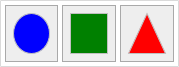
TTMSFNCBitmapSelector is the standalone grid that the picker wraps. Drop it directly onto a form when a persistent visual palette is more appropriate than a drop-down.
Columns and Rows control the grid shape. Each item supports Bitmap, BitmapName (shared container), ColSpan, RowSpan, Hidden, and Disabled.
Custom Drawing
Override OnItemAfterDrawContent to replace the default rendering per item based on its current state (isNormal, isHover, isDown, isSelected).
procedure TForm1.ConfigureBitmapSelector;
var
  I: Integer;
begin
  TMSFNCBitmapSelector1.BeginUpdate;
  TMSFNCBitmapSelector1.Items.Clear;
  TMSFNCBitmapSelector1.Columns := 3;
  TMSFNCBitmapSelector1.Rows := 1;
  for I := 0 to 2 do
    TMSFNCBitmapSelector1.Items.Add;
  TMSFNCBitmapSelector1.EndUpdate;
end;

procedure TForm1.TMSFNCBitmapSelector1BitmapSelect(Sender: TObject;
  AItemIndex: Integer; ABitmap: TTMSFNCBitmap);
begin
  Caption := 'Selected index: ' + AItemIndex.ToString;
end;

procedure TForm1.TMSFNCBitmapSelector1ItemAfterDrawContent(Sender: TObject;
  AGraphics: TTMSFNCGraphics; ARect: TRectF; AItemIndex: Integer);
var
  pt: TTMSFNCGraphicsPath;
begin
  case TMSFNCBitmapSelector1.Items[AItemIndex].State of
    isHover: InflateRect(ARect, -4, -4);
    isDown, isSelected:
    begin
      InflateRectEx(ARect, -4, -4);
      AGraphics.Stroke.Width := 2;
      AGraphics.Stroke.Color := gcBlack;
    end;
    isNormal: InflateRectEx(ARect, -8, -8);
  end;
  ARect := RectF(Int(ARect.Left) + 0.5, Int(ARect.Top) + 0.5,
    Int(ARect.Right) + 0.5, Int(ARect.Bottom) + 0.5);
  case AItemIndex of
    0: begin AGraphics.Fill.Color := gcBlue;  AGraphics.DrawEllipse(ARect); end;
    1: begin AGraphics.Fill.Color := gcGreen; AGraphics.DrawRectangle(ARect); end;
    2:
    begin
      pt := TTMSFNCGraphicsPath.Create;
      pt.MoveTo(PointF(ARect.Left + ARect.Width / 2, ARect.Top));
      pt.LineTo(PointF(ARect.Right, ARect.Bottom));
      pt.LineTo(PointF(ARect.Left,  ARect.Bottom));
      pt.ClosePath;
      AGraphics.Fill.Color := gcRed;
      AGraphics.DrawPath(pt);
      pt.Free;
    end;
  end;
end;
void __fastcall TForm1::ConfigureBitmapSelector()
{
  TMSFNCBitmapSelector1->BeginUpdate();
  TMSFNCBitmapSelector1->Items->Clear();
  TMSFNCBitmapSelector1->Columns = 3;
  TMSFNCBitmapSelector1->Rows = 1;
  for (int I = 0; I <= 2; I++)
    TMSFNCBitmapSelector1->Items->Add();
  TMSFNCBitmapSelector1->EndUpdate();
}

void __fastcall TForm1::TMSFNCBitmapSelector1BitmapSelect(TObject *Sender,
  int AItemIndex, TTMSFNCBitmap *ABitmap)
{
  Caption = "Selected index: " + IntToStr(AItemIndex);
}

void __fastcall TForm1::TMSFNCBitmapSelector1ItemAfterDrawContent(TObject *Sender,
  TTMSFNCGraphics *AGraphics, const System::Types::TRectF &ARect_, int AItemIndex)
{
  System::Types::TRectF ARect = ARect_;
  TTMSFNCGraphicsPath *pt;

  switch (TMSFNCBitmapSelector1->Items->Items[AItemIndex]->State())
  {
    case Fmx::Tmsfnccustomselector::isHover:
      InflateRect(ARect, -4, -4);
      break;
    case Fmx::Tmsfnccustomselector::isDown:
    case Fmx::Tmsfnccustomselector::isSelected:
      InflateRectEx(ARect, -4, -4);
      AGraphics->Stroke->Width = 2;
      AGraphics->Stroke->Color = gcBlack;
      break;
    case Fmx::Tmsfnccustomselector::isNormal:
      InflateRectEx(ARect, -8, -8);
      break;
  }
  ARect = RectF(Int(ARect.Left) + 0.5, Int(ARect.Top) + 0.5,
    Int(ARect.Right) + 0.5, Int(ARect.Bottom) + 0.5);
  switch (AItemIndex)
  {
    case 0:
      AGraphics->Fill->Color = gcBlue;
      AGraphics->DrawEllipse(ARect);
      break;
    case 1:
      AGraphics->Fill->Color = gcGreen;
      AGraphics->DrawRectangle(ARect);
      break;
    case 2:
      pt = new TTMSFNCGraphicsPath();
      pt->MoveTo(PointF(ARect.Left + ARect.Width() / 2, ARect.Top));
      pt->LineTo(PointF(ARect.Right, ARect.Bottom));
      pt->LineTo(PointF(ARect.Left, ARect.Bottom));
      pt->ClosePath();
      AGraphics->Fill->Color = gcRed;
      AGraphics->DrawPath(pt);
      delete pt;
      break;
  }
}