Items and Selection
TTMSFNCCheckGroup displays a set of check boxes and stores the checked state in Value. Use it when users can select more than one option and the application needs a compact bit-mask representation.
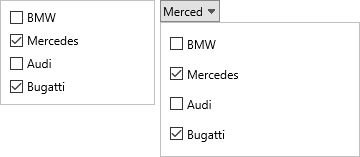
Configure Items
Add entries to Items for each option. Item text can use the same HTML-capable rendering as other FNC controls, which is useful for emphasis or small status labels.
TMSFNCCheckGroup1.Items.Clear;
TMSFNCCheckGroup1.Items.Add('Email');
TMSFNCCheckGroup1.Items.Add('<b>SMS</b>');
TMSFNCCheckGroup1.Items.Add('In-app message');
TMSFNCCheckGroup1.Value := 3;
TMSFNCCheckGroup1.OnCheckBoxClick := TMSFNCCheckGroup1CheckBoxClick;
TMSFNCCheckGroup1->Items->Clear();
TMSFNCCheckGroup1->Items->Add("Email");
TMSFNCCheckGroup1->Items->Add("<b>SMS</b>");
TMSFNCCheckGroup1->Items->Add("In-app message");
TMSFNCCheckGroup1->Value = 3;
TMSFNCCheckGroup1->OnCheckBoxClick = TMSFNCCheckGroup1CheckBoxClick;
React to Selection Changes
Handle OnCheckBoxClick when the application needs the changed item index and the current Value mask. Store the mask when the selected options must be restored later.
procedure TForm1.TMSFNCCheckGroup1CheckBoxClick(Sender: TObject; AItemIndex: Integer; AValue: Int64);
begin
  Caption := 'Changed item ' + AItemIndex.ToString + ', mask ' + AValue.ToString;
end;
void __fastcall TForm1::TMSFNCCheckGroup1CheckBoxClick(TObject *Sender,
  int AItemIndex, __int64 AValue)
{
  Caption = "Changed item " + IntToStr(AItemIndex) + ", mask " + IntToStr(AValue);
}
Use the Picker Variant
TTMSFNCCheckGroupPicker presents the same multi-select model in a drop-down editor. Set Items, Value, Separator, and the drop-down size to make the selected values readable without taking permanent form space.
TMSFNCCheckGroupPicker1.Items.Clear;
TMSFNCCheckGroupPicker1.Items.Add('Create');
TMSFNCCheckGroupPicker1.Items.Add('Update');
TMSFNCCheckGroupPicker1.Items.Add('Delete');
TMSFNCCheckGroupPicker1.Value := 1;
TMSFNCCheckGroupPicker1.Separator := ', ';
TMSFNCCheckGroupPicker1.DropDownWidth := 220;
TMSFNCCheckGroupPicker1.DropDownHeight := 180;
TMSFNCCheckGroupPicker1.CloseOnSelection := False;
TMSFNCCheckGroupPicker1->Items->Add("Create");
TMSFNCCheckGroupPicker1->Items->Add("Update");
TMSFNCCheckGroupPicker1->Items->Add("Delete");
TMSFNCCheckGroupPicker1->Value = 1;
TMSFNCCheckGroupPicker1->Separator = L',';
TMSFNCCheckGroupPicker1->DropDownWidth = 220;
TMSFNCCheckGroupPicker1->DropDownHeight = 180;
TMSFNCCheckGroupPicker1->CloseOnSelection = false;
Handle Click and Anchor Events
Beyond OnCheckBoxClick, the check group exposes three more granular events for interactions the application may need to distinguish from a normal single-click selection change:
OnCheckBoxDblClickfires when an item's check box is double-clicked, useful for a secondary action such as jumping straight to a details view for that option.OnTitleAnchorClickfires when the user clicks an HTML anchor (<a href="...">) embedded in the group'sTitle.Text, for example a "(?)" help link next to the title.OnCheckboxAnchorClickfires when the user clicks an HTML anchor embedded in an individual item's text, for example an inline "(help)" link next to one option.
All three events pass enough context to identify what was clicked: the double-click event reports the item index and the resulting bit-mask value (matching OnCheckBoxClick), while the anchor events report the clicked anchor value, and the item-level anchor event additionally reports the item index.
procedure TForm1.FormCreate(Sender: TObject);
begin
  TMSFNCCheckGroup1.Title.Text := 'Notify me via <a href="info">(?)</a>';
  TMSFNCCheckGroup1.Items.Clear;
  TMSFNCCheckGroup1.Items.Add('Email <a href="email-help">(help)</a>');
  TMSFNCCheckGroup1.Items.Add('SMS');
  TMSFNCCheckGroup1.Items.Add('In-app message');

  TMSFNCCheckGroup1.OnCheckBoxDblClick := TMSFNCCheckGroup1CheckBoxDblClick;
  TMSFNCCheckGroup1.OnTitleAnchorClick := TMSFNCCheckGroup1TitleAnchorClick;
  TMSFNCCheckGroup1.OnCheckboxAnchorClick := TMSFNCCheckGroup1CheckboxAnchorClick;
end;

{ Double-clicking an item toggles a secondary "exclusive" action, e.g. jump straight to a details view for that option. }
procedure TForm1.TMSFNCCheckGroup1CheckBoxDblClick(Sender: TObject;
  AItemIndex: Integer; AValue: Int64);
begin
  Caption := 'Double-clicked item ' + AItemIndex.ToString + ', mask ' + AValue.ToString;
end;

{ An anchor inside the group title, e.g. a "(?)" help link, was clicked. }
procedure TForm1.TMSFNCCheckGroup1TitleAnchorClick(Sender: TObject;
  AAnchor: string);
begin
  ShowMessage('Title anchor clicked: ' + AAnchor);
end;

{ An anchor inside an individual item's text, e.g. an inline "(help)" link, was clicked. }
procedure TForm1.TMSFNCCheckGroup1CheckboxAnchorClick(Sender: TObject;
  AItemIndex: Integer; AAnchor: string);
begin
  ShowMessage('Item ' + AItemIndex.ToString + ' anchor clicked: ' + AAnchor);
end;
void __fastcall TForm1::FormCreate(TObject *Sender)
{
  TMSFNCCheckGroup1->Title->Text = "Notify me via <a href=\"info\">(?)</a>";
  TMSFNCCheckGroup1->Items->Clear();
  TMSFNCCheckGroup1->Items->Add("Email <a href=\"email-help\">(help)</a>");
  TMSFNCCheckGroup1->Items->Add("SMS");
  TMSFNCCheckGroup1->Items->Add("In-app message");

  TMSFNCCheckGroup1->OnCheckBoxDblClick = TMSFNCCheckGroup1CheckBoxDblClick;
  TMSFNCCheckGroup1->OnTitleAnchorClick = TMSFNCCheckGroup1TitleAnchorClick;
  TMSFNCCheckGroup1->OnCheckboxAnchorClick = TMSFNCCheckGroup1CheckboxAnchorClick;
}

// Double-clicking an item toggles a secondary "exclusive" action, e.g. jump straight to a details view for that option.
void __fastcall TForm1::TMSFNCCheckGroup1CheckBoxDblClick(TObject *Sender,
  int AItemIndex, __int64 AValue)
{
  Caption = "Double-clicked item " + IntToStr(AItemIndex) + ", mask " + IntToStr(AValue);
}

// An anchor inside the group title, e.g. a "(?)" help link, was clicked.
void __fastcall TForm1::TMSFNCCheckGroup1TitleAnchorClick(TObject *Sender,
  System::UnicodeString AAnchor)
{
  ShowMessage("Title anchor clicked: " + AAnchor);
}

// An anchor inside an individual item's text, e.g. an inline "(help)" link, was clicked.
void __fastcall TForm1::TMSFNCCheckGroup1CheckboxAnchorClick(TObject *Sender,
  int AItemIndex, System::UnicodeString AAnchor)
{
  ShowMessage("Item " + IntToStr(AItemIndex) + " anchor clicked: " + AAnchor);
}
Combining item configuration, selection events, and the picker variant
Configure items, react to changes, and expose the same selection through a picker for a compact form layout:
procedure TForm1.FormCreate(Sender: TObject);
begin
  TMSFNCCheckGroup1.Items.Add.Text := 'Option A';
  TMSFNCCheckGroup1.Items.Add.Text := 'Option B';
  TMSFNCCheckGroup1.Items.Add.Text := 'Option C';
  TMSFNCCheckGroup1.Value := 3; // pre-check A and B (bits 0 and 1)

  // Mirror items and initial value in the picker
  TMSFNCCheckGroupPicker1.Items.Add.Text := 'Option A';
  TMSFNCCheckGroupPicker1.Items.Add.Text := 'Option B';
  TMSFNCCheckGroupPicker1.Items.Add.Text := 'Option C';
  TMSFNCCheckGroupPicker1.Value := TMSFNCCheckGroup1.Value;
end;

procedure TForm1.TMSFNCCheckGroup1CheckBoxClick(Sender: TObject;
  AIndex: Integer; AValue: Integer);
begin
  TMSFNCCheckGroupPicker1.Value := AValue; // keep picker in sync
end;