Color Selection
TTMSFNCColorPicker combines a compact editor with a drop-down color selector. TTMSFNCColorSelector is the standalone selector grid; the picker wraps it in a popup. Use the picker when a full visible palette would consume too much form space.
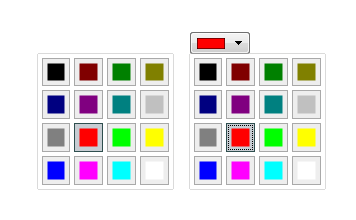
Set the Initial Color
Set SelectedColor before the picker is shown. The selected color can then be applied to graphics, styles, or other UI state when the user confirms a different color.
TMSFNCColorPicker1.SelectedColor := gcRed;
TMSFNCColorPicker1.OnColorSelected := TMSFNCColorPicker1ColorSelected;
TMSFNCColorPicker1->OnColorSelected = TMSFNCColorPicker1ColorSelected;
Size the Drop-Down
Use DropDownWidth and DropDownHeight when the default selector size is too small for the available colors or mode.
TMSFNCColorPicker1.DropDownWidth := 260;
TMSFNCColorPicker1.DropDownHeight := 220;
TMSFNCColorPicker1.CloseOnSelection := True;
TMSFNCColorPicker1->DropDownHeight = 220;
TMSFNCColorPicker1->CloseOnSelection = true;
Apply Selected Colors
Handle OnColorSelected to keep the picker and the rest of the form synchronized.
procedure TForm1.TMSFNCColorPicker1ColorSelected(Sender: TObject; AColor: TTMSFNCGraphicsColor);
begin
  TMSFNCColorPicker1.SelectedColor := AColor;
end;
void __fastcall TForm1::TMSFNCColorPicker1ColorSelected(TObject *Sender,
  Fmx::Tmsfncgraphicstypes::TTMSFNCGraphicsColor AColor)
{
  TMSFNCColorPicker1->SelectedColor = AColor;
}
Combining initial color, drop-down sizing, and live application
The following example pre-selects a colour that matches the current panel background, sizes the drop-down to show a larger palette, and applies the chosen colour immediately:
procedure TForm1.FormCreate(Sender: TObject);
begin
  // Initialize to match the current panel colour
  TMSFNCColorPicker1.SelectedColor := Panel1.Color;
  // Show a larger palette
  TMSFNCColorPicker1.DropDownWidth  := 300;
  TMSFNCColorPicker1.DropDownHeight := 200;
end;

procedure TForm1.TMSFNCColorPicker1ColorSelected(
  Sender: TObject; AColor: TAlphaColor);
begin
  Panel1.Color := AColor;
  lblHex.Caption := '#' + IntToHex(AColor, 8);
end;