Items and Autocomplete
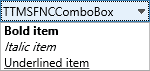
TTMSFNCComboBox displays selectable items in a drop-down list. It can also work as an editable picker when users should type a value or narrow the list through autocomplete.
Populate Items
Use Items or AddItem to build the list. Set ItemIndex when the combo box needs an initial selection.
var
  I: Integer;
begin
  TMSFNCComboBox1.Items.Clear;

  for I := 1 to 10 do
    TMSFNCComboBox1.AddItem('Item ' + I.ToString);

  TMSFNCComboBox1.ItemIndex := 0;
  TMSFNCComboBox1.OnItemSelected := TMSFNCComboBox1ItemSelected;
end;
for (int I = 1; I <= 10; I++)
  TMSFNCComboBox1->AddItem("Item " + IntToStr(I));

TMSFNCComboBox1->ItemIndex = 0;
TMSFNCComboBox1->OnItemSelected = TMSFNCComboBox1ItemSelected;
Enable Editing and Autocomplete
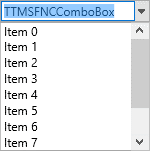
Set Style to csDropDown when users may type in the editor. Enable AutoComplete, AutoDropDown, and AutoCompleteNumChar to open and filter the list after a short typed prefix.
TMSFNCComboBox1.Style := csDropDown;
TMSFNCComboBox1.AutoComplete := True;
TMSFNCComboBox1.AutoDropDown := True;
TMSFNCComboBox1.AutoCompleteDelay := 250;
TMSFNCComboBox1.AutoCompleteNumChar := 2;
TMSFNCComboBox1.DropDownCount := 8;
TMSFNCComboBox1.CaseSensitive := False;
TMSFNCComboBox1->Style = Fmx::Tmsfnccombobox::csDropDown;
TMSFNCComboBox1->AutoComplete = true;
TMSFNCComboBox1->AutoDropDown = true;
TMSFNCComboBox1->AutoCompleteDelay = 250;
TMSFNCComboBox1->AutoCompleteNumChar = 2;
TMSFNCComboBox1->DropDownCount = 8;
TMSFNCComboBox1->CaseSensitive = false;
Handle Selection
Handle OnItemSelected to receive both the selected text and item index. This is the safest place to synchronize dependent controls or store the selected value.
procedure TForm1.TMSFNCComboBox1ItemSelected(Sender: TObject; AText: string; AItemIndex: Integer);
begin
  Caption := 'Selected ' + AText + ' at index ' + AItemIndex.ToString;
end;
void __fastcall TForm1::TMSFNCComboBox1ItemSelected(TObject *Sender, System::UnicodeString AText, int AItemIndex)
{
  Caption = "Selected " + AText + " at index " + IntToStr(AItemIndex);
}
Choose a Filter Mode
FilterMode controls how typed text is matched against the item list when autocomplete or AutoFilter narrows the drop-down. Use fmStart (the default) when users expect to type the beginning of a value, such as a code or an identifier that starts predictably. Use fmAny when the meaningful part of the text can appear anywhere, such as matching a city name by a substring the user remembers.
procedure TForm1.FormCreate(Sender: TObject);
begin
  TMSFNCComboBox1.Style               := csDropDown;
  TMSFNCComboBox1.AutoComplete        := True;
  TMSFNCComboBox1.AutoDropDown        := True;
  TMSFNCComboBox1.AutoCompleteNumChar := 2;

  TMSFNCComboBox1.Items.Clear;
  TMSFNCComboBox1.AddItem('Amsterdam');
  TMSFNCComboBox1.AddItem('Rotterdam');
  TMSFNCComboBox1.AddItem('The Hague');
  TMSFNCComboBox1.AddItem('Utrecht');

  // fmStart (default): typing "dam" matches nothing, typing "Am" matches Amsterdam
  TMSFNCComboBox1.FilterMode := fmStart;

  // fmAny: typing "dam" matches both Amsterdam and Rotterdam
  TMSFNCComboBox2.FilterMode := fmAny;
end;
void __fastcall TForm1::FormCreate(TObject *Sender)
{
  TMSFNCComboBox1->Style = Fmx::Tmsfnccombobox::csDropDown;
  TMSFNCComboBox1->AutoComplete = true;
  TMSFNCComboBox1->AutoDropDown = true;
  TMSFNCComboBox1->AutoCompleteNumChar = 2;

  TMSFNCComboBox1->Items->Clear();
  TMSFNCComboBox1->AddItem("Amsterdam");
  TMSFNCComboBox1->AddItem("Rotterdam");
  TMSFNCComboBox1->AddItem("The Hague");
  TMSFNCComboBox1->AddItem("Utrecht");

  // fmStart (default): typing "dam" matches nothing, typing "Am" matches Amsterdam
  TMSFNCComboBox1->FilterMode = fmStart;

  // fmAny: typing "dam" matches both Amsterdam and Rotterdam
  TMSFNCComboBox2->FilterMode = fmAny;
}
Serve Items Virtually for Large Lists
For very large item sets, populating Items upfront can be wasteful or slow. Virtual item mode avoids that: instead of storing every value in Items, assign OnGetNumberOfItems to report how many items exist and OnGetItemText to supply the display text for a single item on demand as the drop-down list scrolls. This keeps memory usage flat regardless of list size, since only the visible rows are resolved at any time. Assigning both events switches the combo box into virtual mode automatically; leave Items empty and read Count to get the virtual item total instead of Items.Count.
procedure TForm1.FormCreate(Sender: TObject);
begin
  // Do not populate Items: assigning both events switches the
  // combo box into virtual mode and Count is driven by OnGetNumberOfItems.
  TMSFNCComboBox1.OnGetNumberOfItems := TMSFNCComboBox1GetNumberOfItems;
  TMSFNCComboBox1.OnGetItemText := TMSFNCComboBox1GetItemText;
end;

procedure TForm1.TMSFNCComboBox1GetNumberOfItems(Sender: TObject;
  var ANumberOfItems: Integer);
begin
  // Report the size of the backing data without loading it into Items
  ANumberOfItems := Length(FLargeItemList);
end;

procedure TForm1.TMSFNCComboBox1GetItemText(Sender: TObject; AIndex: Integer;
  var AText: string);
begin
  // Resolve the display text for a single row on demand
  if (AIndex >= 0) and (AIndex < Length(FLargeItemList)) then
    AText := FLargeItemList[AIndex];
end;
void __fastcall TForm1::FormCreate(TObject *Sender)
{
  // Do not populate Items: assigning both events switches the
  // combo box into virtual mode and Count is driven by OnGetNumberOfItems.
  TMSFNCComboBox1->OnGetNumberOfItems = TMSFNCComboBox1GetNumberOfItems;
  TMSFNCComboBox1->OnGetItemText = TMSFNCComboBox1GetItemText;
}

void __fastcall TForm1::TMSFNCComboBox1GetNumberOfItems(TObject *Sender,
  int &ANumberOfItems)
{
  // Report the size of the backing data without loading it into Items
  ANumberOfItems = FLargeItemList.Length;
}

void __fastcall TForm1::TMSFNCComboBox1GetItemText(TObject *Sender, int AIndex,
  System::UnicodeString &AText)
{
  // Resolve the display text for a single row on demand
  if ((AIndex >= 0) && (AIndex < FLargeItemList.Length))
    AText = FLargeItemList[AIndex];
}
Combining item population, autocomplete, and selection handling
This is the full setup for a country-picker combobox: populate from a list, enable typed autocomplete after two characters, and react to selection to drive a dependent control:
procedure TForm1.FormCreate(Sender: TObject);
var
  Country: string;
begin
  // Populate items
  TMSFNCComboBox1.Items.Clear;
  for Country in GetCountryList do
    TMSFNCComboBox1.AddItem(Country);
  TMSFNCComboBox1.ItemIndex := 0;

  // Autocomplete: editable style + open after 2 chars
  TMSFNCComboBox1.Style               := csDropDown;
  TMSFNCComboBox1.AutoComplete        := True;
  TMSFNCComboBox1.AutoDropDown        := True;
  TMSFNCComboBox1.AutoCompleteNumChar := 2;
  TMSFNCComboBox1.CaseSensitive       := False;
  TMSFNCComboBox1.DropDownCount       := 8;

  // Selection handler
  TMSFNCComboBox1.OnItemSelected := ComboBoxItemSelected;
end;

procedure TForm1.ComboBoxItemSelected(Sender: TObject;
  AText: string; AItemIndex: Integer);
begin
  // Update a dependent control with the selected country
  PhoneCodeEdit.Text := PhoneCodeFor(AText);
end;