Embedded Control
TTMSFNCControlPicker turns another control into picker drop-down content. Use it when the selection UI is richer than a list, color grid, or date selector.
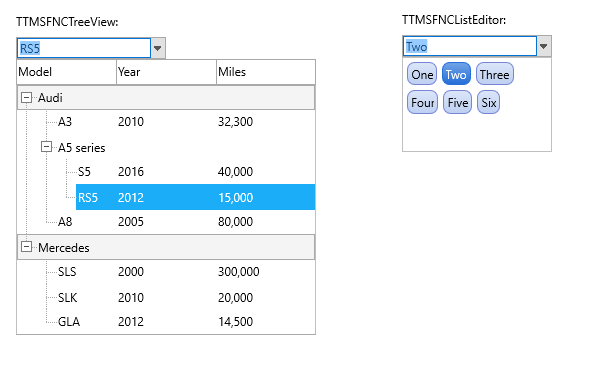
Assign Drop-Down Content
Assign the embedded control through Control. The control can provide picker integration through the control picker interfaces, but the picker can also host an existing compatible control when the form handles content synchronization.
TMSFNCControlPicker1.Control := TMSFNCTreeView1;
TMSFNCControlPicker1.DropDownControlWidth := 280;
TMSFNCControlPicker1.DropDownControlHeight := 220;
TMSFNCControlPicker1.OnSetContent := TMSFNCControlPicker1SetContent;
TMSFNCControlPicker1.OnItemSelected := TMSFNCControlPicker1ItemSelected;
TMSFNCControlPicker1->Control = TMSFNCTreeView1;
TMSFNCControlPicker1->DropDownControlWidth = 280;
TMSFNCControlPicker1->DropDownControlHeight = 220;
TMSFNCControlPicker1->OnSetContent = TMSFNCControlPicker1SetContent;
TMSFNCControlPicker1->OnItemSelected = TMSFNCControlPicker1ItemSelected;
Size the Drop-Down
Use DropDownControlWidth, DropDownControlHeight, DropDownWidthMode, and DropDownHeightMode to choose whether the picker uses explicit dimensions, the embedded control size, item measurements, or the picker size.
TMSFNCControlPicker1.DropDownWidthMode := cwmDropDownWidth;
TMSFNCControlPicker1.DropDownHeightMode := chmDropDownHeight;
TMSFNCControlPicker1.DropDownControlWidth := 320;
TMSFNCControlPicker1.DropDownControlHeight := 240;
TMSFNCControlPicker1.AutoDropDown := True;
TMSFNCControlPicker1.AutoCloseUp := True;
TMSFNCControlPicker1->DropDownWidthMode = cwmDropDownWidth;
TMSFNCControlPicker1->DropDownHeightMode = chmDropDownHeight;
TMSFNCControlPicker1->DropDownControlWidth = 320;
TMSFNCControlPicker1->DropDownControlHeight = 240;
TMSFNCControlPicker1->AutoDropDown = true;
TMSFNCControlPicker1->AutoCloseUp = true;
Synchronize Picker Content
Handle OnSetContent when the picker text should be computed from the embedded control. Handle OnItemSelected when the hosted control reports an item selection through the picker.
procedure TForm1.TMSFNCControlPicker1SetContent(Sender: TObject; var AText: string; var AAllow: Boolean);
begin
  AText := 'Choose a category';
  AAllow := True;
end;

procedure TForm1.TMSFNCControlPicker1ItemSelected(Sender: TObject; AText: string; AItemIndex: Integer);
begin
  Caption := AText;
end;
void __fastcall TForm1::TMSFNCControlPicker1SetContent(TObject *Sender, System::UnicodeString &AText, bool &AAllow)
{
  AText = "Choose a category";
  AAllow = true;
}

void __fastcall TForm1::TMSFNCControlPicker1ItemSelected(TObject *Sender, System::UnicodeString AText, int AItemIndex)
{
  Caption = AText;
}
High-DPI Displays
The picker rescales its own Font, DropDownControlWidth and
DropDownControlHeight when the host form moves to a monitor with a different
DPI, so those are design pixels measured at 96 DPI and must be authored
unscaled. Which of them actually decides the drop-down size, though, depends on
the size mode — and that is the part worth getting right before shipping to a
mixed-DPI desktop:
cwmDropDownWidth/chmDropDownHeightuse the explicitDropDownControlWidthandDropDownControlHeight, which the picker scales. Use these when you want the drop-down to be a fixed logical size.cwmItems/chmItemsderive the size fromItemWidth/ItemHeightmultiplied by the visible item count, and those two properties are read straight from the hosted control. The drop-down then inherits whatever the hosted control does at high DPI, which is the right choice when the hosted control is itself DPI-aware.cwmControl/chmControluse the hosted control's own bounds, andcwmPickerWidth/chmPickerHeighttrack the picker itself — both already in scaled coordinates.
{ Call this from your form's OnCreate: }
procedure TForm1.ConfigureControlPickerForHighDPI;
begin
  TMSFNCControlPicker1.BeginUpdate;
  try
    TMSFNCControlPicker1.Control := TMSFNCCalendar1;

    // Explicit modes. DropDownControlWidth and DropDownControlHeight are
    // design pixels measured at 96 DPI; the picker rescales them - together
    // with its own Font - when the form moves to a high-DPI monitor, so
    // author them unscaled.
    TMSFNCControlPicker1.DropDownWidthMode := cwmDropDownWidth;
    TMSFNCControlPicker1.DropDownHeightMode := chmDropDownHeight;
    TMSFNCControlPicker1.DropDownControlWidth := 320;
    TMSFNCControlPicker1.DropDownControlHeight := 240;

    TMSFNCControlPicker1.Font.Size := 12;
  finally
    TMSFNCControlPicker1.EndUpdate;
  end;
end;

{ Item-driven modes hand sizing to the hosted control: chmItems multiplies
  ItemHeight by the visible item count, and ItemHeight is read straight from
  the hosted control. The drop-down then follows whatever that control does at
  high DPI rather than the picker's own scaling - which is what you want when
  the hosted control is itself DPI-aware. }
procedure TForm1.SizeControlPickerFromHostedControl;
begin
  TMSFNCControlPicker1.DropDownHeightMode := chmItems;
  TMSFNCControlPicker1.DropDownWidthMode := cwmPickerWidth;
end;
// Call this from your form's OnCreate:
void __fastcall TForm1::ConfigureControlPickerForHighDPI()
{
  TMSFNCControlPicker1->BeginUpdate();
  try
  {
    TMSFNCControlPicker1->Control = TMSFNCCalendar1;

    // Explicit modes. DropDownControlWidth and DropDownControlHeight are
    // design pixels measured at 96 DPI; the picker rescales them - together
    // with its own Font - when the form moves to a high-DPI monitor, so
    // author them unscaled.
    TMSFNCControlPicker1->DropDownWidthMode = cwmDropDownWidth;
    TMSFNCControlPicker1->DropDownHeightMode = chmDropDownHeight;
    TMSFNCControlPicker1->DropDownControlWidth = 320;
    TMSFNCControlPicker1->DropDownControlHeight = 240;

    TMSFNCControlPicker1->Font->Size = 12;
  }
  __finally
  {
    TMSFNCControlPicker1->EndUpdate();
  }
}

// Item-driven modes hand sizing to the hosted control: chmItems multiplies
// ItemHeight by the visible item count, and ItemHeight is read straight from
// the hosted control. The drop-down then follows whatever that control does at
// high DPI rather than the picker's own scaling - which is what you want when
// the hosted control is itself DPI-aware.
void __fastcall TForm1::SizeControlPickerFromHostedControl()
{
  TMSFNCControlPicker1->DropDownHeightMode = chmItems;
  TMSFNCControlPicker1->DropDownWidthMode = cwmPickerWidth;
}
Combining embedded control, size mode, and content synchronization
The following example hosts a TTMSFNCCalendar in the picker, sizes the drop-down to the calendar's natural size, and synchronizes the selected date back to the picker text:
procedure TForm1.FormCreate(Sender: TObject);
begin
  TMSFNCControlPicker1.Control := TMSFNCCalendar1;
  TMSFNCControlPicker1.DropDownWidthMode := cwmControl;
  TMSFNCControlPicker1.DropDownHeightMode := chmControl;
  TMSFNCControlPicker1.Text := DateToStr(TMSFNCCalendar1.Date);
end;

procedure TForm1.TMSFNCControlPicker1SetContent(Sender: TObject;
  var AText: string; var AAllow: Boolean);
begin
  // Called when the picker recomputes its collapsed text. Set AAllow to False
  // to keep the existing text instead.
  AText := DateToStr(TMSFNCCalendar1.Date);
  AAllow := True;
end;

procedure TForm1.TMSFNCCalendar1SelectDate(Sender: TObject; ADate: TDate);
begin
  TMSFNCControlPicker1.Text := DateToStr(ADate);
  // DropDown toggles the popup, so calling it while the drop-down is open
  // closes it.
  TMSFNCControlPicker1.DropDown;
end;
void __fastcall TForm1::FormCreate(TObject *Sender)
{
  TMSFNCControlPicker1->Control = TMSFNCCalendar1;
  TMSFNCControlPicker1->DropDownWidthMode = cwmControl;
  TMSFNCControlPicker1->DropDownHeightMode = chmControl;
  TMSFNCControlPicker1->Text = DateToStr(TMSFNCCalendar1->Date);
}

void __fastcall TForm1::TMSFNCControlPicker1SetContent(TObject *Sender,
  System::UnicodeString &AText, bool &AAllow)
{
  // Called when the picker recomputes its collapsed text. Set AAllow to false
  // to keep the existing text instead.
  AText = DateToStr(TMSFNCCalendar1->Date);
  AAllow = true;
}

void __fastcall TForm1::TMSFNCCalendar1SelectDate(TObject *Sender, System::TDate ADate)
{
  TMSFNCControlPicker1->Text = DateToStr(ADate);
  // DropDown toggles the popup, so calling it while the drop-down is open
  // closes it.
  TMSFNCControlPicker1->DropDown();
}
OnSetContent receives both AText and AAllow: set AAllow := False to keep
the picker's existing text instead of the value you assigned. There is no
separate close method — DropDown toggles the popup, so calling it while the
drop-down is open closes it.