Date-Time Selection
TTMSFNCDateTimePicker combines date selection with either analog or digital time entry. Use it when the user must provide a complete TDateTime value from one compact control.

Set the Selected Value
Set SelectedDateTime to initialize the picker. Handle OnDateTimeChanged when the application needs to update filtering, scheduling, or validation logic immediately.
TMSFNCDateTimePicker1.SelectedDateTime := EncodeDate(2026, 5, 19) + EncodeTime(9, 30, 0, 0);
TMSFNCDateTimePicker1.TimePickerMode := dtpmDigital;
TMSFNCDateTimePicker1.OnDateTimeChanged := TMSFNCDateTimePicker1DateTimeChanged;
TMSFNCDateTimePicker1->SelectedDateTime = EncodeDate(2026, 5, 19) + EncodeTime(9, 30, 0, 0);
TMSFNCDateTimePicker1->TimePickerMode = dtpmDigital;
TMSFNCDateTimePicker1->OnDateTimeChanged = TMSFNCDateTimePicker1DateTimeChanged;
Choose the Time Picker Mode
Set TimePickerMode to dtpmDigital for typed or spinner-style time entry, or to dtpmAnalog for a clock-style selector.
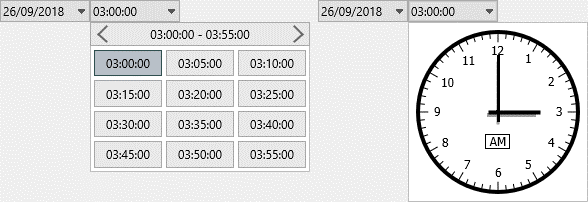
TMSFNCDateTimePicker1.TimePickerMode := dtpmAnalog;

procedure TForm1.TMSFNCDateTimePicker1DateTimeChanged(Sender: TObject; ADateTime: TDateTime);
begin
  Caption := DateTimeToStr(ADateTime);
end;
void __fastcall TForm1::ConfigureAnalogMode()
{
  TMSFNCDateTimePicker1->TimePickerMode = dtpmAnalog;
}

void __fastcall TForm1::TMSFNCDateTimePicker1DateTimeChanged(TObject *Sender, System::TDateTime ADateTime)
{
  Caption = DateTimeToStr(ADateTime);
}
Use the Native Platform Editors
Set Native to True on FMX targets to replace the custom-drawn date and time selectors with the platform's own TDateEdit and TTimeEdit controls. This is useful when the application should follow the look, feel, and input behavior (including any platform-specific calendar or clock UI) that end users already expect from their device, instead of the FNC-drawn picker popup. Native is available on FMX only; it has no effect on other target frameworks. While Native is True, the underlying native controls are reachable through the DateEdit and TimeEdit properties.
TMSFNCDateTimePicker1.SelectedDateTime := EncodeDate(2026, 5, 19) + EncodeTime(9, 30, 0, 0);
TMSFNCDateTimePicker1.Native := True;

procedure TForm1.TMSFNCDateTimePicker1DateTimeChanged(Sender: TObject; ADateTime: TDateTime);
begin
  Caption := DateTimeToStr(ADateTime);
end;
void __fastcall TForm1::ConfigureNativePicker()
{
  TMSFNCDateTimePicker1->SelectedDateTime = EncodeDate(2026, 5, 19) + EncodeTime(9, 30, 0, 0);
  TMSFNCDateTimePicker1->Native = true;
}

void __fastcall TForm1::TMSFNCDateTimePicker1DateTimeChanged(TObject *Sender, System::TDateTime ADateTime)
{
  Caption = DateTimeToStr(ADateTime);
}
Allow a Blank Value and Clear the Selection
AllowNumericNullValue (default True) controls whether the picker can represent an empty, unselected date or time instead of always forcing a concrete value. With the default enabled, an unset date or time value is accepted and shown as blank rather than being coerced to a numeric default; set it to False when the application always requires a concrete date and time. Call Clear to reset the date and time edit controls back to that blank state programmatically, for example when wiring up a "Clear" button or resetting a form.
TMSFNCDateTimePicker1.AllowNumericNullValue := True;
TMSFNCDateTimePicker1.SelectedDateTime := EncodeDate(2026, 5, 19) + EncodeTime(9, 30, 0, 0);

procedure TForm1.ButtonClearClick(Sender: TObject);
begin
  TMSFNCDateTimePicker1.Clear;
end;
void __fastcall TForm1::ConfigureBlankablePicker()
{
  TMSFNCDateTimePicker1->AllowNumericNullValue = true;
  TMSFNCDateTimePicker1->SelectedDateTime = EncodeDate(2026, 5, 19) + EncodeTime(9, 30, 0, 0);
}

void __fastcall TForm1::ButtonClearClick(TObject *Sender)
{
  TMSFNCDateTimePicker1->Clear();
}
Combine Native Editors with a Clearable Blank Value
Native, AllowNumericNullValue, and Clear work together: a platform editor is not limited to the custom-drawn control's blank-state handling. Set TimePickerMode and Native for the desired platform editor layout, keep AllowNumericNullValue enabled, and call Clear to reset the native DateEdit/TimeEdit controls to blank from a "Clear" button or similar action.
TMSFNCDateTimePicker1.TimePickerMode := dtpmDigital;
TMSFNCDateTimePicker1.Native := True;
TMSFNCDateTimePicker1.AllowNumericNullValue := True;
TMSFNCDateTimePicker1.SelectedDateTime := EncodeDate(2026, 5, 19) + EncodeTime(9, 30, 0, 0);

procedure TForm1.ButtonClearClick(Sender: TObject);
begin
  { Clear() resets the native TDateEdit/TTimeEdit controls as well when Native is True. }
  TMSFNCDateTimePicker1.Clear;
end;
void __fastcall TForm1::ConfigureNativeClearablePicker()
{
  TMSFNCDateTimePicker1->TimePickerMode = dtpmDigital;
  TMSFNCDateTimePicker1->Native = true;
  TMSFNCDateTimePicker1->AllowNumericNullValue = true;
  TMSFNCDateTimePicker1->SelectedDateTime = EncodeDate(2026, 5, 19) + EncodeTime(9, 30, 0, 0);
}

void __fastcall TForm1::ButtonClearClick(TObject *Sender)
{
  // Clear() resets the native TDateEdit/TTimeEdit controls as well when Native is true.
  TMSFNCDateTimePicker1->Clear();
}