Time Ranges and Selection
TTMSFNCDigitalTimePicker uses TTMSFNCDigitalTimeSelector as its drop-down content. The picker generates selectable time values from StartTime, EndTime, TimeInterval, and IntervalUnit.
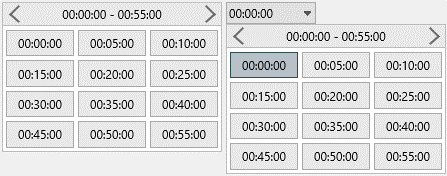
Configure Time Values
Set the time range and interval before the picker opens. Use TimeFormat to control how each generated value is shown.
TMSFNCDigitalTimePicker1.StartTime := EncodeTime(8, 0, 0, 0);
TMSFNCDigitalTimePicker1.EndTime := EncodeTime(18, 0, 0, 0);
TMSFNCDigitalTimePicker1.IntervalUnit := tsuMinutes;
TMSFNCDigitalTimePicker1.TimeInterval := 15;
TMSFNCDigitalTimePicker1.TimeFormat := 'hh:nn';
TMSFNCDigitalTimePicker1.SelectedTime := EncodeTime(9, 30, 0, 0);
TMSFNCDigitalTimePicker1.OnTimeSelected := TMSFNCDigitalTimePicker1TimeSelected;
TMSFNCDigitalTimePicker1->StartTime = EncodeTime(8, 0, 0, 0);
TMSFNCDigitalTimePicker1->EndTime = EncodeTime(18, 0, 0, 0);
TMSFNCDigitalTimePicker1->IntervalUnit = tsuMinutes;
TMSFNCDigitalTimePicker1->TimeInterval = 15;
TMSFNCDigitalTimePicker1->TimeFormat = "hh:nn";
TMSFNCDigitalTimePicker1->SelectedTime = EncodeTime(9, 30, 0, 0);
TMSFNCDigitalTimePicker1->OnTimeSelected = TMSFNCDigitalTimePicker1TimeSelected;
Handle Selection
Handle OnTimeSelected when the selected time should update another control or stored setting. The event passes the chosen TTime value.
procedure TForm1.TMSFNCDigitalTimePicker1TimeSelected(Sender: TObject; ATime: TTime);
begin
  Caption := FormatDateTime('hh:nn', ATime);
end;
void __fastcall TForm1::TMSFNCDigitalTimePicker1TimeSelected(TObject *Sender, System::TTime ATime)
{
  Caption = FormatDateTime("hh:nn", ATime);
}
Use the Selector Directly
Use TTMSFNCDigitalTimeSelector directly when the time list should stay visible instead of living in a drop-down editor.
TMSFNCDigitalTimeSelector1.StartTime := EncodeTime(8, 0, 0, 0);
TMSFNCDigitalTimeSelector1.EndTime := EncodeTime(12, 0, 0, 0);
TMSFNCDigitalTimeSelector1.IntervalUnit := tsuMinutes;
TMSFNCDigitalTimeSelector1.TimeInterval := 30;
TMSFNCDigitalTimeSelector1.TimeFormat := 'hh:nn';
TMSFNCDigitalTimeSelector1.SelectedTime := EncodeTime(10, 0, 0, 0);
TMSFNCDigitalTimeSelector1->StartTime = EncodeTime(8, 0, 0, 0);
TMSFNCDigitalTimeSelector1->EndTime = EncodeTime(12, 0, 0, 0);
TMSFNCDigitalTimeSelector1->IntervalUnit = tsuMinutes;
TMSFNCDigitalTimeSelector1->TimeInterval = 30;
TMSFNCDigitalTimeSelector1->TimeFormat = "hh:nn";
TMSFNCDigitalTimeSelector1->SelectedTime = EncodeTime(10, 0, 0, 0);
Allow a Blank Value and Clear It
SelectedTime is a TTime, so there is no separate "no value" state at the type level — midnight (00:00:00) doubles as the sentinel for "nothing selected". AllowNumericNullValue (default True) controls how that sentinel is displayed: whenever the picker's time value has no fractional (time-of-day) part left, i.e. it equals midnight, the edit field shows an empty string instead of a formatted 00:00:00. Set AllowNumericNullValue := False when midnight is a legitimate time value that should always be shown as text.
Call Clear to reset the picker to that blank state programmatically, for example when wiring up a "Clear" button. Clear sets SelectedTime := 0.0, which — together with AllowNumericNullValue := True — blanks the edit field; it does not change AllowNumericNullValue itself, and it does not affect the time slots already generated for the drop-down.
procedure TForm1.ConfigureBlankableTimePicker;
begin
  TMSFNCDigitalTimePicker1.AllowNumericNullValue := True;
  TMSFNCDigitalTimePicker1.SelectedTime := EncodeTime(9, 30, 0, 0);
end;

procedure TForm1.ButtonClearClick(Sender: TObject);
begin
  TMSFNCDigitalTimePicker1.Clear;
end;
void __fastcall TForm1::ConfigureBlankableTimePicker()
{
  TMSFNCDigitalTimePicker1->AllowNumericNullValue = true;
  TMSFNCDigitalTimePicker1->SelectedTime = EncodeTime(9, 30, 0, 0);
}

void __fastcall TForm1::ButtonClearClick(TObject *Sender)
{
  TMSFNCDigitalTimePicker1->Clear();
}
Combining time configuration, selection handling, and a visible selector
Configure a picker and a selector together so both controls share the same time range and stay in sync when a value is chosen:
procedure TForm1.FormCreate(Sender: TObject);
begin
  TMSFNCDigitalTimePicker1.StartTime    := EncodeTime(8, 0, 0, 0);
  TMSFNCDigitalTimePicker1.EndTime      := EncodeTime(18, 0, 0, 0);
  TMSFNCDigitalTimePicker1.TimeInterval := 30;
  TMSFNCDigitalTimePicker1.TimeFormat   := 'hh:nn';

  TMSFNCDigitalTimeSelector1.StartTime    := TMSFNCDigitalTimePicker1.StartTime;
  TMSFNCDigitalTimeSelector1.EndTime      := TMSFNCDigitalTimePicker1.EndTime;
  TMSFNCDigitalTimeSelector1.TimeInterval := 30;
  TMSFNCDigitalTimeSelector1.TimeFormat   := 'hh:nn';
end;

procedure TForm1.TMSFNCDigitalTimePicker1TimeSelected(Sender: TObject; ATime: TTime);
begin
  TMSFNCDigitalTimeSelector1.SelectedTime := ATime;
end;
void __fastcall TForm1::FormCreate(TObject *Sender)
{
  TMSFNCDigitalTimePicker1->StartTime = EncodeTime(8, 0, 0, 0);
  TMSFNCDigitalTimePicker1->EndTime = EncodeTime(18, 0, 0, 0);
  TMSFNCDigitalTimePicker1->TimeInterval = 30;
  TMSFNCDigitalTimePicker1->TimeFormat = "hh:nn";

  TMSFNCDigitalTimeSelector1->StartTime = TMSFNCDigitalTimePicker1->StartTime;
  TMSFNCDigitalTimeSelector1->EndTime = TMSFNCDigitalTimePicker1->EndTime;
  TMSFNCDigitalTimeSelector1->TimeInterval = 30;
  TMSFNCDigitalTimeSelector1->TimeFormat = "hh:nn";
}

void __fastcall TForm1::TMSFNCDigitalTimePicker1TimeSelected(TObject *Sender, System::TTime ATime)
{
  TMSFNCDigitalTimeSelector1->SelectedTime = ATime;
}
High-DPI Displays
The picker and its time selector express their sizes in design pixels measured
at 96 DPI and rescale them when the host form moves to a monitor with a
different DPI: the picker's Font, DropDownWidth and DropDownHeight, and
the selector's HeaderSize together with Appearance.VerticalSpacing,
Appearance.HorizontalSpacing and Appearance.Font. Author each of those as
its unscaled design value; pre-multiplying by the current scale factor
double-scales the drop-down.
Rows, Columns, TimeInterval and IntervalUnit are counts and durations
rather than pixels, so they are DPI-independent by construction. That makes
them the sturdier way to shape the drop-down: fix the grid, and let the scaled
item metrics decide how many pixels it occupies on the current display.
{ Call this from your form's OnCreate: }
procedure TForm1.ConfigureDigitalTimeMetrics;
begin
  TMSFNCDigitalTimePicker1.BeginUpdate;
  try
    // Design pixels measured at 96 DPI. The picker rescales its Font,
    // DropDownWidth and DropDownHeight, and the time selector inside the
    // drop-down rescales HeaderSize plus the appearance spacings, so none of
    // these may be pre-multiplied by the current scale factor.
    TMSFNCDigitalTimePicker1.Font.Size := 12;
    TMSFNCDigitalTimePicker1.HeaderSize := 24;
    TMSFNCDigitalTimePicker1.Appearance.VerticalSpacing := 2;
    TMSFNCDigitalTimePicker1.Appearance.HorizontalSpacing := 2;

    // Rows and Columns are counts, not pixels, so they are DPI-independent by
    // construction. Prefer shaping the drop-down through the grid and let the
    // scaled item metrics decide the pixel size.
    TMSFNCDigitalTimePicker1.Rows := 4;
    TMSFNCDigitalTimePicker1.Columns := 3;
    TMSFNCDigitalTimePicker1.TimeInterval := 15;
  finally
    TMSFNCDigitalTimePicker1.EndUpdate;
  end;
end;
// Call this from your form's OnCreate:
void __fastcall TForm1::ConfigureDigitalTimeMetrics()
{
  TMSFNCDigitalTimePicker1->BeginUpdate();
  try
  {
    // Design pixels measured at 96 DPI. The picker rescales its Font,
    // DropDownWidth and DropDownHeight, and the time selector inside the
    // drop-down rescales HeaderSize plus the appearance spacings, so none of
    // these may be pre-multiplied by the current scale factor.
    TMSFNCDigitalTimePicker1->Font->Size = 12;
    TMSFNCDigitalTimePicker1->HeaderSize = 24;
    TMSFNCDigitalTimePicker1->Appearance->VerticalSpacing = 2;
    TMSFNCDigitalTimePicker1->Appearance->HorizontalSpacing = 2;

    // Rows and Columns are counts, not pixels, so they are DPI-independent by
    // construction. Prefer shaping the drop-down through the grid and let the
    // scaled item metrics decide the pixel size.
    TMSFNCDigitalTimePicker1->Rows = 4;
    TMSFNCDigitalTimePicker1->Columns = 3;
    TMSFNCDigitalTimePicker1->TimeInterval = 15;
  }
  __finally
  {
    TMSFNCDigitalTimePicker1->EndUpdate();
  }
}