Dataset Filtering
TTMSFNCDataSetFilterDialog builds filter expressions for a Delphi dataset. Assign DataSet before showing the dialog so the available fields can be discovered and the generated FilterText can be applied.
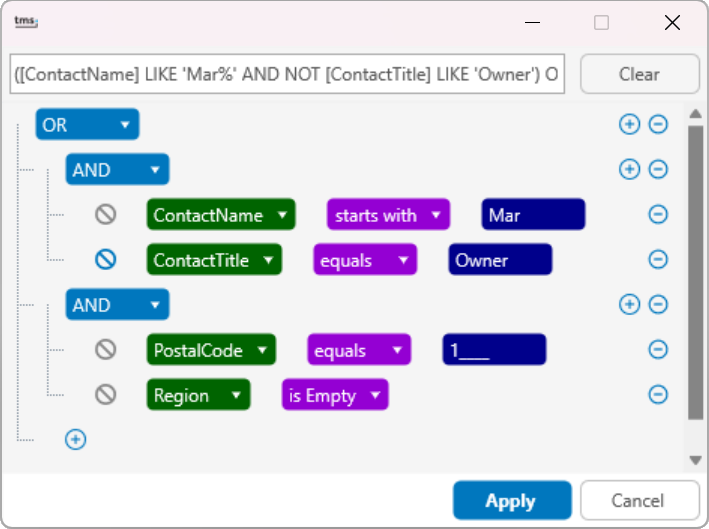
Show the Dialog
Assign an active dataset to DataSet, then call Execute. When the user applies the dialog, the component updates the dataset filter text and toggles filtering when needed.
TMSFNCDataSetFilterDialog1.DataSet := ClientDataSet1;
TMSFNCDataSetFilterDialog1.FilterText := ClientDataSet1.Filter;
TMSFNCDataSetFilterDialog1.Execute;
TMSFNCDataSetFilterDialog1->DataSet = ClientDataSet1;
TMSFNCDataSetFilterDialog1->FilterText = ClientDataSet1->Filter;
TMSFNCDataSetFilterDialog1->Execute();
Seed or Read Filter Text
Use FilterText when the dialog should open with an existing filter or when the application needs to inspect the generated expression after execution.
TMSFNCDataSetFilterDialog1.DataSet := ClientDataSet1;
TMSFNCDataSetFilterDialog1.FilterText := 'Status = ''Open''';
TMSFNCDataSetFilterDialog1.Execute;
Caption := TMSFNCDataSetFilterDialog1.FilterText;
TMSFNCDataSetFilterDialog1->DataSet = ClientDataSet1;
TMSFNCDataSetFilterDialog1->FilterText = "Status = 'Open'";
TMSFNCDataSetFilterDialog1->Execute();
Caption = TMSFNCDataSetFilterDialog1->FilterText;
Customize Dialog Events
Handle button events when the application needs to control whether the dialog closes, clear the filter in a custom way, or log generated filter expressions. Handle OnGetFormatSettings when date, time, or number formatting must match a specific locale.
procedure TForm1.TMSFNCDataSetFilterDialog1ApplyButtonClicked(Sender: TObject;
  AFilterBuilder: TTMSFNCFilterBuilder; var AClose: Boolean);
begin
  Caption := AFilterBuilder.FilterText;
  AClose := True;
end;

procedure TForm1.TMSFNCDataSetFilterDialog1GetFormatSettings(Sender: TObject;
  var AFormatSettings: TFormatSettings);
begin
  AFormatSettings.ShortDateFormat := 'yyyy-mm-dd';
end;
void __fastcall TForm1::TMSFNCDataSetFilterDialog1ApplyButtonClicked(TObject *Sender,
  TTMSFNCFilterBuilder *AFilterBuilder, bool &AClose)
{
  Caption = AFilterBuilder->FilterText;
  AClose = true;
}

void __fastcall TForm1::TMSFNCDataSetFilterDialog1GetFormatSettings(TObject *Sender,
  System::Sysutils::TFormatSettings &AFormatSettings)
{
  AFormatSettings.ShortDateFormat = "yyyy-mm-dd";
}
Show User-Friendly Column Names
Dataset field names are often short, technical identifiers (CUST_NO, STATUS_CD) that are not meaningful to end users. Use DisplayNames when the filter dialog should present a friendlier label for a column instead of the raw field name.
DisplayNames is a TTMSFNCFilterDialogDisplayNames collection of TTMSFNCFilterDialogFieldNameMap items, each mapping one FieldName to one DisplayName. Add mappings explicitly with AddMap, or leave a field unmapped: the dialog auto-populates a mapping from the dataset field's DisplayLabel the first time it reads the dataset's fields, but only when no mapping for that field already exists. The generated FilterText still references the underlying field names — only the dialog UI substitutes the friendly label.
procedure TForm1.FormCreate(Sender: TObject);
begin
  TMSFNCDataSetFilterDialog1.DataSet := ClientDataSet1;

  // Explicitly map a field name to a friendly label.
  TMSFNCDataSetFilterDialog1.DisplayNames.AddMap('CUST_NO', 'Customer Number');
  TMSFNCDataSetFilterDialog1.DisplayNames.AddMap('STATUS_CD', 'Status');

  // Any field left unmapped here is auto-populated from the dataset field's
  // DisplayLabel the first time the dialog reads the dataset's fields
  // (Execute, or any call that rebuilds the filter columns).
end;

procedure TForm1.btnFilterClick(Sender: TObject);
begin
  if TMSFNCDataSetFilterDialog1.Execute then
  begin
    // The generated FilterText still references the underlying field names;
    // only the dialog UI shows the mapped display names to the user.
    ClientDataSet1.Filter := TMSFNCDataSetFilterDialog1.FilterText;
    ClientDataSet1.Filtered := TMSFNCDataSetFilterDialog1.FilterText <> '';
  end;
end;
void __fastcall TForm1::FormCreate(TObject *Sender)
{
  TMSFNCDataSetFilterDialog1->DataSet = ClientDataSet1;

  // Explicitly map a field name to a friendly label.
  TMSFNCDataSetFilterDialog1->DisplayNames->AddMap("CUST_NO", "Customer Number");
  TMSFNCDataSetFilterDialog1->DisplayNames->AddMap("STATUS_CD", "Status");

  // Any field left unmapped here is auto-populated from the dataset field's
  // DisplayLabel the first time the dialog reads the dataset's fields
  // (Execute, or any call that rebuilds the filter columns).
}

void __fastcall TForm1::btnFilterClick(TObject *Sender)
{
  if (TMSFNCDataSetFilterDialog1->Execute())
  {
    // The generated FilterText still references the underlying field names;
    // only the dialog UI shows the mapped display names to the user.
    ClientDataSet1->Filter = TMSFNCDataSetFilterDialog1->FilterText;
    ClientDataSet1->Filtered = TMSFNCDataSetFilterDialog1->FilterText != "";
  }
}
Filtering Without a Dataset
TTMSFNCFilterDialog is the dataset-free sibling of
TTMSFNCDataSetFilterDialog: the same expression editor, but with no DataSet
property and therefore no fields to discover. Reach for it when the data you
are filtering is not a TDataSet at all — an in-memory array or list, a REST
result, a JSON document — and you only need the dialog to author an
expression that your own code then evaluates.
Because there is no dataset to inspect, you supply the columns yourself. The
dialog raises OnGetFilterBuilderDataColumns on every Execute; call
AddDataColumn once per column with its name, data type and display name. The
data type matters: it decides which operators the dialog offers and which
editor it opens for a value, so a date column typed fdtDate gets a date
editor while the same column left fdtAutomatic falls back to plain text.
Evaluate the result with ValidateFilterRow, passing one row of values ordered
to match the columns you declared. Execute returns a TModalResult, so
compare it against mrOk rather than treating it as a Boolean.
{ FCurrentFilter: string, FRows: TArray<TTMSFNCFilterValidateInputRow> and
  FRowVisible: TArray<Boolean> are fields on the form; FilterLabel is a label
  that shows the active filter: }
procedure TForm1.FilterButtonClick(Sender: TObject);
begin
  // TTMSFNCFilterDialog is the dataset-free dialog: it edits a filter
  // expression without being bound to any data source. Seed it with the
  // current expression, show it, and read the result back.
  TMSFNCFilterDialog1.FilterText := FCurrentFilter;

  if TMSFNCFilterDialog1.Execute = mrOk then
  begin
    FCurrentFilter := TMSFNCFilterDialog1.FilterText;
    // DisplayFilterText is the same expression with display names substituted,
    // which is what you show back to the user.
    FilterLabel.Text := TMSFNCFilterDialog1.DisplayFilterText;
    ApplyFilterToRows;
  end;
end;

procedure TForm1.TMSFNCFilterDialog1GetFilterBuilderDataColumns(Sender: TObject;
  AFilterBuilder: TTMSFNCFilterBuilder; ADataColumns: TTMSFNCFilterBuilderColumns);
begin
  // Without a dataset to inspect, the dialog asks for its columns here on
  // every Execute. Declare each column's name, data type and display name -
  // the data type drives which operators and which editor the dialog offers.
  ADataColumns.Clear;
  AFilterBuilder.AddDataColumn('Company', fdtText, 'Company name');
  AFilterBuilder.AddDataColumn('Country', fdtText, 'Country');
  AFilterBuilder.AddDataColumn('Orders', fdtNumber, 'Order count');
  AFilterBuilder.AddDataColumn('Revenue', fdtFloat, 'Revenue');
  AFilterBuilder.AddDataColumn('LastOrder', fdtDate, 'Last order date');
  AFilterBuilder.AddDataColumn('Active', fdtBoolean, 'Active');
end;

procedure TForm1.ApplyFilterToRows;
var
  I: Integer;
begin
  // ValidateFilterRow evaluates one row of values against the expression the
  // user built. Order the values to match the columns declared above.
  for I := 0 to High(FRows) do
    FRowVisible[I] := TMSFNCFilterDialog1.ValidateFilterRow(FRows[I]);
end;
// FCurrentFilter: String, FRows: DynamicArray<TTMSFNCFilterValidateInputRow> and
// FRowVisible: DynamicArray<bool> are fields on the form; FilterLabel is a label
// that shows the active filter:
void __fastcall TForm1::FilterButtonClick(TObject *Sender)
{
  // TTMSFNCFilterDialog is the dataset-free dialog: it edits a filter
  // expression without being bound to any data source. Seed it with the
  // current expression, show it, and read the result back.
  TMSFNCFilterDialog1->FilterText = FCurrentFilter;

  if (TMSFNCFilterDialog1->Execute() == mrOk)
  {
    FCurrentFilter = TMSFNCFilterDialog1->FilterText;
    // DisplayFilterText is the same expression with display names substituted,
    // which is what you show back to the user.
    FilterLabel->Text = TMSFNCFilterDialog1->DisplayFilterText;
    ApplyFilterToRows();
  }
}

void __fastcall TForm1::TMSFNCFilterDialog1GetFilterBuilderDataColumns(TObject *Sender,
  TTMSFNCFilterBuilder *AFilterBuilder, TTMSFNCFilterBuilderColumns *ADataColumns)
{
  // Without a dataset to inspect, the dialog asks for its columns here on
  // every Execute. Declare each column's name, data type and display name -
  // the data type drives which operators and which editor the dialog offers.
  ADataColumns->Clear();
  AFilterBuilder->AddDataColumn("Company", fdtText, "Company name");
  AFilterBuilder->AddDataColumn("Country", fdtText, "Country");
  AFilterBuilder->AddDataColumn("Orders", fdtNumber, "Order count");
  AFilterBuilder->AddDataColumn("Revenue", fdtFloat, "Revenue");
  AFilterBuilder->AddDataColumn("LastOrder", fdtDate, "Last order date");
  AFilterBuilder->AddDataColumn("Active", fdtBoolean, "Active");
}

void __fastcall TForm1::ApplyFilterToRows()
{
  // ValidateFilterRow evaluates one row of values against the expression the
  // user built. Order the values to match the columns declared above.
  for (int I = 0; I < FRows.Length; I++)
    FRowVisible[I] = TMSFNCFilterDialog1->ValidateFilterRow(FRows[I]);
}
Combining dialog execution, seeded filter text, and result handling
The following example seeds the dialog with a previously saved filter expression, applies the result to the dataset, and logs the generated text:
procedure TForm1.btnFilterClick(Sender: TObject);
begin
  TMSFNCDataSetFilterDialog1.DataSet    := ClientDataSet1;
  TMSFNCDataSetFilterDialog1.FilterText := FLastFilter; // restore previous
  if TMSFNCDataSetFilterDialog1.Execute = mrOk then
  begin
    FLastFilter := TMSFNCDataSetFilterDialog1.FilterText;
    ClientDataSet1.Filter   := FLastFilter;
    ClientDataSet1.Filtered := FLastFilter <> '';
    Memo1.Lines.Add('Filter applied: ' + FLastFilter);
  end;
end;

procedure TForm1.TMSFNCDataSetFilterDialog1ApplyButtonClicked(Sender: TObject;
  AFilterBuilder: TTMSFNCFilterBuilder; var AClose: Boolean);
begin
  // Prevent closing if the filter text is empty
  AClose := AFilterBuilder.FilterText <> '';
  if not AClose then
    ShowMessage('Please define at least one filter condition.');
end;
void __fastcall TForm1::btnFilterClick(TObject *Sender)
{
  TMSFNCDataSetFilterDialog1->DataSet = ClientDataSet1;
  TMSFNCDataSetFilterDialog1->FilterText = FLastFilter; // restore previous
  if (TMSFNCDataSetFilterDialog1->Execute() == mrOk)
  {
    FLastFilter = TMSFNCDataSetFilterDialog1->FilterText;
    ClientDataSet1->Filter = FLastFilter;
    ClientDataSet1->Filtered = FLastFilter != "";
    Memo1->Lines->Add("Filter applied: " + FLastFilter);
  }
}

void __fastcall TForm1::TMSFNCDataSetFilterDialog1ApplyButtonClicked(TObject *Sender,
  TTMSFNCFilterBuilder *AFilterBuilder, bool &AClose)
{
  // Prevent closing if the filter text is empty
  AClose = AFilterBuilder->FilterText != "";
  if (!AClose)
    ShowMessage("Please define at least one filter condition.");
}