Font Selection Dialog
TTMSFNCFontDialog presents available font names, sizes, style options, and a color selector. Use it when the selected font should be applied after a dialog result rather than edited inline.
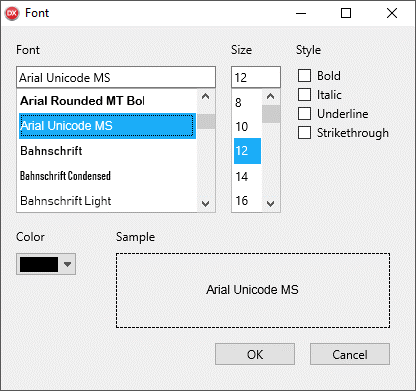
Initialize the Dialog
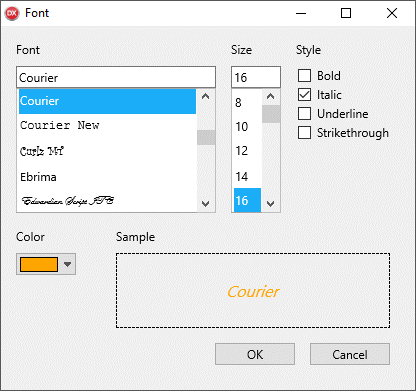
Set the initial font properties before calling Execute. These values populate the dialog and can be read again after the user closes it.
TMSFNCFontDialog1.FontName := 'Courier';
TMSFNCFontDialog1.FontSize := 16;
TMSFNCFontDialog1.FontColor := gcOrange;
TMSFNCFontDialog1.ItalicSelected := True;
TMSFNCFontDialog1.OnDialogResult := TMSFNCFontDialog1DialogResult;
TMSFNCFontDialog1.Execute;
TMSFNCFontDialog1->FontName = "Courier";
TMSFNCFontDialog1->FontSize = 16;
TMSFNCFontDialog1->FontColor = gcOrange;
TMSFNCFontDialog1->ItalicSelected = true;
TMSFNCFontDialog1->OnDialogResult = TMSFNCFontDialog1DialogResult;
TMSFNCFontDialog1->Execute();
Apply Results
Use OnDialogResult to apply the chosen values across platforms. Desktop platforms can show the dialog modally, while web and mobile flows can complete asynchronously.
procedure TForm1.TMSFNCFontDialog1DialogResult(Sender: TObject; AModalResult: TModalResult);
begin
  if AModalResult <> mrOK then
    Exit;

  TMSFNCHTMLText1.Font.Name := TMSFNCFontDialog1.FontName;
  TMSFNCHTMLText1.Font.Size := TMSFNCFontDialog1.FontSize;
  TMSFNCHTMLText1.Font.Color := TMSFNCFontDialog1.FontColor;
  TMSFNCHTMLText1.Font.Style := [];

  if TMSFNCFontDialog1.BoldSelected then
    TMSFNCHTMLText1.Font.Style := TMSFNCHTMLText1.Font.Style + [TFontStyle.fsBold];
  if TMSFNCFontDialog1.ItalicSelected then
    TMSFNCHTMLText1.Font.Style := TMSFNCHTMLText1.Font.Style + [TFontStyle.fsItalic];
  if TMSFNCFontDialog1.UnderlineSelected then
    TMSFNCHTMLText1.Font.Style := TMSFNCHTMLText1.Font.Style + [TFontStyle.fsUnderline];
  if TMSFNCFontDialog1.StrikethroughSelected then
    TMSFNCHTMLText1.Font.Style := TMSFNCHTMLText1.Font.Style + [TFontStyle.fsStrikeOut];
end;
void __fastcall TForm1::TMSFNCFontDialog1DialogResult(TObject *Sender, TModalResult AModalResult)
{
  if (AModalResult != mrOk)
    return;

  TMSFNCHTMLText1->Font->Name = TMSFNCFontDialog1->FontName;
  TMSFNCHTMLText1->Font->Size = TMSFNCFontDialog1->FontSize;
  TMSFNCHTMLText1->Font->Color = TMSFNCFontDialog1->FontColor;
  TMSFNCHTMLText1->Font->Style = TFontStyles();

  if (TMSFNCFontDialog1->BoldSelected)
    TMSFNCHTMLText1->Font->Style = TMSFNCHTMLText1->Font->Style << TFontStyle::fsBold;
  if (TMSFNCFontDialog1->ItalicSelected)
    TMSFNCHTMLText1->Font->Style = TMSFNCHTMLText1->Font->Style << TFontStyle::fsItalic;
  if (TMSFNCFontDialog1->UnderlineSelected)
    TMSFNCHTMLText1->Font->Style = TMSFNCHTMLText1->Font->Style << TFontStyle::fsUnderline;
  if (TMSFNCFontDialog1->StrikethroughSelected)
    TMSFNCHTMLText1->Font->Style = TMSFNCHTMLText1->Font->Style << TFontStyle::fsStrikeOut;
}