Font Name and Size Pickers
TTMSFNCFontNamePicker lists available font names, while TTMSFNCFontSizePicker lists common font sizes. Use them together when users need lightweight font controls without a modal dialog.
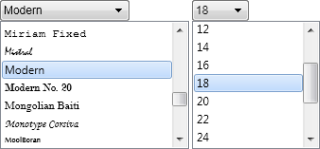
Select Font Values
Set SelectedFontName and SelectedFontSize before the form is shown. Handle OnFontNameSelected and OnFontSizeSelected to apply changes immediately.
TMSFNCFontNamePicker1.SelectedFontName := 'Arial';
TMSFNCFontNamePicker1.OnFontNameSelected := TMSFNCFontNamePicker1FontNameSelected;

TMSFNCFontSizePicker1.SelectedFontSize := 12;
TMSFNCFontSizePicker1.OnFontSizeSelected := TMSFNCFontSizePicker1FontSizeSelected;
TMSFNCFontNamePicker1->SelectedFontName = "Arial";
TMSFNCFontNamePicker1->OnFontNameSelected = TMSFNCFontNamePicker1FontNameSelected;

TMSFNCFontSizePicker1->SelectedFontSize = 12;
TMSFNCFontSizePicker1->OnFontSizeSelected = TMSFNCFontSizePicker1FontSizeSelected;
procedure TForm1.TMSFNCFontNamePicker1FontNameSelected(Sender: TObject; AFontName: string);
begin
  TMSFNCHTMLText1.Font.Name := AFontName;
end;

procedure TForm1.TMSFNCFontSizePicker1FontSizeSelected(Sender: TObject; AFontSize: Single);
begin
  TMSFNCHTMLText1.Font.Size := AFontSize;
end;
void __fastcall TForm1::TMSFNCFontNamePicker1FontNameSelected(TObject *Sender, System::UnicodeString AFontName)
{
  TMSFNCHTMLText1->Font->Name = AFontName;
}

void __fastcall TForm1::TMSFNCFontSizePicker1FontSizeSelected(TObject *Sender, float AFontSize)
{
  TMSFNCHTMLText1->Font->Size = AFontSize;
}
Customize Size Items
The size picker uses a string list for Items. Replace the list when the application should offer a different set of sizes.
TMSFNCFontSizePicker1.Items.Clear;
TMSFNCFontSizePicker1.Items.Add('10');
TMSFNCFontSizePicker1.Items.Add('12');
TMSFNCFontSizePicker1.Items.Add('14');
TMSFNCFontSizePicker1.Items.Add('18');
TMSFNCFontSizePicker1.Items.Add('24');
TMSFNCFontSizePicker1.SelectedFontSize := 14;
TMSFNCFontSizePicker1->Items->Clear();
TMSFNCFontSizePicker1->Items->Add("10");
TMSFNCFontSizePicker1->Items->Add("12");
TMSFNCFontSizePicker1->Items->Add("14");
TMSFNCFontSizePicker1->Items->Add("18");
TMSFNCFontSizePicker1->Items->Add("24");
TMSFNCFontSizePicker1->SelectedFontSize = 14;