Radio Button Guide
TTMSFNCRadioButton is a cross-framework radio button that extends the standard radio button with HTML-formatted labels, a configurable widget position, and a custom widget bitmap. Buttons sharing the same GroupName and parent container are mutually exclusive.
Basic setup
Drop two or more TTMSFNCRadioButton controls onto a form or panel and assign them the same GroupName. Only one button in the group can be checked at a time.
// Drop TTMSFNCRadioButton on a form or create it at runtime.
// Buttons sharing the same GroupName and parent are mutually exclusive.
TMSFNCRadioButton1.Text := 'Option A';
TMSFNCRadioButton1.GroupName := 'group1';
TMSFNCRadioButton1.Checked := True;

TMSFNCRadioButton2.Text := 'Option B';
TMSFNCRadioButton2.GroupName := 'group1';

TMSFNCRadioButton3.Text := 'Option C';
TMSFNCRadioButton3.GroupName := 'group2';  // separate group; independent selection
// Drop TTMSFNCRadioButton on a form or create it at runtime.
// Buttons sharing the same GroupName and parent are mutually exclusive.
TMSFNCRadioButton1->Text = "Option A";
TMSFNCRadioButton1->GroupName = "group1";
TMSFNCRadioButton1->Checked = true;

TMSFNCRadioButton2->Text = "Option B";
TMSFNCRadioButton2->GroupName = "group1";

TMSFNCRadioButton3->Text = "Option C";
TMSFNCRadioButton3->GroupName = "group2";  // separate group; independent selection
Setting Checked := True at design time preselects a button. Reading Checked at any point returns the current state.
Creating buttons at runtime
When the number of options is determined at runtime, create TTMSFNCRadioButton instances dynamically, assign them the same parent and GroupName, then wire the OnChange event.
procedure TForm1.CreateRadioButtons;
var
  rb: TTMSFNCRadioButton;
  i: Integer;
  top: Single;
begin
  top := 20;
  for i := 0 to 3 do
  begin
    rb := TTMSFNCRadioButton.Create(Self);
    rb.Parent := Panel1;
    rb.Text := 'Choice ' + IntToStr(i + 1);
    rb.GroupName := 'choices';
    rb.Left := 10;
    rb.Top := top;
    rb.Width := 120;
    rb.Height := 24;
    rb.OnChange := RadioButtonChange;
    top := top + 30;
  end;
end;

procedure TForm1.RadioButtonChange(Sender: TObject);
var
  rb: TTMSFNCRadioButton;
begin
  rb := Sender as TTMSFNCRadioButton;
  if rb.Checked then
    StatusBar1.Panels.Items[0].Text := 'Selected: ' + rb.Text;
end;
void __fastcall TForm1::CreateRadioButtons()
{
  TTMSFNCRadioButton *rb;
  float top = 20;

  for (int i = 0; i <= 3; i++)
  {
    rb = new TTMSFNCRadioButton(this);
    rb->Parent = Panel1;
    rb->Text = "Choice " + IntToStr(i + 1);
    rb->GroupName = "choices";
    rb->Position->X = 10;
    rb->Position->Y = top;
    rb->Width = 120;
    rb->Height = 24;
    rb->OnChange = RadioButtonChange;
    top = top + 30;
  }
}

void __fastcall TForm1::RadioButtonChange(TObject *Sender)
{
  TTMSFNCRadioButton *rb = dynamic_cast<TTMSFNCRadioButton *>(Sender);
  if (rb->Checked)
    StatusBar1->Panels->Items[0]->Text = "Selected: " + rb->Text;
}
The OnChange event fires when the user toggles any button. Check Checked inside the handler to act only on the button that became selected.
HTML labels and appearance
The Text property accepts HTML markup, making it straightforward to emphasise parts of a label without extra controls. The WidgetPosition property moves the radio circle to any side of the label. Supply a BitmapContainer and set BitmapName to replace the default OS-drawn circle with a custom image.
// HTML formatting in the radio button label and custom widget position
TMSFNCRadioButton1.Text := '<b>Primary</b> option – <font color="#0070C0">recommended</font>';
TMSFNCRadioButton1.GroupName := 'plan';
TMSFNCRadioButton1.WidgetPosition := wpLeft; // widget on the left (default)
TMSFNCRadioButton1.WordWrapping := True;
TMSFNCRadioButton2.Text := '<i>Secondary</i> option';
TMSFNCRadioButton2.GroupName := 'plan';
TMSFNCRadioButton2.WidgetPosition := wpLeft;
TMSFNCRadioButton2.Checked := True;
// Use a BitmapContainer image as a custom radio widget
TMSFNCRadioButton3.BitmapContainer := BitmapContainer1;
TMSFNCRadioButton3.BitmapName := 'radio_custom';
TMSFNCRadioButton3.GroupName := 'plan';
// HTML formatting in the radio button label and custom widget position
TMSFNCRadioButton1->Text = "<b>Primary</b> option – <font color=\"#0070C0\">recommended</font>";
TMSFNCRadioButton1->GroupName = "plan";
TMSFNCRadioButton1->WidgetPosition = Fmx::Tmsfnchtmlimagecontainer::hwpLeft; // widget on the left (default)
TMSFNCRadioButton1->WordWrapping = true;
TMSFNCRadioButton2->Text = "<i>Secondary</i> option";
TMSFNCRadioButton2->GroupName = "plan";
TMSFNCRadioButton2->WidgetPosition = Fmx::Tmsfnchtmlimagecontainer::hwpLeft;
TMSFNCRadioButton2->Checked = true;
// Use a BitmapContainer image as a custom radio widget
TMSFNCRadioButton3->BitmapContainer = BitmapContainer1;
TMSFNCRadioButton3->BitmapName = "radio_custom";
TMSFNCRadioButton3->GroupName = "plan";
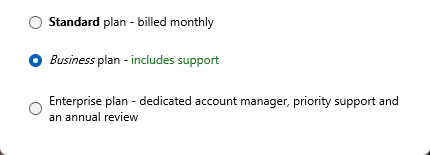
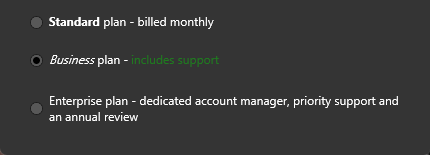
The third option has WordWrapping := True, so a caption longer than the
control wraps onto a second line instead of being clipped.
Combining WidgetPosition, HTML text, and a custom bitmap lets you match the radio button appearance to the application theme without replacing the control.
Groups and mutual exclusion
Mutual exclusion is scoped by parent container and GroupName together. Two sets of buttons on the same parent remain independent as long as they use different GroupName values. Buttons on different parent controls (for example, two TPanel controls) are always independent regardless of GroupName.
// Two independent groups on the same form using different GroupName values
RadioSize1.GroupName := 'Size';
RadioSize2.GroupName := 'Size';
RadioSize3.GroupName := 'Size';

RadioColor1.GroupName := 'Color';
RadioColor2.GroupName := 'Color';
// Two independent groups on the same form using different GroupName values
RadioSize1->GroupName = "Size";
RadioSize2->GroupName = "Size";
RadioSize3->GroupName = "Size";

RadioColor1->GroupName = "Color";
RadioColor2->GroupName = "Color";
Combining dynamic creation, HTML labels, and mutual exclusion
The following example builds two independent groups at runtime — a size group with a styled HTML label and a priority group — each mutually exclusive within its own GroupName:
procedure TForm1.FormCreate(Sender: TObject);
var
  rb: TTMSFNCRadioButton;
begin
  // Size group (3 options)
  for var size in ['<b>Small</b>', '<b>Medium</b>', '<b>Large</b>'] do
  begin
    rb := TTMSFNCRadioButton.Create(Self);
    rb.Parent    := pnlSize;
    rb.GroupName := 'Size';
    rb.Text      := size;
    rb.OnChange  := RBSizeChange;
  end;

  // Priority group (2 options)
  for var prio in ['Normal', 'High priority'] do
  begin
    rb := TTMSFNCRadioButton.Create(Self);
    rb.Parent    := pnlPriority;
    rb.GroupName := 'Priority';
    rb.Text      := prio;
    rb.OnChange  := RBPriorityChange;
  end;
end;
void __fastcall TForm1::FormCreate(TObject *Sender)
{
  TTMSFNCRadioButton *rb;

  // Size group (3 options)
  const System::UnicodeString sizes[3] = {"<b>Small</b>", "<b>Medium</b>", "<b>Large</b>"};
  for (int i = 0; i < 3; i++)
  {
    rb = new TTMSFNCRadioButton(this);
    rb->Parent = pnlSize;
    rb->GroupName = "Size";
    rb->Text = sizes[i];
    rb->OnChange = RBSizeChange;
  }

  // Priority group (2 options)
  const System::UnicodeString prios[2] = {"Normal", "High priority"};
  for (int i = 0; i < 2; i++)
  {
    rb = new TTMSFNCRadioButton(this);
    rb->Parent = pnlPriority;
    rb->GroupName = "Priority";
    rb->Text = prios[i];
    rb->OnChange = RBPriorityChange;
  }
}