Track Bar Guide
TTMSFNCTrackBar is a single-thumb slider for selecting a value within a Min/Max range. It supports horizontal and vertical orientations, tick marks with labels, a coloured right-zone fill, and two events for live and committed value changes.

Basic setup
Set Min, Max, and Value, then wire OnValueChanged to act on the committed result.
// Simple volume slider from 0 to 100
TMSFNCTrackBar1.Min := 0;
TMSFNCTrackBar1.Max := 100;
TMSFNCTrackBar1.Value := 50;

procedure TForm1.TMSFNCTrackBar1ValueChanged(Sender: TObject; AValue: Single);
begin
  LabelVolume.Caption := 'Volume: ' + Format('%.0f', [AValue]) + '%';
end;
void __fastcall TForm1::ConfigureVolume()
{
  // Simple volume slider from 0 to 100
  TMSFNCTrackBar1->Min = 0;
  TMSFNCTrackBar1->Max = 100;
  TMSFNCTrackBar1->Value = 50;
}

void __fastcall TForm1::TMSFNCTrackBar1ValueChanged(TObject *Sender, float AValue)
{
  LabelVolume->Text = "Volume: " + Format("%.0f", ARRAYOFCONST(((Extended)AValue))) + "%";
}
Appearance and interaction options
Appearance.Orientation switches between horizontal and vertical. Tick mark properties control the display of graduation marks and their labels. Appearance.LineRightFill colours the track section to the right (or above) the thumb. Setting Interaction.JumpToExactValue := True moves the thumb directly to the clicked position rather than stepping toward it.
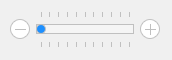
// Vertical slider with tick marks, coloured right-zone fill, and repeat-click
TMSFNCTrackBar1.Min := -20;
TMSFNCTrackBar1.Max :=  20;
TMSFNCTrackBar1.Value := 0;

TMSFNCTrackBar1.Appearance.Orientation := tboVertical;

// Tick marks every 5 units with labels
TMSFNCTrackBar1.Appearance.TickMarkLabel    := True;
TMSFNCTrackBar1.Appearance.TickMarkDivision := 5;
TMSFNCTrackBar1.Appearance.TickMarkLabelFormat := '%.0f';
TMSFNCTrackBar1.Appearance.TickMarkPosition := tmpBoth;

// Fill the track to the right of the thumb in a highlight colour
TMSFNCTrackBar1.Appearance.LineRightFill.Kind  := gfkSolid;
TMSFNCTrackBar1.Appearance.LineRightFill.Color := $FF80C0FF;

// Jump to the position the user clicks rather than stepping toward it
TMSFNCTrackBar1.Interaction.JumpToExactValue := True;
// Vertical slider with tick marks, coloured right-zone fill, and repeat-click
TMSFNCTrackBar1->Min = -20;
TMSFNCTrackBar1->Max = 20;
TMSFNCTrackBar1->Value = 0;

TMSFNCTrackBar1->Appearance->Orientation = tboVertical;

// Tick marks every 5 units with labels
TMSFNCTrackBar1->Appearance->TickMarkLabel = true;
TMSFNCTrackBar1->Appearance->TickMarkDivision = 5;
TMSFNCTrackBar1->Appearance->TickMarkLabelFormat = "%.0f";
TMSFNCTrackBar1->Appearance->TickMarkPosition = tmpBoth;

// Fill the track to the right of the thumb in a highlight colour
TMSFNCTrackBar1->Appearance->LineRightFill->Kind = gfkSolid;
TMSFNCTrackBar1->Appearance->LineRightFill->Color = static_cast<TTMSFNCGraphicsColor>(0xFF80C0FF);

// Jump to the position the user clicks rather than stepping toward it
TMSFNCTrackBar1->Interaction->JumpToExactValue = true;
Setting a global font
TTMSFNCTrackBar draws text in three places: the value label, the track label, and the tick mark labels, each with its own font property (Appearance.ValueFont, Appearance.TrackLabelFont, Appearance.TickMarkLabelFont). Styling each one individually is tedious when you just want the whole control to match a single typeface. The GlobalFont property cascades a font name, size, scale, style, or color across all of them in one assignment, so a single change keeps every label visually consistent.
TMSFNCTrackBar1.Min := 0;
TMSFNCTrackBar1.Max := 100;
TMSFNCTrackBar1.Value := 50;

// Show the labels that GlobalFont will style
TMSFNCTrackBar1.Appearance.TickMarkLabel := True;
TMSFNCTrackBar1.Appearance.TickMarkDivision := 25;

// One assignment restyles the value label, track label, and tick mark labels together
TMSFNCTrackBar1.GlobalFont.Name := 'Segoe UI';
TMSFNCTrackBar1.GlobalFont.Size := 12;
TMSFNCTrackBar1.GlobalFont.Style := [TFontStyle.fsBold];
TMSFNCTrackBar1->Min = 0;
TMSFNCTrackBar1->Max = 100;
TMSFNCTrackBar1->Value = 50;

// Show the labels that GlobalFont will style
TMSFNCTrackBar1->Appearance->TickMarkLabel = true;
TMSFNCTrackBar1->Appearance->TickMarkDivision = 25;

// One assignment restyles the value label, track label, and tick mark labels together
TMSFNCTrackBar1->GlobalFont->Name = "Segoe UI";
TMSFNCTrackBar1->GlobalFont->Size = 12;
TMSFNCTrackBar1->GlobalFont->Style = TFontStyles() << TFontStyle::fsBold;
Combining the trackbar with a value edit
Two events serve different update needs: OnValueChange fires continuously during dragging (useful for live preview), while OnValueChanged fires once on release. Wiring both the trackbar and an edit control to update each other creates a linked input pair.
// Combine trackbar with a label edit that lets users type the value directly.
// OnValueChange fires during drag; OnValueChanged fires on release.

TMSFNCTrackBar1.Min := 0;
TMSFNCTrackBar1.Max := 255;
TMSFNCTrackBar1.Value := 128;
TMSFNCTrackBar1.Interaction.Frequency := 1;
TMSFNCTrackBar1.Interaction.JumpToExactValue := True;

procedure TForm1.TMSFNCTrackBar1ValueChange(Sender: TObject; AValue: Single);
begin
  // Live update: fires as the thumb moves
  EditValue.Text := IntToStr(Round(AValue));
  ShapePreview.Fill.Color := RGB(Round(AValue), 0, 0);
end;

procedure TForm1.EditValueChange(Sender: TObject);
var
  v: Integer;
begin
  // Allow the user to type a value into the edit to move the thumb
  if TryStrToInt(EditValue.Text, v) then
    TMSFNCTrackBar1.Value := v;
end;
void __fastcall TForm1::ConfigureColorTrackBar()
{
  // Combine trackbar with a label edit that lets users type the value directly.
  // OnValueChange fires during drag; OnValueChanged fires on release.

  TMSFNCTrackBar1->Min = 0;
  TMSFNCTrackBar1->Max = 255;
  TMSFNCTrackBar1->Value = 128;
  TMSFNCTrackBar1->Interaction->Frequency = 1;
  TMSFNCTrackBar1->Interaction->JumpToExactValue = true;
  EditValue->OnChange = EditValueChange;
}

void __fastcall TForm1::TMSFNCTrackBar1ValueChange(TObject *Sender, float AValue)
{
  // Live update: fires as the thumb moves
  EditValue->Text = IntToStr(static_cast<int>(AValue + 0.5f));
  ShapePreview->Fill->Color = static_cast<TAlphaColor>(0xFF000000 | (static_cast<unsigned>(AValue + 0.5f) << 16));
}

void __fastcall TForm1::EditValueChange(TObject *Sender)
{
  int v;

  // Allow the user to type a value into the edit to move the thumb
  if (TryStrToInt(EditValue->Text, v))
    TMSFNCTrackBar1->Value = v;
}