TMS Aurelius Export
TMS Data Modeler has an option for integration with TMS Aurelius framework by generating classes based on the database structure.
Overview
TMS Aurelius is a Delphi framework for Object-Relational Mapping (ORM), allowing you to save/load data to database using classes instead of directly using SQL Statements. For it to work, you must create (or use) your Delphi classes and then add attributes to it allowing the framework to know to which table and field each object and property will be saved.
TMS Data Modeler saves you time in the process of creating such classes, by generating the classes automatically based on tables and fields defined in the database. To export the current schema to classes, use the File Menu, option "Export | Delphi (TMS Aurelius)", or the "TMS Aurelius" button in Tools ribbon.
Each table in Data Modeler will become a class. Each table column will become a class field/property. Foreign keys will become associations (properties of an object type). So for example, this Orders table:
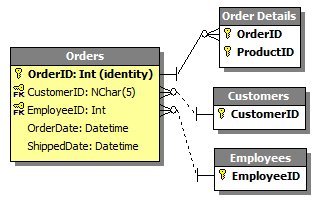
will become this class and mappings:
[Entity]
[Table('Orders')]
[Id('FOrderID', TIdGenerator.IdentityOrSequence)]
TOrder = class
private
  [Column('OrderID', [TColumnProp.Required, TColumnProp.NoInsert, TColumnProp.NoUpdate])]
  FOrderID: integer;
  [Column('OrderDate', [])]
  FOrderDate: Nullable<TDateTime>;
  [Column('ShippedDate', [])]
  FShippedDate: Nullable<TDateTime>;
  [Association]
  [JoinColumn('CustomerID', [], 'CustomerID')]
  FCustomer: Proxy<TCustomer>;
  [Association]
  [JoinColumn('EmployeeID', [], 'EmployeeID')]
  FEmployee: Proxy<TEmployee>;
  [ManyValuedAssociation([], [TCascadeType.SaveUpdate, TCascadeType.Merge], 'FOrderID')]
  FOrderDetailsList: Proxy<TList<TOrderDetails>>;
  function GetCustomer: TCustomer;
  procedure SetCustomerID(const Value: TCustomers);
  function GetEmployee: TEmployee;
  procedure SetEmployee(const Value: TEmployee);
  function GetOrderDetailsList: TList<TOrderDetails>;
public
  constructor Create;
  destructor Destroy; override;
  property OrderID: integer read FOrderID;
  property OrderDate: Nullable<TDateTime> read FOrderDate write FOrderDate;
  property ShippedDate: Nullable<TDateTime> read FShippedDate write FShippedDate;
  property Customer: TCustomer read GetCustomer write SetCustomer;
  property Employee: TEmployee read GetEmployee write SetEmployee;
  property OrderDetailsList: TList<TOrderDetails> read GetOrderDetailsList;
end;
Export Dialog
In the TMS Aurelius Export Dialog you have several settings to configure how the export will be performed.
The main option - and the only one you need to specify explicitly - is the output directory. This is where your units will be generated.
For all the other settings, you have a specific tab with several options you can configure:
Finally, in the Preview Tab you have can see all the source code with unit names that will be generated in the output directory. This tab is useful to browse and check the source code before you actually generate it (and eventually replace existing files).
Mappings Tab
When exporting to TMS Aurelius, you are presented with a dialog with several options for configuring how the classes will be generated. Clicking "Ok" will update the export options in the project and generate the source files. The "Save without generating" button allows you to update the options in the project but with no generating source code - to avoid error messages, if any. Note that you must later save the Data Modeler project to effectively save the options to project file.
The Mappings tab contains a list of all classes, properties, associations and many-valued associations that will be generated by Data Modeler. It allows you to fine tune your exporting, by checking each individual class/property and overriding some default values. This tab is pre-filled with default values and all tables are selected for exporting - you don't need to change any settings here if you don't need to, it will export all tables with default settings.
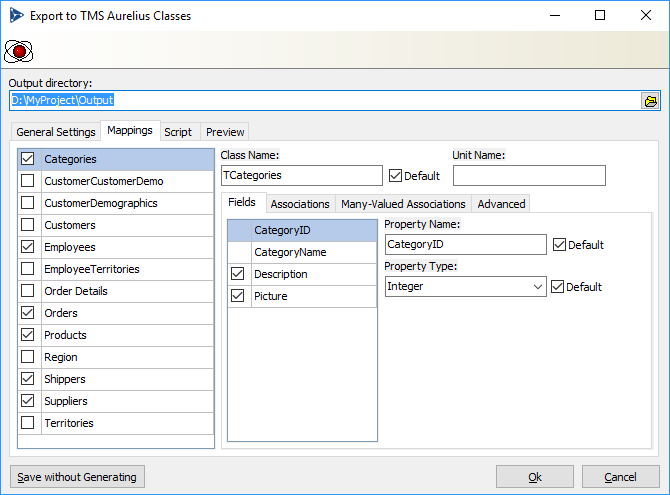
The first list displayed at the left of Mappings tab is a list of available tables/classes that will be generated. When you select an item, the right part of the window is updated to reflect the settings for the currently selected table. By default all tables are selected (meaning all classes will be generated). You can uncheck an item to avoid that class to be generated.
You can right click the list of selected tables for options to select all, unselect all, and other operations in the list.
You can also perform a search in the list by pressing Ctrl+Shift+F. This will open a search box at the bottom of the list:
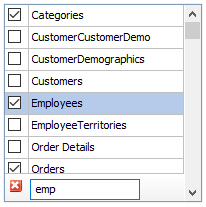
For each selected table in the list at the left, you have the following options you can configure:
| Field | Description |
|---|---|
| Class Name | Defines the name of class to be generated. If Default is checked it will use the default naming rule for the class. |
| Unit Name | Specifies the name of the unit file where this class will be included. If empty (default) the class will be included in the main default unit, specified in the General Settings tab. You can then specify a different unit name here. TMS Data Modeler will automatically add needed uses clause in the unit (for example, if your class uses other classes defined in other units). However, you have to pay attention to cyclical references - for example, if class A references class B and class B references A, and you put each of those classes in different units, the resulting code will not compile. TMS Data Modeler will automatically inform you that you have cyclical references, but it's up to you to solve them by filling the correct unit names in this field. By default all classes are generated in a single unit, which will never cause cyclical references errors. |
Fields Tab
Lists all fields/properties that will be generated for the selected class. You can uncheck items if you don't want them to be exported. Required fields cannot be unchecked. For each selected field you can configure the following options:
| Field | Description |
|---|---|
| Property Name | Defines the name of the property to be generated. Class field names will have the same name of the property but will be prefixed with "F". If Default is checked it will use the default naming rule for properties. |
| Property Type | Defines the type of the property to be generated ("Integer", "Nullable If Default is checked it will use the default type (based on column type). If unchecked, you must type the full name you want. It can be any type name, including Nullables. |
Associations Tab
Lists all properties that will be generated as associations. You can uncheck items if you don't want them to be exported. For each selected association you can configure the following options:
| Field | Description |
|---|---|
| Association Property Name | Defines the name of property to be generated for the association. If Default is checked, the default naming rule specified in General Settings tab will be used. |
| Fetch Mode | Specifies how the association will be fetched (lazy, eager or default). If Default is selected, it will use the value specified in the General Settings tab. |
| Cascade | Specifies the cascade type to be used in association. Options are "Default", "None" (no cascade) and "All but Remove" (all cascade options like save, update, merge, except remove cascade). |
| Map this 1:1 relationship as | Visible for identity relationships. Specifies how the 1:1 association will be exported, if as association or treat as inheritance. If Default is selected, it will use the value specified in the General Settings tab. |
Many-Valued Associations Tab
Lists all properties that will be generated as many-valued associations (collections). You can check items if you want them to be exported. By default collections are unchecked. For each many-valued association that can be generated you can configure the following options:
| Field | Description |
|---|---|
| List Property Name | Defines the name of collection property to be generated for the many-valued association. If Default is checked, the default naming rule specified in General Settings tab will be used. |
| Fetch Mode | Specifies how the association will be fetched (lazy, eager or default). If Default is specified, it will use the value specified in the General Settings tab. |
Advanced Tab
Lists several other settings for the table/class being exported.
Sequence/Generator for ID
Specifies the name of the sequence to be generated as the Sequence
attribute (Sequence['Sequence_Name']).
Not specifying a value here might cause Data Modeler to raise an error when exporting, depending on the value of "Check for missing sequences" option in General Settings tab.
If you don't want to specify a sequence and also don't want any error to be raised regardless of "Check for Missing Sequences" option, choose "(none)".
Dynamic Props Container Name
Specifies the name for the property that will be a container for dynamic
properties.
If empty, then by default no dynamic property container will be created in the class. If Default is checked, it will use the default name specified in the "Defaults" section in main tab.
Models (Comma Separated)
The Aurelius models where this class will belong to.
This relates to multimodel design in Aurelius. For each model specified
here, an attribute [Model('ModelName')] will be added to the class.
If you want to specify more than one model, just separate the model names with commas. For example, "Default,Finance,Sales" will generate the following attributes:
[Model('Default')]
[Model('Finance')]
[Model('Sales')]
You can have this field to be automatically filled by right clicking the list of classes at the left and choosing "Model Names" menu option.
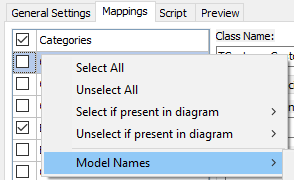
You will have the following options:
Update From Diagrams: For each diagram containing the specified class, a model will be added with the same name of the diagram.
Update From Diagrams (include Default): Same as "Update from Diagrams", but "Default" model will also be added.
Clear All: Remove the models from all classes.
Note
The operations above will be performed for all tables checked in the list, not for the currently selected only.
General Settings Tab
The General Settings tab contains some settings that apply for the exporting process as a whole, different from the Mappings tab that configures each class specifically. Here you will also configure some default behavior that apply to all classes.
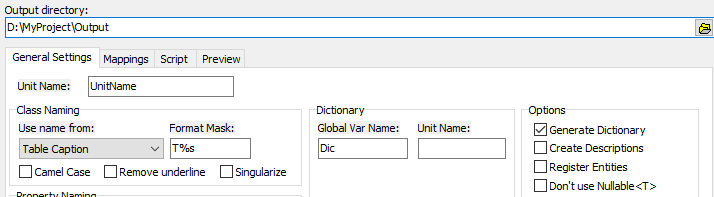
Naming options
You can define the default rule for naming classes, property/fields, associations and many-valued associations. Even though you can configure the name of each specific class, property, etc. in the Mappings tab, using this global configuration allows you to apply a default naming rule for all of them so you don't need to manually name them one by one.
Basically you have the "Use name from" fields which specifies what will be used for the "base name". For example, for class naming, you can use the base name from Table Caption in the model, or Table Name. From the base name, the Format Mask will be applied. The "%s" in the format mask will be replaced by the base name. For example, the default Format Mask for class naming is "T%s" which means the class name will be the base name (usually Table Caption) prefixed with "T".
Additionally, some naming options allow you to:
Camel Case: The first character of the base name or any character followed by underling will become upper case, all the other will become lower case. For example, if the base name in model is "SOME_NAME", it will become "Some_Name".
Remove underline: All underlines will be removed. "SOME_NAME" becomes "SOMENAME". If combined with camel case, it will become "SomeName"
Singularize: If the base name is in plural, it will become singular. "Customers" become "Customer", "Orders" become "Order". It also applies specified singularization rules for English language (e.g., "People" becomes "Person", etc.).
Dictionary
Data Modeler can also generate a dictionary with metadata for the classes. This dictionary can be used in queries in TMS Aurelius.
Global Var Name: Defines the name of Delphi global variable to be used to access the dictionary.
Unit Name: Defines the unit name/file name where the dictionary will be created. If empty (default), the dictionary will be created in the same file/unit as the classes (specified in the "Unit Name" field).
Legacy Dictionary: When checked, it will generate the dictionary in old format. If unchecked (default), it will generate the new format, introduced in TMS Aurelius version 5.6.
Defaults
Defines some default behaviors when translating tables/fields into classes/properties. You can override this default behaviors individually for each class/property in the Mappings tab.
| Field | Description |
|---|---|
| Association Fetch Mode | The default fetch mode used for associations. Default value is Lazy. |
| Association Cascade Definition | The default cascade definition for associations. Options are "None" (no cascade) and "All but Remove" (all cascade options like save, update, merge, except remove cascade). Default value is None. |
| Many-Valued Association Fetch Mode | The default fetch mode used for many-valued associations. Default is Lazy. |
| Map One-to-One Relationship As | Defines how 1:1 relationships will be converted by default. A 1:1 relationship can be converted as a regular association (property) or can be considered an inheritance between two classes. Default value is Association. |
| Ancestor Class | Specifies the name of the class to be used as base class for all entity classes generated by Data Modeler. Default value is empty, which means no ancestor (all classes will descend from TObject). |
| Dynamic Props Container Name | Specifies the default name for the property that will be a container for dynamic properties. If empty, then by default no property will be created in the class. |
| Check for Missing Sequences | Defines if Data Modeler must stop exporting (raise an error) if a sequence is not defined for a class. Options are: - If supported by database: if database supports sequences/generators, then raise an error if a sequence is not defined (default); - Always: always raise an error if a sequence is not specified; - Never: ignore any sequence check. |
Options
Defines some other general options for exporting.
| Field | Description |
|---|---|
| Generate Dictionary | Defines if the dictionary will be generated. |
| Create Descriptions | If checked, an attribute [Description] will be generated for every class and field in the source code. The content of such attribute will come from the tables and fields descriptions in Data Modeler. This attribute is not used by TMS Aurelius and is useful only for the developer if he wants to retrieve such metadata at runtime. |
| Register Entities | When checked, the generated unit will have an initialization section with a call to RegisterEntity for each class declared in the script:RegisterEntity(TSomeClass); RegisterEntity(TAnotherClass); ...This will make sure that when using the generated unit, classes will not be removed from the final executable because they were not being used in the application. This option is useful when using the entity classes from a TMS XData server, for example. |
| Don't use Nullable<T> | By default, non-required columns will be generated as properties of type Nullable<T>. Check this option if you don't want to use Nullable, but instead use the primitive type directly (string, integer, etc.). |
Script Tab
In the Script tab you can write the customization script that manipulates the source code generated by the TMS Aurelius Export feature.
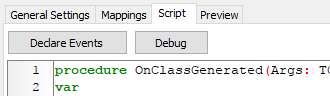
Just type the customization script in the editor. For more information about how to write the script itself, please refer to the Customization Script topic. If you want an initial help, you can click in the Declare Events button to have all the supported script events to be declared automatically in script.
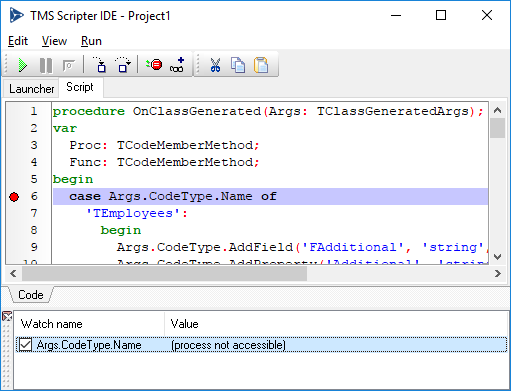
You can also debug the script if needed, by clicking the Debug button. This will open a full script IDE window already prepared with the existing customization script, and you can set breakpoints, add watches, run the script, etc..
The IDE has two scripts available: Launcher and Script. The Launcher is just the main script used to run the source code generation process that makes the event handlers to be fired. The customization script is in the Script tab.
Any changes you make to the Script tab will later be updated to the customization script in the Script tab, after you close the Debug IDE. You should never change the Launcher script - it's generated dynamically and any changes you make to it will be discarded.
Customization Script
You can fully customize the generated source code using the customization script, which you can write and debug from the Script Tab in the export dialog. For information on how to edit and debug the script, please follow the Script Tab topic.
This topic covers what code you can write from script and provide some code examples.
Event Handlers
The script is based on the concept of event handlers. When Data Modeler is creating the meta-information of the code, it can fire many events after each piece of code being generated.
For example, when a database column is processed and a combination of class field/property is created, the event OnColumnGenerated is created. To handle such event, just declare a procedure in the script code with the same name, receiving a single param of type TColumnGeneratedArgs. From that parameter you can retrieve relevant context information and change/adapt the generate code for your own need.
Here is a list of the events fired by the source code generator:
| Event | Description |
|---|---|
| OnColumnGenerated | Fired whenever a table column in processed and becomes a class field and property of a primitive type, and Column attribute is added to the class field. |
| OnAssociationGenerated | Fired whenever an association is processed, i.e., when a database foreign key becomes a class field and property of type Proxy<T> and T, respectively, and attributes Association and JoinColumn are added to the class field. |
| OnManyValuedAssociationGenerated | Fired whenever a many-valued association is processed and becomes a class field/property of type TList<T> and ManyValuedAssociation attribute is added. |
| OnClassGenerated | Fired after a class (entity) type has been fully generated. |
| OnUnitGenerated | Fired after the unit has been fully generated. |
OnColumnGenerated Event
This event is fired whenever a table column is processed and becomes a class field and property of a primitive type, and Column attribute is added to the class field. Should be declared as following:
procedure OnColumnGenerated(Args: TColumnGeneratedArgs);
begin
end;
Type TColumnGeneratedArgs has the following properties:
| Property | Description |
|---|---|
| Prop: TCodeMemberProperty | The public property of type TList<T>. |
| Field: TCodeMemberField | The private field of type Proxy<TList<T>>. |
| CodeUnit: TCodeUnit | The Pascal unit where this class is declared. |
| CodeType: TCodeTypeDeclaration | The type declaration of the class containing the property/field. |
| Getter: TCodeMemberMethod | The private getter method used as the reader of the public property. |
| AssociationAttr: TCodeAttributeDeclaration | The [Association] custom attribute added to the private field. |
| ConstructorMethod: TCodeMemberConstructor | The constructor Create method of the class, used to add the TList<T>.Create statement that instantiates the list object. |
| DestructorMethod: TCodeMemberDestructor | The destructor Destroy method of the class, used to add the TList<T>.Destroy statement that destroys the list object. |
| DBField: TGDAOField | Metadata for the table column in database. |
OnAssociationGenerated Event
This event is fired whenever an association is processed. This means a foreign key in the database becomes a class field of type Proxy<T> and a property of type T where T is an object, and attributes Association and JoinColumn are added to the class field. Should be declared as following:
procedure OnAssociationGenerated(Args: TAssociationGeneratedArgs);
begin
end;
Type TAssociationGeneratedArgs has the following properties:
| Property | Description |
|---|---|
| Prop: TCodeMemberProperty | The public property of type T. |
| Field: TCodeMemberField | The private field of type Proxy<T>. |
| CodeUnit: TCodeUnit | The Pascal unit where this class is declared. |
| CodeType: TCodeTypeDeclaration | The type declaration of the class containing the property/field. |
| Getter: TCodeMemberMethod | The private getter method used as the reader of the public property. It might be nil if property is not lazy-loaded. |
| Setter: TCodeMemberMethod | The private setter method used as the writer of the public property. It might be nil if property is not lay-loaded. |
| AssociationAttr: TCodeAttributeDeclaration | The [Association] custom attribute added to the private field. |
| DBRelationship: TGDAORelationship | Metadata for the database relationship (foreign key) in database. |
OnManyValuedAssociationGenerated Event
This event is fired whenever a many-valued association is processed. This means a foreign key in the database becomes a class field and property of type TList<T> and attributes ManyValuedAssociation and ForeignJoinColumn are added to the class field. Should be declared as following:
procedure OnManyValuedAssociationGenerated(Args: TManyValuedAssociationGeneratedArgs);
begin
end;
Type TManyValuedAssociationGeneratedArgs has the following properties:
| Property | Description |
|---|---|
| Prop: TCodeMemberProperty | The public property of type TList<T>. |
| Field: TCodeMemberField | The private field of type Proxy<TList<T>>. |
| CodeUnit: TCodeUnit | The Pascal unit where this class is declared. |
| CodeType: TCodeTypeDeclaration | The type declaration of the class containing the property/field. |
| Getter: TCodeMemberMethod | The private getter method used as the reader of the public property. |
| AssociationAttr: TCodeAttributeDeclaration | The [ManyValuedAssociation] custom attribute added to the private field. |
| ConstructorMethod: TCodeMemberConstructor | The constructor Create method of the class, used to add the TList<T>.Create statement that instantiates the list object. |
| DestructorMethod: TCodeMemberDestructor | The destructor Destroy method of the class, used to add the TList<T>.Destroy statement that destroys the list object. |
| DBRelationship: TGDAORelationship | Metadata for the database relationship (foreign key) in database. |
OnClassGenerated Event
This event is fired whenever a class (entity) type is fully generated. You can use this event to do some customization to the class after all its properties are added. Should be declared as following:
procedure OnClassGenerated(Args: TClassGeneratedArgs);
begin
end;
Type TClassGeneratedArgs has the following properties:
| Property | Description |
|---|---|
| CodeUnit: TCodeUnit | The Pascal unit where this class is declared. |
| CodeType: TCodeTypeDeclaration | The type declaration of the class containing the property/field. |
| DBTable: TGDAOTable | Metadata for the table in database. |
OnUnitGenerated Event
This event is fired whenever an unit is fully generated. You can use this event to do some customization to the unit after it has been generated, like adding an unit to the uses clause, add code to initialization section, etc.. Should be declared as following:
procedure OnUnitGenerated(Args: TUnitGeneratedArgs);
begin
end;
Type TUnitGeneratedArgs has the following properties:
| Property | Description |
|---|---|
| CodeUnit: TCodeUnit | The Pascal unit that has been generated. |
Code Samples
Some script samples for common customization tasks:
Adding OrderBy Attribute to Many-Valued Association
This example adds the attribute [OrderBy] to the many-valued association. It identifies the many-valued association by the name of the generated private field (FEmployeesList) in a specific class (TEmployees):
procedure OnManyValuedAssociationGenerated(Args: TManyValuedAssociationGeneratedArgs);
begin
  case Args.CodeType.Name of
    'TEmployees':
       case Args.Field.Name of
         'FEmployeesList':
           Args.Field.AddAttribute('OrderBy').AddRawArgument('''LAST_NAME,FIRST_NAME''');
       end;
  end;
end;
Suppose the original generated source code was this one:
[ManyValuedAssociation([TAssociationProp.Lazy],
 [TCascadeType.SaveUpdate, TCascadeType.Merge],
 'FReportsTo')]
FEmployeesList: Proxy<TList<TEmployees>>;
With the script above, it will become this:
[ManyValuedAssociation([TAssociationProp.Lazy],
 [TCascadeType.SaveUpdate, TCascadeType.Merge],
 'FReportsTo')]
[OrderBy('LAST_NAME,FIRST_NAME')]
FEmployeesList: Proxy<TList<TEmployees>>;
Adding Version Attribute to Class Fields
This example adds the attribute [Version] to any class field named "FVersion", regardless of the class it appears.
procedure OnColumnGenerated(Args: TColumnGeneratedArgs);
begin
  if Args.Field.Name = 'FVersion' then
    Args.Field.AddAttribute('Version');
end;
Suppose the original generated source code was this one:
[Column('VERSION', [TColumnProp.Required])]
FVersion: Integer;
With the script above, it will become this:
[Column('VERSION', [TColumnProp.Required])]
[Version]
FVersion: Integer;
Creating a New Property in a Class
This example creates a private string field FAdditional and public property Additional (which getter and setter refers to private field) to the class TEmployees:
procedure OnClassGenerated(Args: TClassGeneratedArgs);
begin
  case Args.CodeType.Name of
    'TEmployees':
      begin
        Args.CodeType.AddField('FAdditional', 'string', mvPrivate);
        Args.CodeType.AddProperty('Additional', 'string',
          'FAdditional', 'FAdditional', mvPublic);
      end;
  end;
end;
This will create the following private field and public property:
private
  FAdditional: string;
public
  property Additional: string read FAdditional write FAdditional;
Creating a New Method Procedure in a Class
This example creates a public method Increase in class TCategories:
procedure OnClassGenerated(Args: TClassGeneratedArgs);
var
  Proc: TCodeMemberMethod;
begin
  case Args.CodeType.Name of
    'TCategories':
      begin
        Proc := Args.CodeType.AddProcedure('Increase', mvPublic);
        Proc.AddParameter('Value', 'Integer').Modifier := pmVar;
        Proc.AddParameter('Increment', 'Integer');
        Proc.AddSnippet('Value := Value + Increment;');
      end;
  end;
end;
It will create the following method declaration and implementation:
procedure Increase(var Value: Integer; Increment: Integer);
procedure TCategories.Increase(var Value: Integer; Increment: Integer);
begin
  Value := Value + Increment;
end;
Creating a New Method Function in a Class
This example creates a public method Triple in class TEmployees:
procedure OnClassGenerated(Args: TClassGeneratedArgs);
var
  Func: TCodeMemberMethod;
begin
  case Args.CodeType.Name of
    'TEmployees':
      begin
        Func := Args.CodeType.AddFunction('Triple', 'double', mvPublic);
        Func.AddParameter('Value', 'double');
        Func.AddSnippet('Result := Value * 3;');
      end;
  end;
end;
It will create the following method declaration and implementation:
function Triple(Value: double): double;
function TEmployees.Triple(Value: double): double;
begin
  Result := Value * 3;
end;
Adding a Unit Name to the Uses Clases
This example adds a unit name "MyUnit" to the uses clause (interface section) of the unit "UnitName":
procedure OnUnitGenerated(Args: TUnitGeneratedArgs);
begin
  if Args.CodeUnit.Name = 'UnitName' then
    Args.CodeUnit.InterfaceUnits.Add(TCodeUsedUnit.Create('MyUnit'));
end;
It will add the following uses clause do the unit:
unit UnitName;

interface

uses
  SysUtils,
  Generics.Collections,
  Aurelius.Mapping.Attributes,
  Aurelius.Types.Blob,
  Aurelius.Types.DynamicProperties,
  Aurelius.Types.Nullable,
  Aurelius.Types.Proxy,
  MyUnit,
  Aurelius.Criteria.Dictionary;
Changing Cascade of Many-Valued Association
This example changes the cascade parameter of many-valued association attribute. It identifies the many-valued association by the name of the generated private field (FEmployeesList) in a specific class (TEmployees):
procedure OnManyValuedAssociationGenerated(Args: TManyValuedAssociationGeneratedArgs);
begin
  case Args.CodeType.Name of
    'TEmployees':
       case Args.Field.Name of
         'FEmployeesList':
             TCodeSnippetExpression(Args.AssociationAttr.Arguments[1].Value).Value :=
               'CascadeTypeAllRemoveOrphan';
       end;
  end;
end;
Suppose the original generated source code was this one:
[ManyValuedAssociation([TAssociationProp.Lazy],
 [TCascadeType.SaveUpdate, TCascadeType.Merge],
 'FReportsTo')]
FEmployeesList: Proxy<TList<TEmployees>>;
With the script above, it will become this:
[ManyValuedAssociation([TAssociationProp.Lazy],
 CascadeTypeAllRemoveOrphan,
 'FReportsTo')]
FEmployeesList: Proxy<TList<TEmployees>>;
Adding ForeignKey Attribute to Associations
By default Aurelius defines the name of foreign keys automatically. You can force a name for the foreign key using ForeignKey attribute. Since Data Modeler already holds the name of all foreign keys (relationships) in the database, you can include a ForeignKey attribute to force all foreign keys to have the existing name in database.
The following example does that:
procedure OnAssociationGenerated(Args: TAssociationGeneratedArgs);
begin
  Args.Field.AddAttribute('ForeignKey').AddRawArgument(
    '''' + Args.DBRelationship.RelationshipName + '''');
end;
Suppose the original generated source code was this one:
[Association([TAssociationProp.Lazy, TAssociationProp.Required], [])]
[JoinColumn('ProductID', [TColumnProp.Required], 'ProductID')]
FProduct: Proxy<TProduct>;
With the script above, it will become this:
[Association([TAssociationProp.Lazy, TAssociationProp.Required], [])]
[JoinColumn('ProductID', [TColumnProp.Required], 'ProductID')]
[ForeignKey('FK_Order_Details_Products')]
FProduct: Proxy<TProduct>;
Adding DBIndex Attributes From Table Indexes
TMS Data Modeler doesn't generate DBIndex attributes from existing table indexes. But if you need it, you can do it using the following code snippet:
procedure OnClassGenerated(Args: TClassGeneratedArgs);
var
  I, J: Integer;
  Idx: TGDAOIndex;
  Fields: string;
  Attr: TCodeAttributeDeclaration;
begin
  for I := 0 to Args.DBTable.Indexes.Count - 1 do
  begin
    Idx := Args.DBTable.Indexes[I];
    Fields := '';
    for J := 0 to Idx.IFields.Count - 1 do
    begin
      if Fields <> '' then Fields := Fields + ',';
      Fields := Fields + Idx.IFields[J].FieldName;
    end;
    Attr := Args.CodeType.AddAttribute('DBIndex');
    Attr.AddRawArgument('''' + Idx.IndexName + '''');
    Attr.AddRawArgument('''' + Fields + '''');
  end;
end;
For example, originally the class would be generated like this:
[Entity]
[Table('Categories')]
[Id('FCategoryID', TIdGenerator.IdentityOrSequence)]
TCategories = class
With the following script a DBIndex attribute will be added for each table index:
[Entity]
[Table('Categories')]
[Id('FCategoryID', TIdGenerator.IdentityOrSequence)]
[DBIndex('CategoryName', 'CategoryName')]
TCategories = class
Adding Schema Name to Table Attribute
Data Modeler doesn't hold schema information for each table, but when exporting to TMS Aurelius classes you can use customization script to add the schema name to the table attribute. The following script adds the schema name dbo to the table category:
procedure OnClassGenerated(Args: TClassGeneratedArgs);
begin
  if Args.DBTable.TableName = 'category' then
    Args.TableAttr.AddRawArgument('''dbo''');
end;
For example, originally the class would be generated like this:
[Entity]
[Table('Category')]
[Id('FCategoryID', TIdGenerator.IdentityOrSequence)]
TCategories = class
With the following script the Table attribute will be like this:
[Entity]
[Table('Category', 'dbo')]
[Id('FCategoryID', TIdGenerator.IdentityOrSequence)]
TCategories = class