Getting started with TMS FNC Hint
Prerequisites
- TMS FNC Core installed and the runtime package added to the project.
Add the component
- Drop
TTMSFNCHintfrom the TMS FNC UI palette page onto a form. - Set
ActivetoTrueto replace the default framework hint.
Assign HTML hint text to a control
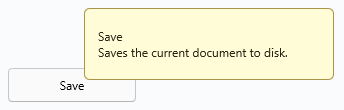
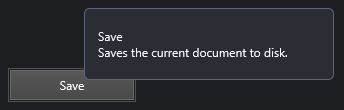
Button1.Hint := '<b>Save</b><br/>Saves the current document to disk.';
Button1.ShowHint := True;
TTMSFNCHint intercepts the standard ShowHint mechanism and renders the string through the FNC HTML engine automatically.
Customise the hint appearance
Hint1.Fill.Color := clYellow;
Hint1.Stroke.Color := clGray;
Hint1.Font.Size := 11;
Next steps
- Guides — positioning, delays, custom drawing, and multi-line hints.
- API reference — full class reference.