Drawing graphics on a PDF page
After NewPage, p.Graphics is the drawing surface for the current page. It
offers two levels. The low-level primitives on this page — lines, rectangles,
ellipses, paths, images, and links — map almost one to one onto PDF operators, so
you control exactly what is written. When you would rather reuse code you already
have, the graphics engine exposes the same API as any other
FNC canvas, so an existing paint routine renders straight into the PDF and you
also get shapes the primitives do not offer, such as rounded rectangles.
Reach for the primitives when you lay out a document from data — a report, an invoice, a certificate — and want predictable output with no dependency on a control. Reach for the graphics engine when the drawing code already exists for a screen control, or when you need its richer shape set.
Coordinates are PDF points (1/72 inch) with the origin at the top-left of the page. See Working in millimetres or inches when your measurements come from a print spec.
Lines, rectangles, and ellipses
DrawLine, DrawRectangle, and DrawEllipse cover most layout needs: rules,
table bands, boxes, and status dots. They all read the current Fill and Stroke
settings, so set those first and then draw.
p.Graphics.Stroke.Color := gcRed;
p.Graphics.Stroke.Width := 3;
p.Graphics.Stroke.Kind := gskDashDotDot;
p.Graphics.DrawLine(PointF(10, 50), PointF(100, 50));
p->Graphics()->Stroke->Color = gcRed;
p->Graphics()->Stroke->Width = 3;
p->Graphics()->Stroke->Kind = TTMSFNCGraphicsStrokeKind::gskDashDotDot;
p->Graphics()->DrawLine(PointF(10, 50), PointF(100, 50));
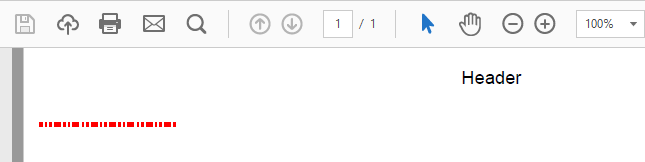
DrawRectangle and DrawEllipse decide for themselves what to paint: fill and
outline when both are active, only the fill when Stroke.Kind is gskNone, only
the outline when Fill.Kind is gfkNone. DrawLine uses only the stroke and
draws nothing when Stroke.Kind is gskNone.
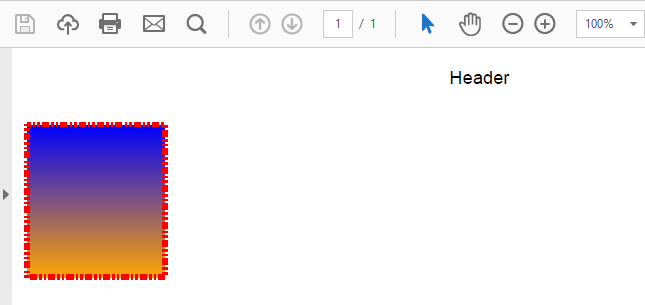
Rectangles support fill with optional gradients:
p.Graphics.Fill.Kind := gfkGradient;
p.Graphics.Fill.Color := gcBlue;
p.Graphics.Fill.ColorTo := gcOrange;
p.Graphics.DrawRectangle(RectF(10, 50, 100, 150));
p->Graphics()->Fill->Kind = TTMSFNCGraphicsFillKind::gfkGradient;
p->Graphics()->Fill->Color = gcBlue;
p->Graphics()->Fill->ColorTo = gcOrange;
p->Graphics()->DrawRectangle(RectF(10, 50, 100, 150));
Fill and stroke
Graphics.Fill and Graphics.Stroke are the canvas state every shape and path
reads. They persist until you change them, which is convenient for a run of
identical rows and a common source of surprises when one shape's settings leak
into the next — set them explicitly before each distinct element.
| Setting | Values | Notes |
|---|---|---|
Fill.Kind |
gfkNone, gfkSolid, gfkGradient |
gfkNone turns the fill off for DrawRectangle / DrawEllipse |
Fill.Color / Fill.ColorTo |
any TTMSFNCGraphicsColor |
A gradient runs from Color to ColorTo across the shape's bounds |
Fill.Orientation |
gfoHorizontal, gfoVertical |
Direction of a gradient fill |
Stroke.Kind |
gskNone, gskSolid, gskDash, gskDot, gskDashDot, gskDashDotDot |
gskNone turns the outline off |
Stroke.Color / Stroke.Width |
colour; width in points |
The sample below draws one line per dash pattern, then shows the three outcomes of the automatic mode choice — a fill-only dot, an outline-only ring, and a gradient box with an outline:
procedure TForm1.DrawFillAndStrokeSamples(const AFileName: string);
const
  DashKinds: array[0..4] of TTMSFNCGraphicsStrokeKind =
    (gskSolid, gskDash, gskDot, gskDashDot, gskDashDotDot);
var
  p: TTMSFNCPDFLib;
  I: Integer;
  y: Single;
begin
  p := TTMSFNCPDFLib.Create;
  try
    p.Header := '';
    p.Footer := '';
    p.BeginDocument(AFileName);
    try
      p.NewPage;

      { One line per dash pattern. DrawLine only uses the stroke, and draws
        nothing at all when Stroke.Kind is gskNone. }
      p.Graphics.Stroke.Color := gcDarkslategray;
      p.Graphics.Stroke.Width := 2;
      for I := 0 to High(DashKinds) do
      begin
        y := 50 + I * 18;
        p.Graphics.Stroke.Kind := DashKinds[I];
        p.Graphics.DrawLine(PointF(40, y), PointF(240, y));
      end;

      { DrawEllipse and DrawRectangle choose the drawing mode themselves:
        a fill without a stroke, a stroke without a fill, or both. }
      p.Graphics.Fill.Kind := gfkSolid;
      p.Graphics.Fill.Color := gcSeagreen;
      p.Graphics.Stroke.Kind := gskNone;
      p.Graphics.DrawEllipse(RectF(280, 44, 330, 94));

      p.Graphics.Fill.Kind := gfkNone;
      p.Graphics.Stroke.Kind := gskSolid;
      p.Graphics.Stroke.Color := gcFirebrick;
      p.Graphics.Stroke.Width := 3;
      p.Graphics.DrawEllipse(RectF(350, 44, 400, 94));

      { A vertical gradient with a thin outline. The gradient runs from
        Fill.Color to Fill.ColorTo across the shape's bounds. }
      p.Graphics.Fill.Kind := gfkGradient;
      p.Graphics.Fill.Color := gcWhite;
      p.Graphics.Fill.ColorTo := gcGoldenrod;
      p.Graphics.Fill.Orientation := gfoVertical;
      p.Graphics.Stroke.Color := gcDimgray;
      p.Graphics.Stroke.Width := 1;
      p.Graphics.DrawRectangle(RectF(420, 44, 560, 94));
    finally
      p.EndDocument;
    end;
  finally
    p.Free;
  end;
end;
void __fastcall TForm1::DrawFillAndStrokeSamples(const String AFileName)
{
  const TTMSFNCGraphicsStrokeKind DashKinds[5] =
    {TTMSFNCGraphicsStrokeKind::gskSolid, TTMSFNCGraphicsStrokeKind::gskDash,
     TTMSFNCGraphicsStrokeKind::gskDot, TTMSFNCGraphicsStrokeKind::gskDashDot,
     TTMSFNCGraphicsStrokeKind::gskDashDotDot};

  TTMSFNCPDFLib *p = new TTMSFNCPDFLib();
  try
  {
    p->Header = "";
    p->Footer = "";
    p->BeginDocument(AFileName);
    try
    {
      p->NewPage();

      // One line per dash pattern. DrawLine only uses the stroke, and draws
      // nothing at all when Stroke.Kind is gskNone.
      p->Graphics()->Stroke->Color = gcDarkslategray;
      p->Graphics()->Stroke->Width = 2;
      for (int I = 0; I < 5; I++)
      {
        float y = 50 + I * 18;
        p->Graphics()->Stroke->Kind = DashKinds[I];
        p->Graphics()->DrawLine(PointF(40, y), PointF(240, y));
      }

      // DrawEllipse and DrawRectangle choose the drawing mode themselves:
      // a fill without a stroke, a stroke without a fill, or both.
      p->Graphics()->Fill->Kind = TTMSFNCGraphicsFillKind::gfkSolid;
      p->Graphics()->Fill->Color = gcSeagreen;
      p->Graphics()->Stroke->Kind = TTMSFNCGraphicsStrokeKind::gskNone;
      p->Graphics()->DrawEllipse(RectF(280, 44, 330, 94));

      p->Graphics()->Fill->Kind = TTMSFNCGraphicsFillKind::gfkNone;
      p->Graphics()->Stroke->Kind = TTMSFNCGraphicsStrokeKind::gskSolid;
      p->Graphics()->Stroke->Color = gcFirebrick;
      p->Graphics()->Stroke->Width = 3;
      p->Graphics()->DrawEllipse(RectF(350, 44, 400, 94));

      // A vertical gradient with a thin outline. The gradient runs from
      // Fill.Color to Fill.ColorTo across the bounds of the shape.
      p->Graphics()->Fill->Kind = TTMSFNCGraphicsFillKind::gfkGradient;
      p->Graphics()->Fill->Color = gcWhite;
      p->Graphics()->Fill->ColorTo = gcGoldenrod;
      p->Graphics()->Fill->Orientation = TTMSFNCGraphicsFillOrientation::gfoVertical;
      p->Graphics()->Stroke->Color = gcDimgray;
      p->Graphics()->Stroke->Width = 1;
      p->Graphics()->DrawRectangle(RectF(420, 44, 560, 94));
    }
    __finally
    {
      p->EndDocument();
    }
  }
  __finally
  {
    delete p;
  }
}
Custom paths
A path is the shape you cannot get from a rectangle or ellipse: a star, a pennant,
an arrow, a chart line. Build it between DrawPathBegin and DrawPathEnd, adding
segments in between, and close it with DrawPathClose when the outline should
return to its start point.
procedure TForm1.DrawGradientStar(const AFileName: string);
var
  p: TTMSFNCPDFLib;
  Center, Vertex: TPointF;
  Radius, Angle: Single;
  I: Integer;
begin
  p := TTMSFNCPDFLib.Create;
  try
    p.Header := '';
    p.Footer := '';
    p.BeginDocument(AFileName);
    try
      p.NewPage;
      Center := PointF(160, 190);
      Radius := 110;

      { Fill and stroke are applied when the path begins, so configure them
        before DrawPathBegin. A gradient fill spans the bounds of the path. }
      p.Graphics.Fill.Kind := gfkGradient;
      p.Graphics.Fill.Color := gcLightblue;
      p.Graphics.Fill.ColorTo := gcSteelblue;
      p.Graphics.Fill.Orientation := gfoHorizontal;
      p.Graphics.Stroke.Kind := gskDot;
      p.Graphics.Stroke.Color := gcBlue;
      p.Graphics.Stroke.Width := 1;

      p.Graphics.DrawPathBegin;
      { Every second vertex of a pentagon, so the outline crosses itself. }
      for I := 0 to 4 do
      begin
        Angle := I * 4 * Pi / 5;
        Vertex := PointF(Center.X + Radius * Sin(Angle),
          Center.Y - Radius * Cos(Angle));
        if I = 0 then
          p.Graphics.DrawPathMoveToPoint(Vertex)
        else
          p.Graphics.DrawPathAddLineToPoint(Vertex);
      end;
      p.Graphics.DrawPathClose;

      { Fill (non-zero winding, so the centre is filled as well) and then
        stroke the outline. This is also the default when no mode is passed. }
      p.Graphics.DrawPathEnd(dmPathFillStroke);
    finally
      p.EndDocument;
    end;
  finally
    p.Free;
  end;
end;
void __fastcall TForm1::DrawGradientStar(const String AFileName)
{
  TTMSFNCPDFLib *p = new TTMSFNCPDFLib();
  try
  {
    p->Header = "";
    p->Footer = "";
    p->BeginDocument(AFileName);
    try
    {
      p->NewPage();
      TPointF Center = PointF(160, 190);
      float Radius = 110;

      // Fill and stroke are applied when the path begins, so configure them
      // before DrawPathBegin. A gradient fill spans the bounds of the path.
      p->Graphics()->Fill->Kind = TTMSFNCGraphicsFillKind::gfkGradient;
      p->Graphics()->Fill->Color = gcLightblue;
      p->Graphics()->Fill->ColorTo = gcSteelblue;
      p->Graphics()->Fill->Orientation = TTMSFNCGraphicsFillOrientation::gfoHorizontal;
      p->Graphics()->Stroke->Kind = TTMSFNCGraphicsStrokeKind::gskDot;
      p->Graphics()->Stroke->Color = gcBlue;
      p->Graphics()->Stroke->Width = 1;

      p->Graphics()->DrawPathBegin();
      // Every second vertex of a pentagon, so the outline crosses itself.
      for (int I = 0; I < 5; I++)
      {
        float Angle = I * 4 * M_PI / 5;
        TPointF Vertex = PointF(Center.X + Radius * sin(Angle),
          Center.Y - Radius * cos(Angle));
        if (I == 0)
          p->Graphics()->DrawPathMoveToPoint(Vertex);
        else
          p->Graphics()->DrawPathAddLineToPoint(Vertex);
      }
      p->Graphics()->DrawPathClose();

      // Fill (non-zero winding, so the centre is filled as well) and then
      // stroke the outline. This is also the default when no mode is passed.
      p->Graphics()->DrawPathEnd(TTMSFNCPDFGraphicsLibPathDrawingMode::dmPathFillStroke);
    }
    __finally
    {
      p->EndDocument();
    }
  }
  __finally
  {
    delete p;
  }
}
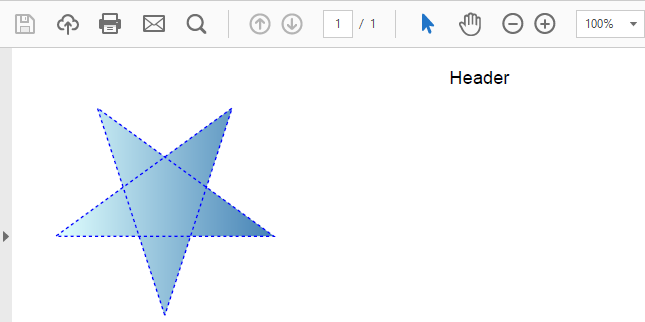
DrawPathBegin applies the current fill and stroke to the path it starts, so
configure Fill and Stroke before calling it, not between the segments.
Path segments
| Method | Adds |
|---|---|
DrawPathMoveToPoint(Point) |
Moves the current point without drawing; starts a new sub-path |
DrawPathAddLineToPoint(Point) |
A straight line from the current point |
DrawPathAddLines(Points) |
A polyline: moves to the first point, then a line to each following point |
DrawPathAddCurveToPoint(Control1, Control2, EndPoint) |
A cubic Bezier curve |
DrawPathAddQuadCurveToPoint(Control, EndPoint) |
A quadratic curve |
DrawPathAddRectangle(Rect) |
A closed rectangle sub-path |
DrawPathAddEllipse(Rect) |
A closed ellipse sub-path; start the path with DrawPathMoveToPoint at the ellipse's left-middle point when it is the first segment |
DrawPathClose |
A straight line back to the start of the current sub-path |
Curves are what turn a sequence of data points into a smooth trend line, and a polyline is the compact way to draw an axis or a sparkline. The sample draws an axis as one polyline, a trend line from two cubic segments, and a filled shape closed from a quadratic curve:
procedure TForm1.DrawTrendSketch(const AFileName: string);
var
  p: TTMSFNCPDFLib;
  Axis: TTMSFNCPDFGraphicsLibPointArray;
begin
  p := TTMSFNCPDFLib.Create;
  try
    p.Header := '';
    p.Footer := '';
    p.BeginDocument(AFileName);
    try
      p.NewPage;

      { Stroke-only paths: turn the fill off so the mode below is the only
        thing that decides what is painted. }
      p.Graphics.Fill.Kind := gfkNone;
      p.Graphics.Stroke.Kind := gskSolid;

      { The axis as one polyline. DrawPathAddLines moves to the first point
        and adds a line to every following point. }
      SetLength(Axis, 3);
      Axis[0] := PointF(40, 60);
      Axis[1] := PointF(40, 220);
      Axis[2] := PointF(420, 220);
      p.Graphics.Stroke.Color := gcGray;
      p.Graphics.Stroke.Width := 1;
      p.Graphics.DrawPathBegin;
      p.Graphics.DrawPathAddLines(Axis);
      p.Graphics.DrawPathEnd(dmPathStroke);

      { A smooth trend line: two cubic Bezier segments that share an end point. }
      p.Graphics.Stroke.Color := gcSeagreen;
      p.Graphics.Stroke.Width := 2;
      p.Graphics.DrawPathBegin;
      p.Graphics.DrawPathMoveToPoint(PointF(40, 200));
      p.Graphics.DrawPathAddCurveToPoint(PointF(100, 120), PointF(160, 120),
        PointF(220, 170));
      p.Graphics.DrawPathAddCurveToPoint(PointF(280, 220), PointF(340, 90),
        PointF(400, 110));
      p.Graphics.DrawPathEnd(dmPathStroke);

      { A closed shape from a quadratic curve and the closing line, filled only. }
      p.Graphics.Fill.Kind := gfkSolid;
      p.Graphics.Fill.Color := gcLightsteelblue;
      p.Graphics.DrawPathBegin;
      p.Graphics.DrawPathMoveToPoint(PointF(460, 200));
      p.Graphics.DrawPathAddQuadCurveToPoint(PointF(500, 80), PointF(540, 200));
      p.Graphics.DrawPathClose;
      p.Graphics.DrawPathEnd(dmPathFill);
    finally
      p.EndDocument;
    end;
  finally
    p.Free;
  end;
end;
void __fastcall TForm1::DrawTrendSketch(const String AFileName)
{
  TTMSFNCPDFLib *p = new TTMSFNCPDFLib();
  try
  {
    p->Header = "";
    p->Footer = "";
    p->BeginDocument(AFileName);
    try
    {
      p->NewPage();

      // Stroke-only paths: turn the fill off so the mode below is the only
      // thing that decides what is painted.
      p->Graphics()->Fill->Kind = TTMSFNCGraphicsFillKind::gfkNone;
      p->Graphics()->Stroke->Kind = TTMSFNCGraphicsStrokeKind::gskSolid;

      // The axis as one polyline. DrawPathAddLines moves to the first point
      // and adds a line to every following point.
      TTMSFNCPDFGraphicsLibPointArray Axis;
      Axis.Length = 3;
      Axis[0] = PointF(40, 60);
      Axis[1] = PointF(40, 220);
      Axis[2] = PointF(420, 220);
      p->Graphics()->Stroke->Color = gcGray;
      p->Graphics()->Stroke->Width = 1;
      p->Graphics()->DrawPathBegin();
      p->Graphics()->DrawPathAddLines(Axis);
      p->Graphics()->DrawPathEnd(TTMSFNCPDFGraphicsLibPathDrawingMode::dmPathStroke);

      // A smooth trend line: two cubic Bezier segments that share an end point.
      p->Graphics()->Stroke->Color = gcSeagreen;
      p->Graphics()->Stroke->Width = 2;
      p->Graphics()->DrawPathBegin();
      p->Graphics()->DrawPathMoveToPoint(PointF(40, 200));
      p->Graphics()->DrawPathAddCurveToPoint(PointF(100, 120), PointF(160, 120),
        PointF(220, 170));
      p->Graphics()->DrawPathAddCurveToPoint(PointF(280, 220), PointF(340, 90),
        PointF(400, 110));
      p->Graphics()->DrawPathEnd(TTMSFNCPDFGraphicsLibPathDrawingMode::dmPathStroke);

      // A closed shape from a quadratic curve and the closing line, filled only.
      p->Graphics()->Fill->Kind = TTMSFNCGraphicsFillKind::gfkSolid;
      p->Graphics()->Fill->Color = gcLightsteelblue;
      p->Graphics()->DrawPathBegin();
      p->Graphics()->DrawPathMoveToPoint(PointF(460, 200));
      p->Graphics()->DrawPathAddQuadCurveToPoint(PointF(500, 80), PointF(540, 200));
      p->Graphics()->DrawPathClose();
      p->Graphics()->DrawPathEnd(TTMSFNCPDFGraphicsLibPathDrawingMode::dmPathFill);
    }
    __finally
    {
      p->EndDocument();
    }
  }
  __finally
  {
    delete p;
  }
}
Path drawing modes
DrawPathEnd takes the mode that decides whether the path is filled, stroked, or
both. Unlike DrawRectangle, it does not look at Fill.Kind or Stroke.Kind:
it paints exactly what the mode says. Ending a path with a fill mode while
Fill.Kind is gfkNone therefore still fills it — with whatever fill colour the
page state last had, black by default. Pass dmPathStroke for outlines and
dmPathFill for flat shapes rather than relying on the default.
| Mode | Effect |
|---|---|
dmPathFill |
Fill, non-zero winding rule |
dmPathEOFill |
Fill, even-odd rule |
dmPathStroke |
Outline only |
dmPathEOStroke |
Close the path, then outline it |
dmPathFillStroke |
Fill, then outline (the default) |
dmPathEOFillStroke |
Fill with the even-odd rule, then outline |
The winding rule only matters for a path that crosses itself or contains another sub-path: under non-zero winding the centre of the star above is filled. How the even-odd variants render depends on the output engine, so for a hole that must look the same everywhere, paint the inner shape over the fill in the background colour instead.
Gradient-filled paths
A path can be filled with a gradient rather than a solid colour, which is what
produces a banded header or a shaded chart area without drawing dozens of adjacent
rectangles. Set Fill.Kind := gfkGradient, Fill.Color, Fill.ColorTo, and
Fill.Orientation before DrawPathBegin, then end the path with a fill mode: the
gradient spans the bounds of the path, as in the star sample above.
DrawPathEndLinearGradient(StartPoint, EndPoint) is the alternative ending when
the gradient should span an explicit extent rather than the path bounds. It only
fills — no outline is drawn.
Graphics state and clipping
Clipping and transforms change how everything after them is drawn, so both are used inside a saved graphics state that is restored when the effect should end.
Saving and restoring state
DrawSaveState pushes the current graphics state — including the clip region and
the transformation matrix — onto a stack; DrawRestoreState pops it. Calls must be
balanced: every save needs exactly one restore, and a try / finally around the
drawing keeps them balanced when an exception is raised.
Clipping paths
A clip restricts all subsequent drawing to a shape. Use it to crop an image to a
frame, to keep a hatch pattern or an overflowing chart inside its panel, or to mask
any area a rectangle cannot express on its own. The sequence is: save the state,
add the clip shape with path segments, call DrawPathBeginClip to activate it,
start a fresh path with DrawPathBegin, draw, and restore the state.
procedure TForm1.DrawHatchedPanel(const AFileName: string);
var
  p: TTMSFNCPDFLib;
  Panel: TRectF;
  x, h: Single;
begin
  p := TTMSFNCPDFLib.Create;
  try
    p.Header := '';
    p.Footer := '';
    p.BeginDocument(AFileName);
    try
      p.NewPage;
      Panel := RectF(40, 40, 300, 160);
      h := Panel.Bottom - Panel.Top;

      { Save first: a clip can only be removed again by restoring the state
        that was saved before it was set. }
      p.Graphics.DrawSaveState;
      try
        { Add the clip shape, activate it, then start a fresh path - the same
          sequence the graphics engine uses for its own ClipRect. }
        p.Graphics.DrawPathAddRectangle(Panel);
        p.Graphics.DrawPathBeginClip;
        p.Graphics.DrawPathBegin;

        { Diagonal hatching that deliberately runs past the panel on both
          sides; the clip trims every line at the panel edge. }
        p.Graphics.Stroke.Kind := gskSolid;
        p.Graphics.Stroke.Color := gcLightsteelblue;
        p.Graphics.Stroke.Width := 2;
        x := Panel.Left - h;
        while x < Panel.Right do
        begin
          p.Graphics.DrawLine(PointF(x, Panel.Bottom), PointF(x + h, Panel.Top));
          x := x + 10;
        end;
      finally
        p.Graphics.DrawRestoreState;
      end;

      { Back outside the saved state: the border and caption are not clipped. }
      p.Graphics.Fill.Kind := gfkNone;
      p.Graphics.Stroke.Color := gcSteelblue;
      p.Graphics.Stroke.Width := 1;
      p.Graphics.DrawRectangle(Panel);
      p.Graphics.Font.Size := 9;
      p.Graphics.DrawText('Reserved for office use', PointF(Panel.Left, Panel.Bottom + 6));
    finally
      p.EndDocument;
    end;
  finally
    p.Free;
  end;
end;
void __fastcall TForm1::DrawHatchedPanel(const String AFileName)
{
  TTMSFNCPDFLib *p = new TTMSFNCPDFLib();
  try
  {
    p->Header = "";
    p->Footer = "";
    p->BeginDocument(AFileName);
    try
    {
      p->NewPage();
      TRectF Panel = RectF(40, 40, 300, 160);
      float h = Panel.Bottom - Panel.Top;

      // Save first: a clip can only be removed again by restoring the state
      // that was saved before it was set.
      p->Graphics()->DrawSaveState();
      try
      {
        // Add the clip shape, activate it, then start a fresh path - the same
        // sequence the graphics engine uses for its own ClipRect.
        p->Graphics()->DrawPathAddRectangle(Panel);
        p->Graphics()->DrawPathBeginClip();
        p->Graphics()->DrawPathBegin();

        // Diagonal hatching that deliberately runs past the panel on both
        // sides; the clip trims every line at the panel edge.
        p->Graphics()->Stroke->Kind = TTMSFNCGraphicsStrokeKind::gskSolid;
        p->Graphics()->Stroke->Color = gcLightsteelblue;
        p->Graphics()->Stroke->Width = 2;
        float x = Panel.Left - h;
        while (x < Panel.Right)
        {
          p->Graphics()->DrawLine(PointF(x, Panel.Bottom), PointF(x + h, Panel.Top));
          x = x + 10;
        }
      }
      __finally
      {
        p->Graphics()->DrawRestoreState();
      }

      // Back outside the saved state: the border and caption are not clipped.
      p->Graphics()->Fill->Kind = TTMSFNCGraphicsFillKind::gfkNone;
      p->Graphics()->Stroke->Color = gcSteelblue;
      p->Graphics()->Stroke->Width = 1;
      p->Graphics()->DrawRectangle(Panel);
      p->Graphics()->Font->Size = 9;
      p->Graphics()->DrawText("Reserved for office use", PointF(Panel.Left, Panel.Bottom + 6));
    }
    __finally
    {
      p->EndDocument();
    }
  }
  __finally
  {
    delete p;
  }
}
The clip lasts until DrawRestoreState pops the state saved before it — PDF has no
other way to widen a clip once set. Anything that must not be clipped, such as the
panel border in the sample, is drawn after the restore.
Transforms
DrawSetTransform applies a matrix — translation, rotation, scaling — to subsequent
drawing, either as six coefficients (m11, m12, m21, m22, dx, dy) or as a
TTMSFNCGraphicsMatrix. It is combined
with the current matrix rather than replacing it, so wrap it in DrawSaveState /
DrawRestoreState to undo it.
The matrix is applied in the output engine's own PDF coordinate space, not in the
top-left page coordinates the drawing calls use; on the default engine that space
has its origin at the bottom-left with the y axis pointing up, so a translation or
rotation behaves mirrored vertically compared with what you might expect. For
rotated text, such as a watermark or a rotated column header, the angle parameter
of the graphics engine's DrawText handles that
conversion for you and is the simpler route.
Clearing a region
DrawClear(Rect) clears a rectangle, but what "clear" means depends on the output
engine. When you need a guaranteed white patch — for example to blank out an area
before stamping new content on it — draw a white-filled rectangle with no stroke
instead.
Images
Draw images with DrawImage (an in-memory bitmap), DrawImageFromFile, or
DrawImageWithName. The last looks the image up by name in the BitmapContainer
assigned to the document, which is convenient when the same set of logos and icons
is used across many documents. On the default output engine, identical image data
drawn more than once is embedded only once, whichever of the three calls you use.
Every overload returns the rectangle the image actually occupies — the reliable anchor for a caption or for whatever is drawn underneath it:
procedure TForm1.DrawImageSources(const AFileName, AImageFile: string);
var
  p: TTMSFNCPDFLib;
  Container: TTMSFNCBitmapContainer;
  Bmp: TTMSFNCBitmap;
  r: TRectF;
begin
  Container := TTMSFNCBitmapContainer.Create;
  try
    Container.AddFromFile(AImageFile, 'Logo');
    Bmp := TTMSFNCBitmap.Create;
    try
      Bmp.LoadFromFile(AImageFile);
      p := TTMSFNCPDFLib.Create;
      try
        p.Header := '';
        p.Footer := '';
        { Named images are looked up in the container assigned here. }
        p.BitmapContainer := Container;
        p.BeginDocument(AFileName);
        try
          p.NewPage;
          p.Graphics.Font.Size := 9;

          { Every overload returns the rectangle the image occupies, which is
            the reliable anchor for a caption underneath it. }
          r := p.Graphics.DrawImageWithName('Logo', PointF(40, 60));
          p.Graphics.DrawText('Rendering from image container', PointF(r.Left, r.Bottom + 8));

          r := p.Graphics.DrawImage(Bmp, PointF(230, 60));
          p.Graphics.DrawText('Rendering from memory image', PointF(r.Left, r.Bottom + 8));

          r := p.Graphics.DrawImageFromFile(AImageFile, PointF(420, 60));
          p.Graphics.DrawText('Rendering from file', PointF(r.Left, r.Bottom + 8));
        finally
          p.EndDocument;
        end;
      finally
        { Free the document before the container it references. }
        p.Free;
      end;
    finally
      Bmp.Free;
    end;
  finally
    Container.Free;
  end;
end;
void __fastcall TForm1::DrawImageSources(const String AFileName, const String AImageFile)
{
  TTMSFNCBitmapContainer *Container = new TTMSFNCBitmapContainer(nullptr);
  try
  {
    Container->AddFromFile(AImageFile, "Logo");
    TTMSFNCBitmap *Bmp = new TTMSFNCBitmap();
    try
    {
      Bmp->LoadFromFile(AImageFile);
      TTMSFNCPDFLib *p = new TTMSFNCPDFLib();
      try
      {
        p->Header = "";
        p->Footer = "";
        // Named images are looked up in the container assigned here.
        p->BitmapContainer = Container;
        p->BeginDocument(AFileName);
        try
        {
          p->NewPage();
          p->Graphics()->Font->Size = 9;

          // Every overload returns the rectangle the image occupies, which is
          // the reliable anchor for a caption underneath it.
          TRectF r = p->Graphics()->DrawImageWithName("Logo", PointF(40, 60));
          p->Graphics()->DrawText("Rendering from image container", PointF(r.Left, r.Bottom + 8));

          r = p->Graphics()->DrawImage(Bmp, PointF(230, 60));
          p->Graphics()->DrawText("Rendering from memory image", PointF(r.Left, r.Bottom + 8));

          r = p->Graphics()->DrawImageFromFile(AImageFile, PointF(420, 60));
          p->Graphics()->DrawText("Rendering from file", PointF(r.Left, r.Bottom + 8));
        }
        __finally
        {
          p->EndDocument();
        }
      }
      __finally
      {
        // Free the document before the container it references.
        delete p;
      }
    }
    __finally
    {
      delete Bmp;
    }
  }
  __finally
  {
    delete Container;
  }
}
Fitting an image into a rectangle
The point overloads draw an image at its own size. The rectangle overloads fit it into a box, which is what a layout usually needs, controlled by three flags:
| Parameter | Default | Effect |
|---|---|---|
Stretch |
True |
Scale the image to the rectangle |
AspectRatio |
True |
Keep the image's proportions while scaling |
Center |
True |
Centre the image in the rectangle; False pins it to the top-left |
With AspectRatio on, the drawn image is smaller than the box in one direction,
so place captions from the returned rectangle rather than from the box.
Background colour, format, and quality
Every draw call has an overload with an ABackgroundColor parameter, and all of
them accept an ImageType (itOriginal, itPNG, itJPG) and a Quality between
0.0 and 1.0. On the default output engine, images are embedded as JPEG at the
given quality and transparent pixels are painted in the background colour, which
is white when you do not pass one. A transparent logo on a coloured band
therefore needs the band colour as its background, and lowering Quality is the
lever for a smaller file. An SVG image loaded into a TTMSFNCBitmap is drawn as
vector graphics on the default engine (except in TMS WEB Core).
procedure TForm1.BuildProductSheet(const AFileName, ALogoFile, APhotoFile: string);
var
  p: TTMSFNCPDFLib;
  Box, Drawn: TRectF;
begin
  p := TTMSFNCPDFLib.Create;
  try
    p.Header := '';
    p.Footer := '';
    p.BeginDocument(AFileName);
    try
      p.NewPage;

      { A coloured header band across the (Letter-sized, 612 pt wide) page. }
      p.Graphics.Fill.Kind := gfkSolid;
      p.Graphics.Fill.Color := gcSteelblue;
      p.Graphics.Stroke.Kind := gskNone;
      p.Graphics.DrawRectangle(RectF(0, 0, 612, 80));

      { Transparent pixels are painted in the background colour, which is
        white unless you pass one. Passing the band colour keeps the logo's
        edges clean on the band. Center = False pins it to the top-left. }
      p.Graphics.DrawImageFromFile(ALogoFile, gcSteelblue, RectF(40, 16, 200, 64),
        True, True, itOriginal, 1.0, False);

      { Fit the photo inside a box: stretch to the box, keep the aspect ratio,
        centre it, and embed it at 80% JPEG quality to keep the file small. }
      Box := RectF(40, 110, 300, 330);
      Drawn := p.Graphics.DrawImageFromFile(APhotoFile, Box, True, True, itJPG, 0.8, True);

      { Caption under the image as actually drawn, not under the box - with
        the aspect ratio kept the two differ in one direction. }
      p.Graphics.Font.Size := 9;
      p.Graphics.Font.Color := gcDimgray;
      p.Graphics.DrawText('Figure 1 - Model 200 in brushed steel',
        PointF(Drawn.Left, Drawn.Bottom + 6));
    finally
      p.EndDocument;
    end;
  finally
    p.Free;
  end;
end;
void __fastcall TForm1::BuildProductSheet(const String AFileName, const String ALogoFile, const String APhotoFile)
{
  TTMSFNCPDFLib *p = new TTMSFNCPDFLib();
  try
  {
    p->Header = "";
    p->Footer = "";
    p->BeginDocument(AFileName);
    try
    {
      p->NewPage();

      // A coloured header band across the (Letter-sized, 612 pt wide) page.
      p->Graphics()->Fill->Kind = TTMSFNCGraphicsFillKind::gfkSolid;
      p->Graphics()->Fill->Color = gcSteelblue;
      p->Graphics()->Stroke->Kind = TTMSFNCGraphicsStrokeKind::gskNone;
      p->Graphics()->DrawRectangle(RectF(0, 0, 612, 80));

      // Transparent pixels are painted in the background colour, which is
      // white unless you pass one. Passing the band colour keeps the logo
      // edges clean on the band. Center = false pins it to the top-left.
      p->Graphics()->DrawImageFromFile(ALogoFile, gcSteelblue, RectF(40, 16, 200, 64),
        true, true, TTMSFNCPDFGraphicsLibImageType::itOriginal, 1.0, false);

      // Fit the photo inside a box: stretch to the box, keep the aspect ratio,
      // centre it, and embed it at 80% JPEG quality to keep the file small.
      TRectF Box = RectF(40, 110, 300, 330);
      TRectF Drawn = p->Graphics()->DrawImageFromFile(APhotoFile, Box, true, true,
        TTMSFNCPDFGraphicsLibImageType::itJPG, 0.8, true);

      // Caption under the image as actually drawn, not under the box - with
      // the aspect ratio kept the two differ in one direction.
      p->Graphics()->Font->Size = 9;
      p->Graphics()->Font->Color = gcDimgray;
      p->Graphics()->DrawText("Figure 1 - Model 200 in brushed steel",
        PointF(Drawn.Left, Drawn.Bottom + 6));
    }
    __finally
    {
      p->EndDocument();
    }
  }
  __finally
  {
    delete p;
  }
}
Links
AddURL and AddGoTo add clickable link annotations — a web address, or a jump to
another page of the same document. Use them for a clickable table of contents, a
"back to contents" link on every page, or a verification URL on a certificate.
| Method | Target |
|---|---|
AddURL(AText, AURL, ARect) |
Opens AURL in the reader's browser |
AddGoTo(AText, APageIndex, AOptions, ARect) |
Jumps to the zero-based page APageIndex; AOptions is a PDF destination option such as /Fit |
Both draw AText inside ARect with Graphics.URLFont (honouring
Graphics.Alignment) and make the drawn text clickable. AddGoTo with empty text
draws nothing and makes the whole rectangle clickable, which turns ordinary text
or an image into a link. Target pages are resolved when the document is written,
so a contents page may link to pages you have not added yet. The page-index
variant of AddGoTo is listed as Windows only in the 1.0.3.0 release notes.
procedure TForm1.BuildLinkedManual(const AFileName: string);
const
  Chapters: array[0..1] of string = ('1. Installation', '2. Licensing');
var
  p: TTMSFNCPDFLib;
  I: Integer;
begin
  p := TTMSFNCPDFLib.Create;
  try
    p.Header := '';
    p.Footer := '';
    p.BeginDocument(AFileName);
    try
      p.NewPage;
      p.Graphics.Font.Name := 'Segoe UI';
      p.Graphics.Font.Size := 18;
      p.Graphics.DrawText('Contents', PointF(40, 40));

      { Link text is drawn with URLFont, not Font. }
      p.Graphics.URLFont.Name := 'Segoe UI';
      p.Graphics.URLFont.Size := 11;
      p.Graphics.URLFont.Color := gcNavy;
      p.Graphics.URLFont.Style := [TFontStyle.fsUnderline];

      { Page indexes are zero-based and resolved when the document is written,
        so an entry may point at a page that has not been added yet. '/Fit'
        asks the reader to show the whole target page. }
      for I := 0 to High(Chapters) do
        p.Graphics.AddGoTo(Chapters[I], I + 1, '/Fit',
          RectF(40, 84 + I * 22, 400, 100 + I * 22));

      p.Graphics.AddURL('Online documentation',
        'https://doc.tmssoftware.com/fnc/core/pdflib/', RectF(40, 150, 400, 166));

      for I := 0 to High(Chapters) do
      begin
        p.NewPage;
        p.Graphics.Font.Size := 18;
        p.Graphics.DrawText(Chapters[I], PointF(40, 40));

        { With empty text, AddGoTo draws nothing and only makes the rectangle
          clickable - here, over text that was drawn normally. }
        p.Graphics.Font.Size := 10;
        p.Graphics.DrawText('Back to contents', PointF(40, 740));
        p.Graphics.AddGoTo('', 0, '/Fit', RectF(40, 740, 140, 754));
      end;
    finally
      p.EndDocument;
    end;
  finally
    p.Free;
  end;
end;
void __fastcall TForm1::BuildLinkedManual(const String AFileName)
{
  const String Chapters[2] = {"1. Installation", "2. Licensing"};

  TTMSFNCPDFLib *p = new TTMSFNCPDFLib();
  try
  {
    p->Header = "";
    p->Footer = "";
    p->BeginDocument(AFileName);
    try
    {
      p->NewPage();
      p->Graphics()->Font->Name = "Segoe UI";
      p->Graphics()->Font->Size = 18;
      p->Graphics()->DrawText("Contents", PointF(40, 40));

      // Link text is drawn with URLFont, not Font.
      p->Graphics()->URLFont->Name = "Segoe UI";
      p->Graphics()->URLFont->Size = 11;
      p->Graphics()->URLFont->Color = gcNavy;
      p->Graphics()->URLFont->Style = TFontStyles() << TFontStyle::fsUnderline;

      // Page indexes are zero-based and resolved when the document is written,
      // so an entry may point at a page that has not been added yet. "/Fit"
      // asks the reader to show the whole target page.
      for (int I = 0; I < 2; I++)
        p->Graphics()->AddGoTo(Chapters[I], I + 1, "/Fit",
          RectF(40, 84 + I * 22, 400, 100 + I * 22));

      p->Graphics()->AddURL("Online documentation",
        "https://doc.tmssoftware.com/fnc/core/pdflib/", RectF(40, 150, 400, 166));

      for (int I = 0; I < 2; I++)
      {
        p->NewPage();
        p->Graphics()->Font->Size = 18;
        p->Graphics()->DrawText(Chapters[I], PointF(40, 40));

        // With empty text, AddGoTo draws nothing and only makes the rectangle
        // clickable - here, over text that was drawn normally.
        p->Graphics()->Font->Size = 10;
        p->Graphics()->DrawText("Back to contents", PointF(40, 740));
        p->Graphics()->AddGoTo("", 0, "/Fit", RectF(40, 740, 140, 754));
      }
    }
    __finally
    {
      p->EndDocument();
    }
  }
  __finally
  {
    delete p;
  }
}
The graphics engine
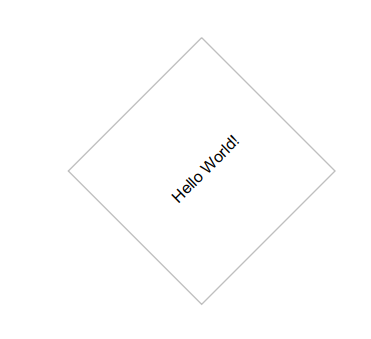
TTMSFNCGraphicsPDFEngine exposes the same drawing API as a regular FNC canvas,
eliminating the need to build raw PDF paths manually. This is the shortest route
from "I already draw this on screen" to "I can put it in a PDF": point the engine
at the document and run the same paint code.
Add FMX.TMSFNCGraphicsPDFEngine to the uses clause:
uses
  FMX.TMSFNCPDFLib, FMX.TMSFNCGraphicsTypes, FMX.TMSFNCGraphicsPDFEngine;

var
  p: TTMSFNCPDFLib;
  g: TTMSFNCGraphicsPDFEngine;
  pth: TTMSFNCGraphicsPath;
begin
  p := TTMSFNCPDFLib.Create;
  g := TTMSFNCGraphicsPDFEngine.Create(p);
  pth := TTMSFNCGraphicsPath.Create;
  try
    p.BeginDocument('output.pdf');
    p.NewPage;
    pth.MoveTo(PointF(200, 200));
    pth.AddLine(PointF(200, 200), PointF(300, 300));
    pth.ClosePath;
    g.DrawPath(pth);
    g.DrawText(RectF(100, 200, 300, 400), 'Hello!', False, gtaCenter, gtaCenter, gttNone, -45);
    p.EndDocument(True);
  finally
    pth.Free;
    g.Free;
    p.Free;
  end;
end;
TTMSFNCPDFLib *p = new TTMSFNCPDFLib();
TTMSFNCGraphicsPDFEngine *g = new TTMSFNCGraphicsPDFEngine(p);
TTMSFNCGraphicsPath *pth = new TTMSFNCGraphicsPath();
try
{
  p->BeginDocument("output.pdf");
  p->NewPage();
  pth->MoveTo(PointF(200, 200));
  pth->AddLine(PointF(200, 200), PointF(300, 300));
  pth->ClosePath();
  g->DrawPath(pth);
  g->DrawText(RectF(100, 200, 300, 400), "Hello!", false,
    TTMSFNCGraphicsTextAlign::gtaCenter, TTMSFNCGraphicsTextAlign::gtaCenter,
    TTMSFNCGraphicsTextTrimming::gttNone, -45);
  p->EndDocument(true);
}
__finally
{
  delete pth;
  delete g;
  delete p;
}
Tip
If the goal is to export a whole existing control or canvas rather than to run
custom paint code, use TTMSFNCGraphicsPDFIO instead — it wraps the same engine
in a one-call export. See the PDF Library overview.
Rounded rectangles and arcs
The graphics interface also has an extended part,
ITMSFNCCustomPDFGraphicsExLib,
with rounded rectangles, arc segments, drop shadows, and radial gradients. Those
calls are implemented by the native engines on macOS, iOS, and Android only; the
default engine used on Windows, Linux, and in TMS WEB Core ignores them, so the
document generates but the shape is simply missing.
For a rounded rectangle or an arc that appears on every platform, draw it through
the graphics engine: its DrawRoundRectangle and DrawArc build the shape from
ordinary path segments, and DrawRoundRectangle can round a chosen subset of
corners.
procedure TForm1.DrawRoundedCards(const AFileName: string);
var
  p: TTMSFNCPDFLib;
  g: TTMSFNCGraphicsPDFEngine;
begin
  p := TTMSFNCPDFLib.Create;
  try
    p.Header := '';
    p.Footer := '';
    p.BeginDocument(AFileName);
    try
      p.NewPage;
      g := TTMSFNCGraphicsPDFEngine.Create(p);
      try
        g.Fill.Kind := gfkSolid;
        g.Fill.Color := gcAliceblue;
        g.Stroke.Kind := gskSolid;
        g.Stroke.Color := gcSteelblue;
        g.Stroke.Width := 1.5;

        { All four corners rounded with a 12 pt radius. }
        g.DrawRoundRectangle(RectF(40, 40, 290, 160), 12);

        { Only the top corners rounded: a tab header. }
        g.Fill.Color := gcSteelblue;
        g.DrawRoundRectangle(RectF(320, 40, 570, 76), 12, [gcTopLeft, gcTopRight]);

        g.Font.Color := gcWhite;
        g.DrawText(RectF(332, 40, 570, 76), 'Order summary', False, gtaLeading, gtaCenter);
      finally
        g.Free;
      end;
    finally
      p.EndDocument;
    end;
  finally
    p.Free;
  end;
end;
void __fastcall TForm1::DrawRoundedCards(const String AFileName)
{
  TTMSFNCPDFLib *p = new TTMSFNCPDFLib();
  try
  {
    p->Header = "";
    p->Footer = "";
    p->BeginDocument(AFileName);
    try
    {
      p->NewPage();
      TTMSFNCGraphicsPDFEngine *g = new TTMSFNCGraphicsPDFEngine(p);
      try
      {
        g->Fill->Kind = TTMSFNCGraphicsFillKind::gfkSolid;
        g->Fill->Color = gcAliceblue;
        g->Stroke->Kind = TTMSFNCGraphicsStrokeKind::gskSolid;
        g->Stroke->Color = gcSteelblue;
        g->Stroke->Width = 1.5;

        // All four corners rounded with a 12 pt radius.
        g->DrawRoundRectangle(RectF(40, 40, 290, 160), 12);

        // Only the top corners rounded: a tab header.
        g->Fill->Color = gcSteelblue;
        g->DrawRoundRectangle(RectF(320, 40, 570, 76), 12,
          TTMSFNCGraphicsCorners() << TTMSFNCGraphicsCorner::gcTopLeft << TTMSFNCGraphicsCorner::gcTopRight);

        g->Font->Color = gcWhite;
        g->DrawText(RectF(332, 40, 570, 76), "Order summary", false,
          TTMSFNCGraphicsTextAlign::gtaLeading, TTMSFNCGraphicsTextAlign::gtaCenter);
      }
      __finally
      {
        delete g;
      }
    }
    __finally
    {
      p->EndDocument();
    }
  }
  __finally
  {
    delete p;
  }
}
Common mistakes
- Colours set after
DrawPathBegin. The path is configured when it begins; setFillandStrokefirst. - A fill mode on a path with the fill "off".
DrawPathEndpaints exactly the mode passed and ignoresFill.Kind; end outline-only paths withdmPathStroke. - A clip that never ends. Only
DrawRestoreStateremoves a clip; always pair it with aDrawSaveStatemade before the clip. - A transform that moves content the wrong way.
DrawSetTransformworks in the engine's native PDF space and accumulates; use the graphics engine's text angle for rotated text. - A rounded rectangle, arc, or shadow that is missing on Windows. The extended graphics calls are native-engine only; use the graphics engine instead.
- A white box around a transparent logo. Pass the colour behind the image as
ABackgroundColor. - A named image that silently does not appear.
DrawImageWithNamedraws nothing when noBitmapContaineris assigned or the name is not in it. - Text hidden behind a shape. Drawing order is painter's order — draw fills first, text last.
Putting it together: a certificate page
A gradient pennant built as a custom path, a portrait photo centre-cropped with a clip and framed afterwards, and a verification web link — four sections of this page in one layout:
procedure TForm1.BuildCertificate(const AFileName, APhotoFile: string);
var
  p: TTMSFNCPDFLib;
  Photo: TRectF;
begin
  p := TTMSFNCPDFLib.Create;
  try
    p.Header := '';
    p.Footer := '';
    p.BeginDocument(AFileName);
    try
      p.NewPage;

      { Custom path with a gradient fill: a pennant-shaped banner. The fill is
        configured before DrawPathBegin, and dmPathFill paints no outline. }
      p.Graphics.Fill.Kind := gfkGradient;
      p.Graphics.Fill.Color := gcMidnightblue;
      p.Graphics.Fill.ColorTo := gcCornflowerblue;
      p.Graphics.Fill.Orientation := gfoHorizontal;
      p.Graphics.Stroke.Kind := gskNone;
      p.Graphics.DrawPathBegin;
      p.Graphics.DrawPathMoveToPoint(PointF(40, 40));
      p.Graphics.DrawPathAddLineToPoint(PointF(572, 40));
      p.Graphics.DrawPathAddLineToPoint(PointF(540, 80));
      p.Graphics.DrawPathAddLineToPoint(PointF(572, 120));
      p.Graphics.DrawPathAddLineToPoint(PointF(40, 120));
      p.Graphics.DrawPathClose;
      p.Graphics.DrawPathEnd(dmPathFill);

      p.Graphics.Font.Name := 'Segoe UI';
      p.Graphics.Font.Size := 22;
      p.Graphics.Font.Color := gcWhite;
      p.Graphics.DrawText('Certificate of completion', PointF(60, 66));

      { Clipping + image fitting: draw the photo larger than the square with
        its aspect ratio kept, then let the clip trim it to the square - a
        centre crop, so a portrait never spills into the text column. }
      Photo := RectF(40, 150, 200, 310);
      p.Graphics.DrawSaveState;
      try
        p.Graphics.DrawPathAddRectangle(Photo);
        p.Graphics.DrawPathBeginClip;
        p.Graphics.DrawPathBegin;
        p.Graphics.DrawImageFromFile(APhotoFile,
          RectF(Photo.Left - 40, Photo.Top - 40, Photo.Right + 40, Photo.Bottom + 40),
          True, True, itJPG, 0.85, True);
      finally
        p.Graphics.DrawRestoreState;
      end;

      { The frame is drawn after the restore, so it is not clipped. }
      p.Graphics.Fill.Kind := gfkNone;
      p.Graphics.Stroke.Kind := gskSolid;
      p.Graphics.Stroke.Color := gcMidnightblue;
      p.Graphics.Stroke.Width := 2;
      p.Graphics.DrawRectangle(Photo);

      p.Graphics.Font.Size := 12;
      p.Graphics.Font.Color := gcBlack;
      p.Graphics.DrawText('Awarded to Alice Moreau', PointF(230, 170));
      p.Graphics.DrawText('for completing Advanced Report Design, 12 hours', PointF(230, 192));

      { A web link: the text is drawn with URLFont and the measured text
        becomes the clickable area. }
      p.Graphics.URLFont.Size := 10;
      p.Graphics.URLFont.Color := gcNavy;
      p.Graphics.AddURL('Verify this certificate online',
        'https://www.example.com/verify/2026-0142', RectF(230, 280, 560, 296));
    finally
      p.EndDocument;
    end;
  finally
    p.Free;
  end;
end;
void __fastcall TForm1::BuildCertificate(const String AFileName, const String APhotoFile)
{
  TTMSFNCPDFLib *p = new TTMSFNCPDFLib();
  try
  {
    p->Header = "";
    p->Footer = "";
    p->BeginDocument(AFileName);
    try
    {
      p->NewPage();

      // Custom path with a gradient fill: a pennant-shaped banner. The fill is
      // configured before DrawPathBegin, and dmPathFill paints no outline.
      p->Graphics()->Fill->Kind = TTMSFNCGraphicsFillKind::gfkGradient;
      p->Graphics()->Fill->Color = gcMidnightblue;
      p->Graphics()->Fill->ColorTo = gcCornflowerblue;
      p->Graphics()->Fill->Orientation = TTMSFNCGraphicsFillOrientation::gfoHorizontal;
      p->Graphics()->Stroke->Kind = TTMSFNCGraphicsStrokeKind::gskNone;
      p->Graphics()->DrawPathBegin();
      p->Graphics()->DrawPathMoveToPoint(PointF(40, 40));
      p->Graphics()->DrawPathAddLineToPoint(PointF(572, 40));
      p->Graphics()->DrawPathAddLineToPoint(PointF(540, 80));
      p->Graphics()->DrawPathAddLineToPoint(PointF(572, 120));
      p->Graphics()->DrawPathAddLineToPoint(PointF(40, 120));
      p->Graphics()->DrawPathClose();
      p->Graphics()->DrawPathEnd(TTMSFNCPDFGraphicsLibPathDrawingMode::dmPathFill);

      p->Graphics()->Font->Name = "Segoe UI";
      p->Graphics()->Font->Size = 22;
      p->Graphics()->Font->Color = gcWhite;
      p->Graphics()->DrawText("Certificate of completion", PointF(60, 66));

      // Clipping + image fitting: draw the photo larger than the square with
      // its aspect ratio kept, then let the clip trim it to the square - a
      // centre crop, so a portrait never spills into the text column.
      TRectF Photo = RectF(40, 150, 200, 310);
      p->Graphics()->DrawSaveState();
      try
      {
        p->Graphics()->DrawPathAddRectangle(Photo);
        p->Graphics()->DrawPathBeginClip();
        p->Graphics()->DrawPathBegin();
        p->Graphics()->DrawImageFromFile(APhotoFile,
          RectF(Photo.Left - 40, Photo.Top - 40, Photo.Right + 40, Photo.Bottom + 40),
          true, true, TTMSFNCPDFGraphicsLibImageType::itJPG, 0.85, true);
      }
      __finally
      {
        p->Graphics()->DrawRestoreState();
      }

      // The frame is drawn after the restore, so it is not clipped.
      p->Graphics()->Fill->Kind = TTMSFNCGraphicsFillKind::gfkNone;
      p->Graphics()->Stroke->Kind = TTMSFNCGraphicsStrokeKind::gskSolid;
      p->Graphics()->Stroke->Color = gcMidnightblue;
      p->Graphics()->Stroke->Width = 2;
      p->Graphics()->DrawRectangle(Photo);

      p->Graphics()->Font->Size = 12;
      p->Graphics()->Font->Color = gcBlack;
      p->Graphics()->DrawText("Awarded to Alice Moreau", PointF(230, 170));
      p->Graphics()->DrawText("for completing Advanced Report Design, 12 hours", PointF(230, 192));

      // A web link: the text is drawn with URLFont and the measured text
      // becomes the clickable area.
      p->Graphics()->URLFont->Size = 10;
      p->Graphics()->URLFont->Color = gcNavy;
      p->Graphics()->AddURL("Verify this certificate online",
        "https://www.example.com/verify/2026-0142", RectF(230, 280, 560, 296));
    }
    __finally
    {
      p->EndDocument();
    }
  }
  __finally
  {
    delete p;
  }
}
Putting it together: the full report
The header band, the ruled and alternately-filled table rows, and the footer rule in the chapter index screenshot are all shapes from this page, drawn before the text that sits on them:
procedure TForm1.BuildReport(const AFileName: string);
const
  Rows: array[0..7, 0..2] of string = (
    ('Northern Europe', 'Alice Moreau', '184.000'),
    ('Southern Europe', 'Bob Devlin',   '72.500'),
    ('North America',   'Carol Yang',   '412.800'),
    ('South America',   'Dan Pereira',  '43.000'),
    ('Middle East',     'Eve Novak',    '159.000'),
    ('South Asia',      'Frank Bauer',  '91.000'),
    ('East Asia',       'Grace Lim',    '213.000'),
    ('Oceania',         'Hugo Marsh',   '66.500'));
var
  p: TTMSFNCPDFLib;
  i: Integer;
  y: Single;
  Euro: string;
begin
  { Build the euro sign from its code point so the source stays ASCII-safe. }
  Euro := Char($20AC);

  p := TTMSFNCPDFLib.Create;
  try
    { Header/Footer default to a non-empty value - clear them before drawing
      your own, or the built-in caption appears at the top of every page. }
    p.Header := '';
    p.Footer := '';

    { A custom page fitted to the content, so the PDF has no trailing empty
      space below the table. }
    p.PageSize := psCustom;
    p.PageWidth := 595;
    p.PageHeight := 440;

    p.BeginDocument(AFileName);
    try
      p.NewPage;

      { Header band: a filled rectangle with no stroke, drawn before the text
        that sits on top of it. }
      p.Graphics.Fill.Color := gcSteelblue;
      p.Graphics.Fill.Kind := gfkSolid;
      p.Graphics.Stroke.Kind := gskNone;
      p.Graphics.DrawRectangle(RectF(40, 40, 555, 92));

      p.Graphics.Font.Color := gcWhite;
      p.Graphics.Font.Name := 'Segoe UI';
      p.Graphics.Font.Size := 18;
      p.Graphics.DrawText('Regional sales report', PointF(54, 55));
      p.Graphics.Font.Size := 10;
      p.Graphics.DrawText('Fiscal year 2026 - all regions', PointF(54, 76));

      { Mini HTML for a paragraph that mixes weight and colour inline. }
      p.Graphics.Font.Color := gcBlack;
      p.Graphics.Font.Size := 10;
      p.Graphics.DrawHTMLText(
        'Revenue by region for the full year. Figures in <b>EUR</b>, ' +
        'rounded to the nearest thousand. Regions above ' +
        '<font color="#1F7A1F"><b>150.000</b></font> are on track.',
        RectF(40, 108, 555, 148));

      { Table header. Alignment is canvas state, so it is set for the currency
        column and restored immediately afterwards. }
      y := 158;
      p.Graphics.Fill.Color := gcGainsboro;
      p.Graphics.Stroke.Kind := gskSolid;
      p.Graphics.Stroke.Color := gcSilver;
      p.Graphics.DrawRectangle(RectF(40, y, 555, y + 24));
      p.Graphics.Font.Size := 10;
      p.Graphics.DrawText('Region', PointF(50, y + 6));
      p.Graphics.DrawText('Account manager', PointF(220, y + 6));
      p.Graphics.Alignment := gtaTrailing;
      p.Graphics.DrawText('Revenue', RectF(390, y + 6, 545, y + 22));
      p.Graphics.Alignment := gtaLeading;

      { Rows, with alternating band fills. }
      y := y + 24;
      for i := 0 to High(Rows) do
      begin
        if i mod 2 = 1 then
          p.Graphics.Fill.Color := gcWhitesmoke
        else
          p.Graphics.Fill.Color := gcWhite;
        p.Graphics.DrawRectangle(RectF(40, y, 555, y + 22));
        p.Graphics.DrawText(Rows[i][0], PointF(50, y + 5));
        p.Graphics.DrawText(Rows[i][1], PointF(220, y + 5));
        p.Graphics.Alignment := gtaTrailing;
        p.Graphics.DrawText(Euro + ' ' + Rows[i][2],
          RectF(390, y + 5, 545, y + 21));
        p.Graphics.Alignment := gtaLeading;
        y := y + 22;
      end;

      { Totals row. }
      p.Graphics.Fill.Color := gcLightsteelblue;
      p.Graphics.DrawRectangle(RectF(40, y, 555, y + 24));
      p.Graphics.DrawText('Total', PointF(50, y + 6));
      p.Graphics.Alignment := gtaTrailing;
      p.Graphics.DrawText(Euro + ' 1.241.800', RectF(390, y + 6, 555, y + 22));
      p.Graphics.Alignment := gtaLeading;

      { Footer rule and caption, clear of the table. }
      p.Graphics.Stroke.Color := gcSilver;
      p.Graphics.DrawLine(PointF(40, 398), PointF(555, 398));
      p.Graphics.Font.Size := 8;
      p.Graphics.Font.Color := gcGray;
      p.Graphics.DrawText('Generated with TMS FNC PDF Library', PointF(40, 406));
      p.Graphics.Alignment := gtaTrailing;
      p.Graphics.DrawText('Page 1 of 1', RectF(390, 406, 555, 420));
      p.Graphics.Alignment := gtaLeading;
    finally
      p.EndDocument;
    end;
  finally
    p.Free;
  end;
end;
void __fastcall TForm1::BuildReport(const String AFileName)
{
  const String Rows[8][3] = {
    {"Northern Europe", "Alice Moreau", "184.000"},
    {"Southern Europe", "Bob Devlin",   "72.500"},
    {"North America",   "Carol Yang",   "412.800"},
    {"South America",   "Dan Pereira",  "43.000"},
    {"Middle East",     "Eve Novak",    "159.000"},
    {"South Asia",      "Frank Bauer",  "91.000"},
    {"East Asia",       "Grace Lim",    "213.000"},
    {"Oceania",         "Hugo Marsh",   "66.500"}};

  // Build the euro sign from its code point so the source stays ASCII-safe.
  String Euro = WideChar(0x20AC);

  TTMSFNCPDFLib *p = new TTMSFNCPDFLib();
  try
  {
    // Header/Footer default to a non-empty value - clear them before drawing
    // your own, or the built-in caption appears at the top of every page.
    p->Header = "";
    p->Footer = "";

    // A custom page fitted to the content, so the PDF has no trailing empty
    // space below the table.
    p->PageSize = TTMSFNCPDFLibPageSize::psCustom;
    p->PageWidth = 595;
    p->PageHeight = 440;

    p->BeginDocument(AFileName);
    try
    {
      p->NewPage();

      // Header band: a filled rectangle with no stroke, drawn before the text
      // that sits on top of it.
      p->Graphics()->Fill->Color = gcSteelblue;
      p->Graphics()->Fill->Kind = TTMSFNCGraphicsFillKind::gfkSolid;
      p->Graphics()->Stroke->Kind = TTMSFNCGraphicsStrokeKind::gskNone;
      p->Graphics()->DrawRectangle(RectF(40, 40, 555, 92));

      p->Graphics()->Font->Color = gcWhite;
      p->Graphics()->Font->Name = "Segoe UI";
      p->Graphics()->Font->Size = 18;
      p->Graphics()->DrawText("Regional sales report", PointF(54, 55));
      p->Graphics()->Font->Size = 10;
      p->Graphics()->DrawText("Fiscal year 2026 - all regions", PointF(54, 76));

      // Mini HTML for a paragraph that mixes weight and colour inline.
      p->Graphics()->Font->Color = gcBlack;
      p->Graphics()->Font->Size = 10;
      p->Graphics()->DrawHTMLText(
        "Revenue by region for the full year. Figures in <b>EUR</b>, "
        "rounded to the nearest thousand. Regions above "
        "<font color=\"#1F7A1F\"><b>150.000</b></font> are on track.",
        RectF(40, 108, 555, 148));

      // Table header. Alignment is canvas state, so it is set for the currency
      // column and restored immediately afterwards.
      float y = 158;
      p->Graphics()->Fill->Color = gcGainsboro;
      p->Graphics()->Stroke->Kind = TTMSFNCGraphicsStrokeKind::gskSolid;
      p->Graphics()->Stroke->Color = gcSilver;
      p->Graphics()->DrawRectangle(RectF(40, y, 555, y + 24));
      p->Graphics()->Font->Size = 10;
      p->Graphics()->DrawText("Region", PointF(50, y + 6));
      p->Graphics()->DrawText("Account manager", PointF(220, y + 6));
      p->Graphics()->Alignment = TTMSFNCGraphicsTextAlign::gtaTrailing;
      p->Graphics()->DrawText("Revenue", RectF(390, y + 6, 545, y + 22));
      p->Graphics()->Alignment = TTMSFNCGraphicsTextAlign::gtaLeading;

      // Rows, with alternating band fills.
      y = y + 24;
      for (int i = 0; i < 8; i++)
      {
        if (i % 2 == 1)
          p->Graphics()->Fill->Color = gcWhitesmoke;
        else
          p->Graphics()->Fill->Color = gcWhite;
        p->Graphics()->DrawRectangle(RectF(40, y, 555, y + 22));
        p->Graphics()->DrawText(Rows[i][0], PointF(50, y + 5));
        p->Graphics()->DrawText(Rows[i][1], PointF(220, y + 5));
        p->Graphics()->Alignment = TTMSFNCGraphicsTextAlign::gtaTrailing;
        p->Graphics()->DrawText(Euro + " " + Rows[i][2],
          RectF(390, y + 5, 545, y + 21));
        p->Graphics()->Alignment = TTMSFNCGraphicsTextAlign::gtaLeading;
        y = y + 22;
      }

      // Totals row.
      p->Graphics()->Fill->Color = gcLightsteelblue;
      p->Graphics()->DrawRectangle(RectF(40, y, 555, y + 24));
      p->Graphics()->DrawText("Total", PointF(50, y + 6));
      p->Graphics()->Alignment = TTMSFNCGraphicsTextAlign::gtaTrailing;
      p->Graphics()->DrawText(Euro + " 1.241.800", RectF(390, y + 6, 555, y + 22));
      p->Graphics()->Alignment = TTMSFNCGraphicsTextAlign::gtaLeading;

      // Footer rule and caption, clear of the table.
      p->Graphics()->Stroke->Color = gcSilver;
      p->Graphics()->DrawLine(PointF(40, 398), PointF(555, 398));
      p->Graphics()->Font->Size = 8;
      p->Graphics()->Font->Color = gcGray;
      p->Graphics()->DrawText("Generated with TMS FNC PDF Library", PointF(40, 406));
      p->Graphics()->Alignment = TTMSFNCGraphicsTextAlign::gtaTrailing;
      p->Graphics()->DrawText("Page 1 of 1", RectF(390, 406, 555, 420));
      p->Graphics()->Alignment = TTMSFNCGraphicsTextAlign::gtaLeading;
    }
    __finally
    {
      p->EndDocument();
    }
  }
  __finally
  {
    delete p;
  }
}