Text and fonts in a PDF document
Text is where a PDF stops being a drawing and becomes a document — and where most
of the layout decisions live. TTMSFNCPDFLib draws text three ways: plain text at
a point, wrapped text in a rectangle or a set of columns, and Mini HTML for
anything that needs mixed formatting inside one block. Around those calls sit the
tools that make a layout reliable: measuring before drawing, the overflow count
that tells you when to start another page, line-break and truncation modes, and
font handling — embedding, and the fallback list that finds glyphs your primary
font does not have. Reach for plain DrawText for labels, table cells and running
text in one style; reach for DrawHTMLText as soon as a paragraph mixes weights,
colours, links or images, because it lays the fragments out for you. Everything on
this page applies to generating a new document between BeginDocument and
EndDocument.
Drawing text
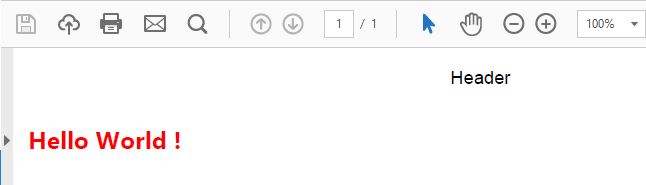
Use DrawText to draw plain or word-wrapped text. Its appearance comes from
p.Graphics.Font — Name, Size, Color and Style:
p.Graphics.Font.Name := 'Segoe UI';
p.Graphics.Font.Size := 16;
p.Graphics.Font.Color := gcRed;
p.Graphics.Font.Style := [TFontStyle.fsBold];
p.Graphics.DrawText('Hello World !', PointF(10, 50));
p->Graphics()->Font->Name = "Segoe UI";
p->Graphics()->Font->Size = 16;
p->Graphics()->Font->Color = gcRed;
p->Graphics()->Font->Style = TFontStyles() << TFontStyle::fsBold;
p->Graphics()->DrawText("Hello World !", PointF(10, 50));
Which overload you call decides the layout behaviour and what comes back:
| Call | Returns | Behaviour |
|---|---|---|
DrawText(Text, Point, Calculate = False) |
TRectF |
One line at the point; no wrapping and no alignment. Explicit line breaks in Text still start new lines |
DrawText(Text, Rect, Calculate = False) |
TRectF |
Wraps within the rectangle and applies Alignment; lines that do not fit above Rect.Bottom are not drawn |
DrawText(Text, Rect, Columns, Padding = 5, DetectOverflow = False) |
Integer |
Splits Rect into Columns equal columns, flows the text through them, and returns the number of characters that did not fit |
DrawText(Text, Rects, Padding = 5, DetectOverflow = False) |
Integer |
Flows the text through an array of rectangles in order, and returns the overflow count |
Passing a TRectF instead of a TPointF is what enables word wrapping. Line
breaks inside the string (#13#10 or sLineBreak) force a new line in the
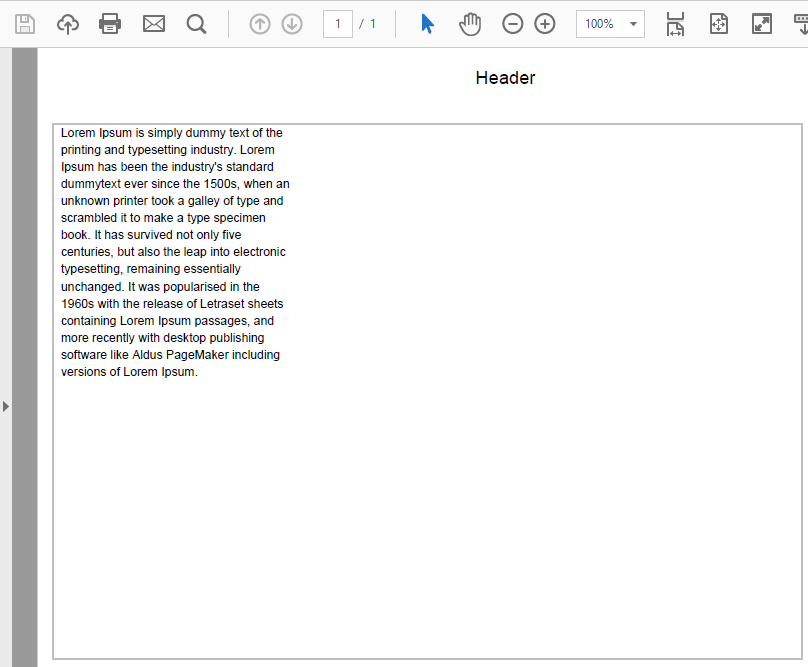
wrapping modes. Pass an integer column count as a third argument to flow text
across multiple columns:
p.Graphics.DrawText(s, RectF(10, 50, 500, 400), 3);
Padding in the column and rectangle-array overloads is a horizontal inset
applied to both sides of every column, so it doubles as the gutter between
columns.
Measuring text before drawing
Layout decisions usually need a size before anything is committed to the page: how tall a shaded box behind a title must be, whether a paragraph still fits on this page, how wide a label column should be. Measuring is always a separate, side-effect-free call, so it is cheap to measure first and draw second.
| Call | What it measures |
|---|---|
CalculateText(Text) |
Single-line extent of Text in the current font |
CalculateText(Text, Rect) |
The rectangle the wrapped text needs inside Rect's width, including lines that would fall below Rect.Bottom |
CalculateTextOverflow(Text, Rect, Columns, Padding = 5) |
How many characters would not fit in the columns |
CalculateTextOverflow(Text, Rects, Padding = 5) |
The same, for an array of rectangles |
CalculateHTMLText(Text, Rect, Scale = 1) / CalculateHTMLText(Text, Scale = 1) |
The extent of Mini HTML text, constrained to a rectangle or unconstrained |
GetTextRect |
The rectangle of the most recent DrawText or DrawHTMLText call |
CalculateText is the same as calling the matching DrawText overload with
Calculate = True, and CalculateTextOverflow is the column overload with
DetectOverflow = True. With the general engine used on Windows, Linux, VCL and
WEB, a measured rectangle is as wide as its widest line and as tall as the number
of lines multiplied by Font.Size * LineHeightFactor.
The overflow count is also returned by the drawing column overload, which
turns it into a pagination loop: draw what fits, keep the tail of the string, and
start a new page while anything is left. The characters that did not fit are
always the last Overflow characters of the string you passed.
procedure TForm1.GenerateFlowedArticle(const AFileName, ATitle, ABody: string);
var
  p: TTMSFNCPDFLib;
  TitleRect, Body: TRectF;
  Remaining: string;
  Overflow: Integer;
begin
  p := TTMSFNCPDFLib.Create;
  try
    p.Header := '';
    p.Footer := '';
    p.BeginDocument(AFileName);
    try
      p.NewPage;

      { Measure first. CalculateText lays the title out inside the available
        width and returns the rectangle it needs - nothing is drawn yet. }
      p.Graphics.Font.Name := 'Segoe UI';
      p.Graphics.Font.Size := 20;
      p.Graphics.Font.Style := [TFontStyle.fsBold];
      TitleRect := p.Graphics.CalculateText(ATitle, RectF(50, 50, 545, 400));

      { A band exactly as tall as the measured title, then the title on top. }
      p.Graphics.Fill.Kind := gfkSolid;
      p.Graphics.Fill.Color := gcWhitesmoke;
      p.Graphics.Stroke.Kind := gskNone;
      p.Graphics.DrawRectangle(RectF(40, 40, 555, TitleRect.Bottom + 10));
      p.Graphics.DrawText(ATitle, RectF(50, 50, 545, TitleRect.Bottom));

      { The column overload draws what fits and returns the number of
        characters that did not; those are the tail of the string. }
      p.Graphics.Font.Size := 11;
      p.Graphics.Font.Style := [];
      Body := RectF(40, TitleRect.Bottom + 30, 555, 750);
      Remaining := ABody;
      Overflow := p.Graphics.DrawText(Remaining, Body, 1);
      while Overflow > 0 do
      begin
        { Guard against a rectangle too small to take even one line. }
        if Overflow >= Length(Remaining) then
          Break;
        Remaining := Copy(Remaining, Length(Remaining) - Overflow + 1, Overflow);
        p.NewPage;
        Body := RectF(40, 40, 555, 750);
        Overflow := p.Graphics.DrawText(Remaining, Body, 1);
      end;
    finally
      p.EndDocument;
    end;
  finally
    p.Free;
  end;
end;
void __fastcall TForm1::GenerateFlowedArticle(const String AFileName, const String ATitle, const String ABody)
{
  TTMSFNCPDFLib *p = new TTMSFNCPDFLib();
  try
  {
    p->Header = "";
    p->Footer = "";
    p->BeginDocument(AFileName);
    try
    {
      p->NewPage();

      // Measure first. CalculateText lays the title out inside the available
      // width and returns the rectangle it needs - nothing is drawn yet.
      p->Graphics()->Font->Name = "Segoe UI";
      p->Graphics()->Font->Size = 20;
      p->Graphics()->Font->Style = TFontStyles() << TFontStyle::fsBold;
      TRectF TitleRect = p->Graphics()->CalculateText(ATitle, RectF(50, 50, 545, 400));

      // A band exactly as tall as the measured title, then the title on top.
      p->Graphics()->Fill->Kind = TTMSFNCGraphicsFillKind::gfkSolid;
      p->Graphics()->Fill->Color = gcWhitesmoke;
      p->Graphics()->Stroke->Kind = TTMSFNCGraphicsStrokeKind::gskNone;
      p->Graphics()->DrawRectangle(RectF(40, 40, 555, TitleRect.Bottom + 10));
      p->Graphics()->DrawText(ATitle, RectF(50, 50, 545, TitleRect.Bottom));

      // The column overload draws what fits and returns the number of
      // characters that did not; those are the tail of the string.
      p->Graphics()->Font->Size = 11;
      p->Graphics()->Font->Style = TFontStyles();
      TRectF Body = RectF(40, TitleRect.Bottom + 30, 555, 750);
      String Remaining = ABody;
      int Overflow = p->Graphics()->DrawText(Remaining, Body, 1);
      while (Overflow > 0)
      {
        // Guard against a rectangle too small to take even one line.
        if (Overflow >= Remaining.Length())
          break;
        Remaining = Remaining.SubString(Remaining.Length() - Overflow + 1, Overflow);
        p->NewPage();
        Body = RectF(40, 40, 555, 750);
        Overflow = p->Graphics()->DrawText(Remaining, Body, 1);
      }
    }
    __finally
    {
      p->EndDocument();
    }
  }
  __finally
  {
    delete p;
  }
}
Note
DetectOverflow = True makes the column overloads measure only — nothing is
drawn. Leave it False in a loop like the one above, where the same call must
both draw the part that fits and report what is left.
HTML text
DrawHTMLText renders Mini HTML-formatted text, which is the way to mix bold,
colour, and links inside a single paragraph without splitting it into separate
DrawText calls and computing each fragment's width. It wraps words, advances
lines, and places inline images for you.
p.Graphics.DrawHTMLText(s, RectF(10, 50, 300, 400));
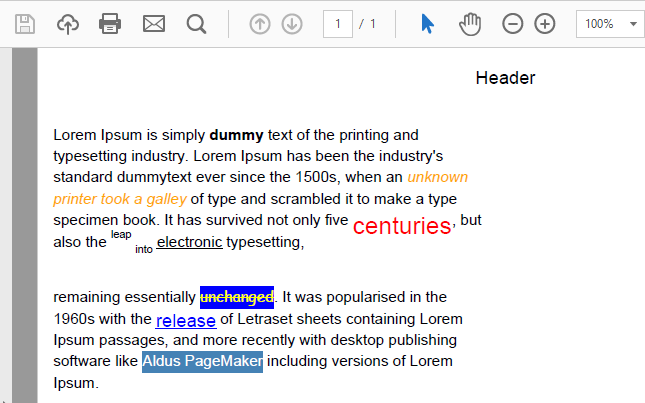
The engine understands this tag set:
| Tag | Effect |
|---|---|
<b>, <i>, <u>, <s> |
Bold, italic, underline, strike-through |
<sup>, <sub> |
Superscript and subscript, drawn at 70 % of the current size |
<br> |
Line break |
<p align="left\|center\|right" indent="n" bgcolor="..."> |
Paragraph with alignment, left indent in points and background colour; </p> ends the line |
<font face="..." size="n" color="..." bgcolor="..."> |
Font name, size, text colour and highlight. size 1–5 map to 8, 10, 12, 14 and 16 pt; any other value is used as points |
<a href="..."> |
Link text, drawn blue and underlined, with a clickable link annotation |
<img src="..." width="n" height="n" align="left\|center\|right"> |
Inline image. Give one dimension to scale proportionally |
<ul> + <li type="circle\|square\|star\|arrow\|tick"> |
Bulleted list; without type the bullet is a dash |
<hr color="..."> |
Horizontal rule |
<ind x="n"> |
Indent the current line by n points |
Colours are either #RRGGBB or a colour name. The entities &, <,
>, , ", ©, ®, ™, €, £,
§, ¶ and $ are decoded.
The src of an image is looked up by name in the document's bitmap container —
assign p.BitmapContainer (or p.Graphics.BitmapContainer) before drawing. On
desktop targets a file:// path is accepted as well; the WEB target has no local
file system and resolves container names only.
Three rules about how the markup combines with the canvas state explain most surprises:
- Only
Font.NameandFont.Sizecarry over. Text colour and style come from the markup; unformatted HTML text is black and regular whateverGraphics.Font.ColorandGraphics.Font.Stylesay. </font>resets everything. Closing a<font>returns the text to plain black — bold, italic and the other styles opened before it end too. Nest<font>outermost and close it last.- Use
<br>for line breaks. Raw line-break characters in the markup are not a reliable way to break lines.
procedure TForm1.GenerateNewsletter(const AFileName: string);
var
p: TTMSFNCPDFLib;
Html: string;
I: Integer;
begin
{ A heading, then a paragraph that mixes weight, colour and superscript.
</font> resets every formatting tag in effect, so it closes last. }
Html :=
'<p align="center"><font size="18" color="#1F4E79"><b>Quarterly update</b></font></p><br>' +
'<p>Revenue grew <b>12%</b> year over year, driven by <i>subscription</i> ' +
'renewals. Churn fell to <font color="#1F7A1F"><b>2.1%</b></font>, the lowest ' +
'in five years.<sup>1</sup></p>' +
'<hr color="#1F4E79">' +
{ List items are written without </li>: the item ends at the next tag. }
'<ul><li type="tick">Three new regions opened' +
'<li type="tick">Support response under four hours' +
'<li type="circle">Mobile app in public beta</ul>' +
'<p><font bgcolor="#FFF2CC">Next review: 14 October.</font> Details at ' +
'<a href="https://www.example.com/q3">www.example.com/q3</a>.</p><br>' +
{ src names an image in the BitmapContainer; align belongs to the img tag. }
'<img src="logo" width="80" align="right"><br>';
{ Enough regional notes to run past the first page. }
for I := 1 to 40 do
Html := Html + Format('<p><b>Region %d.</b> Targets met; ' +
'pipeline & staffing on plan.</p>', [I]);
Html := Html + '<br><font size="1"><sup>1</sup> Excluding one-off migrations.</font>';
p := TTMSFNCPDFLib.Create;
try
p.Header := '';
p.Footer := '';
{ A TTMSFNCBitmapContainer on the form that holds an image named 'logo'. }
p.BitmapContainer := TMSFNCBitmapContainer1;
p.BeginDocument(AFileName);
try
p.NewPage;
{ DrawHTMLText takes only the font name and size from Graphics.Font;
colour and style come from the markup. }
p.Graphics.Font.Name := 'Segoe UI';
p.Graphics.Font.Size := 11;
{ Paging = True: when the text overflows the rectangle, a new page is
started and the text continues there. }
p.Graphics.DrawHTMLText(Html, RectF(40, 40, 555, 750), True);
{ DrawHTMLText leaves Alignment set by the last paragraph it drew. }
p.Graphics.Alignment := gtaLeading;
finally
p.EndDocument;
end;
finally
p.Free;
end;
end;
void __fastcall TForm1::GenerateNewsletter(const String AFileName)
{
// A heading, then a paragraph that mixes weight, colour and superscript.
// </font> resets every formatting tag in effect, so it closes last.
String Html =
"<p align=\"center\"><font size=\"18\" color=\"#1F4E79\"><b>Quarterly update</b></font></p><br>"
"<p>Revenue grew <b>12%</b> year over year, driven by <i>subscription</i> "
"renewals. Churn fell to <font color=\"#1F7A1F\"><b>2.1%</b></font>, the lowest "
"in five years.<sup>1</sup></p>"
"<hr color=\"#1F4E79\">"
// List items are written without </li>: the item ends at the next tag.
"<ul><li type=\"tick\">Three new regions opened"
"<li type=\"tick\">Support response under four hours"
"<li type=\"circle\">Mobile app in public beta</ul>"
"<p><font bgcolor=\"#FFF2CC\">Next review: 14 October.</font> Details at "
"<a href=\"https://www.example.com/q3\">www.example.com/q3</a>.</p><br>"
// src names an image in the BitmapContainer; align belongs to the img tag.
"<img src=\"logo\" width=\"80\" align=\"right\"><br>";
// Enough regional notes to run past the first page.
for (int I = 1; I <= 40; I++)
Html = Html + Format("<p><b>Region %d.</b> Targets met; "
"pipeline & staffing on plan.</p>", ARRAYOFCONST((I)));
Html = Html + "<br><font size=\"1\"><sup>1</sup> Excluding one-off migrations.</font>";
TTMSFNCPDFLib *p = new TTMSFNCPDFLib();
try
{
p->Header = "";
p->Footer = "";
// A TTMSFNCBitmapContainer on the form that holds an image named "logo".
p->BitmapContainer = TMSFNCBitmapContainer1;
p->BeginDocument(AFileName);
try
{
p->NewPage();
// DrawHTMLText takes only the font name and size from Graphics.Font;
// colour and style come from the markup.
p->Graphics()->Font->Name = "Segoe UI";
p->Graphics()->Font->Size = 11;
// Paging = true: when the text overflows the rectangle, a new page is
// started and the text continues there.
p->Graphics()->DrawHTMLText(Html, RectF(40, 40, 555, 750), true);
// DrawHTMLText leaves Alignment set by the last paragraph it drew.
p->Graphics()->Alignment = TTMSFNCGraphicsTextAlign::gtaLeading;
}
__finally
{
p->EndDocument();
}
}
__finally
{
delete p;
}
}
Flowing HTML text across pages
A long HTML body does not have to be cut into page-sized pieces by hand. Pass
Paging = True (the third argument of the rectangle overload) and, when the text
reaches the bottom of the rectangle, DrawHTMLText starts a new page and continues
there, so headers, footers and page numbers are added exactly as they are for
NewPage. Give the rectangle the full body area of the page — its horizontal
bounds are reused on every continuation page. Without paging, the bottom of the
rectangle is not a reliable limit for HTML text; when a block has to fit a fixed
area, measure it first with CalculateHTMLText and shorten or split it yourself.
The Scale argument multiplies every font size and image dimension in the
markup, which is a quick way to reuse one block of HTML at a different size.
Rich text is not the portable route
p.GraphicsEx.RichText and DrawRichText render attributed text through the
platform's native text engine. The general engine used on Windows, Linux, VCL and
WEB does not implement it — DrawRichText returns without drawing there. Use
DrawHTMLText for formatted text that must render on every target.
Alignment
Set p.Graphics.Alignment to gtaLeading (default), gtaCenter, or
gtaTrailing. Alignment is a property of the canvas, not an argument to
DrawText, so it applies to every subsequent call until it is changed — set it,
draw, and set it back. Right-aligned currency in a table is the usual reason to
reach for it.
Alignment only takes effect in the rectangle overloads: it positions each line between the rectangle's left and right edges. The point overload has no width to align within and always starts the text at the point, so a right-aligned figure needs a rectangle whose right edge is the column edge.
Note
For HTML text, align with <p align="..."> rather than Graphics.Alignment.
DrawHTMLText sets the alignment per paragraph from the markup and leaves
Graphics.Alignment at the value of the last paragraph it drew — reset it
before the next DrawText call.
Total page count placeholder
A footer that reads "Page 3 of 12" is impossible to draw honestly in a single
pass: the total is only known once the last page has been written. Rather than
buffering the whole document or making two passes, embed the PDFPageCountRef
constant in the text and let the library substitute the real total during
finalisation. Reach for it whenever a running header or footer has to state the
document length; for anything else, plain Format with a number you already
know is simpler.
uses
  FMX.TMSFNCPDFLib, FMX.TMSFNCPDFCoreLibBase, FMX.TMSFNCGraphicsTypes;

procedure TForm1.GenerateNumberedReport(const AFileName: string;
  const ALines: TStrings);
var
  p: TTMSFNCPDFLib;
  I: Integer;
  Footer: TRectF;
begin
  p := TTMSFNCPDFLib.Create;
  try
    { Header and Footer default to the literal captions 'Header' and 'Footer';
      clear them so only the footer drawn below appears. }
    p.Header := '';
    p.Footer := '';
    p.BeginDocument(AFileName);
    try
      for I := 0 to ALines.Count - 1 do
      begin
        p.NewPage;

        p.Graphics.Alignment := gtaLeading;
        p.Graphics.Font.Size := 12;
        p.Graphics.DrawText(ALines[I], RectF(40, 40, 555, 740));

        { PDFPageCountRef is a literal placeholder token. It survives into the
          content stream and is replaced with the real total page count when
          the document is finalised - so it can be drawn on page 1 even though
          the total is not known yet. }
        Footer := RectF(40, 760, 555, 790);
        p.Graphics.Alignment := gtaTrailing;
        p.Graphics.Font.Size := 9;
        p.Graphics.DrawText(Format('Page %d of %s', [I + 1, PDFPageCountRef]),
          Footer);
        p.Graphics.Alignment := gtaLeading;
      end;
    finally
      p.EndDocument;
    end;
  finally
    p.Free;
  end;
end;
void __fastcall TForm1::GenerateNumberedReport(const String AFileName,
  TStrings *ALines)
{
  TTMSFNCPDFLib *p = new TTMSFNCPDFLib();
  try
  {
    // Header and Footer default to the literal captions "Header" and "Footer";
    // clear them so only the footer drawn below appears.
    p->Header = "";
    p->Footer = "";
    p->BeginDocument(AFileName);
    try
    {
      for (int I = 0; I < ALines->Count; I++)
      {
        p->NewPage();

        p->Graphics()->Alignment = TTMSFNCGraphicsTextAlign::gtaLeading;
        p->Graphics()->Font->Size = 12;
        p->Graphics()->DrawText(ALines->Strings[I], RectF(40, 40, 555, 740));

        // PDFPageCountRef is a literal placeholder token. It survives into the
        // content stream and is replaced with the real total page count when
        // the document is finalised - so it can be drawn on page 1 even though
        // the total is not known yet.
        TRectF Footer = RectF(40, 760, 555, 790);
        p->Graphics()->Alignment = TTMSFNCGraphicsTextAlign::gtaTrailing;
        p->Graphics()->Font->Size = 9;
        p->Graphics()->DrawText(Format("Page %d of %s", ARRAYOFCONST((I + 1, PDFPageCountRef))),
          Footer);
        p->Graphics()->Alignment = TTMSFNCGraphicsTextAlign::gtaLeading;
      }
    }
    __finally
    {
      p->EndDocument();
    }
  }
  __finally
  {
    delete p;
  }
}
The mechanism has one subtlety worth understanding, because it explains the only
way this can look wrong. Text width is measured while the page is written, but
the placeholder's width is not yet known, so measurement substitutes
PageCountHint — the library's running estimate of the total. For
gtaLeading text that is harmless: the line starts at the left edge regardless
of how wide it ends up. For gtaCenter and gtaTrailing text the start x
depends on the final width, so instead of committing a position the library
writes an x-position placeholder and records it in the output writer's
PageCountXPosInfos array, together with the font, font size, character
spacing, and the width of the line excluding the page-count token. When the
document is finalised, each recorded entry is replayed with the true total and
the correct x is written back. This is why a centred or right-aligned
"Page N of M" stays correctly aligned even when the total rolls from 9 to 10
pages.
Practical consequences:
PDFPageCountRefis a plain string constant fromFMX.TMSFNCPDFCoreLibBase— compose it withFormator ordinary concatenation, do not try to escape it.- It is substituted by the general PDF engine used by
TTMSFNCPDFLibon Windows. On platforms that render through a native PDF engine, compute the total yourself and draw it as literal text. PageCountXPosInfosandPageCountHintonTTMSFNCPDFGraphicsLibOutputWriterare the bookkeeping for this pass. They are read-only diagnostics from an application's point of view; the correction runs automatically and there is nothing to trigger by hand.
Line break mode
Graphics.LineBreakMode decides what happens when text is wider than its
rectangle: wrap onto more lines, or stay on one line and give something up.
Wrapping suits paragraphs; the single-line modes suit fixed-height cells, where an
ellipsis reads better than a clipped glyph or a row that grows.
| Value | Description |
|---|---|
bmLineBreakModeWordWrap |
Wrap at word boundaries — spaces, hyphens and line breaks (default) |
bmLineBreakModeCharacterWrap |
Wrap at any character |
bmLineBreakModeClip |
One line, cut at the rectangle edge |
bmLineBreakModeHeadTruncation |
One line; the start is replaced by ... so the end stays visible |
bmLineBreakModeMiddleTruncation |
One line; the middle is replaced by ... so both ends stay visible |
bmLineBreakModeTailTruncation |
One line; the end is replaced by ... |
bmLineBreakModeNone |
One line, cut at the rectangle edge, with no truncation marker |
The modes are fully supported on macOS and iOS. Windows, Linux and Android
support them in a limited form: in the general engine used on Windows, Linux, VCL
and WEB, the three truncation modes insert three full stops, Clip and None
both cut at the edge, and in every single-line mode line breaks in the text are
drawn as spaces. LineBreakMode is canvas state like Alignment, so restore
bmLineBreakModeWordWrap after a truncated cell. DrawHTMLText always wraps at
words, whatever the mode is set to.
Line height
Graphics.LineHeightFactor multiplies the font size to give the distance between
lines — raise it for airy body text, lower it for dense tables. Its default is
1.4 with the general engine (Windows, Linux, VCL, WEB) and 1.0 on macOS, iOS and
Android, so a layout tuned on one platform can run longer or shorter on another;
set it explicitly when line counts matter. Call LineHeightFactorResetToDefault
to restore the platform default.
Hyperlinks in text
A link in a generated document is two things at once: visible text, and a
clickable annotation over it. Graphics.AddURL(AText, AURL, ARect) does both — it
draws AText in ARect and places the link over the drawn text, honouring
Alignment. It draws with Graphics.URLFont, not Graphics.Font; URLFont is
blue and underlined by default and is a separate font object, so give it the name
and size the surrounding text uses.
Inside Mini HTML, write <a href="..."> instead. The HTML engine styles link text
itself — blue and underlined in the current font — and does not use URLFont.
Links that jump to another page of the same document (AddGoTo) are covered with
the other link annotations in Links.
Fonts
Font embedding
By default, a font subset is embedded in the PDF for portability. Set
EmbedFonts := False to disable embedding — smaller files and faster generation,
at the cost of correct rendering anywhere the font is missing. That trade is only
safe for print-only workflows on machines you control.
EmbedFontType controls the embedding strategy:
| Value | Description |
|---|---|
eftNative |
Platform native embedding (default) |
eftCustom |
TMS cross-platform embedding |
On Android, set Graphics.Font.FileName to a TTF file path to use a font that is
not registered in the system directory.
The automatic header, footer and page number have fonts of their own —
HeaderFont, FooterFont and PageNumberFont on the document — see
Headers, footers, and page numbering.
Non-Latin text and font fallback
Strings are Unicode, so Cyrillic, Greek, Chinese, Japanese or symbol characters
are drawn by passing them to DrawText or DrawHTMLText like any other text.
The one requirement is a font that contains the glyphs, and a document font
rarely covers every script. That is what FontFallBackList is for: when a string
contains a character the current font lacks, the general engine tries the fonts in
this list in order and switches to the first one that has it.
The list starts with platform defaults, so common scripts work without any setup:
| Platform | Default fallback fonts |
|---|---|
| Windows | Nirmala UI, Leelawadee UI, Tahoma, SimSun, Segoe UI Symbol, Arial Unicode MS |
| Linux | Noto Sans, Noto Sans CJK (SC, TC, JP), Noto Serif CJK SC, WenQuanYi Micro Hei and Zen Hei, AR PL UMing and UKai |
| WEB | Roboto, Nirmala UI, Leelawadee UI, Tahoma, SimSun, Segoe UI Symbol, Arial Unicode MS — only fonts present in the font cache count |
A name that is not installed is skipped, so adding a font you prefer is safe:
Insert it at the front to try it first, or Add it to try it last. Assigning a
new list to FontFallBackList replaces the defaults. Embedding is what makes
the substituted glyphs render on the reader's machine, so keep EmbedFonts
enabled for multilingual documents.
Warning
Fallback supplies glyphs; it does not shape text. The general engine draws characters left to right in the order they are stored, with one glyph per character, so right-to-left scripts such as Arabic and Hebrew, and scripts whose letters change form or combine, do not come out in correct reading form. Test such output on each target platform before relying on it.
Common mistakes
- Alignment "leaking" into later text.
Alignmentis canvas state, not a per-call argument. Reset it after the aligned block — and afterDrawHTMLText, which leaves it at the last paragraph's alignment. - Aligning with the point overload.
DrawText(Text, Point)ignoresAlignment; give right-aligned or centred text a rectangle. - Expecting wrapping from the point overload.
DrawText(Text, Point)never wraps — pass a rectangle. - Text silently missing at the bottom of a rectangle. The rectangle overload
drops lines that do not fit. Use the column overload and its overflow count, or
measure with
CalculateTextfirst. - Setting
DetectOverflow := Truein a pagination loop. It turns the call into a measurement and nothing is drawn. - Styling HTML through
Graphics.Font. Only the font name and size reachDrawHTMLText; set colour and weight with tags. - Closing
</font>inside a bold run. It ends the bold as well. - An
<img>that does not appear. Itssrcmust match a bitmap name in the assigned bitmap container. - Leaving a truncation mode switched on. Wrapped paragraphs after a truncated
cell come out as single lines. Restore
bmLineBreakModeWordWrap. AddURLtext in the wrong font. It draws withURLFont, which does not followGraphics.Font.- Replacing the fallback list by assignment.
FontFallBackList := MyListdrops the platform defaults;InsertorAddinstead. - A missing font on the target machine. That is what
EmbedFontsprevents; do not disable it for documents that leave your control. - Using
DrawRichTextfor cross-platform output. It draws nothing on Windows, Linux, VCL and WEB; useDrawHTMLText.
Putting it together
A multilingual price list
City names in four scripts resolved through the fallback list, descriptions
truncated to one line, right-aligned prices, and a clickable source link — font
fallback, line break mode, alignment and hyperlinks in one table. Note how
LineBreakMode and Alignment are set per column and restored before the link:
procedure TForm1.GeneratePriceList(const AFileName: string);
const
  Descriptions: array[0..3] of string = (
    'City centre, three nights, breakfast and airport transfer included',
    'Old town walking tour with a local guide',
    'Island ferry pass valid for all routes during the whole summer season',
    'High-speed rail day return');
  Prices: array[0..3] of string = ('1.240,00', '85,00', '310,50', '96,00');

  function U(const ACodes: array of Word): string;
  var
    I: Integer;
  begin
    { Build non-Latin text from code points so the source stays ASCII. }
    Result := '';
    for I := 0 to High(ACodes) do
      Result := Result + Char(ACodes[I]);
  end;

var
  p: TTMSFNCPDFLib;
  Cities: array[0..3] of string;
  I: Integer;
  y: Single;
begin
  Cities[0] := 'Paris';
  Cities[1] := U([$041C, $043E, $0441, $043A, $0432, $0430]);  { Moscow }
  Cities[2] := U([$0391, $03B8, $03AE, $03BD, $03B1]);         { Athens }
  Cities[3] := U([$5317, $4EAC]);                              { Beijing }

  p := TTMSFNCPDFLib.Create;
  try
    p.Header := '';
    p.Footer := '';
    { Tried in order when a glyph is missing from the current font; a name
      that is not installed (or, on WEB, not cached) is skipped. }
    p.FontFallBackList.Insert(0, 'Microsoft YaHei');

    p.BeginDocument(AFileName);
    try
      p.NewPage;
      p.Graphics.Font.Name := 'Segoe UI';
      p.Graphics.Font.Size := 11;

      y := 60;
      for I := 0 to High(Cities) do
      begin
        { Column 1: characters Segoe UI lacks (the Chinese name) come from
          the first fallback font that has them. }
        p.Graphics.Alignment := gtaLeading;
        p.Graphics.LineBreakMode := bmLineBreakModeWordWrap;
        p.Graphics.DrawText(Cities[I], RectF(40, y, 140, y + 18));

        { Column 2: one line, cut with an ellipsis instead of wrapping. }
        p.Graphics.LineBreakMode := bmLineBreakModeTailTruncation;
        p.Graphics.DrawText(Descriptions[I], RectF(150, y, 440, y + 18));

        { Column 3: right-aligned. Alignment only applies to rectangle
          overloads, so the price gets a rectangle, not a point. }
        p.Graphics.LineBreakMode := bmLineBreakModeWordWrap;
        p.Graphics.Alignment := gtaTrailing;
        p.Graphics.DrawText(Char($20AC) + ' ' + Prices[I], RectF(450, y, 555, y + 18));
        y := y + 24;
      end;

      { Canvas state back to the defaults before the next block. }
      p.Graphics.Alignment := gtaLeading;
      p.Graphics.LineBreakMode := bmLineBreakModeWordWrap;

      { AddURL draws the text with URLFont (blue and underlined by default)
        and places a clickable link annotation over it. URLFont is a font of
        its own - it does not follow Graphics.Font - so name and size it. }
      p.Graphics.URLFont.Name := 'Segoe UI';
      p.Graphics.URLFont.Size := 9;
      p.Graphics.AddURL('Prices from www.example.com/tariffs',
        'https://www.example.com/tariffs', RectF(40, y + 20, 555, y + 34));
    finally
      p.EndDocument;
    end;
  finally
    p.Free;
  end;
end;
// Build non-Latin text from code points so the source stays ASCII.
static String U(const Word *ACodes, int ACount)
{
  String Result = "";
  for (int I = 0; I < ACount; I++)
    Result = Result + WideChar(ACodes[I]);
  return Result;
}

void __fastcall TForm1::GeneratePriceList(const String AFileName)
{
  const String Descriptions[4] = {
    "City centre, three nights, breakfast and airport transfer included",
    "Old town walking tour with a local guide",
    "Island ferry pass valid for all routes during the whole summer season",
    "High-speed rail day return"};
  const String Prices[4] = {"1.240,00", "85,00", "310,50", "96,00"};

  const Word Moscow[] = {0x041C, 0x043E, 0x0441, 0x043A, 0x0432, 0x0430};
  const Word Athens[] = {0x0391, 0x03B8, 0x03AE, 0x03BD, 0x03B1};
  const Word Beijing[] = {0x5317, 0x4EAC};

  String Cities[4];
  Cities[0] = "Paris";
  Cities[1] = U(Moscow, 6);
  Cities[2] = U(Athens, 5);
  Cities[3] = U(Beijing, 2);

  TTMSFNCPDFLib *p = new TTMSFNCPDFLib();
  try
  {
    p->Header = "";
    p->Footer = "";
    // Tried in order when a glyph is missing from the current font; a name
    // that is not installed (or, on WEB, not cached) is skipped.
    p->FontFallBackList->Insert(0, "Microsoft YaHei");

    p->BeginDocument(AFileName);
    try
    {
      p->NewPage();
      p->Graphics()->Font->Name = "Segoe UI";
      p->Graphics()->Font->Size = 11;

      float y = 60;
      for (int I = 0; I < 4; I++)
      {
        // Column 1: characters Segoe UI lacks (the Chinese name) come from
        // the first fallback font that has them.
        p->Graphics()->Alignment = TTMSFNCGraphicsTextAlign::gtaLeading;
        p->Graphics()->LineBreakMode = TTMSFNCPDFGraphicsLibLineBreakMode::bmLineBreakModeWordWrap;
        p->Graphics()->DrawText(Cities[I], RectF(40, y, 140, y + 18));

        // Column 2: one line, cut with an ellipsis instead of wrapping.
        p->Graphics()->LineBreakMode = TTMSFNCPDFGraphicsLibLineBreakMode::bmLineBreakModeTailTruncation;
        p->Graphics()->DrawText(Descriptions[I], RectF(150, y, 440, y + 18));

        // Column 3: right-aligned. Alignment only applies to rectangle
        // overloads, so the price gets a rectangle, not a point.
        p->Graphics()->LineBreakMode = TTMSFNCPDFGraphicsLibLineBreakMode::bmLineBreakModeWordWrap;
        p->Graphics()->Alignment = TTMSFNCGraphicsTextAlign::gtaTrailing;
        p->Graphics()->DrawText(String(WideChar(0x20AC)) + " " + Prices[I], RectF(450, y, 555, y + 18));
        y = y + 24;
      }

      // Canvas state back to the defaults before the next block.
      p->Graphics()->Alignment = TTMSFNCGraphicsTextAlign::gtaLeading;
      p->Graphics()->LineBreakMode = TTMSFNCPDFGraphicsLibLineBreakMode::bmLineBreakModeWordWrap;

      // AddURL draws the text with URLFont (blue and underlined by default)
      // and places a clickable link annotation over it. URLFont is a font of
      // its own - it does not follow Graphics.Font - so name and size it.
      p->Graphics()->URLFont->Name = "Segoe UI";
      p->Graphics()->URLFont->Size = 9;
      p->Graphics()->AddURL("Prices from www.example.com/tariffs",
        "https://www.example.com/tariffs", RectF(40, y + 20, 555, y + 34));
    }
    __finally
    {
      p->EndDocument();
    }
  }
  __finally
  {
    delete p;
  }
}
The full report
Plain text, Mini HTML, and trailing alignment in one page — the source of the
screenshot on the chapter index. Note how Alignment is set
immediately before each currency figure and restored straight afterwards:
procedure TForm1.BuildReport(const AFileName: string);
const
  Rows: array[0..7, 0..2] of string = (
    ('Northern Europe', 'Alice Moreau', '184.000'),
    ('Southern Europe', 'Bob Devlin',   '72.500'),
    ('North America',   'Carol Yang',   '412.800'),
    ('South America',   'Dan Pereira',  '43.000'),
    ('Middle East',     'Eve Novak',    '159.000'),
    ('South Asia',      'Frank Bauer',  '91.000'),
    ('East Asia',       'Grace Lim',    '213.000'),
    ('Oceania',         'Hugo Marsh',   '66.500'));
var
  p: TTMSFNCPDFLib;
  i: Integer;
  y: Single;
  Euro: string;
begin
  { Build the euro sign from its code point so the source stays ASCII-safe. }
  Euro := Char($20AC);

  p := TTMSFNCPDFLib.Create;
  try
    { Header/Footer default to a non-empty value - clear them before drawing
      your own, or the built-in caption appears at the top of every page. }
    p.Header := '';
    p.Footer := '';

    { A custom page fitted to the content, so the PDF has no trailing empty
      space below the table. }
    p.PageSize := psCustom;
    p.PageWidth := 595;
    p.PageHeight := 440;

    p.BeginDocument(AFileName);
    try
      p.NewPage;

      { Header band: a filled rectangle with no stroke, drawn before the text
        that sits on top of it. }
      p.Graphics.Fill.Color := gcSteelblue;
      p.Graphics.Fill.Kind := gfkSolid;
      p.Graphics.Stroke.Kind := gskNone;
      p.Graphics.DrawRectangle(RectF(40, 40, 555, 92));

      p.Graphics.Font.Color := gcWhite;
      p.Graphics.Font.Name := 'Segoe UI';
      p.Graphics.Font.Size := 18;
      p.Graphics.DrawText('Regional sales report', PointF(54, 55));
      p.Graphics.Font.Size := 10;
      p.Graphics.DrawText('Fiscal year 2026 - all regions', PointF(54, 76));

      { Mini HTML for a paragraph that mixes weight and colour inline. }
      p.Graphics.Font.Color := gcBlack;
      p.Graphics.Font.Size := 10;
      p.Graphics.DrawHTMLText(
        'Revenue by region for the full year. Figures in <b>EUR</b>, ' +
        'rounded to the nearest thousand. Regions above ' +
        '<font color="#1F7A1F"><b>150.000</b></font> are on track.',
        RectF(40, 108, 555, 148));

      { Table header. Alignment is canvas state, so it is set for the currency
        column and restored immediately afterwards. }
      y := 158;
      p.Graphics.Fill.Color := gcGainsboro;
      p.Graphics.Stroke.Kind := gskSolid;
      p.Graphics.Stroke.Color := gcSilver;
      p.Graphics.DrawRectangle(RectF(40, y, 555, y + 24));
      p.Graphics.Font.Size := 10;
      p.Graphics.DrawText('Region', PointF(50, y + 6));
      p.Graphics.DrawText('Account manager', PointF(220, y + 6));
      p.Graphics.Alignment := gtaTrailing;
      p.Graphics.DrawText('Revenue', RectF(390, y + 6, 545, y + 22));
      p.Graphics.Alignment := gtaLeading;

      { Rows, with alternating band fills. }
      y := y + 24;
      for i := 0 to High(Rows) do
      begin
        if i mod 2 = 1 then
          p.Graphics.Fill.Color := gcWhitesmoke
        else
          p.Graphics.Fill.Color := gcWhite;
        p.Graphics.DrawRectangle(RectF(40, y, 555, y + 22));
        p.Graphics.DrawText(Rows[i][0], PointF(50, y + 5));
        p.Graphics.DrawText(Rows[i][1], PointF(220, y + 5));
        p.Graphics.Alignment := gtaTrailing;
        p.Graphics.DrawText(Euro + ' ' + Rows[i][2],
          RectF(390, y + 5, 545, y + 21));
        p.Graphics.Alignment := gtaLeading;
        y := y + 22;
      end;

      { Totals row. }
      p.Graphics.Fill.Color := gcLightsteelblue;
      p.Graphics.DrawRectangle(RectF(40, y, 555, y + 24));
      p.Graphics.DrawText('Total', PointF(50, y + 6));
      p.Graphics.Alignment := gtaTrailing;
      p.Graphics.DrawText(Euro + ' 1.241.800', RectF(390, y + 6, 555, y + 22));
      p.Graphics.Alignment := gtaLeading;

      { Footer rule and caption, clear of the table. }
      p.Graphics.Stroke.Color := gcSilver;
      p.Graphics.DrawLine(PointF(40, 398), PointF(555, 398));
      p.Graphics.Font.Size := 8;
      p.Graphics.Font.Color := gcGray;
      p.Graphics.DrawText('Generated with TMS FNC PDF Library', PointF(40, 406));
      p.Graphics.Alignment := gtaTrailing;
      p.Graphics.DrawText('Page 1 of 1', RectF(390, 406, 555, 420));
      p.Graphics.Alignment := gtaLeading;
    finally
      p.EndDocument;
    end;
  finally
    p.Free;
  end;
end;
void __fastcall TForm1::BuildReport(const String AFileName)
{
  const String Rows[8][3] = {
    {"Northern Europe", "Alice Moreau", "184.000"},
    {"Southern Europe", "Bob Devlin",   "72.500"},
    {"North America",   "Carol Yang",   "412.800"},
    {"South America",   "Dan Pereira",  "43.000"},
    {"Middle East",     "Eve Novak",    "159.000"},
    {"South Asia",      "Frank Bauer",  "91.000"},
    {"East Asia",       "Grace Lim",    "213.000"},
    {"Oceania",         "Hugo Marsh",   "66.500"}};

  // Build the euro sign from its code point so the source stays ASCII-safe.
  String Euro = WideChar(0x20AC);

  TTMSFNCPDFLib *p = new TTMSFNCPDFLib();
  try
  {
    // Header/Footer default to a non-empty value - clear them before drawing
    // your own, or the built-in caption appears at the top of every page.
    p->Header = "";
    p->Footer = "";

    // A custom page fitted to the content, so the PDF has no trailing empty
    // space below the table.
    p->PageSize = TTMSFNCPDFLibPageSize::psCustom;
    p->PageWidth = 595;
    p->PageHeight = 440;

    p->BeginDocument(AFileName);
    try
    {
      p->NewPage();

      // Header band: a filled rectangle with no stroke, drawn before the text
      // that sits on top of it.
      p->Graphics()->Fill->Color = gcSteelblue;
      p->Graphics()->Fill->Kind = TTMSFNCGraphicsFillKind::gfkSolid;
      p->Graphics()->Stroke->Kind = TTMSFNCGraphicsStrokeKind::gskNone;
      p->Graphics()->DrawRectangle(RectF(40, 40, 555, 92));

      p->Graphics()->Font->Color = gcWhite;
      p->Graphics()->Font->Name = "Segoe UI";
      p->Graphics()->Font->Size = 18;
      p->Graphics()->DrawText("Regional sales report", PointF(54, 55));
      p->Graphics()->Font->Size = 10;
      p->Graphics()->DrawText("Fiscal year 2026 - all regions", PointF(54, 76));

      // Mini HTML for a paragraph that mixes weight and colour inline.
      p->Graphics()->Font->Color = gcBlack;
      p->Graphics()->Font->Size = 10;
      p->Graphics()->DrawHTMLText(
        "Revenue by region for the full year. Figures in <b>EUR</b>, "
        "rounded to the nearest thousand. Regions above "
        "<font color=\"#1F7A1F\"><b>150.000</b></font> are on track.",
        RectF(40, 108, 555, 148));

      // Table header. Alignment is canvas state, so it is set for the currency
      // column and restored immediately afterwards.
      float y = 158;
      p->Graphics()->Fill->Color = gcGainsboro;
      p->Graphics()->Stroke->Kind = TTMSFNCGraphicsStrokeKind::gskSolid;
      p->Graphics()->Stroke->Color = gcSilver;
      p->Graphics()->DrawRectangle(RectF(40, y, 555, y + 24));
      p->Graphics()->Font->Size = 10;
      p->Graphics()->DrawText("Region", PointF(50, y + 6));
      p->Graphics()->DrawText("Account manager", PointF(220, y + 6));
      p->Graphics()->Alignment = TTMSFNCGraphicsTextAlign::gtaTrailing;
      p->Graphics()->DrawText("Revenue", RectF(390, y + 6, 545, y + 22));
      p->Graphics()->Alignment = TTMSFNCGraphicsTextAlign::gtaLeading;

      // Rows, with alternating band fills.
      y = y + 24;
      for (int i = 0; i < 8; i++)
      {
        if (i % 2 == 1)
          p->Graphics()->Fill->Color = gcWhitesmoke;
        else
          p->Graphics()->Fill->Color = gcWhite;
        p->Graphics()->DrawRectangle(RectF(40, y, 555, y + 22));
        p->Graphics()->DrawText(Rows[i][0], PointF(50, y + 5));
        p->Graphics()->DrawText(Rows[i][1], PointF(220, y + 5));
        p->Graphics()->Alignment = TTMSFNCGraphicsTextAlign::gtaTrailing;
        p->Graphics()->DrawText(Euro + " " + Rows[i][2],
          RectF(390, y + 5, 545, y + 21));
        p->Graphics()->Alignment = TTMSFNCGraphicsTextAlign::gtaLeading;
        y = y + 22;
      }

      // Totals row.
      p->Graphics()->Fill->Color = gcLightsteelblue;
      p->Graphics()->DrawRectangle(RectF(40, y, 555, y + 24));
      p->Graphics()->DrawText("Total", PointF(50, y + 6));
      p->Graphics()->Alignment = TTMSFNCGraphicsTextAlign::gtaTrailing;
      p->Graphics()->DrawText(Euro + " 1.241.800", RectF(390, y + 6, 555, y + 22));
      p->Graphics()->Alignment = TTMSFNCGraphicsTextAlign::gtaLeading;

      // Footer rule and caption, clear of the table.
      p->Graphics()->Stroke->Color = gcSilver;
      p->Graphics()->DrawLine(PointF(40, 398), PointF(555, 398));
      p->Graphics()->Font->Size = 8;
      p->Graphics()->Font->Color = gcGray;
      p->Graphics()->DrawText("Generated with TMS FNC PDF Library", PointF(40, 406));
      p->Graphics()->Alignment = TTMSFNCGraphicsTextAlign::gtaTrailing;
      p->Graphics()->DrawText("Page 1 of 1", RectF(390, 406, 555, 420));
      p->Graphics()->Alignment = TTMSFNCGraphicsTextAlign::gtaLeading;
    }
    __finally
    {
      p->EndDocument();
    }
  }
  __finally
  {
    delete p;
  }
}