Generating PDF in TMS WEB Core
The PDF Library is shareable between VCL, FMX, and WEB Core, and the generation
code is the same on all three: in a WEB Core project you use the
WEBLib.TMSFNCPDFLib unit and write the same BeginDocument / NewPage /
EndDocument sequence as on the desktop. What differs is everything the browser
cannot simply read from or write to a disk. Fonts must be fetched before they
can be embedded, compression needs a JavaScript library that is not bundled by
default, images cannot come from local paths, and the finished document has to
be delivered to the user as a download or a browser tab rather than saved to a
folder. The WEB build also uses the general PDF writer, so a few document-level
options behave as they do on Windows and Linux rather than as on macOS.
Get those points right and the rest of the PDF Library guides apply unchanged.
Font caching
In VCL and FMX, TTMSFNCPDFLib reads font files from the system font directory
when it embeds a subset. A browser has no such directory, so fonts have to be
fetched over HTTP first and cached before generation starts.
Pre-load each font you intend to use:
AddFontToCache('http://www.myserver.com/fonts/arial.ttf');
AddFontToCache('http://www.myserver.com/fonts/tahoma.ttf');
AddFontToCache starts an asynchronous download. Generating a document before it
completes produces a PDF with the font missing, so wait for the cache rather than
generating immediately: handle Application.OnFontCacheReady and start the export
from there.
Important
This is the most common WEB Core issue. A document that renders correctly in a
desktop build and loses its fonts in the browser almost always means generation
ran before OnFontCacheReady fired — not that the font is wrong.
Serve the font files from the same origin as the application where you can; a cross-origin font request needs the usual CORS headers on the font server, and a blocked request fails the same way a missing file does.
How cached fonts are matched
The cache is not keyed by URL or file name. When a document is generated, each
cached file is opened and its family name and style are read from the font
itself, and Graphics.Font.Name plus Graphics.Font.Style are matched against
those. Three consequences follow:
Font.Namemust be the family name inside the file —'Open Sans'forOpenSans-Regular.ttf, not the file name.- Bold and italic are separate files. Cache
arialbd.ttfnext toarial.ttffor bold text. When the styled face is not in the cache, the regular face of the family is used instead, so bold text silently comes out regular. - Supply raw TrueType (
.ttf) or OpenType (.otf) files. The library reads the font tables directly and does not unpack compressed web-font containers such as WOFF or WOFF2.
Checking the cache before generating
OnFontCacheReady fires when every queued download has finished — including
downloads that failed. A request that returns an error still counts as done; the
item just carries no data. Before an export that depends on its fonts, walk the
cache with GetFontCacheCount and GetFontCacheItem(I): each item exposes
Loaded, URL (or Blob) and Data, and a failed item has no Data.Data.
The event is application-wide and fires each time the cache becomes complete, so a font added later triggers it again. Run a one-shot export by clearing the handler when it fires, as the example at the end of this page does. If no font is added at all, the event never fires — do not gate generation on it in that case.
Loading a font the user picks
AddFontToCache has a second overload that takes a TJSBlob instead of a URL. A
file selected in a TWebFilePicker or TWebOpenDialog is a JavaScript File,
which is a Blob, so a user can supply a corporate or licensed font from their
own machine without it ever being published on your server — and without any
CORS configuration.
procedure TForm1.WebFilePicker1Change(Sender: TObject);
var
  I: Integer;
begin
  { A picked file is a JavaScript File, which is a Blob: no URL, no server
    round trip, and no CORS rules to satisfy. }
  Application.OnFontCacheReady := HandleUserFontsReady;
  for I := 0 to WebFilePicker1.Files.Count - 1 do
    AddFontToCache(WebFilePicker1.Files[I].FileObject);
end;

procedure TForm1.HandleUserFontsReady(Sender: TObject);
var
  p: TTMSFNCPDFLib;
  I, Loaded: Integer;
begin
  Application.OnFontCacheReady := nil;

  Loaded := 0;
  for I := 0 to GetFontCacheCount - 1 do
    if Assigned(GetFontCacheItem(I).Data.Data) then
      Inc(Loaded);

  p := TTMSFNCPDFLib.Create;
  try
    p.Header := '';
    p.Footer := '';

    { A file name plus AOpenInPDFReader = True opens the result in a new
      browser tab. A file name without it produces no output at all. }
    p.BeginDocument('specimen.pdf');
    try
      p.NewPage;

      { Font.Name must be the family name stored inside the font file - for
        example 'Open Sans' for OpenSans-Regular.ttf - not the file name. }
      p.Graphics.Font.Name := WebEdit1.Text;
      p.Graphics.Font.Size := 28;
      p.Graphics.DrawText('The quick brown fox jumps over the lazy dog',
        RectF(40, 40, 555, 200));

      p.Graphics.Font.Size := 9;
      p.Graphics.DrawText(Format('%d of %d cached fonts loaded.',
        [Loaded, GetFontCacheCount]), PointF(40, 220));
    finally
      p.EndDocument(True);
    end;
  finally
    p.Free;
  end;
end;
void __fastcall TForm1::WebFilePicker1Change(TObject *Sender)
{
  // A picked file is a JavaScript File, which is a Blob: no URL, no server
  // round trip, and no CORS rules to satisfy.
  Application->OnFontCacheReady = HandleUserFontsReady;
  for (int I = 0; I < WebFilePicker1->Files->Count; I++)
    AddFontToCache(WebFilePicker1->Files->Items[I]->FileObject);
}

void __fastcall TForm1::HandleUserFontsReady(TObject *Sender)
{
  Application->OnFontCacheReady = nullptr;

  int Loaded = 0;
  for (int I = 0; I < GetFontCacheCount(); I++)
    if (GetFontCacheItem(I)->Data->Data != nullptr)
      Loaded++;

  TTMSFNCPDFLib *p = new TTMSFNCPDFLib();
  try
  {
    p->Header = "";
    p->Footer = "";

    // A file name plus AOpenInPDFReader = true opens the result in a new
    // browser tab. A file name without it produces no output at all.
    p->BeginDocument("specimen.pdf");
    try
    {
      p->NewPage();

      // Font.Name must be the family name stored inside the font file - for
      // example "Open Sans" for OpenSans-Regular.ttf - not the file name.
      p->Graphics()->Font->Name = WebEdit1->Text;
      p->Graphics()->Font->Size = 28;
      p->Graphics()->DrawText("The quick brown fox jumps over the lazy dog",
        RectF(40, 40, 555, 200));

      p->Graphics()->Font->Size = 9;
      p->Graphics()->DrawText(Format("%d of %d cached fonts loaded.",
        ARRAYOFCONST((Loaded, GetFontCacheCount()))), PointF(40, 220));
    }
    __finally
    {
      p->EndDocument(true);
    }
  }
  __finally
  {
    delete p;
  }
}
Font fallback in the browser
FontFallBackList works in the browser exactly as described in
Non-Latin text and font fallback,
with one difference: a fallback font is only available when it is in the font
cache. The WEB default list names Roboto, Nirmala UI, Leelawadee UI, Tahoma,
SimSun, Segoe UI Symbol and Arial Unicode MS, but none of them exists in the
browser until you cache it. For documents with non-Latin text, cache a font that
covers the script and make sure its family name is in the list — Insert it at
the front when it is not one of the defaults.
Compression
WEB Core requires the Pako ZLib library for PDF compression. Enable it via Manage JavaScript Libraries → Pako ZLib Compression (PDF) in the project context menu.
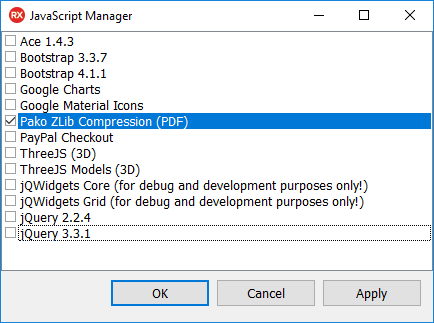
Without it, generation still works but the output is uncompressed — noticeably
larger files, which matters most when the PDF is downloaded over a slow
connection or stored per user. The library checks for pako at the moment it
writes each stream, so the script only has to be loaded before generation, not
before the form is created. Current Pako releases are supported.
Delivering the PDF
A desktop build writes the file to disk; a browser build has no folder to write
to, so the choice is between handing the bytes to the user as a download and
opening the document in the browser's own PDF viewer. The file name passed to
BeginDocument decides which route EndDocument takes:
BeginDocument |
EndDocument |
Result |
|---|---|---|
'' |
EndDocument |
Returns a new TMemoryStream with the document. Your code owns it: deliver it, then free it |
| A file name | EndDocument(True) |
Opens the document in a new browser tab; returns nil |
| A file name | EndDocument |
Nothing is produced — the document is discarded |
For a download with a name you choose, take the stream route and call
SaveToFile on the stream: in TMS WEB Core that offers the bytes to the user as a
download under that name. The same stream can instead be uploaded to your server
or attached to a message. The file name given to BeginDocument in the viewer
route is not used as a download name.
Images in the browser
There is no local file system in the browser, so the file-based image routes of
the desktop do not apply: DrawImageFromFile cannot read a local path, and the
Mini HTML engine resolves <img src="..."> only by name in the bitmap container
on the WEB target. Put images in a TTMSFNCBitmapContainer — at design time, or
loaded at run time — assign it to p.BitmapContainer, and draw them with
DrawImageWithName or an <img> tag. See Images
and HTML text.
Image data in the browser loads asynchronously, like fonts. A bitmap that has not
finished loading is empty, and DrawImageWithName skips an empty bitmap without
an error, so generate only after images loaded at run time have arrived.
What stays the same
Everything else in the PDF Library guides is portable as written:
| Area | WEB Core |
|---|---|
| Document skeleton | Identical — BeginDocument / NewPage / EndDocument |
| Drawing and text | Identical API, drawn by the general PDF writer also used on Windows and Linux |
| Form fields | Documented for Windows and Linux; not a documented WEB capability |
| Passwords and permissions | Stored but not written — the file is unencrypted, as on Windows and Linux. See Security, archival output, and the generation engine |
PDF/A (pdfA1) |
Not available — generation raises an exception |
| Output | Use the stream overload and hand the bytes to a browser download, or open the document in a browser tab |
Because EndDocument returns a TMemoryStream when no file name is given, the
download case is the stream case — there is no local path to write to. See
Creating a PDF document.
Putting it together
The browser-specific concerns in one flow: cache a regular and a bold face, wait for the cache, confirm every download succeeded, generate to a stream, and hand the bytes to the browser as a named download. Only the first and last steps differ from the desktop code.
procedure TForm1.WebFormCreate(Sender: TObject);
begin
  { A browser has no system font directory, so every font the document embeds
    has to be fetched first. Bold is a separate file: the cache matches on the
    family name stored inside the file plus its style. }
  AddFontToCache('fonts/arial.ttf');
  AddFontToCache('fonts/arialbd.ttf');

  { The downloads are asynchronous, so the export starts from the ready
    callback - never directly after the AddFontToCache calls above. }
  Application.OnFontCacheReady := HandleFontCacheReady;
end;

procedure TForm1.HandleFontCacheReady(Sender: TObject);
var
  p: TTMSFNCPDFLib;
  s: TMemoryStream;
  I: Integer;
begin
  { The event fires again whenever a later AddFontToCache completes, so run
    the export once. }
  Application.OnFontCacheReady := nil;

  { Ready means every download has finished - not that every one succeeded.
    A failed request leaves the item without data. }
  for I := 0 to GetFontCacheCount - 1 do
    if not Assigned(GetFontCacheItem(I).Data.Data) then
    begin
      ShowMessage('Font could not be loaded: ' + GetFontCacheItem(I).URL);
      Exit;
    end;

  p := TTMSFNCPDFLib.Create;
  try
    p.Header := '';
    p.Footer := '';

    { No file name: EndDocument hands the bytes back as a new stream. }
    p.BeginDocument('');
    try
      p.NewPage;
      p.Graphics.Font.Name := 'Arial';
      p.Graphics.Font.Size := 16;
      p.Graphics.Font.Style := [TFontStyle.fsBold];
      p.Graphics.DrawText('Generated in the browser', PointF(40, 40));
      p.Graphics.Font.Style := [];
      p.Graphics.Font.Size := 11;
      p.Graphics.DrawText('Regular and bold faces both come from the font cache.',
        PointF(40, 70));
    finally
      s := p.EndDocument;
    end;

    { The stream belongs to the caller. In TMS WEB Core, SaveToFile on a memory
      stream offers the bytes to the user as a download with this name. }
    try
      s.SaveToFile('report.pdf');
    finally
      s.Free;
    end;
  finally
    p.Free;
  end;
end;
void __fastcall TForm1::WebFormCreate(TObject *Sender)
{
  // A browser has no system font directory, so every font the document embeds
  // has to be fetched first. Bold is a separate file: the cache matches on the
  // family name stored inside the file plus its style.
  AddFontToCache("fonts/arial.ttf");
  AddFontToCache("fonts/arialbd.ttf");

  // The downloads are asynchronous, so the export starts from the ready
  // callback - never directly after the AddFontToCache calls above.
  Application->OnFontCacheReady = HandleFontCacheReady;
}

void __fastcall TForm1::HandleFontCacheReady(TObject *Sender)
{
  // The event fires again whenever a later AddFontToCache completes, so run
  // the export once.
  Application->OnFontCacheReady = nullptr;

  // Ready means every download has finished - not that every one succeeded.
  // A failed request leaves the item without data.
  for (int I = 0; I < GetFontCacheCount(); I++)
    if (GetFontCacheItem(I)->Data->Data == nullptr)
    {
      ShowMessage("Font could not be loaded: " + GetFontCacheItem(I)->URL);
      return;
    }

  TTMSFNCPDFLib *p = new TTMSFNCPDFLib();
  try
  {
    p->Header = "";
    p->Footer = "";

    // No file name: EndDocument hands the bytes back as a new stream.
    TMemoryStream *s;
    p->BeginDocument("");
    try
    {
      p->NewPage();
      p->Graphics()->Font->Name = "Arial";
      p->Graphics()->Font->Size = 16;
      p->Graphics()->Font->Style = TFontStyles() << TFontStyle::fsBold;
      p->Graphics()->DrawText("Generated in the browser", PointF(40, 40));
      p->Graphics()->Font->Style = TFontStyles();
      p->Graphics()->Font->Size = 11;
      p->Graphics()->DrawText("Regular and bold faces both come from the font cache.",
        PointF(40, 70));
    }
    __finally
    {
      s = p->EndDocument();
    }

    // The stream belongs to the caller. In TMS WEB Core, SaveToFile on a memory
    // stream offers the bytes to the user as a download with this name.
    try
    {
      s->SaveToFile("report.pdf");
    }
    __finally
    {
      delete s;
    }
  }
  __finally
  {
    delete p;
  }
}
Common mistakes
- Generating before the font cache is ready. Wait for
Application.OnFontCacheReady. - Treating "ready" as "succeeded". The event also fires after failed
downloads; check each item's
Databefore generating. - Exporting twice. The event fires again whenever a later font finishes loading; clear the handler in a one-shot export.
- Assuming system fonts exist. They do not; every embedded font must be cached
first — including the fonts in
FontFallBackList. - Setting
Font.Nameto the file name. The cache matches the family name stored inside the font file. - Bold text that renders regular. The bold face is a separate file; cache it.
- Caching
.woffor.woff2files. Use the.ttfor.otforiginal. - Cross-origin font requests without CORS headers. The download fails and the font is missing from the output.
- Passing a file name and calling
EndDocumentwithoutTrue. Nothing is produced. Use an empty file name for a stream, orEndDocument(True)to open a tab. - Leaking the stream. The stream
EndDocumentreturns is yours to free after it has been delivered. - Local image paths.
DrawImageFromFileandfile://image sources do not work in the browser; use a bitmap container. - Setting
PDFStandard := pdfA1. PDF/A is not available on the WEB target. - Missing Pako ZLib. Output is valid but uncompressed.