Printing
Printing sends FNC drawing to a physical printer — or, on iOS, Android and in the
browser, to the platform's own print pipeline — instead of to a file. Reach for it
when the user expects a printout or the system print dialog; reach for
TTMSFNCGraphicsPDFIO or TTMSFNCPDFLib
instead when the result has to be a PDF file you store, mail or download. The print
classes are layered: a low-level printer that hands you a canvas, a print IO
component that adds page bands and prints any FNC control, and component-specific
print IO classes that know how to paginate a grid or a rich editor. Pick the
highest level that fits — each level down gives you more control and asks you to do
more of the pagination yourself.
| Class | Unit | Level | Use when |
|---|---|---|---|
TTMSFNCPrinter (via the global TMSFNCPrinter function) |
FMX.TMSFNCPrinters |
Low-level | You draw every page yourself on the printer canvas. |
TTMSFNCGraphicsPrintIO |
FMX.TMSFNCPrintIO |
Mid-level | You print one or more FNC controls, or custom drawing, with header, footer and page number. |
TTMSFNCGridPrintIO |
FMX.TMSFNCGridPrintIO (TMS FNC UI Pack) |
Component-specific | You print a TTMSFNCGrid across multiple pages. |
TTMSFNCRichEditorPrintIO |
FMX.TMSFNCRichEditorPrintIO (TMS FNC UI Pack) |
Component-specific | You print TTMSFNCRichEditor content with automatic page flow. |
The first two ship with TMS FNC Core. The component-specific classes ship with
TMS FNC UI Pack, alongside the controls they print. Replace the FMX. prefix with
VCL. or WEBLib. for the other frameworks; TTMSFNCRichEditorPrintIO has no
WEBLib. unit. For TTMSFNCDataGrid, use TTMSFNCDataGridPrintIO — see
DataGrid printing.
TTMSFNCPrinter
The low-level printer is a single shared instance returned by the global
TMSFNCPrinter function. Use it when no print IO class fits — a label sheet, a
ticket, a listing you lay out line by line. Assign OnDrawContent, call
BeginDoc, draw on Graphics, and call EndDoc at the end of the callback.
On Windows, macOS, iOS and in the browser, BeginDoc calls OnDrawContent
synchronously before it returns. On Android the print flow is asynchronous, which
is why the callback — not the code after BeginDoc — is the one place drawing code
belongs on every platform.
Warning
On Android, add FNCPrintDocumentAdapter.jar (or the combined FNC JAR) to your
project libraries. Drawing code placed after BeginDoc instead of inside
OnDrawContent does not run in page order there.
uses
  FMX.TMSFNCPrinters, FMX.TMSFNCGraphicsTypes;

procedure TForm1.PrintClick(Sender: TObject);
begin
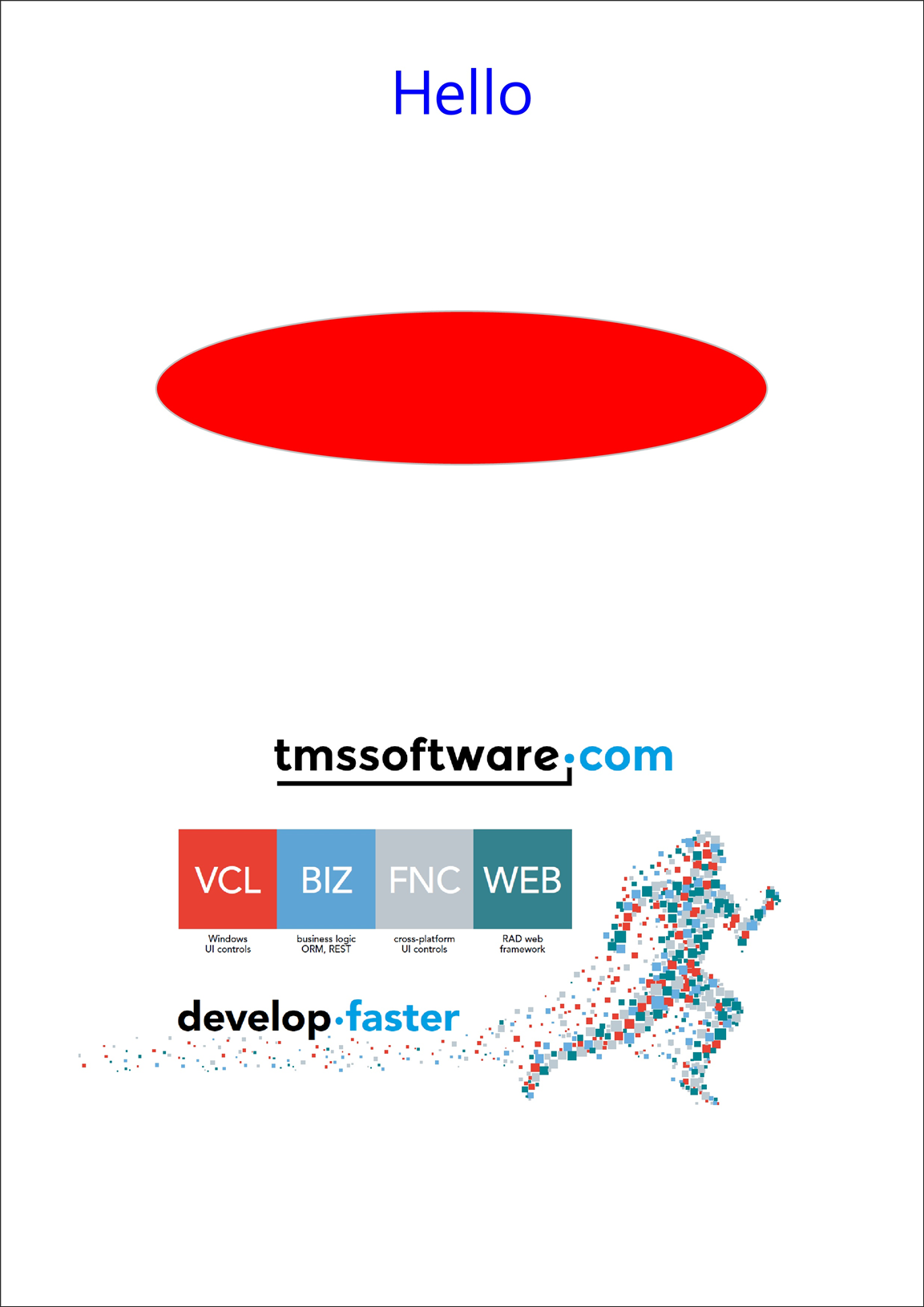
  TMSFNCPrinter.OnDrawContent :=
    procedure
    begin
      TMSFNCPrinter.Graphics.Font.Color := gcBlue;
      TMSFNCPrinter.Graphics.Font.Size := 40;
      TMSFNCPrinter.Graphics.DrawText(0, 20,
        TMSFNCPrinter.PageWidth, 100, 'Hello', False, gtaCenter, gtaCenter);
      TMSFNCPrinter.Graphics.Fill.Color := gcRed;
      TMSFNCPrinter.Graphics.DrawEllipse(100, 200, TMSFNCPrinter.PageWidth - 100, 300);
      { EndDoc sends the job and frees Graphics - do not touch Graphics after it. }
      TMSFNCPrinter.EndDoc;
    end;
  TMSFNCPrinter.BeginDoc;
end;
void __fastcall TForm1::PrintClick(TObject *Sender)
{
  TMSFNCPrinter()->OnDrawContent = []()
  {
    TMSFNCPrinter()->Graphics->Font->Color = gcBlue;
    TMSFNCPrinter()->Graphics->Font->Size = 40;
    TMSFNCPrinter()->Graphics->DrawText(0, 20,
      TMSFNCPrinter()->PageWidth, 100, "Hello", false,
      TTMSFNCGraphicsTextAlign::gtaCenter, TTMSFNCGraphicsTextAlign::gtaCenter);
    TMSFNCPrinter()->Graphics->Fill->Color = gcRed;
    TMSFNCPrinter()->Graphics->DrawEllipse(100, 200, TMSFNCPrinter()->PageWidth - 100, 300);
    // EndDoc sends the job and frees Graphics - do not touch Graphics after it.
    TMSFNCPrinter()->EndDoc();
  };
  TMSFNCPrinter()->BeginDoc();
}
Methods
| Method | Description |
|---|---|
BeginDoc |
Starts the print job, creates Graphics, and invokes OnDrawContent (asynchronously on Android). |
NewPage |
Ends the current page and starts the next one. PageNumber increases by one. |
EndDoc |
Finishes the job and sends it to the printer. It also frees Graphics, so call it last, at the end of OnDrawContent. |
Properties
| Property | Description |
|---|---|
OnDrawContent |
Callback (an anonymous method) that draws the document. |
Graphics |
TTMSFNCGraphics canvas for the current job. Only valid between BeginDoc and EndDoc. |
PageWidth / PageHeight |
Printable page size in the canvas's logical units, not device pixels. On FMX for Windows the canvas is scaled from 72 units per inch to the printer resolution, so these are points. Writable on WEB only. |
PageNumber |
Current page number, starting at 1 for the first page. |
Orientation |
TPrinterOrientation.poPortrait or poLandscape. Set it before BeginDoc; a change during a job does not affect that job. |
Device |
Active printer name. Assigning it selects a printer: on FMX the first printer whose name contains the value, on VCL an exact name match. Read-only on WEB, Android and iOS. |
DPI |
Printer resolution. Writable on Android only. |
PrintJobName |
Android: name shown in the system print queue. |
PrintSize |
Android: paper size (TPrintSize, for example psISO_A4). |
PrintCompleted |
iOS: True once the print controller has finished with the job. |
Paginating your own content
TTMSFNCPrinter does not paginate for you: when the next element would not fit
above the bottom margin, call NewPage and reset your position. Compare against
PageHeight, which is in the same logical units you draw in, and set
Orientation before BeginDoc so PageWidth and PageHeight already reflect it.
uses
  System.SysUtils, System.UITypes, FMX.TMSFNCPrinters;

procedure TForm1.PrintListingClick(Sender: TObject);
const
  Margin = 40;
  LineHeight = 18;
begin
  { Orientation is picked up when the job starts: set it before BeginDoc. }
  TMSFNCPrinter.Orientation := TPrinterOrientation.poPortrait;

  TMSFNCPrinter.OnDrawContent :=
    procedure
    var
      I, Y: Integer;
    begin
      TMSFNCPrinter.Graphics.Font.Size := 11;
      Y := Margin;
      for I := 1 to 200 do
      begin
        { PageHeight is in the same logical units the canvas draws in. }
        if Y + LineHeight > TMSFNCPrinter.PageHeight - Margin then
        begin
          TMSFNCPrinter.NewPage;
          Y := Margin;
        end;

        TMSFNCPrinter.Graphics.DrawText(Margin, Y,
          TMSFNCPrinter.PageWidth - Margin, Y + LineHeight,
          Format('Page %d - line %d', [TMSFNCPrinter.PageNumber, I]));
        Inc(Y, LineHeight);
      end;
      TMSFNCPrinter.EndDoc;
    end;

  TMSFNCPrinter.BeginDoc;
end;
void __fastcall TForm1::PrintListingClick(TObject *Sender)
{
  const int Margin = 40;
  const int LineHeight = 18;

  // Orientation is picked up when the job starts: set it before BeginDoc.
  TMSFNCPrinter()->Orientation = TPrinterOrientation::poPortrait;

  TMSFNCPrinter()->OnDrawContent = [=]()
  {
    TMSFNCPrinter()->Graphics->Font->Size = 11;
    int Y = Margin;
    for (int I = 1; I <= 200; I++)
    {
      // PageHeight is in the same logical units the canvas draws in.
      if (Y + LineHeight > TMSFNCPrinter()->PageHeight - Margin)
      {
        TMSFNCPrinter()->NewPage();
        Y = Margin;
      }

      TMSFNCPrinter()->Graphics->DrawText(Margin, Y,
        TMSFNCPrinter()->PageWidth - Margin, Y + LineHeight,
        Format("Page %d - line %d", ARRAYOFCONST((TMSFNCPrinter()->PageNumber, I))));
      Y += LineHeight;
    }
    TMSFNCPrinter()->EndDoc();
  };

  TMSFNCPrinter()->BeginDoc();
}
TTMSFNCGraphicsPrintIO
TTMSFNCGraphicsPrintIO builds on the shared printer and adds the parts every
printout needs: a header band, a footer band, an automatic page number, and content
margins. It prints any FNC control — every TTMSFNCCustomControl descendant can
draw itself onto the print canvas — so a chart, planner or gauge prints with the
same code you would use to export it.
uses
  FMX.TMSFNCPrintIO;

procedure TForm1.PrintClick(Sender: TObject);
var
  r: TRectF;
begin
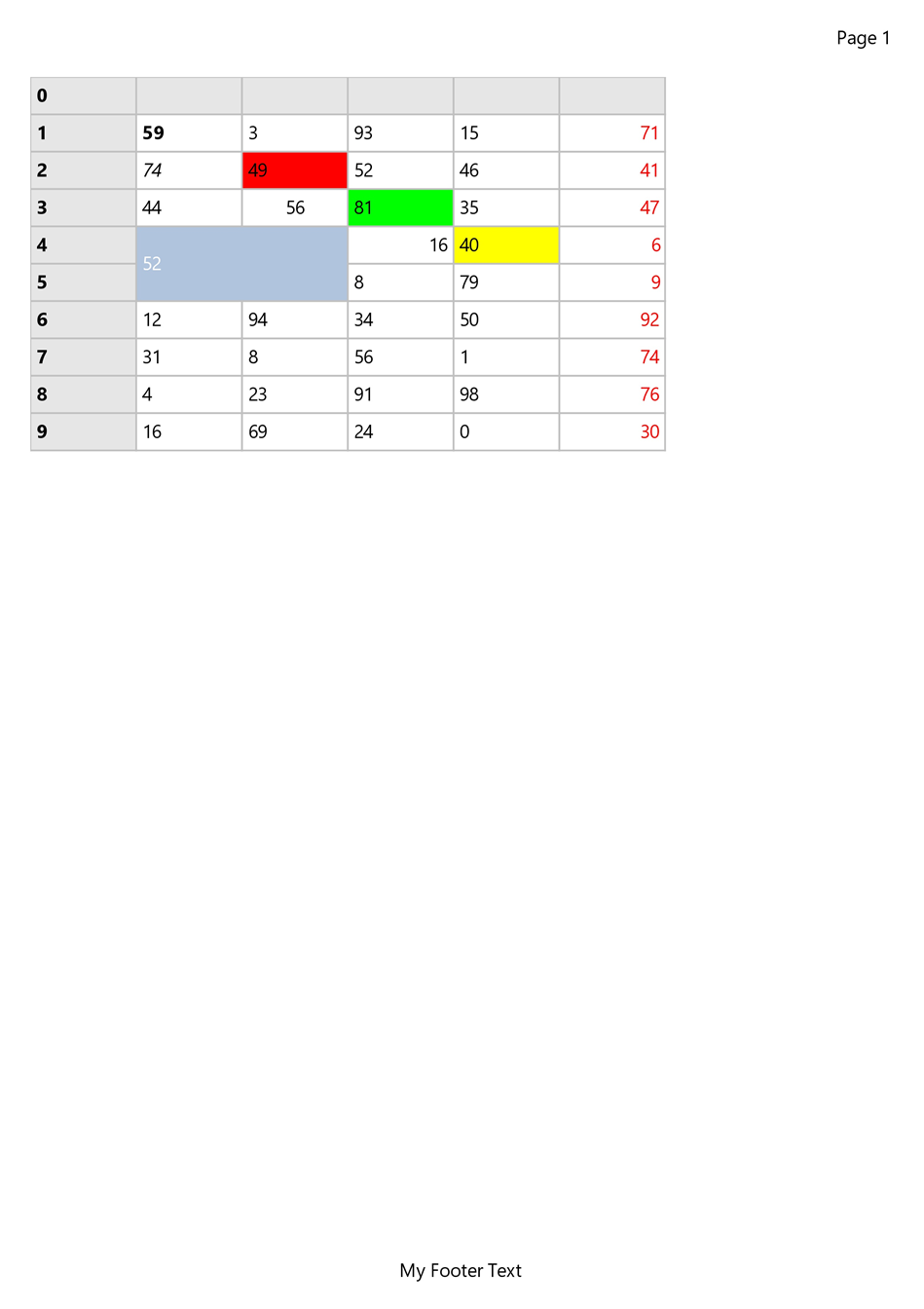
  TMSFNCGraphicsPrintIO1.Options.Header := 'My Report';
  TMSFNCGraphicsPrintIO1.Options.Footer := 'My Footer Text';
  TMSFNCGraphicsPrintIO1.Options.PageNumber := pnHeader;
  TMSFNCGraphicsPrintIO1.Options.PageNumberFormat := 'Page %d';
  r := RectF(
    TMSFNCGraphicsPrintIO1.Options.Margins.Left,
    TMSFNCGraphicsPrintIO1.Options.Margins.Top,
    TMSFNCGraphicsPrintIO1.Options.Margins.Left + TMSFNCChart1.Width,
    TMSFNCGraphicsPrintIO1.Options.Margins.Top + TMSFNCChart1.Height);
  TMSFNCGraphicsPrintIO1.Print(TMSFNCChart1, r);
end;
void __fastcall TForm1::PrintClick(TObject *Sender)
{
  TMSFNCGraphicsPrintIO1->Options->Header = "My Report";
  TMSFNCGraphicsPrintIO1->Options->Footer = "My Footer Text";
  TMSFNCGraphicsPrintIO1->Options->PageNumber = TTMSFNCPrintPageNumber::pnHeader;
  TMSFNCGraphicsPrintIO1->Options->PageNumberFormat = "Page %d";
  TRectF r = RectF(
    TMSFNCGraphicsPrintIO1->Options->Margins->Left,
    TMSFNCGraphicsPrintIO1->Options->Margins->Top,
    TMSFNCGraphicsPrintIO1->Options->Margins->Left + TMSFNCChart1->Width,
    TMSFNCGraphicsPrintIO1->Options->Margins->Top + TMSFNCChart1->Height);
  TMSFNCGraphicsPrintIO1->Print(TMSFNCChart1, r);
}
Print methods
| Method | Description |
|---|---|
Print |
Prints ExportObject. When ExportObject is nil, prints only the header, footer and page number, and fires the content events so you can draw the body yourself. |
Print(AExportObject, AExportRect) |
Prints one control into the given rectangle. |
Print(AExportObjects) |
Prints several controls, each into the page content area. |
Print(AExportObjects, AExportRects) |
Prints several controls, each into its own rectangle. An object without a matching rectangle gets the page content area. |
How several objects are laid out
When you pass an array, every object after the first starts a new page by default — the array is treated as one object per page, and each new page gets its header, footer and page number. Two events change that:
OnCanCreateNewPagefires before each object after the first. SetACanCreate := Falseto keep that object on the current page.OnGetExportRectfires just before each object draws, with the rectangle it is about to use. ChangeARectto place the object — useful when you pass no rectangles and want to divide the content area at print time, when the real page size is known.
uses
  FMX.TMSFNCPrintIO, FMX.TMSFNCGraphics;

procedure TForm1.PrintIOCanCreateNewPage(Sender: TObject; const AGraphics: TTMSFNCGraphics;
  const AExportObject: TTMSFNCPrintIOExportObject; var ACanCreate: Boolean);
begin
  { Fired before every object after the first. Keep the margin chart on the
    revenue chart's page instead of starting a new one. }
  ACanCreate := AExportObject <> ChartMargin;
end;

procedure TForm1.PrintIOGetExportRect(Sender: TObject; const AGraphics: TTMSFNCGraphics;
  const AExportObject: TTMSFNCPrintIOExportObject; var ARect: TRectF);
var
  Mid: Single;
begin
  { No rectangles were passed to Print, so ARect arrives as the page content
    area (the page minus Options.Margins). Give each chart one half. }
  Mid := ARect.Top + (ARect.Bottom - ARect.Top) / 2;
  if AExportObject = ChartRevenue then
    ARect.Bottom := Mid - 6
  else if AExportObject = ChartMargin then
    ARect.Top := Mid + 6;
end;

procedure TForm1.PrintDashboardClick(Sender: TObject);
var
  Objects: TTMSFNCPrintIOExportObjectArray;
begin
  TMSFNCGraphicsPrintIO1.OnCanCreateNewPage := PrintIOCanCreateNewPage;
  TMSFNCGraphicsPrintIO1.OnGetExportRect := PrintIOGetExportRect;

  SetLength(Objects, 2);
  Objects[0] := ChartRevenue;
  Objects[1] := ChartMargin;
  TMSFNCGraphicsPrintIO1.Print(Objects);
end;
void __fastcall TForm1::PrintIOCanCreateNewPage(TObject *Sender, TTMSFNCGraphics *const AGraphics,
  TTMSFNCPrintIOExportObject *const AExportObject, bool &ACanCreate)
{
  // Fired before every object after the first. Keep the margin chart on the
  // revenue chart page instead of starting a new one.
  ACanCreate = AExportObject != ChartMargin;
}

void __fastcall TForm1::PrintIOGetExportRect(TObject *Sender, TTMSFNCGraphics *const AGraphics,
  TTMSFNCPrintIOExportObject *const AExportObject, TRectF &ARect)
{
  // No rectangles were passed to Print, so ARect arrives as the page content
  // area (the page minus Options.Margins). Give each chart one half.
  float Mid = ARect.Top + (ARect.Bottom - ARect.Top) / 2;
  if (AExportObject == ChartRevenue)
    ARect.Bottom = Mid - 6;
  else if (AExportObject == ChartMargin)
    ARect.Top = Mid + 6;
}

void __fastcall TForm1::PrintDashboardClick(TObject *Sender)
{
  TMSFNCGraphicsPrintIO1->OnCanCreateNewPage = PrintIOCanCreateNewPage;
  TMSFNCGraphicsPrintIO1->OnGetExportRect = PrintIOGetExportRect;

  TTMSFNCPrintIOExportObjectArray Objects;
  Objects.Length = 2;
  Objects[0] = ChartRevenue;
  Objects[1] = ChartMargin;
  TMSFNCGraphicsPrintIO1->Print(Objects);
}
Printing custom drawing
A print does not need a control. Call Print with ExportObject set to nil and
the component still starts the job and draws its header, footer and page number;
OnBeforeDrawContent and OnAfterDrawContent then fire with the content
rectangle, and whatever you draw there becomes the page body. This is the shortest
route to a banded printout of content that no control renders — a delivery note, a
cover page.
uses
  FMX.TMSFNCPrintIO, FMX.TMSFNCGraphics, FMX.TMSFNCGraphicsTypes;

procedure TForm1.PrintIOAfterDrawContent(Sender: TObject; AExportObject: TObject;
  APageIndex: Integer; ARect: TRectF; AGraphics: TTMSFNCGraphics);
begin
  { ARect is the content area: the page minus Options.Margins. }
  AGraphics.Font.Size := 16;
  AGraphics.DrawText(RectF(ARect.Left, ARect.Top, ARect.Right, ARect.Top + 30),
    'Delivery note 2026-0412', False, gtaLeading, gtaCenter);

  AGraphics.Stroke.Color := gcDarkgray;
  AGraphics.DrawLine(PointF(ARect.Left, ARect.Top + 36), PointF(ARect.Right, ARect.Top + 36));

  AGraphics.Font.Size := 11;
  AGraphics.DrawText(RectF(ARect.Left, ARect.Top + 48, ARect.Right, ARect.Top + 120),
    'Deliver to: Harbour Street 12, Ghent. Signature on receipt.', True, gtaLeading, gtaLeading);
end;

procedure TForm1.PrintDeliveryNoteClick(Sender: TObject);
begin
  TMSFNCGraphicsPrintIO1.ExportObject := nil;
  TMSFNCGraphicsPrintIO1.Options.Header := 'Acme Logistics';
  TMSFNCGraphicsPrintIO1.Options.Footer := 'Thank you for your business';
  TMSFNCGraphicsPrintIO1.OnAfterDrawContent := PrintIOAfterDrawContent;

  { With no export object, Print still starts the job, draws the header and
    footer, and fires the content events with the content rectangle. }
  TMSFNCGraphicsPrintIO1.Print;
end;
void __fastcall TForm1::PrintIOAfterDrawContent(TObject *Sender, TObject *AExportObject,
  int APageIndex, const TRectF &ARect, TTMSFNCGraphics *AGraphics)
{
  // ARect is the content area: the page minus Options.Margins.
  AGraphics->Font->Size = 16;
  AGraphics->DrawText(RectF(ARect.Left, ARect.Top, ARect.Right, ARect.Top + 30),
    "Delivery note 2026-0412", false, TTMSFNCGraphicsTextAlign::gtaLeading,
    TTMSFNCGraphicsTextAlign::gtaCenter);

  AGraphics->Stroke->Color = gcDarkgray;
  AGraphics->DrawLine(PointF(ARect.Left, ARect.Top + 36), PointF(ARect.Right, ARect.Top + 36));

  AGraphics->Font->Size = 11;
  AGraphics->DrawText(RectF(ARect.Left, ARect.Top + 48, ARect.Right, ARect.Top + 120),
    "Deliver to: Harbour Street 12, Ghent. Signature on receipt.", true,
    TTMSFNCGraphicsTextAlign::gtaLeading, TTMSFNCGraphicsTextAlign::gtaLeading);
}

void __fastcall TForm1::PrintDeliveryNoteClick(TObject *Sender)
{
  TMSFNCGraphicsPrintIO1->ExportObject = nullptr;
  TMSFNCGraphicsPrintIO1->Options->Header = "Acme Logistics";
  TMSFNCGraphicsPrintIO1->Options->Footer = "Thank you for your business";
  TMSFNCGraphicsPrintIO1->OnAfterDrawContent = PrintIOAfterDrawContent;

  // With no export object, Print still starts the job, draws the header and
  // footer, and fires the content events with the content rectangle.
  TMSFNCGraphicsPrintIO1->Print();
}
TTMSFNCPrintIOOptions
| Property | Default | Description |
|---|---|---|
Margins |
Left 20, Top 50, Right 20, Bottom 50 | Content area inset from the page edges. |
Header / Footer |
(empty) | Band text. A band with empty text, or with a size of 0, is not drawn. |
HeaderSize / FooterSize |
30 |
Height of the header/footer band. |
HeaderMargins / FooterMargins |
Left 20, Top 10, Right 20, Bottom 10 | Band inset from the page edges. |
HeaderFont / FooterFont |
Band fonts. | |
HeaderHorizontalAlignment / HeaderVerticalAlignment |
gtaCenter / gtaCenter |
Header text placement inside its band. |
FooterHorizontalAlignment / FooterVerticalAlignment |
gtaCenter / gtaCenter |
Footer text placement inside its band. |
PageNumber |
pnNone |
pnNone, pnHeader or pnFooter. |
PageNumberFormat |
'%d' at design time, empty in code |
Format string with one %d. |
PageNumberFont / PageNumberSize / PageNumberMargins |
size 30, margins as the bands |
Page-number band appearance. |
PageNumberHorizontalAlignment / PageNumberVerticalAlignment |
gtaTrailing / gtaCenter |
Page-number placement inside its band. |
DefaultFont |
Font assigned to the canvas when the print IO starts a new page for the next export object or grid page. It is not applied to the first page, so set fonts explicitly for text you draw in the events. | |
Device |
Selects the printer on the shared TMSFNCPrinter (not available on WEB, Android and iOS). |
|
PageOrientation |
poPortrait |
Reads and writes the shared printer's Orientation. |
PageSize |
Android only: paper size of the shared printer. | |
PageWidth / PageHeight / DPI / PageIndex |
Read-only pass-throughs to the shared printer, useful inside the print events. |
Page setup: printer, orientation and margins
Page setup is split between two places, and knowing which is which avoids the two
classic layout bugs. Device and PageOrientation are not stored on the print IO:
they are forwarded to the shared TMSFNCPrinter, so they apply to every print IO in
the application until changed again. Margins, on the other hand, belongs to the
print IO and defines the content area — and it is independent of the header
band. The defaults fit together only because the default top margin (50) sits
just below the default header band (10 + 30). Enlarge HeaderSize without
enlarging Margins.Top and the content prints over the header.
uses
  System.UITypes, FMX.TMSFNCPrintIO;

procedure TForm1.ConfigureLandscapeReport;
var
  Options: TTMSFNCPrintIOOptions;
begin
  Options := TMSFNCGraphicsPrintIO1.Options;

  { Device and PageOrientation are forwarded to the shared TMSFNCPrinter:
    they change the printer for every print IO in the application. }
  Options.Device := 'Microsoft Print to PDF';
  Options.PageOrientation := TPrinterOrientation.poLandscape;

  { The content area is the page minus Margins. It does not move out of the
    way of the header band, so push Margins.Top below the band's bottom edge. }
  Options.Header := 'Regional sales - landscape';
  Options.HeaderSize := 40;
  Options.HeaderMargins.Top := 12;
  Options.Margins.Top := Options.HeaderMargins.Top + Options.HeaderSize + 12;
  Options.Margins.Left := 30;
  Options.Margins.Right := 30;
end;
void __fastcall TForm1::ConfigureLandscapeReport()
{
  TTMSFNCPrintIOOptions *Options = TMSFNCGraphicsPrintIO1->Options;

  // Device and PageOrientation are forwarded to the shared TMSFNCPrinter:
  // they change the printer for every print IO in the application.
  Options->Device = "Microsoft Print to PDF";
  Options->PageOrientation = TPrinterOrientation::poLandscape;

  // The content area is the page minus Margins. It does not move out of the
  // way of the header band, so push Margins.Top below the band bottom edge.
  Options->Header = "Regional sales - landscape";
  Options->HeaderSize = 40;
  Options->HeaderMargins->Top = 12;
  Options->Margins->Top = Options->HeaderMargins->Top + Options->HeaderSize + 12;
  Options->Margins->Left = 30;
  Options->Margins->Right = 30;
}
Header, footer, and page-number placement
Each of the three bands is a rectangle, and the text inside it is positioned by an alignment pair rather than by coordinates. Reach for these when a band is taller than its text — a 40pt header with a one-line caption, a footer that must hug the content, or a page number that has to share the header strip with the header caption.
Every band's rectangle is derived from the page edges plus its own size and margins:
| Band | Rectangle |
|---|---|
| Header | Full page width inset by HeaderMargins, HeaderSize tall, measured down from the top. |
| Footer | Full page width inset by FooterMargins, FooterSize tall, measured up from the bottom. |
| Page number | Full page width inset by PageNumberMargins, PageNumberSize tall, at the top for pnHeader and at the bottom for pnFooter. |
Text is then placed inside that rectangle by the matching alignment pair, using TTMSFNCGraphicsTextAlign values (gtaLeading, gtaCenter, gtaTrailing):
| Property | Default | Controls |
|---|---|---|
HeaderHorizontalAlignment / HeaderVerticalAlignment |
gtaCenter / gtaCenter |
Header text inside the header band. |
FooterHorizontalAlignment / FooterVerticalAlignment |
gtaCenter / gtaCenter |
Footer text inside the footer band. |
PageNumberHorizontalAlignment / PageNumberVerticalAlignment |
gtaTrailing / gtaCenter |
Page-number text inside the page-number band. |
uses
  FMX.TMSFNCPrintIO, FMX.TMSFNCGraphicsTypes;

procedure TForm1.ConfigurePrintLayout;
var
  Options: TTMSFNCPrintIOOptions;
begin
  Options := TMSFNCGraphicsPrintIO1.Options;

  { Header band: 40pt tall, text pinned to the bottom-left of the band so it
    sits just above the content area. }
  Options.Header := 'Quarterly sales report';
  Options.HeaderSize := 40;
  Options.HeaderMargins.Left := 24;
  Options.HeaderMargins.Top := 12;
  Options.HeaderHorizontalAlignment := gtaLeading;
  Options.HeaderVerticalAlignment := gtaTrailing;

  { Footer band: text centered horizontally, pinned to the top of the band. }
  Options.Footer := 'Confidential - internal use only';
  Options.FooterSize := 30;
  Options.FooterHorizontalAlignment := gtaCenter;
  Options.FooterVerticalAlignment := gtaLeading;

  { The page-number band is computed from the page edges independently of the
    header band, so with pnHeader the two share the same strip. Keep the page
    number on the right (the default) so it does not overlap the header text. }
  Options.PageNumber := pnHeader;
  Options.PageNumberFormat := 'Page %d';
  Options.PageNumberSize := 40;
  Options.PageNumberMargins.Right := 24;
  Options.PageNumberHorizontalAlignment := gtaTrailing;
  Options.PageNumberVerticalAlignment := gtaTrailing;

  TMSFNCGraphicsPrintIO1.Print;
end;
void __fastcall TForm1::ConfigurePrintLayout()
{
  TTMSFNCPrintIOOptions *Options = TMSFNCGraphicsPrintIO1->Options;

  // Header band: 40pt tall, text pinned to the bottom-left of the band so it
  // sits just above the content area.
  Options->Header = "Quarterly sales report";
  Options->HeaderSize = 40;
  Options->HeaderMargins->Left = 24;
  Options->HeaderMargins->Top = 12;
  Options->HeaderHorizontalAlignment = TTMSFNCGraphicsTextAlign::gtaLeading;
  Options->HeaderVerticalAlignment = TTMSFNCGraphicsTextAlign::gtaTrailing;

  // Footer band: text centered horizontally, pinned to the top of the band.
  Options->Footer = "Confidential - internal use only";
  Options->FooterSize = 30;
  Options->FooterHorizontalAlignment = TTMSFNCGraphicsTextAlign::gtaCenter;
  Options->FooterVerticalAlignment = TTMSFNCGraphicsTextAlign::gtaLeading;

  // The page-number band is computed from the page edges independently of the
  // header band, so with pnHeader the two share the same strip. Keep the page
  // number on the right (the default) so it does not overlap the header text.
  Options->PageNumber = TTMSFNCPrintPageNumber::pnHeader;
  Options->PageNumberFormat = "Page %d";
  Options->PageNumberSize = 40;
  Options->PageNumberMargins->Right = 24;
  Options->PageNumberHorizontalAlignment = TTMSFNCGraphicsTextAlign::gtaTrailing;
  Options->PageNumberVerticalAlignment = TTMSFNCGraphicsTextAlign::gtaTrailing;

  TMSFNCGraphicsPrintIO1->Print();
}
Three things the source makes explicit:
- The page-number band is independent of the header/footer band, not nested in it. Both are computed from the page edges, so with
PageNumber := pnHeaderthe page number is drawn over the same strip as the header. They do not collide by default only because the page number defaults togtaTrailingwhile the header defaults togtaCenter. If you centre the page number, give the two bands different sizes or margins. PageNumberFormatis aFormatstring with exactly one%d. It is pre-filled with'%d'only at design time — a print IO created in code starts with an empty format string, so the page number renders as nothing until you assign one. Extra placeholders raise a formatting error.PageNumber := pnNone(the default) skips the page-number band entirely, alignment and margins included.
The number itself is the shared printer's PageNumber, so the first page prints
as 1. The same value arrives as APageIndex in the draw events.
TTMSFNCGraphicsPrintIO properties
| Property | Description |
|---|---|
Options |
TTMSFNCPrintIOOptions for bands, margins and printer settings. |
ExportObject |
The control Print prints when called without arguments. |
BitmapContainer |
A bitmap container reference on the component. It is not attached to the print canvas. When the exported control has its own BitmapContainer, that one is attached automatically before the control draws; to draw a named bitmap in your own event handlers, assign AGraphics.BitmapContainer there. |
Draw callbacks
| Event | Description |
|---|---|
OnBeforeDrawHeader / OnAfterDrawHeader |
Around the header text on every page. In the before event you may change AHeader, or set ADefaultDraw := False to draw the band yourself. |
OnBeforeDrawFooter / OnAfterDrawFooter |
The same for the footer. |
OnBeforeDrawPageNumber / OnAfterDrawPageNumber |
The same for the page number; APageNumber holds the formatted text. |
OnBeforeDrawContent / OnAfterDrawContent |
Around each export object. ARect is the object's rectangle (the content area when none was given). Set ADefaultDraw := False in the before event to skip the control and draw instead. |
OnGetExportRect |
Just before an export object draws; change ARect to move or resize it. |
OnCanCreateNewPage |
Before each export object after the first; set ACanCreate := False to stay on the current page. |
OnAfterDraw |
Once, after every object and band has been drawn and before the job is sent. |
All of these are of object events: assign form methods, not anonymous procedures.
Putting it together: a landscape report with two charts on one page
The example below combines page setup, the header and page-number bands, a header event that adds a logo and the print date, and the two layout events that place both charts side by side on the first page.
uses
  System.SysUtils, System.UITypes, FMX.TMSFNCPrintIO, FMX.TMSFNCGraphics, FMX.TMSFNCGraphicsTypes;

procedure TForm1.ReportBeforeDrawHeader(Sender: TObject; AExportObject: TObject;
  APageIndex: Integer; ARect: TRectF; AGraphics: TTMSFNCGraphics;
  var AHeader: string; var ADefaultDraw: Boolean);
begin
  { The print canvas does not use the print IO's BitmapContainer property:
    attach the container that holds the logo before drawing it by name. }
  AGraphics.BitmapContainer := TMSFNCBitmapContainer1;
  AGraphics.DrawBitmapWithName(RectF(ARect.Right - 80, ARect.Top, ARect.Right, ARect.Bottom), 'logo');

  AHeader := AHeader + ' - ' + FormatDateTime('yyyy-mm-dd', Date);
  ADefaultDraw := True; { still draw the (modified) header text }
end;

procedure TForm1.ReportCanCreateNewPage(Sender: TObject; const AGraphics: TTMSFNCGraphics;
  const AExportObject: TTMSFNCPrintIOExportObject; var ACanCreate: Boolean);
begin
  ACanCreate := False; { both charts share page 1 }
end;

procedure TForm1.ReportGetExportRect(Sender: TObject; const AGraphics: TTMSFNCGraphics;
  const AExportObject: TTMSFNCPrintIOExportObject; var ARect: TRectF);
var
  Mid: Single;
begin
  { Side by side: revenue on the left half, margin on the right half. }
  Mid := ARect.Left + (ARect.Right - ARect.Left) / 2;
  if AExportObject = ChartRevenue then
    ARect.Right := Mid - 8
  else
    ARect.Left := Mid + 8;
end;

procedure TForm1.PrintReportClick(Sender: TObject);
var
  Options: TTMSFNCPrintIOOptions;
  Objects: TTMSFNCPrintIOExportObjectArray;
begin
  Options := TMSFNCGraphicsPrintIO1.Options;
  Options.PageOrientation := TPrinterOrientation.poLandscape;

  Options.Header := 'Quarterly Report';
  Options.HeaderSize := 40;
  Options.HeaderHorizontalAlignment := gtaLeading;
  Options.Margins.Top := Options.HeaderMargins.Top + Options.HeaderSize + 10;

  Options.PageNumber := pnFooter;
  Options.PageNumberFormat := 'Page %d';
  Options.PageNumberHorizontalAlignment := gtaCenter;

  TMSFNCGraphicsPrintIO1.OnBeforeDrawHeader := ReportBeforeDrawHeader;
  TMSFNCGraphicsPrintIO1.OnCanCreateNewPage := ReportCanCreateNewPage;
  TMSFNCGraphicsPrintIO1.OnGetExportRect := ReportGetExportRect;

  SetLength(Objects, 2);
  Objects[0] := ChartRevenue;
  Objects[1] := ChartMargin;
  TMSFNCGraphicsPrintIO1.Print(Objects);
end;
void __fastcall TForm1::ReportBeforeDrawHeader(TObject *Sender, TObject *AExportObject,
  int APageIndex, const TRectF &ARect, TTMSFNCGraphics *AGraphics,
  String &AHeader, bool &ADefaultDraw)
{
  // The print canvas does not use the BitmapContainer property of the print IO:
  // attach the container that holds the logo before drawing it by name.
  AGraphics->BitmapContainer = TMSFNCBitmapContainer1;
  AGraphics->DrawBitmapWithName(RectF(ARect.Right - 80, ARect.Top, ARect.Right, ARect.Bottom), "logo");

  AHeader = AHeader + " - " + FormatDateTime("yyyy-mm-dd", Date());
  ADefaultDraw = true; // still draw the (modified) header text
}

void __fastcall TForm1::ReportCanCreateNewPage(TObject *Sender, TTMSFNCGraphics *const AGraphics,
  TTMSFNCPrintIOExportObject *const AExportObject, bool &ACanCreate)
{
  ACanCreate = false; // both charts share page 1
}

void __fastcall TForm1::ReportGetExportRect(TObject *Sender, TTMSFNCGraphics *const AGraphics,
  TTMSFNCPrintIOExportObject *const AExportObject, TRectF &ARect)
{
  // Side by side: revenue on the left half, margin on the right half.
  float Mid = ARect.Left + (ARect.Right - ARect.Left) / 2;
  if (AExportObject == ChartRevenue)
    ARect.Right = Mid - 8;
  else
    ARect.Left = Mid + 8;
}

void __fastcall TForm1::PrintReportClick(TObject *Sender)
{
  TTMSFNCPrintIOOptions *Options = TMSFNCGraphicsPrintIO1->Options;
  Options->PageOrientation = TPrinterOrientation::poLandscape;

  Options->Header = "Quarterly Report";
  Options->HeaderSize = 40;
  Options->HeaderHorizontalAlignment = TTMSFNCGraphicsTextAlign::gtaLeading;
  Options->Margins->Top = Options->HeaderMargins->Top + Options->HeaderSize + 10;

  Options->PageNumber = TTMSFNCPrintPageNumber::pnFooter;
  Options->PageNumberFormat = "Page %d";
  Options->PageNumberHorizontalAlignment = TTMSFNCGraphicsTextAlign::gtaCenter;

  TMSFNCGraphicsPrintIO1->OnBeforeDrawHeader = ReportBeforeDrawHeader;
  TMSFNCGraphicsPrintIO1->OnCanCreateNewPage = ReportCanCreateNewPage;
  TMSFNCGraphicsPrintIO1->OnGetExportRect = ReportGetExportRect;

  TTMSFNCPrintIOExportObjectArray Objects;
  Objects.Length = 2;
  Objects[0] = ChartRevenue;
  Objects[1] = ChartMargin;
  TMSFNCGraphicsPrintIO1->Print(Objects);
}
TTMSFNCGridPrintIO
Extends TTMSFNCGraphicsPrintIO for multi-page TTMSFNCGrid output. Assign the
grid to the Grid property and call Print: rows that do not fit above the bottom
margin continue on a new page, and when the grid is wider than the page the
remaining columns continue on further pages.
uses
  FMX.TMSFNCPrintIO, FMX.TMSFNCGridPrintIO;

procedure TForm1.PrintClick(Sender: TObject);
begin
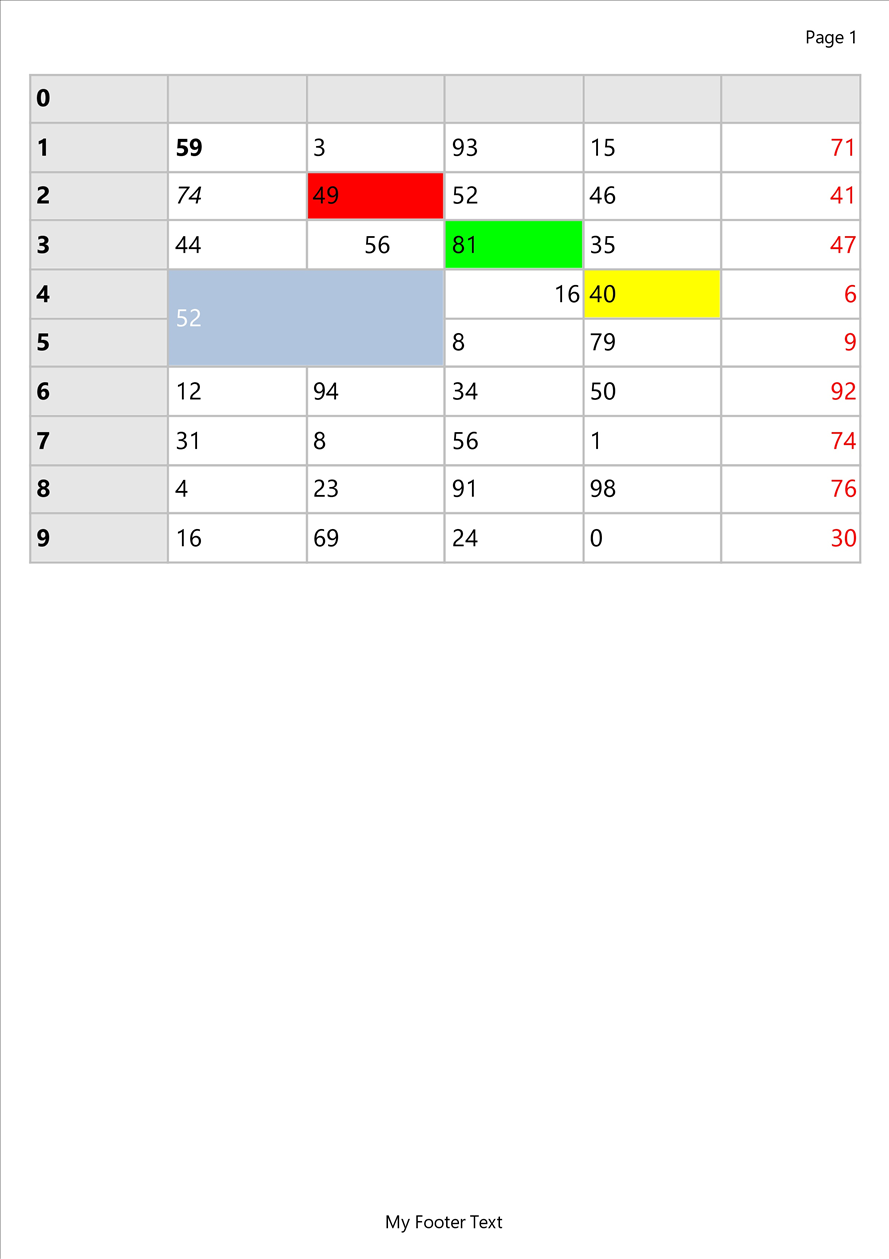
  TMSFNCGridPrintIO1.Grid := TMSFNCGrid1;
  TMSFNCGridPrintIO1.Options.RepeatFixedRows := True;
  TMSFNCGridPrintIO1.Options.Footer := 'My Footer Text';
  TMSFNCGridPrintIO1.Options.PageNumber := pnHeader;
  TMSFNCGridPrintIO1.Options.PageNumberFormat := 'Page %d';
  TMSFNCGridPrintIO1.Print;
end;
void __fastcall TForm1::PrintClick(TObject *Sender)
{
  TMSFNCGridPrintIO1->Grid = TMSFNCGrid1;
  TMSFNCGridPrintIO1->Options->RepeatFixedRows = true;
  TMSFNCGridPrintIO1->Options->Footer = "My Footer Text";
  TMSFNCGridPrintIO1->Options->PageNumber = TTMSFNCPrintPageNumber::pnHeader;
  TMSFNCGridPrintIO1->Options->PageNumberFormat = "Page %d";
  TMSFNCGridPrintIO1->Print();
}
TTMSFNCGridPrintIOOptions
Extends TTMSFNCPrintIOOptions with grid-specific output control:
| Property | Default | Description |
|---|---|---|
CellLayout |
gclFull |
gclFull prints cells with the grid's own appearance, including the current selection highlight. gclColor keeps cell fills but draws uniform black grid lines and prints selected cells in the normal layout. gclNone prints black text on black grid lines with no cell fills. |
FitToPage |
True |
Scales the whole grid — column widths, row heights and font sizes — so the total column width equals the content width. The factor also applies when the grid is narrower than the page, enlarging it. Set False to print at 1:1 and let extra columns flow to further pages. |
RepeatFixedRows |
False |
Repeats the fixed rows at the top of each page. |
RepeatFixedColumns |
False |
Repeats the fixed columns at the left of each page. |
TTMSFNCGridPrintIO callbacks
TTMSFNCGridPrintIO publishes a subset of the base callbacks. The header, footer and
page-number events are not available on this class; the band text still comes
from Options.
| Event | Description |
|---|---|
OnRowIsPageBreak |
Called once for every row, in a pass before printing starts. IsPageBreak := True requests a page break before that row, for example at a group boundary. |
OnBeforeDrawContent / OnAfterDrawContent |
Inherited from TTMSFNCGraphicsPrintIO; fire around the grid output. |
TTMSFNCRichEditorPrintIO
Prints TTMSFNCRichEditor content with automatic line wrapping and page flow.
Assign the editor to the RichEditor property and call Print. The content fills
the page area inside Options.Margins — a rectangle passed to Print is not used —
and a new page, with its header and footer, starts whenever the next line or image
does not fit.
uses
  FMX.TMSFNCPrintIO, FMX.TMSFNCRichEditorPrintIO;

procedure TForm1.PrintClick(Sender: TObject);
begin
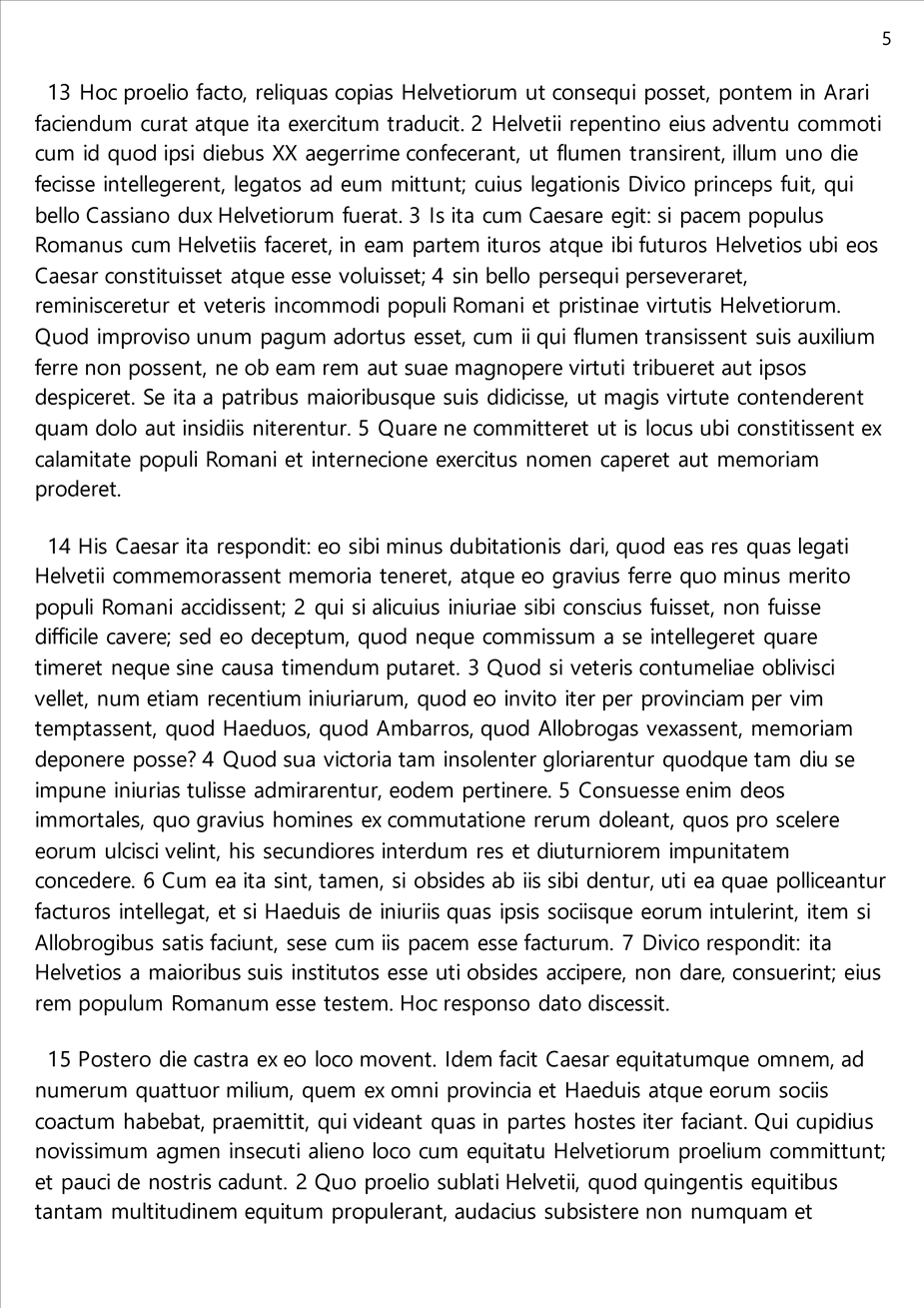
  TMSFNCRichEditorPrintIO1.RichEditor := TMSFNCRichEditor1;
  TMSFNCRichEditorPrintIO1.Options.PageNumber := pnHeader;
  TMSFNCRichEditorPrintIO1.Options.PageNumberFormat := 'Page %d';
  TMSFNCRichEditorPrintIO1.Print;
end;
void __fastcall TForm1::PrintClick(TObject *Sender)
{
  TMSFNCRichEditorPrintIO1->RichEditor = TMSFNCRichEditor1;
  TMSFNCRichEditorPrintIO1->Options->PageNumber = TTMSFNCPrintPageNumber::pnHeader;
  TMSFNCRichEditorPrintIO1->Options->PageNumberFormat = "Page %d";
  TMSFNCRichEditorPrintIO1->Print();
}
TTMSFNCRichEditorPrintIOOptions
Extends TTMSFNCPrintIOOptions with one additional property:
| Property | Default | Description |
|---|---|---|
ExportImages |
True |
Include the editor's images in the printout. Set False for faster, text-only output. |
The published events are the header, footer and content events; the page-number, page-break and export-rectangle events are not available on this class. See the rich editor import and export guide for the editor side.
Common pitfalls
- Content printing over the header.
Marginsdoes not followHeaderSize. After enlarging a band, enlarge the matching margin. - Every control on its own page. That is the default for an object array; veto
the page break in
OnCanCreateNewPage. - An empty page number in code.
PageNumberFormatis only pre-filled at design time; assign'Page %d'(or similar) when you create the print IO at runtime. - Orientation or printer "leaking" into another printout.
DeviceandPageOrientationchange the shared printer, not one component. Set them before every print that depends on them. - Using
GraphicsafterEndDoc.EndDocfrees the printer canvas; keep all drawing insideOnDrawContent. - Named bitmaps not found in a header handler. Assign
AGraphics.BitmapContainerin the handler; the print IO's ownBitmapContainerproperty is not applied to the canvas. - Assigning an anonymous method to a print IO event. Only
TTMSFNCPrinter.OnDrawContenttakes an anonymous method; the print IO events need form methods.
Related API
| API | Purpose |
|---|---|
TTMSFNCPrinter |
Low-level shared printer |
TTMSFNCGraphicsPrintIO |
Control and custom-content printing with page bands |
TTMSFNCPrintIOOptions |
Band, margin, page-number and printer options |
TTMSFNCRichEditorPrintIO |
Rich editor printing (TMS FNC UI Pack) |
TTMSFNCDataGridPrintIO |
DataGrid printing (TMS FNC UI Pack) |