Channels and values
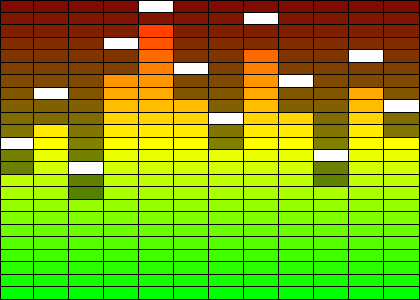
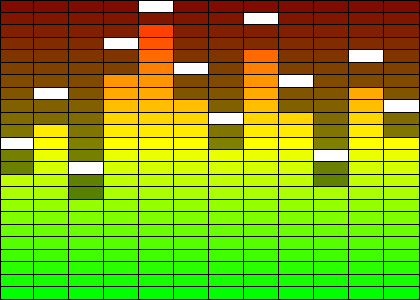
TTMSFNCWidgetLEDScope draws a row of vertical bars (channels), each a stack of
discrete LED segments lit from the bottom up. It is a static indicator, not a
scrolling oscilloscope: you set how many segments each bar has and how many are
currently lit, and the control draws the result. Reach for it to show a bank of
levels side by side — audio meters, per-core load, signal strengths — where a
compact LED-grid look reads better than a set of progress bars. This chapter
covers building the channel set, the Value/Steps relationship, and the
Count/DefaultChannel shortcut for uniform bars.
Building the channel set
The bars live in the Channels collection. Each Channels.Add returns a
TTMSFNCWidgetLEDScopeChannel you configure independently. A new control starts
with design-time sample channels, so clear them first when you build your own set.
Wrap bulk edits in BeginUpdate/EndUpdate so the scope repaints once.
procedure TForm1.SetupLEDScope;
var
  I: Integer;
  Channel: TTMSFNCWidgetLEDScopeChannel;
begin
  FScope := TTMSFNCWidgetLEDScope.Create(Self);
  FScope.Parent := Self;
  FScope.SetBounds(20, 20, 420, 300);

  // Replace the design-time sample channels with our own.
  FScope.Channels.BeginUpdate;
  try
    FScope.Channels.Clear;
    for I := 0 to 11 do
    begin
      Channel := FScope.Channels.Add;
      Channel.Steps := 24;           // 24 stacked LED segments per bar
      Channel.Value := 4 + (I mod 20); // number of lit segments, counted from the bottom
    end;
  finally
    FScope.Channels.EndUpdate;
  end;
end;
void __fastcall TForm1::SetupLEDScope()
{
  TTMSFNCWidgetLEDScopeChannel *Channel;

  FScope = new TTMSFNCWidgetLEDScope(this);
  FScope->Parent = this;
  FScope->SetBounds(20, 20, 420, 300);

  // Replace the design-time sample channels with our own.
  FScope->Channels->BeginUpdate();
  __try
  {
    FScope->Channels->Clear();
    for (int I = 0; I <= 11; I++)
    {
      Channel = FScope->Channels->Add();
      Channel->Steps = 24;             // 24 stacked LED segments per bar
      Channel->Value = 4 + (I % 20);   // number of lit segments, counted from the bottom
    }
  }
  __finally
  {
    FScope->Channels->EndUpdate();
  }
}
Steps and the lit value
Steps is the number of segments stacked in a bar (default 50). Value is how
many of them are lit, counted from the bottom; the rest stay unlit. Keep Value
within 0..Steps. Note that the setter is self-correcting: assigning a Value
greater than the current Steps raises Steps to match, and a Value above the
current PeakValue raises the peak too — so set Steps before Value if you
want a fixed segment count.
Uniform bars with Count and DefaultChannel
When every bar should look the same, set Count instead of adding channels by
hand: it grows or shrinks the Channels collection to that many bars. New bars
copy DefaultChannel, a template channel whose colors, Steps, and stroke seed
every channel the control creates. Configure DefaultChannel first, then set
Count, to stamp out a consistent bank in one step. InitSample fills the scope
with 15 random-valued channels — handy for previewing a layout.
Pitfalls
- Clear the sample channels. A fresh control carries design-time sample bars;
call
Channels.Clearbefore adding your own or you will see extras. - Order matters for
Steps/Value. SettingValueaboveStepssilently raisesSteps. AssignStepsfirst when you need an exact segment count. Countrebuilds fromDefaultChannel. Channels added by raisingCountuse the template, not whatever the last hand-added channel looked like — setDefaultChannelbefore changingCount.
See also
- Peaks and colors — gradients, the stroke, and peak markers.
- Get started — the shortest working scope.
- API reference — full class reference.