Animating the marquee
TTMSFNCWidgetMarqueeProgress is a circular progress ring built for indeterminate
work — operations where you cannot report a real percentage, such as a server
backup, a network request, or a long query. Instead of filling up to a known
value, an arc segment rotates continuously around the ring to signal "something
is happening". Reach for the marquee widget when you have no progress figure to
show; use the determinate progress or gauge widgets when you do. This chapter
covers starting and stopping the rotation, tuning its speed, and using Value
to control the length of the moving arc.
Starting and stopping the rotation
Rotation is driven entirely by MarqueeAnimation, a TTMSFNCMarqueeAnimationOptions
object on the widget. Set MarqueeAnimation.Active := True to start the sweep and
False to stop it — for example, start it when a background task begins and stop
it in the task's completion handler. The arc keeps its last position when stopped.
procedure TForm1.SetupMarquee;
begin
  FMarquee := TTMSFNCWidgetMarqueeProgress.Create(Self);
  FMarquee.Parent := Self;
  FMarquee.SetBounds(20, 20, 220, 220);

  // Value is the arc-segment length as a percentage (0..100) of the ring.
  // For an indeterminate "working" look, a partial arc that rotates reads best.
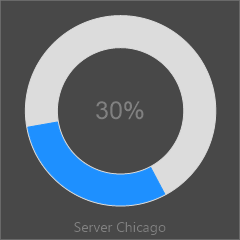
  FMarquee.Value := 30;
  FMarquee.CaptionOptions.Text := 'Server Chicago';

  // Drive the rotation. Interval is the millisecond delay between steps
  // (1..200, smaller is faster); Step is the degrees added per tick (1..20).
  FMarquee.MarqueeAnimation.Interval := 1;
  FMarquee.MarqueeAnimation.Step := 4;
  FMarquee.MarqueeAnimation.Active := True; // start rotating
end;

procedure TForm1.StopMarquee;
begin
  // Stop the rotation when the background task completes.
  FMarquee.MarqueeAnimation.Active := False;
  FMarquee.Value := 100; // fill the ring to signal "done"
end;
void __fastcall TForm1::SetupMarquee()
{
  FMarquee = new TTMSFNCWidgetMarqueeProgress(this);
  FMarquee->Parent = this;
  FMarquee->SetBounds(20, 20, 220, 220);

  // Value is the arc-segment length as a percentage (0..100) of the ring.
  // For an indeterminate "working" look, a partial arc that rotates reads best.
  FMarquee->Value = 30;
  FMarquee->CaptionOptions->Text = "Server Chicago";

  // Drive the rotation. Interval is the millisecond delay between steps
  // (1..200, smaller is faster); Step is the degrees added per tick (1..20).
  FMarquee->MarqueeAnimation->Interval = 1;
  FMarquee->MarqueeAnimation->Step = 4;
  FMarquee->MarqueeAnimation->Active = true; // start rotating
}

void __fastcall TForm1::StopMarquee()
{
  // Stop the rotation when the background task completes.
  FMarquee->MarqueeAnimation->Active = false;
  FMarquee->Value = 100; // fill the ring to signal "done"
}

Speed: interval and step
Two properties shape how fast and how smoothly the arc travels:
MarqueeAnimation.Interval— the delay in milliseconds between two animation steps. The valid range is 1 to 200, and the default is 1; a smaller value rotates faster. Values outside the range are ignored.MarqueeAnimation.Step— the angular increment in degrees added on each step. The valid range is 1 to 20, and the default is 4; a larger step makes the arc jump in bigger increments (faster but less smooth).
A low Interval with a small Step gives the smoothest rotation; raise Step
for a faster, choppier sweep without changing the tick rate.
Arc length with Value
For this widget, Value is the length of the moving arc segment, expressed as
a percentage (0..100) of the full ring — internally the sweep is Value / 100 * 360
degrees. A partial value such as 30 produces a comfortable rotating segment that
reads clearly as "busy"; setting Value := 100 fills the whole ring, which is
useful as a "finished" state once the work completes. StepIt raises Value by
one and StepBy(AValue) adds a given amount, both clamping at 100 — handy if you
want the segment to grow as a coarse, open-ended progress hint.
Pitfalls
- Nothing rotates until
MarqueeAnimation.Activeis True. Sizing and styling the ring alone draws a static arc; the sweep only runs whileActiveis set. - Animation needs a solid fill. Rotation is only visible with a solid arc
fill (
CircleOptions.Fill.Kind := gfkSolid); the designer sets this up automatically, but set it explicitly when you build the widget in code (see Appearance). Valuehere is arc length, not real progress. It is a percentage of the ring, not a measured quantity. Leave it partial (for example 30) for the classic indeterminate look; set it to 100 only to show completion.IntervalandStepsilently clamp. Out-of-range assignments (for exampleInterval := 0orStep := 50) are ignored, leaving the previous value.
See also
- Appearance — arc fill, track, thickness, border, and caption.
- API reference — full class reference.