Adding Messages
TTMSFNCChat stores messages in the ChatMessages collection. Messages can be added programmatically or typed by the user via the built-in message field.
The built-in message field
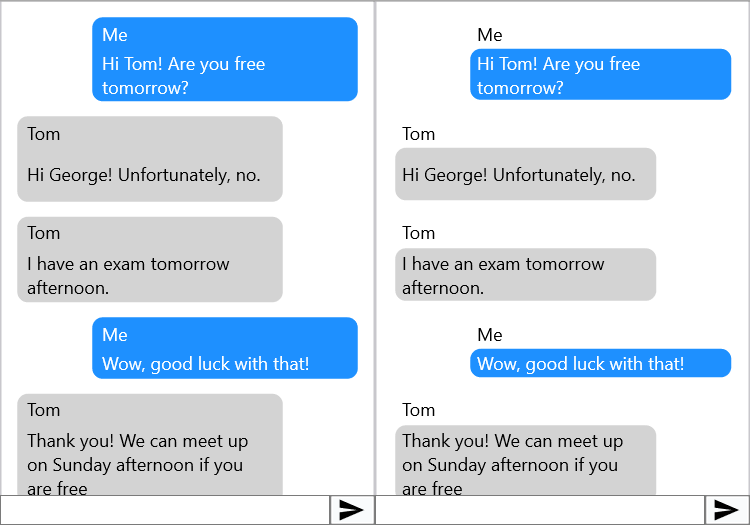
Set ShowMessageField := True to show a TMemo input and a send button at the bottom:
TMSFNCChat1.ShowMessageField := True;
TMSFNCChat1->ShowMessageField = true;
When the user presses the send button or Enter, a new right-aligned message is added. Use OnBeforeSendMessage to validate or modify the text before it is added:
procedure TForm1.TMSFNCChat1BeforeSendMessage(Sender: TObject;
  var AText: string; var AAllow: Boolean);
begin
  if Trim(AText) = '' then
    AAllow := False;
end;
void __fastcall TForm1::TMSFNCChat1BeforeSendMessage(TObject *Sender,
  System::UnicodeString &AText, bool &AAllow)
{
  if (Trim(AText) == "")
    AAllow = false;
}
Adding messages in code
// Add messages via collection
procedure TForm1.Button1Click(Sender: TObject);
var
  itm: TTMSFNCChatItem;
begin
  itm := TMSFNCChat1.ChatMessages.Add;
  itm.Text            := 'How was your day?';
  itm.Title           := 'Mom';
  itm.Fill.Color      := gcGray;
  itm.MessageLocation := cmlLeft;
end;

// Add messages via helper functions
itm := TMSFNCChat1.AddMessage('Hello!', cmlRight);                    // right-aligned
itm := TMSFNCChat1.AddMessage('Hi there!', 'Alice', cmlLeft);         // with title

// Add an image
TMSFNCChat1.AddImage('C:\Photos\photo.jpg');
TMSFNCChat1.AddImage('C:\Photos\photo.jpg', 'Look at this!', cmlLeft);
// With named image in BitmapContainer:
TMSFNCChat1.AddImageWithName('C:\Photos\photo.jpg', 'my-photo');

// Add a file link
TMSFNCChat1.AddFile('file://C:\Reports\report.pdf', 'Monthly Report', 'Attached');

// Clear all messages
TMSFNCChat1.Clear;

// Scroll to a specific item
TMSFNCChat1.ScrollToItem(TMSFNCChat1.ChatMessages.Count - 1);

// Show the message input field at the bottom
TMSFNCChat1.ShowMessageField := True;

// Intercept the send button
procedure TForm1.TMSFNCChat1BeforeSendMessage(Sender: TObject;
  var AText: string; var AAllow: Boolean);
begin
  if Trim(AText) = '' then
    AAllow := False;  // block empty messages
end;
// Add messages via collection
void __fastcall TForm1::Button1Click(TObject *Sender)
{
  TTMSFNCChatItem *itm = static_cast<TTMSFNCChatItem *>(TMSFNCChat1->ChatMessages->Add());
  itm->Text            = "How was your day?";
  itm->Title           = "Mom";
  itm->Fill->Color     = gcGray;
  itm->MessageLocation = cmlLeft;

  // Add messages via helper functions
  itm = TMSFNCChat1->AddMessage("Hello!", cmlRight);                    // right-aligned
  itm = TMSFNCChat1->AddMessage("Hi there!", "Alice", cmlLeft);         // with title

  // Add an image
  TMSFNCChat1->AddImage("C:\\Photos\\photo.jpg");
  TMSFNCChat1->AddImage("C:\\Photos\\photo.jpg", "Look at this!", cmlLeft);
  // With named image in BitmapContainer:
  TMSFNCChat1->AddImageWithName("C:\\Photos\\photo.jpg", "my-photo");

  // Add a file link
  TMSFNCChat1->AddFile("file://C:\\Reports\\report.pdf", "Monthly Report", "Attached");

  // Clear all messages
  TMSFNCChat1->Clear();

  // Scroll to the latest item
  TMSFNCChat1->ScrollToBottom();

  // Show the message input field at the bottom
  TMSFNCChat1->ShowMessageField = true;
}

// Intercept the send button
void __fastcall TForm1::TMSFNCChat1BeforeSendMessage(TObject *Sender,
  System::UnicodeString &AText, bool &AAllow)
{
  if (Trim(AText) == "")
    AAllow = false;  // block empty messages
}
Via ChatMessages collection
var itm: TTMSFNCChatItem;
begin
  itm := TMSFNCChat1.ChatMessages.Add;
  itm.Text            := 'How was your day?';
  itm.Title           := 'Mom';
  itm.Fill.Color      := gcGray;
  itm.MessageLocation := cmlLeft;  // cmlLeft or cmlRight
end;
TTMSFNCChatItem *itm = static_cast<TTMSFNCChatItem *>(TMSFNCChat1->ChatMessages->Add());
itm->Text            = "How was your day?";
itm->Title           = "Mom";
itm->Fill->Color     = gcGray;
itm->MessageLocation = cmlLeft;  // cmlLeft or cmlRight
Via AddMessage helpers
TMSFNCChat1.AddMessage('Hello!');                         // right-aligned
TMSFNCChat1.AddMessage('Hi there!', 'Alice', cmlLeft);    // with title, left-aligned
TMSFNCChat1->AddMessage("Hello!");                         // right-aligned
TMSFNCChat1->AddMessage("Hi there!", "Alice", cmlLeft);    // with title, left-aligned
DefaultLeftItem and DefaultRightItem provide the appearance template applied to messages added via AddMessage.
Adding images
// From file path
TMSFNCChat1.AddImage('C:\Photos\photo.jpg');
TMSFNCChat1.AddImage('C:\Photos\photo.jpg', 'Look at this!', cmlLeft);

// With a named key for BitmapContainer storage
TMSFNCChat1.AddImageWithName('C:\Photos\photo.jpg', 'photo-key');
// From file path
TMSFNCChat1->AddImage("C:\\Photos\\photo.jpg");
TMSFNCChat1->AddImage("C:\\Photos\\photo.jpg", "Look at this!", cmlLeft);

// With a named key for BitmapContainer storage
TMSFNCChat1->AddImageWithName("C:\\Photos\\photo.jpg", "photo-key");
Assign a TTMSFNCBitmapContainer to BitmapContainer and set AddImagesToBitmapContainer := True so images are stored by name rather than embedded as base64 (which can slow down rendering with many images).
Note
On the WEB platform without a BitmapContainer, pass a base64-encoded data URI as the image path.
Adding file links
TMSFNCChat1.AddFile('file://C:\Reports\report.pdf', 'Monthly Report', 'Attached');
TMSFNCChat1->AddFile("file://C:\\Reports\\report.pdf", "Monthly Report", "Attached");
The first parameter is the URL opened on click; the second is the display name.
Drag and drop
TTMSFNCChat detects files dragged over the message area. Handle OnFileDragOver to allow the drop, then read the dropped files in OnFileDrop:
procedure TForm1.TMSFNCChat1FileDragOver(Sender: TObject;
  AFileList: TStringList; var AAllow: Boolean);
begin
  AAllow := True;
end;

procedure TForm1.TMSFNCChat1FileDrop(Sender: TObject; AFileList: TStringList);
var
  i: Integer;
begin
  for i := 0 to AFileList.Count - 1 do
    TMSFNCChat1.AddFile('file://' + AFileList[i], ExtractFileName(AFileList[i]));
end;
void __fastcall TForm1::TMSFNCChat1FileDragOver(TObject *Sender, bool &AAllow)
{
  AAllow = true;
}

void __fastcall TForm1::TMSFNCChat1FileDrop(TObject *Sender, TTMSFNCChatDropFileList AFileList)
{
  for (int i = 0; i < AFileList.Length; i++)
    TMSFNCChat1->AddFile("file://" + AFileList[i], ExtractFileName(AFileList[i]));
}
Reload (pull-to-refresh)
TMSFNCChat1.Reload.Enabled := True;
TMSFNCChat1->Reload->Enabled = true;
Dragging down on the chat list starts a reload animation and fires OnStartReload. When your background fetch is done, call StopReload:
procedure TForm1.TMSFNCChat1StartReload(Sender: TObject);
begin
  TThread.CreateAnonymousThread(procedure
  begin
    // load older messages...
    TThread.Synchronize(nil, procedure
    begin
      TMSFNCChat1.StopReload;
    end);
  end).Start;
end;
void __fastcall TForm1::TMSFNCChat1StartReload(TObject *Sender)
{
  TThread::CreateAnonymousThread([this]()
  {
    // load older messages...
    TThread::Synchronize(nullptr, [this]()
    {
      TMSFNCChat1->StopReload();
    });
  })->Start();
}
Combining drag-and-drop, validation, and reload
This pattern connects file drag-and-drop, send validation, and pull-to-refresh in one form:
procedure TForm1.TMSFNCChat1BeforeSendMessage(Sender: TObject;
  var AText: string; var AAllow: Boolean);
begin
  AAllow := Trim(AText) <> '';
end;

procedure TForm1.TMSFNCChat1FileDrop(Sender: TObject; AFileList: TStringList);
var
  i: Integer;
begin
  for i := 0 to AFileList.Count - 1 do
    TMSFNCChat1.AddFile('file://' + AFileList[i], ExtractFileName(AFileList[i]));
end;

procedure TForm1.TMSFNCChat1StartReload(Sender: TObject);
begin
  TThread.CreateAnonymousThread(procedure
  begin
    TThread.Synchronize(nil, procedure begin TMSFNCChat1.StopReload; end);
  end).Start;
end;
void __fastcall TForm1::TMSFNCChat1BeforeSendMessage(TObject *Sender,
  System::UnicodeString &AText, bool &AAllow)
{
  AAllow = Trim(AText) != "";
}

void __fastcall TForm1::TMSFNCChat1FileDrop(TObject *Sender, TTMSFNCChatDropFileList AFileList)
{
  for (int i = 0; i < AFileList.Length; i++)
    TMSFNCChat1->AddFile("file://" + AFileList[i], ExtractFileName(AFileList[i]));
}

void __fastcall TForm1::TMSFNCChat1StartReload(TObject *Sender)
{
  TThread::CreateAnonymousThread([this]()
  {
    TThread::Synchronize(nullptr, [this]() { TMSFNCChat1->StopReload(); });
  })->Start();
}