Checked Items
TTMSFNCCheckedListBox extends the standard list box workflow with check boxes on each item. Use it for preference lists, feature toggles, filter options, and other cases where users can select more than one value without opening a separate dialog.
Populate Items
AddItem returns a TTMSFNCCheckedListBoxItem, so code can set the text and check state in the same setup block.
procedure TForm1.ConfigureCheckedListBox;
var
  Item: TTMSFNCCheckedListBoxItem;
begin
  TMSFNCCheckedListBox1.AddItem('PDF export').Checked := True;
  TMSFNCCheckedListBox1.AddItem('Email notification');

  Item := TMSFNCCheckedListBox1.AddItem('Archive copy');
  TMSFNCCheckedListBox1.CheckedItem[Item] := True;
end;
void __fastcall TForm1::ConfigureCheckedListBox()
{
  TTMSFNCCheckedListBoxItem *Item;

  TMSFNCCheckedListBox1->AddItem("PDF export")->Checked = true;
  TMSFNCCheckedListBox1->AddItem("Email notification");

  Item = TMSFNCCheckedListBox1->AddItem("Archive copy");
  TMSFNCCheckedListBox1->CheckedItem[Item] = true;
}
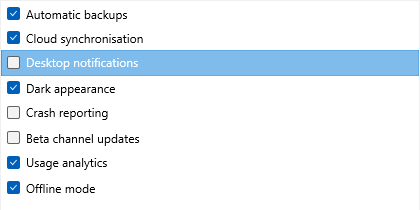
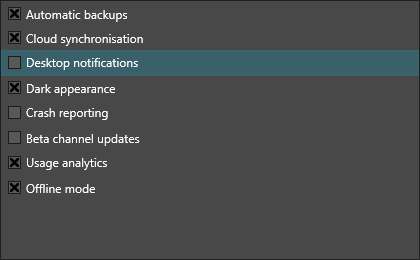
Note the two independent states in the capture: Desktop notifications is the highlighted row but is not checked, while several unhighlighted rows are.
Respond to Check Changes
Use OnItemCheckChanged when another part of the form must react immediately after the user checks or unchecks an item.
procedure TForm1.FormCreate(Sender: TObject);
begin
  TMSFNCCheckedListBox1.OnItemCheckChanged := TMSFNCCheckedListBox1ItemCheckChanged;
end;

procedure TForm1.TMSFNCCheckedListBox1ItemCheckChanged(Sender: TObject;
  AItem: TTMSFNCCheckedListBoxItem);
begin
  Caption := AItem.Text + ': ' + BoolToStr(AItem.Checked, True);
end;
void __fastcall TForm1::FormCreate(TObject *Sender)
{
  TMSFNCCheckedListBox1->OnItemCheckChanged = TMSFNCCheckedListBox1ItemCheckChanged;
}

void __fastcall TForm1::TMSFNCCheckedListBox1ItemCheckChanged(TObject *Sender,
  TTMSFNCCheckedListBoxItem *AItem)
{
  Caption = AItem->Text + ": " + BoolToStr(AItem->Checked, true);
}
Read or Change Selection
Use Checked[index] when you already know the item position. Use CheckedItems when you want the full checked set. CheckAll and UncheckAll are useful for command buttons or reset actions.
procedure TForm1.SelectAllOptions;
begin
  TMSFNCCheckedListBox1.CheckAll;
end;

procedure TForm1.ShowCheckedOptions;
var
  Checked: TTMSFNCListBoxCheckedItems;
  Item: TTMSFNCCheckedListBoxItem;
  Summary: string;
begin
  Checked := TMSFNCCheckedListBox1.CheckedItems;
  Summary := '';

  for Item in Checked do
  begin
    if Summary <> '' then
      Summary := Summary + ', ';

    Summary := Summary + Item.Text;
  end;

  ShowMessage(Summary);
end;
void __fastcall TForm1::SelectAllOptions()
{
  TMSFNCCheckedListBox1->CheckAll();
}

void __fastcall TForm1::ShowCheckedOptions()
{
  TTMSFNCListBoxCheckedItems Checked = TMSFNCCheckedListBox1->CheckedItems();
  System::UnicodeString Summary = "";

  for (int i = 0; i < Checked.Length; i++)
  {
    TTMSFNCCheckedListBoxItem *Item = Checked[i];
    if (Summary != "")
      Summary = Summary + ", ";

    Summary = Summary + Item->Text;
  }

  ShowMessage(Summary);
}
Combining population, change events, and bulk collection
The following example loads a feature list, responds to each toggle by updating a status label, and provides a Select All / None action:
procedure TForm1.FormCreate(Sender: TObject);
var
  item: TTMSFNCCheckedListBoxItem;
begin
  for var feat in ['Compression', 'Encryption', 'Logging', 'Audit Trail'] do
  begin
    item := TMSFNCCheckedListBox1.AddItem(feat);
    item.Checked := feat = 'Logging'; // default on
  end;
end;

procedure TForm1.TMSFNCCheckedListBox1ItemCheckChanged(
  Sender: TObject; AItem: TTMSFNCCheckedListBoxItem);
begin
  lblStatus.Caption := AItem.Text +
    IfThen(AItem.Checked, ' enabled', ' disabled');
end;

procedure TForm1.btnSelectAllClick(Sender: TObject);
begin
  TMSFNCCheckedListBox1.CheckAll;
end;

procedure TForm1.btnApplyClick(Sender: TObject);
var
  checked: TArray<TTMSFNCCheckedListBoxItem>;
  s: string;
begin
  checked := TMSFNCCheckedListBox1.CheckedItems;
  for var item in checked do
    s := s + item.Text + ', ';
  ShowMessage('Active features: ' + s.TrimRight([',', ' ']));
end;
void __fastcall TForm1::FormCreate(TObject *Sender)
{
  const System::UnicodeString features[] = {"Compression", "Encryption", "Logging", "Audit Trail"};
  for (int i = 0; i < 4; i++)
  {
    TTMSFNCCheckedListBoxItem *item = TMSFNCCheckedListBox1->AddItem(features[i]);
    item->Checked = (features[i] == "Logging"); // default on
  }
}

void __fastcall TForm1::TMSFNCCheckedListBox1ItemCheckChanged(
  TObject *Sender, TTMSFNCCheckedListBoxItem *AItem)
{
  lblStatus->Text = AItem->Text + (AItem->Checked ? " enabled" : " disabled");
}

void __fastcall TForm1::btnSelectAllClick(TObject *Sender)
{
  TMSFNCCheckedListBox1->CheckAll();
}

void __fastcall TForm1::btnApplyClick(TObject *Sender)
{
  TTMSFNCListBoxCheckedItems checked = TMSFNCCheckedListBox1->CheckedItems();
  System::UnicodeString s;
  for (int i = 0; i < checked.Length; i++)
    s = s + checked[i]->Text + ", ";
  if (s.Length() >= 2)
    s.SetLength(s.Length() - 2);
  ShowMessage("Active features: " + s);
}
Checked state versus selection
Checking and selecting are independent. Selected follows the highlight the user
moves with the mouse or arrow keys; Checked[Index] is the persistent choice the
check box records. A user can highlight one row while a completely different set
stays checked, which is exactly why a checked list box is the right control for
"pick several" — reading Selected to find the chosen values is the most common
mistake with this component.
| Member | Reads / writes |
|---|---|
Checked[AItemIndex] |
The check state of one item, by position. |
CheckedItem[AItem] |
The same state, addressed by the item object rather than its index. |
CheckedItems |
Every checked item, as a TTMSFNCListBoxCheckedItems array. |
CheckAll / UncheckAll |
Bulk set or clear every item. |
Common mistakes
- Reading
Selectedinstead ofChecked. Selection is the highlight; the check boxes are the answer the user gave. - Assuming index stability.
Checked[Index]is positional, so sorting, filtering, or removing items moves the state with the position, not with the value. Address the item (CheckedItem[AItem]) when the list can be reordered. - Doing per-item work inside
OnItemCheckChangedduring a bulk change.CheckAll/UncheckAllraise the event for every item; guard the handler with a flag when the reaction is expensive.
See also
- TMS FNC Checked List Box overview
- API reference: TTMSFNCCheckedListBox
- Checked nodes (tree) — the hierarchical equivalent