Checked Nodes
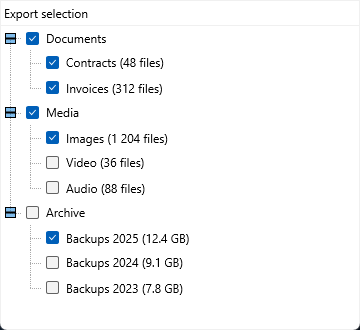
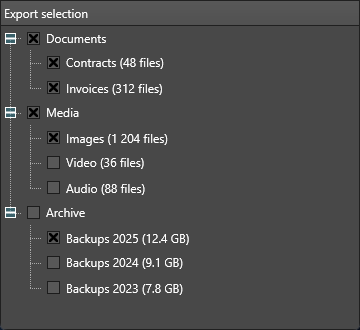
TTMSFNCCheckedTreeView extends TTMSFNCTreeView with check boxes on nodes. Use it for hierarchical choices where a flat checked list would lose parent-child context.
Populate Nodes
Create nodes with the normal tree API, then set Checked[Node] for the initial state. A node added at run time does not show a check box until you set its check type - Node.CheckTypes[0] := tvntCheckBox - because the control assigns that automatically only for nodes created at design time.
procedure TForm1.ConfigureCheckedTreeView;
var
  RootNode: TTMSFNCTreeViewNode;
  ChildNode: TTMSFNCTreeViewNode;
begin
  TMSFNCCheckedTreeView1.Clear;

  RootNode := TMSFNCCheckedTreeView1.AddNode;
  RootNode.CheckTypes[0] := tvntCheckBox;
  RootNode.Text[0] := 'Export';
  TMSFNCCheckedTreeView1.Checked[RootNode] := True;

  ChildNode := TMSFNCCheckedTreeView1.AddNode(RootNode);
  ChildNode.CheckTypes[0] := tvntCheckBox;
  ChildNode.Text[0] := 'Include images';
  TMSFNCCheckedTreeView1.Checked[ChildNode] := True;

  ChildNode := TMSFNCCheckedTreeView1.AddNode(RootNode);
  ChildNode.CheckTypes[0] := tvntCheckBox;
  ChildNode.Text[0] := 'Include audit trail';
end;
void __fastcall TForm1::ConfigureCheckedTreeView()
{
  TTMSFNCTreeViewNode *RootNode;
  TTMSFNCTreeViewNode *ChildNode;

  TMSFNCCheckedTreeView1->Clear();

  RootNode = TMSFNCCheckedTreeView1->AddNode();
  RootNode->CheckTypes[0] = tvntCheckBox;
  RootNode->Text[0] = "Export";
  TMSFNCCheckedTreeView1->Checked[RootNode] = true;

  ChildNode = TMSFNCCheckedTreeView1->AddNode(RootNode);
  ChildNode->CheckTypes[0] = tvntCheckBox;
  ChildNode->Text[0] = "Include images";
  TMSFNCCheckedTreeView1->Checked[ChildNode] = true;

  ChildNode = TMSFNCCheckedTreeView1->AddNode(RootNode);
  ChildNode->CheckTypes[0] = tvntCheckBox;
  ChildNode->Text[0] = "Include audit trail";
}
Read Checked Nodes
Use CheckedNodes to collect checked nodes. The optional ARecurse argument controls whether child nodes are included recursively.
procedure TForm1.ShowCheckedNodes;
var
  Nodes: TTMSFNCTreeViewCheckedNodes;
  Node: TTMSFNCTreeViewNode;
  Summary: string;
begin
  Nodes := TMSFNCCheckedTreeView1.CheckedNodes(0, True);
  Summary := '';

  for Node in Nodes do
  begin
    if Summary <> '' then
      Summary := Summary + ', ';

    Summary := Summary + Node.Text[0];
  end;

  ShowMessage(Summary);
end;
void __fastcall TForm1::ShowCheckedNodes()
{
  TTMSFNCTreeViewCheckedNodes Nodes = TMSFNCCheckedTreeView1->CheckedNodes(0, true);
  System::UnicodeString Summary = "";

  for (int i = 0; i < Nodes.Length; i++)
  {
    TTMSFNCTreeViewNode *Node = Nodes[i];
    if (Summary != "")
      Summary = Summary + ", ";

    Summary = Summary + Node->Text[0];
  }

  ShowMessage(Summary);
}
Combining hierarchy, checked state, and recursive collection
Keep tree structure and checked state together in one setup routine when the checked hierarchy mirrors an application feature set. This makes later collection predictable because each checked node already carries the display text that users saw:
procedure TForm1.FormCreate(Sender: TObject);
var
  grpNode, childNode: TTMSFNCTreeViewNode;
begin
  TMSFNCCheckedTreeView1.BeginUpdate;

  grpNode := TMSFNCCheckedTreeView1.AddNode(nil);
  grpNode.CheckTypes[0] := tvntCheckBox;
  grpNode.Text[0] := 'Reporting';

  childNode := TMSFNCCheckedTreeView1.AddNode(grpNode);
  childNode.CheckTypes[0] := tvntCheckBox;
  childNode.Text[0] := 'Daily summary';
  childNode := TMSFNCCheckedTreeView1.AddNode(grpNode);
  childNode.CheckTypes[0] := tvntCheckBox;
  childNode.Text[0] := 'Weekly digest';

  TMSFNCCheckedTreeView1.CheckNode(grpNode, 0, True); // checks the group and its children
  TMSFNCCheckedTreeView1.UnCheckNode(childNode, 0);   // override: this one stays unchecked
  TMSFNCCheckedTreeView1.EndUpdate;
end;

procedure TForm1.btnCollectClick(Sender: TObject);
var
  nodes: TTMSFNCTreeViewCheckedNodes;
begin
  nodes := TMSFNCCheckedTreeView1.CheckedNodes(0, True); // column 0, recurse
  for var n in nodes do
    Memo1.Lines.Add(n.Text[0]);
end;
void __fastcall TForm1::FormCreate(TObject *Sender)
{
  TTMSFNCTreeViewNode *grpNode, *childNode;

  TMSFNCCheckedTreeView1->BeginUpdate();

  grpNode = TMSFNCCheckedTreeView1->AddNode(nullptr);
  grpNode->CheckTypes[0] = tvntCheckBox;
  grpNode->Text[0] = "Reporting";

  childNode = TMSFNCCheckedTreeView1->AddNode(grpNode);
  childNode->CheckTypes[0] = tvntCheckBox;
  childNode->Text[0] = "Daily summary";
  childNode = TMSFNCCheckedTreeView1->AddNode(grpNode);
  childNode->CheckTypes[0] = tvntCheckBox;
  childNode->Text[0] = "Weekly digest";

  TMSFNCCheckedTreeView1->CheckNode(grpNode, 0, true); // checks the group and its children
  TMSFNCCheckedTreeView1->UnCheckNode(childNode, 0);   // override: this one stays unchecked
  TMSFNCCheckedTreeView1->EndUpdate();
}

void __fastcall TForm1::btnCollectClick(TObject *Sender)
{
  TTMSFNCTreeViewCheckedNodes nodes =
    TMSFNCCheckedTreeView1->CheckedNodes(0, true); // column 0, recurse
  for (int i = 0; i < nodes.Length; i++)
    Memo1->Lines->Add(nodes[i]->Text[0]);
}
Reading the checked set
CheckedNodes returns a TTMSFNCTreeViewCheckedNodes — a plain
array of TTMSFNCTreeViewNode. Both of its parameters have defaults, and the
first one is the column, not the recursion flag:
function CheckedNodes(AColumn: Integer = 0; ARecurse: Boolean = True): TTMSFNCTreeViewCheckedNodes;
So CheckedNodes(0, True) walks the whole tree for column 0. Passing a single
argument sets the column, which is the easiest call to get wrong.
Parents, children, and partial state
A checked tree carries a question a flat list never has: what does a checked parent mean when only some of its children are checked? The control stores one state per node and does not cascade for you, so decide the policy in your own code — either check the children when a parent is checked, or treat a parent as a label whose own state is ignored and read only the leaves. Doing neither is what produces a "selection" the user did not intend.
Common mistakes
- No check boxes on run-time nodes.
CheckTypes[0]is set totvntCheckBoxautomatically only at design time. Nodes you add in code render without a check box until you set it yourself. - Passing the recursion flag as the first argument.
CheckedNodes(True)sets the column, not the recursion. UseCheckedNodes(0, True). - Expecting parent checks to cascade. Each node's state is independent; cascade it yourself if that is the behaviour you want.
- Collecting with
ARecurse = Falseand wondering where the children went. That call returns only the top level.