Renderer source
Render a single grid from an external, prepared "layer" — a complete renderer with its own data, appearance, and scroll state — and swap between layers with one property assignment. Use it to keep several ready-made views alive at once and flip the visible one instantly, without rebuilding or reloading the grid.
Overview
A TTMSFNCDataGrid normally owns and draws
its own renderer layer: the cells you fill, the theme you set, and the scroll
position all belong to that one grid. A renderer source lets you move that
layer outside the grid into a reusable component, then link it back by
reference.
TTMSFNCDataGridRendererSource
wraps a standalone TTMSFNCDataGridRenderer
instance — a full layer with its own data and appearance. Assign one to the
grid's RendererSource property and the grid renders that instance: its data,
its theme, its scroll behaviour. The grid keeps no copy, so edits to the active
layer show up live. Set RendererSource back to nil and the grid reverts to
its own built-in renderer and data, untouched.
Reach for a renderer source when you want several prepared views and one grid to show them: a dashboard that flips between "Sales" and "Inventory" tables, a wizard that swaps datasets between steps, or an A/B comparison where each layer keeps its own scroll position and selection while it sits in the background. When you only ever show one dataset, you do not need this — fill the grid directly. When you need data operations with no grid at all, use the headless data layer instead.
How a layer fits the three-layer design
The grid is built from a component facade, a core, a data layer, and a renderer (see Architecture). The renderer is the layer that holds drawing state, appearance, and the cell data it paints. A renderer source externalises exactly that layer:
TTMSFNCDataGridRendererSource.Rendereris the ownedTTMSFNCDataGridRenderer. Configure cells, fixed rows,CellAppearance, andOptionson it exactly as you would on a grid.- The source implements
ITMSFNCDataGridRendererSource, whose singleGetRendererInstancemethod hands the grid the instance to draw. The grid links to whatever component implements that contract, not to a fixed class. - While a source is linked, the grid facade (
Cells[],RowCount,Sort, selection, …) operates on the active layer — so all your usual grid code keeps working, it just targets the linked layer.
Quick start
Create a source, configure its Renderer like a grid, and link it:
procedure TForm1.BuildSalesLayer;
var
  src: TTMSFNCDataGridRendererSource;
  r: TTMSFNCDataGridRenderer;
  i: Integer;
begin
  // A renderer source owns a complete, standalone "layer": its own renderer
  // instance, its own data and its own appearance. It renders nothing on its
  // own - it only becomes visible once linked to a grid's RendererSource.
  src := TTMSFNCDataGridRendererSource.Create(Self);
  src.Name := 'SalesLayer';
  FSalesLayer := src;

  // Configure the layer through its owned Renderer. Everything you can set on a
  // grid - cells, fixed rows, appearance, column stretching - is set here.
  r := src.Renderer;
  r.BeginUpdate;
  try
    r.CellAppearance.FixedLayout.Fill.Color := gcSteelblue;
    r.CellAppearance.FixedLayout.Font.Color := gcWhite;
    r.CellAppearance.NormalLayout.Fill.Color := gcAliceblue;
    r.Options.Column.Stretching.Enabled := True;

    r.FixedRowCount := 1;
    r.ColumnCount := 3;
    r.RowCount := 4;

    r.Cells[0, 0] := 'Region';
    r.Cells[1, 0] := 'Q1';
    r.Cells[2, 0] := 'Q2';
    for i := 1 to 3 do
    begin
      r.Cells[0, i] := Format('Region %d', [i]);
      r.Cells[1, i] := (400 + i * 10).ToString;
      r.Cells[2, i] := (450 + i * 10).ToString;
    end;
  finally
    r.EndUpdate;
  end;
end;
void __fastcall TForm1::BuildSalesLayer()
{
  // A renderer source owns a complete, standalone "layer": its own renderer
  // instance, its own data and its own appearance. It renders nothing on its
  // own - it only becomes visible once linked to a grid's RendererSource.
  TTMSFNCDataGridRendererSource *src = new TTMSFNCDataGridRendererSource(this);
  src->Name = "SalesLayer";
  FSalesLayer = src;

  // Configure the layer through its owned Renderer. Everything you can set on a
  // grid - cells, fixed rows, appearance, column stretching - is set here.
  TTMSFNCDataGridRenderer *r = src->Renderer;
  r->BeginUpdate();
  try
  {
    r->CellAppearance->FixedLayout->Fill->Color = gcSteelblue;
    r->CellAppearance->FixedLayout->Font->Color = gcWhite;
    r->CellAppearance->NormalLayout->Fill->Color = gcAliceblue;
    r->Options->Column->Stretching->Enabled = true;

    r->FixedRowCount = 1;
    r->ColumnCount = 3;
    r->RowCount = 4;

    r->Strings[0][0] = "Region";
    r->Strings[1][0] = "Q1";
    r->Strings[2][0] = "Q2";
    for (int i = 1; i <= 3; i++)
    {
      r->Strings[0][i] = Format("Region %d", ARRAYOFCONST((i)));
      r->Strings[1][i] = IntToStr(400 + i * 10);
      r->Strings[2][i] = IntToStr(450 + i * 10);
    }
  }
  __finally
  {
    r->EndUpdate();
  }
}
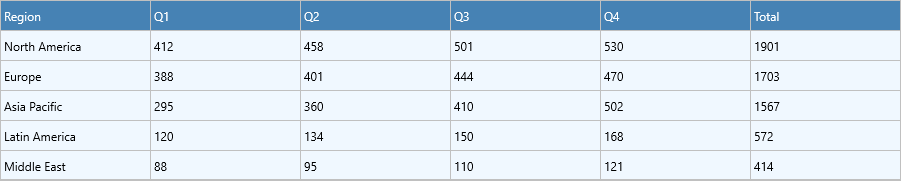
Once the layer is built, one assignment shows it in the grid. The screenshot below shows the grid rendering the linked "Sales by Region" layer with the layer's own blue theme — the grid component itself was never themed or filled; its data, appearance, and scroll state all come from the linked layer, by reference:

Switching layers at runtime
Prepare each layer once, then flip the visible one with a single property write. Editing through the grid facade targets whichever layer is active, and each layer remembers its own state while another is shown:
procedure TForm1.ShowSalesLayer(Sender: TObject);
begin
  // One assignment swaps the entire layer by reference: data, appearance and
  // scroll position all come from the source. The grid keeps no copy.
  Grid.RendererSource := FSalesLayer;
end;

procedure TForm1.ShowOwnLayer(Sender: TObject);
begin
  // nil reverts the grid to its own built-in renderer and its own data, exactly
  // as it was before any source was linked.
  Grid.RendererSource := nil;
end;

procedure TForm1.AppendRowToActiveLayer(Sender: TObject);
var
  newRow: Integer;
begin
  // The grid facade always targets the ACTIVE layer. While a source is linked,
  // edits flow into that layer and are kept by it - switch away and back and the
  // change is still there, because the grid renders the source by reference.
  Grid.BeginUpdate;
  try
    newRow := Grid.RowCount;
    Grid.RowCount := newRow + 1;
    Grid.Cells[0, newRow] := Format('Added row %d', [newRow]);
  finally
    Grid.EndUpdate;
  end;
end;
void __fastcall TForm1::ShowSalesLayer(TObject *Sender)
{
  // One assignment swaps the entire layer by reference: data, appearance and
  // scroll position all come from the source. The grid keeps no copy.
  Grid->RendererSource = FSalesLayer;
}

void __fastcall TForm1::ShowOwnLayer(TObject *Sender)
{
  // nullptr reverts the grid to its own built-in renderer and its own data, exactly
  // as it was before any source was linked.
  Grid->RendererSource = nullptr;
}

void __fastcall TForm1::AppendRowToActiveLayer(TObject *Sender)
{
  // The grid facade always targets the ACTIVE layer. While a source is linked,
  // edits flow into that layer and are kept by it - switch away and back and the
  // change is still there, because the grid renders the source by reference.
  Grid->BeginUpdate();
  try
  {
    int newRow = Grid->RowCount;
    Grid->RowCount = newRow + 1;
    Grid->Strings[0][newRow] = Format("Added row %d", ARRAYOFCONST((newRow)));
  }
  __finally
  {
    Grid->EndUpdate();
  }
}
This is the combination that makes renderer sources useful: switching and
editing the active layer together. Build two sources up front, link one,
append a row through Grid.Cells[] — that row belongs to the linked layer.
Switch to the second layer, edit it, switch back, and the first layer's added
row is still there because the grid renders the source by reference rather than
copying it.
Supplying a custom renderer class
The source instantiates its renderer from GetRendererInstanceClass. Subclass
the source and override that protected method to inject a custom
TTMSFNCDataGridRenderer descendant
— for example, one with a custom cell class or overridden drawing:
type
  TMyRendererSource = class(TTMSFNCDataGridRendererSource)
  protected
    function GetRendererInstanceClass: TTMSFNCDataGridRendererClass; override;
  end;

function TMyRendererSource.GetRendererInstanceClass: TTMSFNCDataGridRendererClass;
begin
  Result := TMyCustomRenderer;   // your TTMSFNCDataGridRenderer descendant
end;
// Your TTMSFNCDataGridRenderer descendant
class TMyCustomRenderer : public TTMSFNCDataGridRenderer
{
};

class TMyRendererSource : public TTMSFNCDataGridRendererSource
{
protected:
  virtual TTMSFNCDataGridRendererClass __fastcall GetRendererInstanceClass();
};

TTMSFNCDataGridRendererClass __fastcall TMyRendererSource::GetRendererInstanceClass()
{
  return __classid(TMyCustomRenderer);   // your TTMSFNCDataGridRenderer descendant
}
The grid still links through the same RendererSource property and
ITMSFNCDataGridRendererSource contract — only the renderer class it draws
changes.
Pitfalls
- Lifetime and free-notification. The grid holds the source by reference and
registers free-notification, so freeing a linked source automatically resets
RendererSourcetoniland reverts the grid — but the source is a real component you own. Give it anAOwner(or free it yourself) so the layer is not leaked when the form closes. nilreverts, it does not clear. SettingRendererSource := nilrestores the grid's own layer and data exactly as before; it does not empty the grid. The external layer keeps its data for the next time you link it.- Edits go to the active layer, not the grid's own layer. While a source is
linked,
Grid.Cells[...] := …changes the linked layer. If you meant to edit the grid's built-in data, setRendererSource := nilfirst. - Configure the layer through
Source.Renderer. Theme and fill the source's ownRendererbefore (or after) linking — styling the grid directly has no effect while an external layer is active, because the grid is drawing the source's instance.
Related API
TTMSFNCDataGrid.RendererSource— links an external layer to the grid;nilreverts to the grid's own layer.TTMSFNCDataGridRendererSource— the layer wrapper component.TTMSFNCDataGridRendererSource.Renderer— the ownedTTMSFNCDataGridRenderer; configure data and appearance here.ITMSFNCDataGridRendererSource.GetRendererInstance— contract the grid links through; any component can implement it.GetRendererInstanceClass— protected virtual; override in a subclass to supply a custom renderer class.
See also
- Architecture — where the renderer layer fits in the three-layer design.
- Headless data layer — run data operations with no visual grid at all.
- Appearance & theming — the appearance API you configure on each layer's renderer.