Options and Configuration
TTMSFNCMemo.Options is a TTMSFNCMemoOptions instance that controls every UI and editing behaviour. Most options map directly to Monaco Editor configuration keys and can be changed at any time.
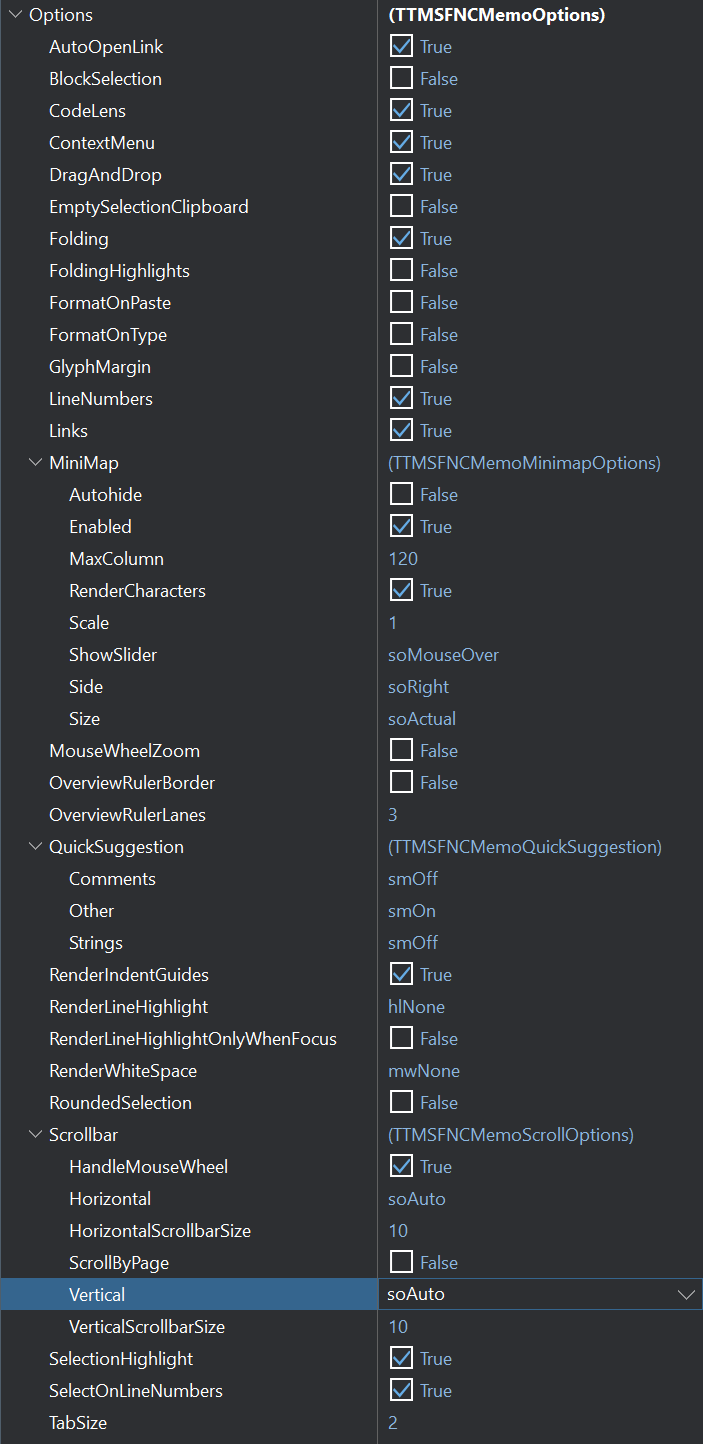
Display options
| Property | Default | Description |
|---|---|---|
LineNumbers |
True |
Show or hide line numbers in the gutter. |
GlyphMargin |
False |
Show the glyph margin column (required for breakpoints and bookmarks). |
RenderIndentGuides |
True |
Show vertical indent guide lines. |
RenderLineHighlight |
hlNone |
Highlight the current line: hlNone, hlLine, hlGutter, hlAll. |
RenderLineHighlightOnlyWhenFocus |
False |
Restrict line highlight to when the editor has focus. |
RenderWhiteSpace |
rwsNone |
Render whitespace characters: rwsNone, rwsBoundary, rwsSelection, rwsAll. |
SelectionHighlight |
True |
Highlight all other occurrences of the selected text. |
RoundedSelection |
True |
Render selections with rounded corners. |
OverviewRulerLanes |
3 |
Number of vertical lanes in the overview ruler (right edge). |
OverviewRulerBorder |
True |
Draw a border around the overview ruler. |
Editing behaviour
| Property | Default | Description |
|---|---|---|
ContextMenu |
True |
Enable or disable the right-click context menu. |
DragAndDrop |
True |
Enable drag-and-drop of text and files. |
EmptySelectionClipboard |
True |
Ctrl+C with no selection copies the entire current line. |
Folding |
True |
Enable code folding. |
FoldingHighlights |
True |
Highlight folding region start/end lines. |
FormatOnPaste |
False |
Auto-format pasted code. |
FormatOnType |
False |
Auto-format as you type. |
MouseWheelZoom |
False |
Allow Ctrl+MouseWheel to zoom the font. |
Links |
True |
Render clickable link underlines. |
AutoOpenLink |
True |
Ctrl+click opens a link in the default browser. |
BlockSelection |
False |
Allow Alt+drag for block/column selection. |
SelectOnLineNumbers |
False |
Clicking a line number selects the whole line. |
TabSize |
4 |
Number of spaces per tab stop. |
WordWrap |
False |
Wrap long lines. |
WordWrapColumn |
80 |
Wrap at this column when WordWrap is True. |
WantTab (on TTMSFNCMemo) |
False |
When True, Tab inserts a tab character instead of moving focus. |
Native popup menu (Windows)
PopupMenu on TTMSFNCMemo is the standard inherited menu-association property, but assigning it changes how the editor's context menu behaves: when a PopupMenu is set, the memo disables its own built-in (Monaco) context menu and lets your native TPopupMenu show on right-click instead. This is currently wired up on Windows only.
Use it when you need application-specific commands (custom actions, clipboard shortcuts, or items tied to your own menu structure) instead of the built-in editor menu:
procedure TForm1.FormCreate(Sender: TObject);
var
  mi: TMenuItem;
begin
  PopupMenu1 := TPopupMenu.Create(Self);

  mi := TMenuItem.Create(PopupMenu1);
  mi.Text := 'Cut';
  mi.OnClick := PopupMenuCutClick;
  PopupMenu1.AddObject(mi);

  mi := TMenuItem.Create(PopupMenu1);
  mi.Text := 'Copy';
  mi.OnClick := PopupMenuCopyClick;
  PopupMenu1.AddObject(mi);

  mi := TMenuItem.Create(PopupMenu1);
  mi.Text := 'Paste';
  mi.OnClick := PopupMenuPasteClick;
  PopupMenu1.AddObject(mi);

  // Assigning PopupMenu disables the built-in (Monaco) context menu and
  // wires the native popup menu into the editor's context-menu handling.
  TMSFNCMemo1.PopupMenu := PopupMenu1;
end;

procedure TForm1.PopupMenuCutClick(Sender: TObject);
begin
  TMSFNCMemo1.CutToClipBoard;
end;

procedure TForm1.PopupMenuCopyClick(Sender: TObject);
begin
  TMSFNCMemo1.CopyToClipBoard;
end;

procedure TForm1.PopupMenuPasteClick(Sender: TObject);
begin
  TMSFNCMemo1.PasteFromClipBoard;
end;
void __fastcall TForm1::FormCreate(TObject *Sender)
{
  PopupMenu1 = new TPopupMenu(this);

  TMenuItem *mi = new TMenuItem(PopupMenu1);
  mi->Text = "Cut";
  mi->OnClick = PopupMenuCutClick;
  PopupMenu1->AddObject(mi);

  mi = new TMenuItem(PopupMenu1);
  mi->Text = "Copy";
  mi->OnClick = PopupMenuCopyClick;
  PopupMenu1->AddObject(mi);

  mi = new TMenuItem(PopupMenu1);
  mi->Text = "Paste";
  mi->OnClick = PopupMenuPasteClick;
  PopupMenu1->AddObject(mi);

  // Assigning PopupMenu disables the built-in (Monaco) context menu and
  // wires the native popup menu into the editor's context-menu handling.
  TMSFNCMemo1->PopupMenu = PopupMenu1;
}

void __fastcall TForm1::PopupMenuCutClick(TObject *Sender)
{
  TMSFNCMemo1->CutToClipBoard();
}

void __fastcall TForm1::PopupMenuCopyClick(TObject *Sender)
{
  TMSFNCMemo1->CopyToClipBoard();
}

void __fastcall TForm1::PopupMenuPasteClick(TObject *Sender)
{
  TMSFNCMemo1->PasteFromClipBoard();
}
Note
This only replaces the menu shown by the memo itself; it does not affect Options.ContextMenu, which still governs whether the built-in menu would appear when no PopupMenu is assigned.
Code features
| Property | Default | Description |
|---|---|---|
UseCustomCodeCompletion |
False |
Enable custom code-completion items. |
BracketPairColorization |
False |
Colour-code matching bracket pairs. |
CodeLens |
True |
Show CodeLens annotations (reference counts, etc.). |
Minimap
The minimap is a bird's-eye view rendered on the right edge of the editor.
{ Inside your form's OnCreate, or at any time - options apply immediately. }
TMSFNCMemo1.Options.MiniMap.Enabled          := True;
TMSFNCMemo1.Options.MiniMap.Autohide         := False;
TMSFNCMemo1.Options.MiniMap.Side             := 'right';     // 'right' | 'left'
TMSFNCMemo1.Options.MiniMap.ShowSlider       := 'mouseover'; // 'always' | 'mouseover'
TMSFNCMemo1.Options.MiniMap.RenderCharacters := True;        // False draws blocks instead of glyphs
TMSFNCMemo1.Options.MiniMap.MaxColumn        := 120;
TMSFNCMemo1.Options.MiniMap.Scale            := 1;
// Inside your form's OnCreate, or at any time - options apply immediately.
TMSFNCMemo1->Options->MiniMap->Enabled = true;
TMSFNCMemo1->Options->MiniMap->Autohide = false;
TMSFNCMemo1->Options->MiniMap->Side = soRight;               // soRight | soLeft
TMSFNCMemo1->Options->MiniMap->ShowSlider = soMouseOver;  // soAlways | soMouseOver
TMSFNCMemo1->Options->MiniMap->RenderCharacters = true;  // false draws blocks instead of glyphs
TMSFNCMemo1->Options->MiniMap->MaxColumn = 120;
TMSFNCMemo1->Options->MiniMap->Scale = 1;
| Property | Default | Description |
|---|---|---|
MiniMap.Enabled |
True |
Show or hide the minimap. |
MiniMap.Autohide |
False |
Hide the minimap when the mouse is not hovering. |
MiniMap.MaxColumn |
120 |
Maximum width of the minimap in characters. |
MiniMap.RenderCharacters |
True |
Render actual characters; False renders colour blocks. |
MiniMap.Scale |
1 |
Relative font size in the minimap. |
MiniMap.ShowSlider |
'mouseover' |
When to show the minimap slider: 'always' or 'mouseover'. |
MiniMap.Side |
'right' |
Which side to place the minimap: 'right' or 'left'. |
MiniMap.Size |
'actual' |
Minimap render mode: 'actual', 'fill', or 'fit'. |
Scrollbar
| Property | Default | Description |
|---|---|---|
Scrollbar.Horizontal |
saAuto |
Horizontal scrollbar visibility: saAuto, saHidden, saVisible. |
Scrollbar.Vertical |
saAuto |
Vertical scrollbar visibility. |
Scrollbar.HorizontalScrollbarSize |
10 |
Pixel height of the horizontal scrollbar. |
Scrollbar.VerticalScrollbarSize |
10 |
Pixel width of the vertical scrollbar. |
Scrollbar.HandleMouseWheel |
True |
Scroll on mouse-wheel events. |
Scrollbar.ScrollByPage |
False |
Gutter-area clicks scroll by page instead of jumping to position. |
Language and theme
Set directly on TTMSFNCMemo, not in Options:
TMSFNCMemo1.Language := mlPascal;          // see TTMSFNCMemoLanguage for all values
TMSFNCMemo1.Theme    := mtVisualStudioDark; // mtVisualStudio/mtVisualStudioDark/mtHighContrastDark/mtCustom
TMSFNCMemo1->Language = mlPascal;           // see TTMSFNCMemoLanguage for all values
TMSFNCMemo1->Theme = mtVisualStudioDark;    // mtVisualStudio/mtVisualStudioDark/mtHighContrastDark/mtCustom
Over 50 languages are built in, including Pascal, TypeScript, Python, C#, JSON, Markdown, and SQL.
// Override font
TMSFNCMemo1.Font.Name := 'Fira Code';
TMSFNCMemo1.Font.Size := 13;

// Use local Monaco library files instead of CDN
TMSFNCMemo1.LibraryLocation := llOffline;
// Override font
TMSFNCMemo1->Font->Name = "Fira Code";
TMSFNCMemo1->Font->Size = 13;

// Use local Monaco library files instead of CDN
TMSFNCMemo1->LibraryLocation = llOffline;
Quick reference: full options snippet
// --- Display ---
TMSFNCMemo1.Options.LineNumbers              := True;
TMSFNCMemo1.Options.GlyphMargin             := True;   // required for breakpoints/bookmarks
TMSFNCMemo1.Options.RenderIndentGuides      := True;
TMSFNCMemo1.Options.RenderLineHighlight     := hlAll;  // hlNone/hlLine/hlGutter/hlAll
TMSFNCMemo1.Options.RenderWhiteSpace        := rwsAll; // rwsNone/rwsBoundary/rwsSelection/rwsAll
TMSFNCMemo1.Options.SelectionHighlight      := True;
TMSFNCMemo1.Options.RoundedSelection        := True;
TMSFNCMemo1.Options.OverviewRulerLanes      := 3;
TMSFNCMemo1.Options.OverviewRulerBorder     := True;

// --- Editing behaviour ---
TMSFNCMemo1.Options.ContextMenu             := True;
TMSFNCMemo1.Options.DragAndDrop             := True;
TMSFNCMemo1.Options.EmptySelectionClipboard := True;   // Ctrl+C with no selection copies the line
TMSFNCMemo1.Options.Folding                 := True;
TMSFNCMemo1.Options.FoldingHighlights       := True;
TMSFNCMemo1.Options.FormatOnPaste           := True;
TMSFNCMemo1.Options.FormatOnType            := True;
TMSFNCMemo1.Options.MouseWheelZoom          := True;
TMSFNCMemo1.Options.Links                   := True;
TMSFNCMemo1.Options.AutoOpenLink            := True;
TMSFNCMemo1.Options.BlockSelection          := True;
TMSFNCMemo1.Options.TabSize                 := 2;
TMSFNCMemo1.Options.WordWrap                := True;
TMSFNCMemo1.WantTab                         := True;   // Tab key stays in the editor

// --- Code features ---
TMSFNCMemo1.Options.CodeLens                := False;
TMSFNCMemo1.Options.UseCustomCodeCompletion := True;
TMSFNCMemo1.Options.BracketPairColorization := True;

// --- Minimap ---
TMSFNCMemo1.Options.MiniMap.Enabled          := True;
TMSFNCMemo1.Options.MiniMap.Autohide         := False;
TMSFNCMemo1.Options.MiniMap.MaxColumn        := 120;
TMSFNCMemo1.Options.MiniMap.RenderCharacters := True;
TMSFNCMemo1.Options.MiniMap.Scale            := 1;
TMSFNCMemo1.Options.MiniMap.ShowSlider       := 'mouseover'; // 'always' | 'mouseover'
TMSFNCMemo1.Options.MiniMap.Side             := 'right';     // 'right' | 'left'

// --- Scrollbar ---
TMSFNCMemo1.Options.Scrollbar.HandleMouseWheel       := True;
TMSFNCMemo1.Options.Scrollbar.Horizontal             := saAuto; // saAuto/saHidden/saVisible
TMSFNCMemo1.Options.Scrollbar.HorizontalScrollbarSize := 10;
TMSFNCMemo1.Options.Scrollbar.Vertical               := saAuto;
TMSFNCMemo1.Options.Scrollbar.VerticalScrollbarSize  := 10;
TMSFNCMemo1.Options.Scrollbar.ScrollByPage           := False;

// --- Theme and language (on TTMSFNCMemo directly) ---
TMSFNCMemo1.Language        := mlPascal;
TMSFNCMemo1.Theme           := mtVisualStudio;     // mtVisualStudio/mtVisualStudioDark/mtHighContrastDark/mtCustom
TMSFNCMemo1.LibraryLocation := llOnline;           // llOnline = CDN; llOffline = local files
TMSFNCMemo1.ReadOnly        := False;
// --- Display ---
TMSFNCMemo1->Options->LineNumbers = true;
TMSFNCMemo1->Options->GlyphMargin = true;   // required for breakpoints/bookmarks
TMSFNCMemo1->Options->RenderIndentGuides = true;
TMSFNCMemo1->Options->RenderLineHighlight = hlAll;  // hlNone/hlLine/hlGutter/hlAll
TMSFNCMemo1->Options->RenderWhiteSpace = mwAll;    // mwNone/mwBoundary/mwSelection/mwAll
TMSFNCMemo1->Options->SelectionHighlight = true;
TMSFNCMemo1->Options->RoundedSelection = true;
TMSFNCMemo1->Options->OverviewRulerLanes = 3;
TMSFNCMemo1->Options->OverviewRulerBorder = true;

// --- Editing behaviour ---
TMSFNCMemo1->Options->ContextMenu = true;
TMSFNCMemo1->Options->DragAndDrop = true;
TMSFNCMemo1->Options->EmptySelectionClipboard = true;   // Ctrl+C with no selection copies the line
TMSFNCMemo1->Options->Folding = true;
TMSFNCMemo1->Options->FoldingHighlights = true;
TMSFNCMemo1->Options->FormatOnPaste = true;
TMSFNCMemo1->Options->FormatOnType = true;
TMSFNCMemo1->Options->MouseWheelZoom = true;
TMSFNCMemo1->Options->Links = true;
TMSFNCMemo1->Options->AutoOpenLink = true;
TMSFNCMemo1->Options->BlockSelection = true;
TMSFNCMemo1->Options->TabSize = 2;
TMSFNCMemo1->Options->WordWrap = wwtOn;
TMSFNCMemo1->WantTab = true;   // Tab key stays in the editor

// --- Code features ---
TMSFNCMemo1->Options->CodeLens = false;
TMSFNCMemo1->Options->UseCustomCodeCompletion = true;
TMSFNCMemo1->Options->BracketPairColorization = true;

// --- Minimap ---
TMSFNCMemo1->Options->MiniMap->Enabled = true;
TMSFNCMemo1->Options->MiniMap->Autohide = false;
TMSFNCMemo1->Options->MiniMap->MaxColumn = 120;
TMSFNCMemo1->Options->MiniMap->RenderCharacters = true;
TMSFNCMemo1->Options->MiniMap->Scale = 1;
TMSFNCMemo1->Options->MiniMap->ShowSlider = soMouseOver;  // soAlways | soMouseOver
TMSFNCMemo1->Options->MiniMap->Side = soRight;               // soRight | soLeft

// --- Scrollbar ---
TMSFNCMemo1->Options->Scrollbar->HandleMouseWheel = true;
TMSFNCMemo1->Options->Scrollbar->Horizontal = soAuto; // soAuto/soHidden/soVisible
TMSFNCMemo1->Options->Scrollbar->HorizontalScrollbarSize = 10;
TMSFNCMemo1->Options->Scrollbar->Vertical = soAuto;
TMSFNCMemo1->Options->Scrollbar->VerticalScrollbarSize = 10;
TMSFNCMemo1->Options->Scrollbar->ScrollByPage = false;

// --- Theme and language (on TTMSFNCMemo directly) ---
TMSFNCMemo1->Language = mlPascal;
TMSFNCMemo1->Theme = mtVisualStudio;     // mtVisualStudio/mtVisualStudioDark/mtHighContrastDark/mtCustom
TMSFNCMemo1->LibraryLocation = llOnline; // llOnline = CDN; llOffline = local files
// TTMSFNCMemo has no ReadOnly property; read-only is a per-source setting.
TMSFNCMemo1->Sources->Items[TMSFNCMemo1->ActiveSource]->ReadOnly = false;
See also
- Custom theme
- Breakpoints, bookmarks, and search
TTMSFNCMemoTTMSFNCMemoOptions