Breakpoints, Bookmarks, and Search
TTMSFNCMemo provides interactive gutter markers (breakpoints, bookmarks, line highlights), a programmatic and dialog-based find/replace API, and scrolling helpers for navigating large files.
Gutter markers
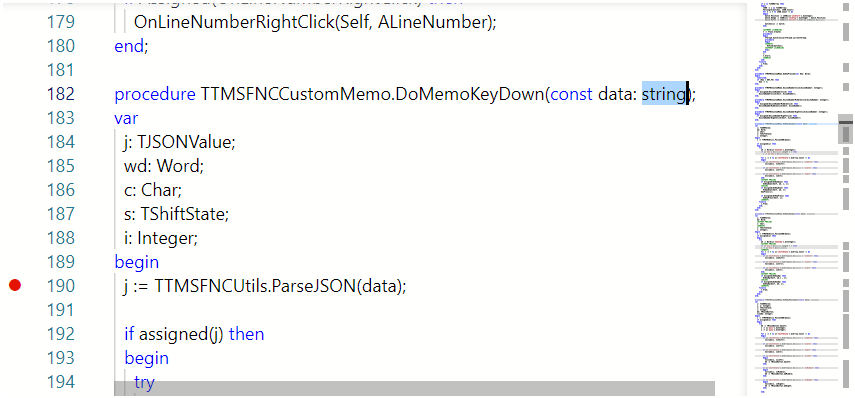
The editor gutter consists of two clickable columns: the line-number column and the glyph margin. Enable the glyph margin in Options so that marker icons appear:
TMSFNCMemo1.Options.GlyphMargin := True;
TMSFNCMemo1->Options->GlyphMargin = true;
Breakpoints
TMSFNCMemo1.BreakPoints[5] := True;    // set
TMSFNCMemo1.BreakPoints[5] := False;   // clear
ShowMessage(IntToStr(TMSFNCMemo1.BreakPointCount)); // count of active breakpoints
TMSFNCMemo1.GoToBreakPoint(0);         // navigate to the first breakpoint
TMSFNCMemo1->BreakPoints[5] = true;    // set
TMSFNCMemo1->BreakPoints[5] = false;   // clear
ShowMessage(IntToStr(TMSFNCMemo1->BreakPointCount)); // count of active breakpoints
TMSFNCMemo1->GoToBreakPoint(0);        // navigate to the first breakpoint
Bookmarks
TMSFNCMemo1.Bookmarks[12] := True;
ShowMessage(IntToStr(TMSFNCMemo1.BookmarksCount));
TMSFNCMemo1.GoToBookmark(0);
TMSFNCMemo1->Bookmarks[12] = true;
ShowMessage(IntToStr(TMSFNCMemo1->BookmarksCount));
TMSFNCMemo1->GoToBookmark(0);
Line highlights
TMSFNCMemo1.LineHighlight[3] := True;
ShowMessage(IntToStr(TMSFNCMemo1.LineHighlightCount));
TMSFNCMemo1.GoToLineHighlight(0);
TMSFNCMemo1->LineHighlight[3] = true;
ShowMessage(IntToStr(TMSFNCMemo1->LineHighlightCount));
TMSFNCMemo1->GoToLineHighlight(0);
Toggling on a click
Subscribe to OnGutterClick to let users toggle breakpoints directly in the editor:
procedure TForm1.TMSFNCMemo1GutterClick(Sender: TObject; LineNumber: Integer);
begin
  TMSFNCMemo1.BreakPoints[LineNumber] :=
    not TMSFNCMemo1.BreakPoints[LineNumber];
end;
void __fastcall TForm1::TMSFNCMemo1GutterClick(TObject *Sender, int LineNumber)
{
  TMSFNCMemo1->BreakPoints[LineNumber] = !TMSFNCMemo1->BreakPoints[LineNumber];
}
OnGutterClick fires for any click in the gutter (line number or glyph margin). Use OnLineNumberClick or OnGlyphMarginClick for finer control.
Find and replace
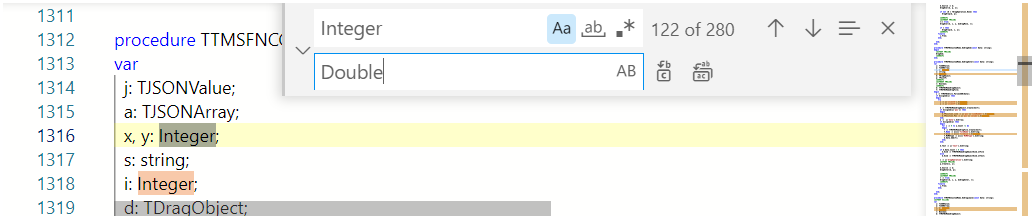
Built-in dialog
TMSFNCMemo1.ShowFindDialog;
TMSFNCMemo1->ShowFindDialog();
Programmatic find
// Find with default options, searching downward
TMSFNCMemo1.Find('procedure', fbDown);

// Find all and handle results
TMSFNCMemo1.FindAll('begin');

procedure TForm1.TMSFNCMemo1FindAll(Sender: TObject;
  AMatches: TTMSFNCMemoMatches);
begin
  ShowMessage('Found ' + IntToStr(AMatches.Count) + ' matches');
end;
void __fastcall TForm1::FindDemo()
{
  // Find with default options, searching downward
  TMSFNCMemo1->Find("procedure", fbDown);

  // Find all and handle results
  TMSFNCMemo1->FindAll("begin");
}

void __fastcall TForm1::TMSFNCMemo1FindAll(TObject *Sender, TTMSFNCMemoMatches AMatches)
{
  ShowMessage("Found " + IntToStr(AMatches.Length) + " matches");
}
Navigate incrementally with FindNext / FindPrevious without re-issuing the search string.
Find with custom options
Populate a TTMSFNCMemoFindOptions record to override matching behaviour:
var
  opts: TTMSFNCMemoFindOptions;
begin
  opts.MatchCase              := True;
  opts.SetSelect              := True;   // jump to and select the match
  opts.IsRegex                := False;
  opts.SearchOnlyEditableRange := False;
  opts.CaptureMatches         := False;
  opts.LimitResultCount       := 0;      // 0 = no limit
  opts.WordSeparators         := '';
  TMSFNCMemo1.Find('TTMSFNCMemo', opts, fbDown);
end;
void __fastcall TForm1::FindWithOptions()
{
  TTMSFNCMemoFindOptions opts;
  opts.MatchCase = true;
  opts.SetSelect = true;   // jump to and select the match
  opts.IsRegex = false;
  opts.SearchOnlyEditableRange = false;
  opts.CaptureMatches = false;
  opts.LimitResultCount = 0;      // 0 = no limit
  opts.WordSeparators = "";
  TMSFNCMemo1->Find("TTMSFNCMemo", opts, fbDown);
}
Replace
// === Breakpoints, Bookmarks, Line Highlights ===

// Enable the glyph margin in options first so markers are visible
TMSFNCMemo1.Options.GlyphMargin := True;

// Toggle a breakpoint on a line (1-based line number)
TMSFNCMemo1.BreakPoints[5] := True;
TMSFNCMemo1.BreakPoints[5] := not TMSFNCMemo1.BreakPoints[5]; // toggle

// Toggle a bookmark
TMSFNCMemo1.Bookmarks[12] := True;

// Toggle line highlighting
TMSFNCMemo1.LineHighlight[3] := True;

// Navigate to the first bookmark/breakpoint/highlight
TMSFNCMemo1.GoToBookmark(0);
TMSFNCMemo1.GoToBreakPoint(0);
TMSFNCMemo1.GoToLineHighlight(0);

// Count markers
ShowMessage(IntToStr(TMSFNCMemo1.BreakPointCount));
ShowMessage(IntToStr(TMSFNCMemo1.BookmarksCount));
ShowMessage(IntToStr(TMSFNCMemo1.LineHighlightCount));

// Toggle a breakpoint when the user clicks the gutter
procedure TForm1.TMSFNCMemo1GutterClick(Sender: TObject; LineNumber: Integer);
begin
  TMSFNCMemo1.BreakPoints[LineNumber] :=
    not TMSFNCMemo1.BreakPoints[LineNumber];
end;

// === Find & Replace ===

// Simple find (uses default options, searches downward)
TMSFNCMemo1.Find('procedure', fbDown);

// Find with options (MatchCase + select the match)
var
  opts: TTMSFNCMemoFindOptions;
begin
  opts.MatchCase  := True;
  opts.SetSelect  := True;
  opts.IsRegex    := False;
  opts.SearchOnlyEditableRange := False;
  opts.CaptureMatches := False;
  opts.LimitResultCount := 0;
  opts.WordSeparators := '';
  TMSFNCMemo1.Find('TMSFNCMemo', opts, fbDown);
end;

// Find all and react
TMSFNCMemo1.FindAll('procedure');

procedure TForm1.TMSFNCMemo1FindAll(Sender: TObject;
  AMatches: TTMSFNCMemoMatches);
begin
  ShowMessage('Found ' + IntToStr(AMatches.Count) + ' matches');
end;

// Replace
TMSFNCMemo1.Replace('OldName', 'NewName', fbAll);

// Replace the current selection
TMSFNCMemo1.SelectAll;
TMSFNCMemo1.Replace('Replacement');

// Open the built-in find/replace dialog
TMSFNCMemo1.ShowFindDialog;

// === Scrolling / Navigation ===
TMSFNCMemo1.ScrollToLine(50);
TMSFNCMemo1.ScrollToLineCenter(50);
// === Breakpoints, Bookmarks, Line Highlights ===
void __fastcall TForm1::MarkersDemo()
{
  // Enable the glyph margin in options first so markers are visible
  TMSFNCMemo1->Options->GlyphMargin = true;

  // Toggle a breakpoint on a line (1-based line number)
  TMSFNCMemo1->BreakPoints[5] = true;
  TMSFNCMemo1->BreakPoints[5] = !TMSFNCMemo1->BreakPoints[5]; // toggle

  // Toggle a bookmark
  TMSFNCMemo1->Bookmarks[12] = true;

  // Toggle line highlighting
  TMSFNCMemo1->LineHighlight[3] = true;

  // Navigate to the first bookmark/breakpoint/highlight
  TMSFNCMemo1->GoToBookmark(0);
  TMSFNCMemo1->GoToBreakPoint(0);
  TMSFNCMemo1->GoToLineHighlight(0);

  // Count markers
  ShowMessage(IntToStr(TMSFNCMemo1->BreakPointCount));
  ShowMessage(IntToStr(TMSFNCMemo1->BookmarksCount));
  ShowMessage(IntToStr(TMSFNCMemo1->LineHighlightCount));
}

// Toggle a breakpoint when the user clicks the gutter
void __fastcall TForm1::TMSFNCMemo1GutterClick(TObject *Sender, int LineNumber)
{
  TMSFNCMemo1->BreakPoints[LineNumber] = !TMSFNCMemo1->BreakPoints[LineNumber];
}

// === Find & Replace ===
void __fastcall TForm1::FindReplaceDemo()
{
  // Simple find (uses default options, searches downward)
  TMSFNCMemo1->Find("procedure", fbDown);

  // Find with options (MatchCase + select the match)
  TTMSFNCMemoFindOptions opts;
  opts.MatchCase = true;
  opts.SetSelect = true;
  opts.IsRegex = false;
  opts.SearchOnlyEditableRange = false;
  opts.CaptureMatches = false;
  opts.LimitResultCount = 0;
  opts.WordSeparators = "";
  TMSFNCMemo1->Find("TMSFNCMemo", opts, fbDown);

  // Find all and react
  TMSFNCMemo1->FindAll("procedure");
}

void __fastcall TForm1::TMSFNCMemo1FindAll(TObject *Sender, TTMSFNCMemoMatches AMatches)
{
  ShowMessage("Found " + IntToStr(AMatches.Length) + " matches");
}

void __fastcall TForm1::ReplaceAndScroll()
{
  // Replace
  TMSFNCMemo1->Replace("OldName", "NewName", fbAll);

  // Replace the current selection
  TMSFNCMemo1->SelectAll();
  TMSFNCMemo1->Replace("Replacement");

  // Open the built-in find/replace dialog
  TMSFNCMemo1->ShowFindDialog();

  // === Scrolling / Navigation ===
  TMSFNCMemo1->ScrollToLine(50);
  TMSFNCMemo1->ScrollToLineCenter(50);
}
// Replace all occurrences
TMSFNCMemo1.Replace('OldName', 'NewName', fbAll);

// Replace the current selection
TMSFNCMemo1.Replace('Replacement');

// Replace a specific range (start position, length, replacement)
TMSFNCMemo1.Replace(0, 8, 'NewHeader');
// Replace all occurrences
TMSFNCMemo1->Replace("OldName", "NewName", fbAll);

// Replace the current selection
TMSFNCMemo1->Replace("Replacement");

// Replace a specific range (start position, length, replacement)
TMSFNCMemo1->Replace(0, 8, "NewHeader");
React to replace operations via OnReplaceAll, OnReplaceNext, or OnReplacePrevious.
Scrolling and navigation
TMSFNCMemo1.ScrollToLine(50);        // scroll so line 50 is visible
TMSFNCMemo1.ScrollToLineCenter(50);  // scroll and vertically centre line 50
TMSFNCMemo1->ScrollToLine(50);        // scroll so line 50 is visible
TMSFNCMemo1->ScrollToLineCenter(50);  // scroll and vertically centre line 50
Position utilities:
var
  cp: TTMSFNCMemoCaretPosition;
  pos: Integer;
begin
  // Caret position (line + column)
  cp := TMSFNCMemo1.CaretPosition;

  // Convert between text offset and caret position
  pos := TMSFNCMemo1.PosToTextPos(cp);
  cp  := TMSFNCMemo1.TextPosToPos(pos);

  // Word at cursor
  ShowMessage(TMSFNCMemo1.GetWordAtCursor);
end;
void __fastcall TForm1::CaretInfo()
{
  // Caret position (line + column)
  TTMSFNCMemoCaretPosition cp = TMSFNCMemo1->CaretPosition;

  // Convert between text offset and caret position
  int pos = TMSFNCMemo1->PosToTextPos(cp);
  cp = TMSFNCMemo1->TextPosToPos(pos);

  // Word at cursor
  ShowMessage(TMSFNCMemo1->GetWordAtPosition());
}
Combining navigation, bookmarks, and word access
// Multi-source IDE-style editor combining:
// - Custom language + theme
// - Multiple sources with per-source language
// - Breakpoints toggled via gutter
// - Live code completion via event
// - Find all via keyboard shortcut handler

procedure TForm1.FormCreate(Sender: TObject);
begin
  // Theme
  TMSFNCMemo1.Theme := mtVisualStudioDark;

  // Editor options for IDE-like feel
  TMSFNCMemo1.Options.LineNumbers              := True;
  TMSFNCMemo1.Options.GlyphMargin             := True;
  TMSFNCMemo1.Options.Folding                 := True;
  TMSFNCMemo1.Options.BracketPairColorization := True;
  TMSFNCMemo1.Options.UseCustomCodeCompletion := True;
  TMSFNCMemo1.Options.MiniMap.Enabled         := True;
  TMSFNCMemo1.WantTab                          := True;

  // Static completion items
  TMSFNCMemo1.CompletionList.Add('WriteLn',    skFunction);
  TMSFNCMemo1.CompletionList.Add('ShowMessage', skFunction);

  // Add sources
  TMSFNCMemo1.Sources.AddSource('',   mlPascal, 'Unit1.pas');
  TMSFNCMemo1.Sources.AddSource('{}', mlJson,   'config.json');
  TMSFNCMemo1.ActiveSource := 0;  // start on the Pascal source

  // File extension map
  TMSFNCMemo1.LanguageFileExtensionsMap.Add(mlPascal, '.dpr');
end;

// Toggle breakpoint on gutter click
procedure TForm1.TMSFNCMemo1GutterClick(Sender: TObject; LineNumber: Integer);
begin
  TMSFNCMemo1.BreakPoints[LineNumber] :=
    not TMSFNCMemo1.BreakPoints[LineNumber];
end;

// Dynamic code completion based on cursor context
procedure TForm1.TMSFNCMemo1GetCodeCompletion(Sender: TObject;
  Token: string; CustomCompletionList: TTMSFNCMemoCodeCompletion;
  Position: TTMSFNCMemoCaretPosition);
begin
  if Token.StartsWith('T') then
  begin
    CustomCompletionList.Add('TStringList',    skClass);
    CustomCompletionList.Add('TMemoryStream',  skClass);
    CustomCompletionList.Add('TTMSFNCMemo',    skClass);
  end;
end;

// Show match count when the user searches with a custom button
procedure TForm1.ButtonFindAllClick(Sender: TObject);
begin
  TMSFNCMemo1.FindAll(EditSearch.Text);
end;

procedure TForm1.TMSFNCMemo1FindAll(Sender: TObject;
  AMatches: TTMSFNCMemoMatches);
begin
  LabelMatches.Caption := IntToStr(AMatches.Count) + ' match(es)';
end;
// Multi-source IDE-style editor combining:
// - Custom language + theme
// - Multiple sources with per-source language
// - Breakpoints toggled via gutter
// - Live code completion via event
// - Find all via keyboard shortcut handler

void __fastcall TForm1::FormCreate(TObject *Sender)
{
  // Theme
  TMSFNCMemo1->Theme = mtVisualStudioDark;

  // Editor options for IDE-like feel
  TMSFNCMemo1->Options->LineNumbers = true;
  TMSFNCMemo1->Options->GlyphMargin = true;
  TMSFNCMemo1->Options->Folding = true;
  TMSFNCMemo1->Options->BracketPairColorization = true;
  TMSFNCMemo1->Options->UseCustomCodeCompletion = true;
  TMSFNCMemo1->Options->MiniMap->Enabled = true;
  TMSFNCMemo1->WantTab = true;

  // Static completion items
  TMSFNCMemo1->CompletionList->Add("WriteLn", skFunction);
  TMSFNCMemo1->CompletionList->Add("ShowMessage", skFunction);

  // Add sources
  TMSFNCMemo1->Sources->AddSource("", mlPascal, "Unit1.pas");
  TMSFNCMemo1->Sources->AddSource("{}", mlJSON, "config.json");
  TMSFNCMemo1->ActiveSource = 0;  // start on the Pascal source

  // File extension map
  TMSFNCMemo1->LanguageFileExtensionsMap->Add(mlPascal, ".dpr");
}

// Toggle breakpoint on gutter click
void __fastcall TForm1::TMSFNCMemo1GutterClick(TObject *Sender, int LineNumber)
{
  TMSFNCMemo1->BreakPoints[LineNumber] = !TMSFNCMemo1->BreakPoints[LineNumber];
}

// Dynamic code completion based on cursor context
void __fastcall TForm1::TMSFNCMemo1GetCodeCompletion(TObject *Sender,
  UnicodeString Token, TTMSFNCMemoCodeCompletion *CustomCompletionList,
  const TTMSFNCMemoCaretPosition &Position)
{
  if (Token.Pos("T") == 1)
  {
    CustomCompletionList->Add("TStringList", skClass);
    CustomCompletionList->Add("TMemoryStream", skClass);
    CustomCompletionList->Add("TTMSFNCMemo", skClass);
  }
}

// Show match count when the user searches with a custom button
void __fastcall TForm1::ButtonFindAllClick(TObject *Sender)
{
  TMSFNCMemo1->FindAll(EditSearch->Text);
}

void __fastcall TForm1::TMSFNCMemo1FindAll(TObject *Sender, TTMSFNCMemoMatches Matches)
{
  LabelMatches->Text = IntToStr(Matches.Length) + " match(es)";
}