Code Completion
TTMSFNCMemo provides two layers of code completion:
- Built-in word completion — automatically suggests every word already present in the editor (always active).
- Custom completion items — you supply a static list via
CompletionListand/or a dynamic list via theOnGetCodeCompletionevent.
Enable custom completion before adding items:
TMSFNCMemo1.Options.UseCustomCodeCompletion := True;
TMSFNCMemo1->Options->UseCustomCodeCompletion = true;
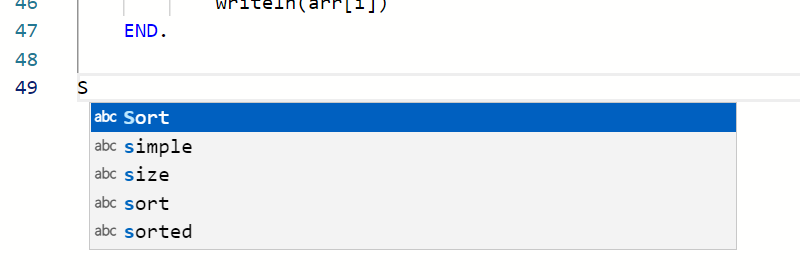
Static completion list
Items added to CompletionList are always included in every completion request, regardless of cursor position. Use this for global identifiers that are always in scope.
TMSFNCMemo1.CompletionList.Add('WriteLn',    skFunction);
TMSFNCMemo1.CompletionList.Add('ShowMessage', skFunction);
TMSFNCMemo1.CompletionList.Add('TStringList', skClass);
TMSFNCMemo1->CompletionList->Add("WriteLn", skFunction);
TMSFNCMemo1->CompletionList->Add("ShowMessage", skFunction);
TMSFNCMemo1->CompletionList->Add("TStringList", skClass);
Items can also be added at design time through the Object Inspector.
Completion item properties
| Property | Type | Description |
|---|---|---|
Name |
string |
The label shown in the completion list (required). |
Kind |
TTMSFNCMemoSuggestionKind |
Icon style — skText, skFunction, skMethod, skClass, skKeyword, etc. |
InsertText |
string |
Text inserted when the item is selected. Defaults to Name. |
InsertTextRules |
TTMSFNCMemoSuggestionInsertTextRule |
itrNone or itrInsertAsSnippet (enables tab-stop placeholders). |
Documentation |
string |
Tooltip shown next to the item in the list. |
Preselect |
Boolean |
Pre-select this item when the list opens. |
FilterText |
string |
Alternative text used when filtering the list by typing. |
SortText |
string |
Controls sort order within the list. |
Inserting as a snippet
Set InsertTextRules := itrInsertAsSnippet to embed tab-stop placeholders (${1:hint}, $2, …) in the inserted text. The cursor jumps to each placeholder in order when the user presses Tab.
// === Static completion list (design-time or form create) ===
TMSFNCMemo1.Options.UseCustomCodeCompletion := True;

with TMSFNCMemo1.CompletionList.Add('WriteLn', skFunction) do
  Documentation := 'Write a line to the output.';

with TMSFNCMemo1.CompletionList.Add('ShowMessage', skFunction) do
begin
  InsertText := 'ShowMessage(${1:msg})';
  InsertTextRules := itrInsertAsSnippet;
  Documentation   := 'Show a message dialog.';
end;

// Insert as snippet: the cursor jumps to each ${N} placeholder on Tab
with TMSFNCMemo1.CompletionList.Add('if-else', skKeyword) do
begin
  InsertText :=
    'if ${1:condition} then' + sLineBreak +
    'begin' + sLineBreak +
    '  $2' + sLineBreak +
    'end' + sLineBreak +
    'else' + sLineBreak +
    'begin' + sLineBreak +
    '  $3' + sLineBreak +
    'end;';
  InsertTextRules := itrInsertAsSnippet;
end;

// === Dynamic completion via event ===
// Add items that depend on the token at the cursor position.
procedure TForm1.TMSFNCMemo1GetCodeCompletion(Sender: TObject;
  Token: string; CustomCompletionList: TTMSFNCMemoCodeCompletion;
  Position: TTMSFNCMemoCaretPosition);
begin
  if Token.StartsWith('console') then
  begin
    CustomCompletionList.Add('console.log',   skFunction);
    CustomCompletionList.Add('console.error', skFunction);
    CustomCompletionList.Add('console.warn',  skFunction);
  end
  else
  begin
    CustomCompletionList.Add('IntToStr(', skFunction);
    CustomCompletionList.Add('StrToInt(', skFunction);
  end;
end;
// === Static completion list (design-time or form create) ===
void __fastcall TForm1::SetupStaticCompletion()
{
  TMSFNCMemo1->Options->UseCustomCodeCompletion = true;

  TTMSFNCMemoCodeCompletionItem *item = TMSFNCMemo1->CompletionList->Add("WriteLn", skFunction);
  item->Documentation = "Write a line to the output.";

  item = TMSFNCMemo1->CompletionList->Add("ShowMessage", skFunction);
  item->InsertText->Text = "ShowMessage(${1:msg})";
  item->InsertTextRules = itrInsertAsSnippet;
  item->Documentation = "Show a message dialog.";

  // Insert as snippet: the cursor jumps to each ${N} placeholder on Tab
  item = TMSFNCMemo1->CompletionList->Add("if-else", skKeyword);
  item->InsertText->Text =
    UnicodeString("if ${1:condition} then") + sLineBreak +
    "begin" + sLineBreak +
    "  $2" + sLineBreak +
    "end" + sLineBreak +
    "else" + sLineBreak +
    "begin" + sLineBreak +
    "  $3" + sLineBreak +
    "end;";
  item->InsertTextRules = itrInsertAsSnippet;
}

// === Dynamic completion via event ===
// Add items that depend on the token at the cursor position.
void __fastcall TForm1::TMSFNCMemo1GetCodeCompletion(TObject *Sender,
  UnicodeString Token, TTMSFNCMemoCodeCompletion *CustomCompletionList,
  const TTMSFNCMemoCaretPosition &Position)
{
  if (Token.Pos("console") == 1)
  {
    CustomCompletionList->Add("console.log", skFunction);
    CustomCompletionList->Add("console.error", skFunction);
    CustomCompletionList->Add("console.warn", skFunction);
  }
  else
  {
    CustomCompletionList->Add("IntToStr(", skFunction);
    CustomCompletionList->Add("StrToInt(", skFunction);
  }
}
Example snippet text for an if-else construct:
if ${1:condition} then
begin
  $2
end
else
begin
  $3
end;
Dynamic completion via OnGetCodeCompletion
OnGetCodeCompletion fires whenever the user triggers completion (Ctrl+Space or by typing). Use it to return context-sensitive items:
procedure TForm1.TMSFNCMemo1GetCodeCompletion(Sender: TObject;
  Token: string; CustomCompletionList: TTMSFNCMemoCodeCompletion;
  Position: TTMSFNCMemoCaretPosition);
begin
  if Token.StartsWith('console') then
  begin
    CustomCompletionList.Add('console.log',   skFunction);
    CustomCompletionList.Add('console.error', skFunction);
  end;
end;
void __fastcall TForm1::TMSFNCMemo1GetCodeCompletion(TObject *Sender,
  UnicodeString Token, TTMSFNCMemoCodeCompletion *CustomCompletionList,
  const TTMSFNCMemoCaretPosition &Position)
{
  if (Token.Pos("console") == 1)
  {
    CustomCompletionList->Add("console.log", skFunction);
    CustomCompletionList->Add("console.error", skFunction);
  }
}
Parameters:
| Parameter | Description |
|---|---|
Token |
The word at the cursor position (partial or complete). |
CustomCompletionList |
TTMSFNCMemoCodeCompletion to fill; these items are merged with the static list. |
Position |
TTMSFNCMemoCaretPosition with Line and Pos of the cursor. |
Note
The completion list automatically filters as the user types. If completion is triggered after a whitespace or line break, all items are shown and typing then narrows the list.
Combining a static list, snippet insertion, and dynamic completion
Seed the static list with global identifiers, define a snippet with tab stops, and add context-sensitive items at runtime:
procedure TForm1.FormCreate(Sender: TObject);
var
  itm: TTMSFNCMemoCodeCompletionItem;
begin
  TMSFNCMemo1.Options.UseCustomCodeCompletion := True;
  TMSFNCMemo1.CompletionList.Add('WriteLn',    skFunction);
  itm := TMSFNCMemo1.CompletionList.Add('for-loop', skKeyword);
  itm.InsertText      := 'for ${1:i} := 0 to ${2:Count} - 1 do'#10'begin'#10'  $3'#10'end;';
  itm.InsertTextRules := itrInsertAsSnippet;
  TMSFNCMemo1.OnGetCodeCompletion := MemoGetCodeCompletion;
end;

procedure TForm1.MemoGetCodeCompletion(Sender: TObject;
  Token: string; CustomCompletionList: TTMSFNCMemoCodeCompletion;
  Position: TTMSFNCMemoCaretPosition);
begin
  if Token.StartsWith('Show') then
    CustomCompletionList.Add('ShowMessage', skFunction);
end;
void __fastcall TForm1::FormCreate(TObject *Sender)
{
  TMSFNCMemo1->Options->UseCustomCodeCompletion = true;
  TMSFNCMemo1->CompletionList->Add("WriteLn", skFunction);
  TTMSFNCMemoCodeCompletionItem *itm = TMSFNCMemo1->CompletionList->Add("for-loop", skKeyword);
  itm->InsertText->Text = "for ${1:i} := 0 to ${2:Count} - 1 do\nbegin\n  $3\nend;";
  itm->InsertTextRules = itrInsertAsSnippet;
  TMSFNCMemo1->OnGetCodeCompletion = MemoGetCodeCompletion;
}

void __fastcall TForm1::MemoGetCodeCompletion(TObject *Sender,
  UnicodeString Token, TTMSFNCMemoCodeCompletion *CustomCompletionList,
  const TTMSFNCMemoCaretPosition &Position)
{
  if (Token.Pos("Show") == 1)
    CustomCompletionList->Add("ShowMessage", skFunction);
}