Sections
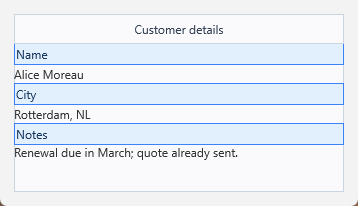
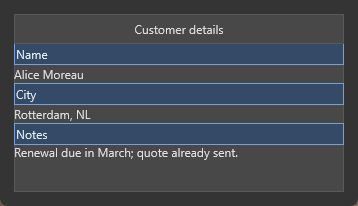
Sections divide the panel content area into labelled horizontal bands. Each section can be given a Text label, a fixed Size (height in pixels), and an optional Control that is automatically positioned and sized to fill the section.
Adding sections
var
  S: TTMSFNCPanelSection;
begin
  TMSFNCPanel1.BeginUpdate;
  try
    TMSFNCPanel1.Sections.Clear;

    S := TMSFNCPanel1.Sections.Add;
    S.Text := 'Name';
    S.Size := 40;

    S := TMSFNCPanel1.Sections.Add;
    S.Text := 'Address';
    S.Size := 40;

    S := TMSFNCPanel1.Sections.Add;
    S.Text := 'Notes';
    // Last section with no fixed size stretches to fill the remainder
  finally
    TMSFNCPanel1.EndUpdate;
  end;
end;
TTMSFNCPanelSection *S;
TMSFNCPanel1->BeginUpdate();
try
{
  TMSFNCPanel1->Sections->Clear();

  S = TMSFNCPanel1->Sections->Add();
  S->Text = "Name";
  S->Size = 40;

  S = TMSFNCPanel1->Sections->Add();
  S->Text = "Address";
  S->Size = 40;

  S = TMSFNCPanel1->Sections->Add();
  S->Text = "Notes";
  // Last section with no fixed size stretches to fill the remainder
}
__finally
{
  TMSFNCPanel1->EndUpdate();
}
Sections stack from top to bottom. If the total section height is less than the panel content area, the last section stretches to fill the remainder. Set Size to a positive value to fix the height.
Assigning controls to sections
var
  Section: TTMSFNCPanelSection;
begin
  Section := TMSFNCPanel1.Sections.Add;
  Section.Text := 'Name';
  Section.Size := 40;
  Section.Control := NameEdit; // NameEdit.Parent must be the panel
end;
TTMSFNCPanelSection *Section = TMSFNCPanel1->Sections->Add();
Section->Text = "Name";
Section->Size = 40;
Section->Control = NameEdit; // NameEdit->Parent must be the panel
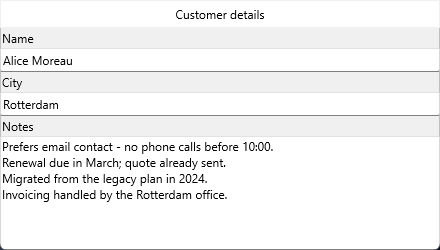
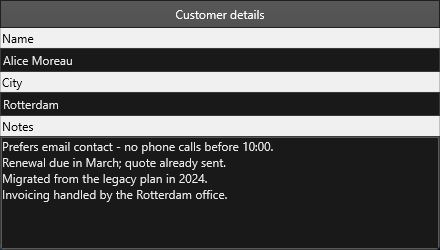
The assigned control is resized and repositioned automatically whenever the panel is resized.
Section appearance
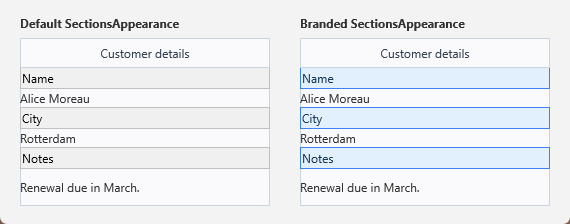
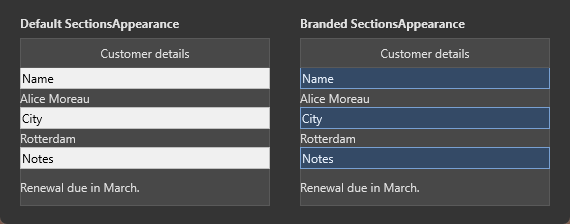
All sections share one SectionsAppearance — there is no per-section override — so Fill, Stroke and Font restyle every band at once:
TMSFNCPanel1.SectionsAppearance.Fill.Color := $FFF5F5F5;
TMSFNCPanel1.SectionsAppearance.Stroke.Color := $FFCCCCCC;
TMSFNCPanel1.SectionsAppearance.Font.Size := 11;
TMSFNCPanel1->SectionsAppearance->Fill->Color = (TAlphaColor)0xFFF5F5F5;
TMSFNCPanel1->SectionsAppearance->Stroke->Color = (TAlphaColor)0xFFCCCCCC;
TMSFNCPanel1->SectionsAppearance->Font->Size = 11;
Note the dark capture: the panel does not adapt SectionsAppearance to the
FMX style, so the default bands stay light in a dark application. Brand them
explicitly, or set AdaptToStyle and let the style supply the colours instead —
an adapted panel ignores SectionsAppearance entirely.
How sizing resolves
Sections stack top to bottom in the panel's content area, and Size is a height
in pixels. Leave Size at its default and the section takes what is left, which
is why the last section grows when the panel is resized: it is the one still
asking for the remainder. Give every section a fixed Size and the panel simply
leaves any surplus empty.
| Member | Purpose |
|---|---|
Text |
The section's label. |
Size |
Fixed height in pixels; unset means "take the remaining space". |
Control |
A control positioned and resized to fill the section body. |
Tag |
Free integer, useful to identify a section in shared handlers. |
Sizing on high-DPI displays
Every pixel size on the panel is a design value measured at 96 DPI, and the
panel rescales the whole set when the host form moves to a monitor with a
different DPI: each section's Size, SectionsAppearance.Font, and — on both
the header and the footer — Size, Font, ButtonSize, ButtonSpacing,
DropDownWidth and DropDownHeight. Set them in code as their unscaled design
values. Pre-multiplying by the current scale factor double-scales the layout,
which typically shows up as a header tall enough to eat the first section.
This is also the reason the "leave the last section unsized" rule from the
previous section matters more than it looks. A section with no fixed Size
absorbs whatever the scaled sections above it leave over, so the layout stays
correct at any DPI; fix every section's height and the surplus that scaling
introduces or removes has nowhere to go.
{ Call this from your form's OnCreate: }
procedure TForm1.ConfigurePanelMetrics;
var
  S: TTMSFNCPanelSection;
begin
  TMSFNCPanel1.BeginUpdate;
  try
    // Header and footer metrics are design pixels measured at 96 DPI. The
    // panel rescales Size, Font, ButtonSize, ButtonSpacing, DropDownWidth and
    // DropDownHeight on both elements when the form moves to a high-DPI
    // monitor, so author them unscaled.
    TMSFNCPanel1.Header.Visible := True;
    TMSFNCPanel1.Header.Text := 'Customer';
    TMSFNCPanel1.Header.Size := 30;
    TMSFNCPanel1.Header.Font.Size := 12;
    TMSFNCPanel1.Header.ButtonSize := 20;
    TMSFNCPanel1.Header.ButtonSpacing := 4;
    TMSFNCPanel1.Header.DropDownWidth := 200;
    TMSFNCPanel1.Header.DropDownHeight := 150;

    // SectionsAppearance.Font and every section Size are rescaled in the same
    // pass.
    TMSFNCPanel1.SectionsAppearance.Font.Size := 11;

    TMSFNCPanel1.Sections.Clear;

    S := TMSFNCPanel1.Sections.Add;
    S.Text := 'Name';
    S.Size := 40;

    S := TMSFNCPanel1.Sections.Add;
    S.Text := 'Address';
    S.Size := 40;

    // Leaving the last section unsized is the DPI-safe way to absorb the
    // remainder: it takes whatever the scaled sections above it leave over,
    // at any DPI.
    S := TMSFNCPanel1.Sections.Add;
    S.Text := 'Notes';
  finally
    TMSFNCPanel1.EndUpdate;
  end;
end;
// Call this from your form's OnCreate:
void __fastcall TForm1::ConfigurePanelMetrics()
{
  TTMSFNCPanelSection *S;
  TMSFNCPanel1->BeginUpdate();
  try
  {
    // Header and footer metrics are design pixels measured at 96 DPI. The
    // panel rescales Size, Font, ButtonSize, ButtonSpacing, DropDownWidth and
    // DropDownHeight on both elements when the form moves to a high-DPI
    // monitor, so author them unscaled.
    TMSFNCPanel1->Header->Visible = true;
    TMSFNCPanel1->Header->Text = "Customer";
    TMSFNCPanel1->Header->Size = 30;
    TMSFNCPanel1->Header->Font->Size = 12;
    TMSFNCPanel1->Header->ButtonSize = 20;
    TMSFNCPanel1->Header->ButtonSpacing = 4;
    TMSFNCPanel1->Header->DropDownWidth = 200;
    TMSFNCPanel1->Header->DropDownHeight = 150;

    // SectionsAppearance.Font and every section Size are rescaled in the same
    // pass.
    TMSFNCPanel1->SectionsAppearance->Font->Size = 11;

    TMSFNCPanel1->Sections->Clear();

    S = TMSFNCPanel1->Sections->Add();
    S->Text = "Name";
    S->Size = 40;

    S = TMSFNCPanel1->Sections->Add();
    S->Text = "Address";
    S->Size = 40;

    // Leaving the last section unsized is the DPI-safe way to absorb the
    // remainder: it takes whatever the scaled sections above it leave over,
    // at any DPI.
    S = TMSFNCPanel1->Sections->Add();
    S->Text = "Notes";
  }
  __finally
  {
    TMSFNCPanel1->EndUpdate();
  }
}
Common mistakes
- Assigning a control whose
Parentis not the panel.Controlpositions an existing control; it does not reparent it. SetParentfirst or the control is laid out somewhere you cannot see. - Fixing the size of every section. Nothing then absorbs a resize, so the surplus shows as empty space at the bottom.
- Sizing a control by hand after assigning it. The panel repositions and resizes assigned controls when it is resized and when the section collection changes, so manual bounds are overwritten.
- Assigning
Controlbefore every section has been added.Controlsizes the control immediately, and it treats the section as the last one whenever itsIndexequalsSections.Count - 1at that moment — so a control assigned right after its own section was added is given the whole remaining height instead of its own. Inside aBeginUpdate/EndUpdateblock nothing corrects it either: theSectionsChangednotification that recomputes the bounds is suppressed, andEndUpdatedoes not replay it. Add all the sections first, then assign the controls in a second pass.
Sections, appearance, and controls together
The example below combines the pieces from the sections above: sections added at
their unscaled design sizes, one branded SectionsAppearance, and the controls
assigned in a second pass so each one gets its own height.
{ Call this from your form's OnCreate: }
procedure TForm1.BuildCustomerPanel;
var
  S: TTMSFNCPanelSection;
begin
  TMSFNCPanel1.BeginUpdate;
  try
    // Header metrics and section heights are design values at 96 DPI - the
    // panel rescales them itself, so do not pre-multiply.
    TMSFNCPanel1.Header.Visible := True;
    TMSFNCPanel1.Header.Text := 'Customer details';
    TMSFNCPanel1.Header.Size := 30;

    // One shared appearance for every band.
    TMSFNCPanel1.SectionsAppearance.Fill.Color := $FFE2F0FD;
    TMSFNCPanel1.SectionsAppearance.Stroke.Color := $FF3B82F6;
    TMSFNCPanel1.SectionsAppearance.Font.Color := $FF17375E;
    TMSFNCPanel1.SectionsAppearance.Font.Size := 12;

    TMSFNCPanel1.Sections.Clear;

    S := TMSFNCPanel1.Sections.Add;
    S.Text := 'Name';
    S.Size := 40;

    S := TMSFNCPanel1.Sections.Add;
    S.Text := 'City';
    S.Size := 40;

    // Unsized: absorbs the remainder at any DPI.
    S := TMSFNCPanel1.Sections.Add;
    S.Text := 'Notes';
  finally
    TMSFNCPanel1.EndUpdate;
  end;

  // Second pass, after every section exists. Section.Control sizes the control
  // immediately and treats the section as the last one whenever its Index is
  // Sections.Count - 1 AT THAT MOMENT, so a control assigned while its section
  // is still the newest is given the whole remaining height instead of its own.
  // Inside BeginUpdate/EndUpdate nothing corrects it afterwards.
  NameEdit.Parent := TMSFNCPanel1;      // Control positions, it does not reparent
  CityEdit.Parent := TMSFNCPanel1;
  NotesMemo.Parent := TMSFNCPanel1;

  TMSFNCPanel1.Sections[0].Control := NameEdit;
  TMSFNCPanel1.Sections[1].Control := CityEdit;
  TMSFNCPanel1.Sections[2].Control := NotesMemo;
end;
// Call this from your form's OnCreate:
void __fastcall TForm1::BuildCustomerPanel()
{
  TTMSFNCPanelSection *S;
  TMSFNCPanel1->BeginUpdate();
  try
  {
    // Header metrics and section heights are design values at 96 DPI - the
    // panel rescales them itself, so do not pre-multiply.
    TMSFNCPanel1->Header->Visible = true;
    TMSFNCPanel1->Header->Text = "Customer details";
    TMSFNCPanel1->Header->Size = 30;

    // One shared appearance for every band.
    TMSFNCPanel1->SectionsAppearance->Fill->Color = (TAlphaColor)0xFFE2F0FD;
    TMSFNCPanel1->SectionsAppearance->Stroke->Color = (TAlphaColor)0xFF3B82F6;
    TMSFNCPanel1->SectionsAppearance->Font->Color = (TAlphaColor)0xFF17375E;
    TMSFNCPanel1->SectionsAppearance->Font->Size = 12;

    TMSFNCPanel1->Sections->Clear();

    S = TMSFNCPanel1->Sections->Add();
    S->Text = "Name";
    S->Size = 40;

    S = TMSFNCPanel1->Sections->Add();
    S->Text = "City";
    S->Size = 40;

    // Unsized: absorbs the remainder at any DPI.
    S = TMSFNCPanel1->Sections->Add();
    S->Text = "Notes";
  }
  __finally
  {
    TMSFNCPanel1->EndUpdate();
  }

  // Second pass, after every section exists. Section.Control sizes the control
  // immediately and treats the section as the last one whenever its Index is
  // Sections.Count - 1 AT THAT MOMENT, so a control assigned while its section
  // is still the newest is given the whole remaining height instead of its own.
  // Inside BeginUpdate/EndUpdate nothing corrects it afterwards.
  NameEdit->Parent = TMSFNCPanel1;      // Control positions, it does not reparent
  CityEdit->Parent = TMSFNCPanel1;
  NotesMemo->Parent = TMSFNCPanel1;

  TMSFNCPanel1->Sections->Items[0]->Control = NameEdit;
  TMSFNCPanel1->Sections->Items[1]->Control = CityEdit;
  TMSFNCPanel1->Sections->Items[2]->Control = NotesMemo;
}