Conditions and Items
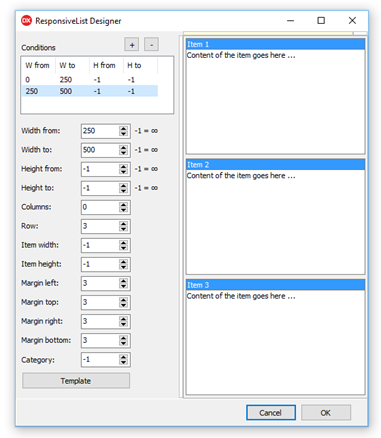
Responsive list layout starts with conditions. Each condition defines the client size range where it applies and the row, column, or fixed item size to use in that range. Items then provide the content that is rendered inside those calculated cells.
Width-Based Conditions
Use narrow ranges for compact one-column layouts and wider ranges for multi-column layouts. Keep ItemWidth at -1 when the item width should stretch proportionally with the control.
procedure TForm1.ConfigureResponsiveList;
var
  Condition: TResponsiveCondition;
  Item: TResponsiveListItem;
begin
  TMSFNCResponsiveList1.Conditions.Clear;

  Condition := TMSFNCResponsiveList1.Conditions.Add;
  Condition.WidthFrom := 0;
  Condition.WidthTo := 320;
  Condition.Columns := 1;
  Condition.ItemHeight := 140;

  Condition := TMSFNCResponsiveList1.Conditions.Add;
  Condition.WidthFrom := 321;
  Condition.WidthTo := -1;
  Condition.Columns := 3;
  Condition.ItemHeight := 140;

  TMSFNCResponsiveList1.Items.Clear;

  Item := TMSFNCResponsiveList1.Items.Add;
  Item.HeaderText := 'Support';
  Item.Content := '<b>Open tickets</b><br>12 items need review';
  Item.FooterText := 'Updated today';

  Item := TMSFNCResponsiveList1.Items.Add;
  Item.HeaderText := 'Sales';
  Item.Content := '<b>Pipeline</b><br>4 opportunities closing';
  Item.FooterText := 'This week';
end;
void __fastcall TForm1::ConfigureResponsiveList()
{
  TResponsiveCondition *Condition;
  TResponsiveListItem *Item;

  TMSFNCResponsiveList1->Conditions->Clear();

  Condition = TMSFNCResponsiveList1->Conditions->Add();
  Condition->WidthFrom = 0;
  Condition->WidthTo = 320;
  Condition->Columns = 1;
  Condition->ItemHeight = 140;

  Condition = TMSFNCResponsiveList1->Conditions->Add();
  Condition->WidthFrom = 321;
  Condition->WidthTo = -1;
  Condition->Columns = 3;
  Condition->ItemHeight = 140;

  TMSFNCResponsiveList1->Items->Clear();

  Item = TMSFNCResponsiveList1->Items->Add();
  Item->HeaderText = "Support";
  Item->Content = "<b>Open tickets</b><br>12 items need review";
  Item->FooterText = "Updated today";

  Item = TMSFNCResponsiveList1->Items->Add();
  Item->HeaderText = "Sales";
  Item->Content = "<b>Pipeline</b><br>4 opportunities closing";
  Item->FooterText = "This week";
}
Item Content
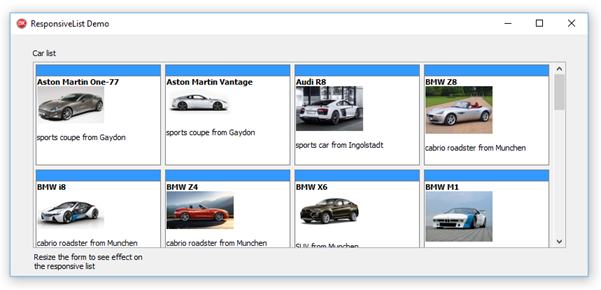
Items can combine Content, HeaderText, FooterText, and Values. Use headers and footers for stable labels, and use values when templates need to swap the amount of text shown at different sizes.
Use the item appearance colors for hover and selected states when users need clear feedback while moving through a dense responsive layout.
Responding to Item Double-Clicks
Use OnItemDblClick when a double-click should open a detail view, start an edit action, or otherwise drill into the content behind a card. The event passes the TResponsiveListItem that was double-clicked, so the handler can read its Index, HeaderText, Content, or Values to identify which item triggered it without maintaining a separate lookup.
procedure TForm1.TMSFNCResponsiveList1ItemDblClick(Sender: TObject; AItem: TResponsiveListItem);
begin
  ShowMessage(Format('Double-clicked item %d: %s', [AItem.Index, AItem.HeaderText]));
end;

procedure TForm1.FormCreate(Sender: TObject);
begin
  TMSFNCResponsiveList1.OnItemDblClick := TMSFNCResponsiveList1ItemDblClick;
end;
void __fastcall TForm1::TMSFNCResponsiveList1ItemDblClick(TObject *Sender, TResponsiveListItem *AItem)
{
  ShowMessage(Format("Double-clicked item %d: %s", ARRAYOFCONST((AItem->Index, AItem->HeaderText))));
}

void __fastcall TForm1::FormCreate(TObject *Sender)
{
  TMSFNCResponsiveList1->OnItemDblClick = TMSFNCResponsiveList1ItemDblClick;
}
Combining Conditions, Content, and Double-Click
A typical dashboard combines all three building blocks: width-based conditions control the layout, item content carries the data, and OnItemDblClick reacts to user interaction. The example below sets up conditions and a content-bearing item, then wires a double-click handler that reads the clicked item's header and content to open a detail view.
procedure TForm1.ConfigureResponsiveListWithDoubleClick;
var
  Condition: TResponsiveCondition;
  Item: TResponsiveListItem;
begin
  TMSFNCResponsiveList1.Conditions.Clear;

  Condition := TMSFNCResponsiveList1.Conditions.Add;
  Condition.WidthFrom := 0;
  Condition.WidthTo := 320;
  Condition.Columns := 1;
  Condition.ItemHeight := 140;

  Condition := TMSFNCResponsiveList1.Conditions.Add;
  Condition.WidthFrom := 321;
  Condition.WidthTo := -1;
  Condition.Columns := 3;
  Condition.ItemHeight := 140;

  TMSFNCResponsiveList1.Items.Clear;

  Item := TMSFNCResponsiveList1.Items.Add;
  Item.HeaderText := 'Support';
  Item.Content := '<b>Open tickets</b><br>12 items need review';
  Item.FooterText := 'Updated today';

  TMSFNCResponsiveList1.OnItemDblClick := TMSFNCResponsiveList1ItemDblClick;
end;

procedure TForm1.TMSFNCResponsiveList1ItemDblClick(Sender: TObject; AItem: TResponsiveListItem);
begin
  ShowDetailView(AItem.HeaderText, AItem.Content);
end;
void __fastcall TForm1::ConfigureResponsiveListWithDoubleClick()
{
  TResponsiveCondition *Condition;
  TResponsiveListItem *Item;

  TMSFNCResponsiveList1->Conditions->Clear();

  Condition = TMSFNCResponsiveList1->Conditions->Add();
  Condition->WidthFrom = 0;
  Condition->WidthTo = 320;
  Condition->Columns = 1;
  Condition->ItemHeight = 140;

  Condition = TMSFNCResponsiveList1->Conditions->Add();
  Condition->WidthFrom = 321;
  Condition->WidthTo = -1;
  Condition->Columns = 3;
  Condition->ItemHeight = 140;

  TMSFNCResponsiveList1->Items->Clear();

  Item = TMSFNCResponsiveList1->Items->Add();
  Item->HeaderText = "Support";
  Item->Content = "<b>Open tickets</b><br>12 items need review";
  Item->FooterText = "Updated today";

  TMSFNCResponsiveList1->OnItemDblClick = TMSFNCResponsiveList1ItemDblClick;
}

void __fastcall TForm1::TMSFNCResponsiveList1ItemDblClick(TObject *Sender, TResponsiveListItem *AItem)
{
  ShowDetailView(AItem->HeaderText, AItem->Content);
}
Per-Monitor High DPI
Responsive breakpoints and DPI scaling could easily fight each other: a
condition that matches on Width would fire at a different logical width on
every display if the numbers were device pixels. They are not. The list keeps a
scale factor for the monitor it is currently on, refreshes it whenever the DPI
changes, and multiplies the condition thresholds by it before matching —
WidthFrom, WidthTo, HeightFrom and HeightTo — then scales the chosen
condition's ItemWidth, ItemHeight and Margins the same way while laying
out. Per-item HeaderHeight and FooterHeight are scaled at paint time from
the same factor.
The consequence is the rule to remember: author every one of those numbers as a
design pixel measured at 96 DPI. A WidthTo of 320 then flips the layout at
320 logical pixels on a standard display and on a 200% display, which is what
a breakpoint is supposed to mean. Scaling them yourself breaks that — the
thresholds get multiplied twice, and a window that should show three columns
drops to one.
{ Call this from your form's OnCreate: }
procedure TForm1.ConfigureResponsiveBreakpoints;
var
  Condition: TResponsiveCondition;
  Item: TResponsiveListItem;
begin
  TMSFNCResponsiveList1.Conditions.Clear;

  // WidthFrom, WidthTo, HeightFrom, HeightTo, ItemWidth, ItemHeight and
  // Margins are all design pixels measured at 96 DPI. Before matching a
  // condition the list multiplies the thresholds by the current monitor scale
  // factor, and it scales the item metrics the same way when laying out. So a
  // 320 breakpoint fires at 320 logical pixels on every display - never scale
  // these values yourself.
  Condition := TMSFNCResponsiveList1.Conditions.Add;
  Condition.WidthFrom := 0;
  Condition.WidthTo := 320;
  Condition.Columns := 1;
  Condition.ItemHeight := 140;
  Condition.Margins.Left := 4;
  Condition.Margins.Right := 4;

  Condition := TMSFNCResponsiveList1.Conditions.Add;
  Condition.WidthFrom := 321;
  Condition.WidthTo := -1;
  Condition.Columns := 3;
  Condition.ItemHeight := 140;
  Condition.Margins.Left := 8;
  Condition.Margins.Right := 8;

  TMSFNCResponsiveList1.Items.Clear;

  Item := TMSFNCResponsiveList1.Items.Add;
  Item.HeaderText := 'Support';
  Item.Content := '<b>Open tickets</b><br>12 items need review';
  Item.FooterText := 'Updated today';

  // Per-item header and footer heights are design pixels too, scaled at paint
  // time from the same per-monitor factor.
  Item.HeaderHeight := 20;
  Item.FooterHeight := 16;
end;
// Call this from your form's OnCreate:
void __fastcall TForm1::ConfigureResponsiveBreakpoints()
{
  TResponsiveCondition *Condition;
  TResponsiveListItem *Item;

  TMSFNCResponsiveList1->Conditions->Clear();

  // WidthFrom, WidthTo, HeightFrom, HeightTo, ItemWidth, ItemHeight and
  // Margins are all design pixels measured at 96 DPI. Before matching a
  // condition the list multiplies the thresholds by the current monitor scale
  // factor, and it scales the item metrics the same way when laying out. So a
  // 320 breakpoint fires at 320 logical pixels on every display - never scale
  // these values yourself.
  Condition = TMSFNCResponsiveList1->Conditions->Add();
  Condition->WidthFrom = 0;
  Condition->WidthTo = 320;
  Condition->Columns = 1;
  Condition->ItemHeight = 140;
  Condition->Margins->Left = 4;
  Condition->Margins->Right = 4;

  Condition = TMSFNCResponsiveList1->Conditions->Add();
  Condition->WidthFrom = 321;
  Condition->WidthTo = -1;
  Condition->Columns = 3;
  Condition->ItemHeight = 140;
  Condition->Margins->Left = 8;
  Condition->Margins->Right = 8;

  TMSFNCResponsiveList1->Items->Clear();

  Item = TMSFNCResponsiveList1->Items->Add();
  Item->HeaderText = "Support";
  Item->Content = "<b>Open tickets</b><br>12 items need review";
  Item->FooterText = "Updated today";

  // Per-item header and footer heights are design pixels too, scaled at paint
  // time from the same per-monitor factor.
  Item->HeaderHeight = 20;
  Item->FooterHeight = 16;
}