Templates and Nested Lists
Templates are what make a responsive list responsive: the same set of items can
present very different amounts of detail depending on the width available.
A condition supplies a template string with placeholders such as %TITLE and
%PRICE, and the list resolves those placeholders from each item's Values
collection at render time. Because the items never change — only the active
template does — you can move from a dense one-line layout on a phone to a rich
multi-line card on a desktop without rebuilding the list. This guide covers
writing responsive templates, supplying item values for the placeholders,
hosting a nested list inside an item, and combining templates with values in a
single multi-breakpoint setup.
Responsive Templates
Use shorter templates for narrow layouts and richer templates when more width is
available. Each condition owns its own Template, so the breakpoint that is
active for the current width decides how much detail every item shows. This
keeps the item count stable while adapting the presentation.
procedure TForm1.ConfigureResponsiveTemplates;
var
  Condition: TResponsiveCondition;
  Item: TResponsiveListItem;
begin
  TMSFNCResponsiveList1.Conditions.Clear;

  Condition := TMSFNCResponsiveList1.Conditions.Add;
  Condition.WidthFrom := 0;
  Condition.WidthTo := 360;
  Condition.Columns := 1;
  Condition.Template := '<b>%TITLE</b><br>%PRICE';

  Condition := TMSFNCResponsiveList1.Conditions.Add;
  Condition.WidthFrom := 361;
  Condition.WidthTo := -1;
  Condition.Columns := 2;
  Condition.Template := '<b>%TITLE</b><br>%PRICE<br>%DESCRIPTION';

  Item := TMSFNCResponsiveList1.Items.Add;
  Item.Values['TITLE'] := 'Service Plan';
  Item.Values['PRICE'] := '$49';
  Item.Values['DESCRIPTION'] := 'Includes priority support and monthly reporting.';
end;
void __fastcall TForm1::ConfigureResponsiveTemplates()
{
  TResponsiveCondition *Condition;
  TResponsiveListItem *Item;

  TMSFNCResponsiveList1->Conditions->Clear();

  Condition = TMSFNCResponsiveList1->Conditions->Add();
  Condition->WidthFrom = 0;
  Condition->WidthTo = 360;
  Condition->Columns = 1;
  Condition->Template = "<b>%TITLE</b><br>%PRICE";

  Condition = TMSFNCResponsiveList1->Conditions->Add();
  Condition->WidthFrom = 361;
  Condition->WidthTo = -1;
  Condition->Columns = 2;
  Condition->Template = "<b>%TITLE</b><br>%PRICE<br>%DESCRIPTION";

  Item = TMSFNCResponsiveList1->Items->Add();
  Item->Values["TITLE"] = System::UnicodeString("Service Plan");
  Item->Values["PRICE"] = System::UnicodeString("$49");
  Item->Values["DESCRIPTION"] = System::UnicodeString("Includes priority support and monthly reporting.");
}
Placeholders and Item Values
Placeholders in a template (%TITLE, %PRICE, %DESCRIPTION) are resolved
from each item's Values collection, keyed by name. Store every value an item
might display — even values only shown at wider breakpoints — so switching to a
richer template never leaves a placeholder empty. Names are case-sensitive and
must match the placeholder text exactly.
Nested Responsive Lists
A responsive list can host another responsive list inside an item. Use this when a tile needs its own responsive sub-layout, such as a dashboard card with nested actions or a product tile with related choices.
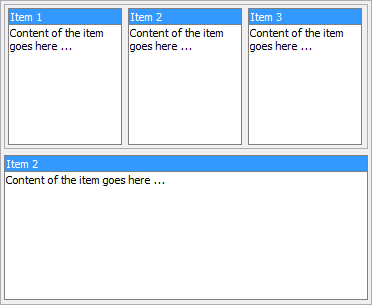
When nesting lists, configure conditions on both lists. The child list adapts to the item rectangle assigned by the parent list, so its breakpoints should be based on the item size, not the full form size.
Combining breakpoint templates with item values
The following example wires three breakpoints — narrow, medium, and wide — to
progressively richer templates, then adds items whose Values supply every
placeholder. As the control widens, the same items reveal more detail without
any item rebuild:
procedure TForm1.ConfigureProductList;
var
  Condition: TResponsiveCondition;
  Item: TResponsiveListItem;
begin
  TMSFNCResponsiveList1.Conditions.Clear;

  // Narrow: title only, single column.
  Condition := TMSFNCResponsiveList1.Conditions.Add;
  Condition.WidthFrom := 0;
  Condition.WidthTo := 360;
  Condition.Columns := 1;
  Condition.Template := '<b>%TITLE</b>';

  // Medium: title and price, two columns.
  Condition := TMSFNCResponsiveList1.Conditions.Add;
  Condition.WidthFrom := 361;
  Condition.WidthTo := 720;
  Condition.Columns := 2;
  Condition.Template := '<b>%TITLE</b><br>%PRICE';

  // Wide: full card, three columns.
  Condition := TMSFNCResponsiveList1.Conditions.Add;
  Condition.WidthFrom := 721;
  Condition.WidthTo := -1;
  Condition.Columns := 3;
  Condition.Template := '<b>%TITLE</b><br>%PRICE<br>%DESCRIPTION';

  TMSFNCResponsiveList1.Items.Clear;

  Item := TMSFNCResponsiveList1.Items.Add;
  Item.Values['TITLE'] := 'Service Plan';
  Item.Values['PRICE'] := '$49';
  Item.Values['DESCRIPTION'] := 'Includes priority support and monthly reporting.';

  Item := TMSFNCResponsiveList1.Items.Add;
  Item.Values['TITLE'] := 'Starter Plan';
  Item.Values['PRICE'] := '$19';
  Item.Values['DESCRIPTION'] := 'Core features for small teams.';
end;
void __fastcall TForm1::ConfigureProductList()
{
  TResponsiveCondition *Condition;
  TResponsiveListItem *Item;

  TMSFNCResponsiveList1->Conditions->Clear();

  // Narrow: title only, single column.
  Condition = TMSFNCResponsiveList1->Conditions->Add();
  Condition->WidthFrom = 0;
  Condition->WidthTo = 360;
  Condition->Columns = 1;
  Condition->Template = "<b>%TITLE</b>";

  // Medium: title and price, two columns.
  Condition = TMSFNCResponsiveList1->Conditions->Add();
  Condition->WidthFrom = 361;
  Condition->WidthTo = 720;
  Condition->Columns = 2;
  Condition->Template = "<b>%TITLE</b><br>%PRICE";

  // Wide: full card, three columns.
  Condition = TMSFNCResponsiveList1->Conditions->Add();
  Condition->WidthFrom = 721;
  Condition->WidthTo = -1;
  Condition->Columns = 3;
  Condition->Template = "<b>%TITLE</b><br>%PRICE<br>%DESCRIPTION";

  TMSFNCResponsiveList1->Items->Clear();

  Item = TMSFNCResponsiveList1->Items->Add();
  Item->Values["TITLE"] = System::UnicodeString("Service Plan");
  Item->Values["PRICE"] = System::UnicodeString("$49");
  Item->Values["DESCRIPTION"] = System::UnicodeString("Includes priority support and monthly reporting.");

  Item = TMSFNCResponsiveList1->Items->Add();
  Item->Values["TITLE"] = System::UnicodeString("Starter Plan");
  Item->Values["PRICE"] = System::UnicodeString("$19");
  Item->Values["DESCRIPTION"] = System::UnicodeString("Core features for small teams.");
}
Common pitfalls
- Missing values for wide templates. A placeholder with no matching
Valuesentry renders empty. Populate every value the widest template references, not just the ones visible at the current width. - Overlapping width ranges. Condition
WidthFrom/WidthToranges should not overlap; use-1for the open-ended upper bound on the widest condition. - Child breakpoints sized to the form. A nested list reflows inside the item rectangle, so base its conditions on the item width, not the form width.