Edit toolbar
TTMSFNCRichEditorEditToolBar provides the document- and clipboard-level commands that sit alongside formatting: open a file, save a file, cut, copy, paste, undo, and redo. Like the format toolbar it binds to an editor through RichEditor and keeps its buttons in step with the editor state (for example, undo/redo enable only when there is something to undo or redo). This chapter covers restricting the button set and reacting to each command.
Choosing which buttons are visible
Options is a set of TTMSFNCRichEditorEditToolBarOption, defaulting to AllEditOptions. Assign a subset to expose only the groups you want — for example, clipboard-and-history only, or file-only:
procedure TForm1.ConfigureEditButtons;
begin
  // Options is a set of TTMSFNCRichEditorEditToolBarOption, defaulting to
  // AllEditOptions. Show only the clipboard and history buttons here.
  TMSFNCRichEditorEditToolBar1.Options :=
    [etoCut, etoCopy, etoPaste, etoUndo, etoRedo];

  // Or expose only file open/save, hiding clipboard and history.
  TMSFNCRichEditorEditToolBar1.Options := [etoOpenFile, etoSaveFile];
end;
void __fastcall TForm1::ConfigureEditButtons()
{
  // Options is a set of TTMSFNCRichEditorEditToolBarOption, defaulting to
  // AllEditOptions. Show only the clipboard and history buttons here.
  TMSFNCRichEditorEditToolBar1->Options =
    TTMSFNCRichEditorEditToolBarOptions() << TTMSFNCRichEditorEditToolBarOption::etoCut << TTMSFNCRichEditorEditToolBarOption::etoCopy << TTMSFNCRichEditorEditToolBarOption::etoPaste << TTMSFNCRichEditorEditToolBarOption::etoUndo << TTMSFNCRichEditorEditToolBarOption::etoRedo;

  // Or expose only file open/save, hiding clipboard and history.
  TMSFNCRichEditorEditToolBar1->Options = TTMSFNCRichEditorEditToolBarOptions() << TTMSFNCRichEditorEditToolBarOption::etoOpenFile << TTMSFNCRichEditorEditToolBarOption::etoSaveFile;
}
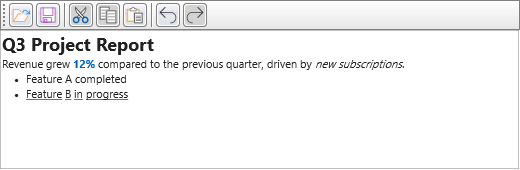
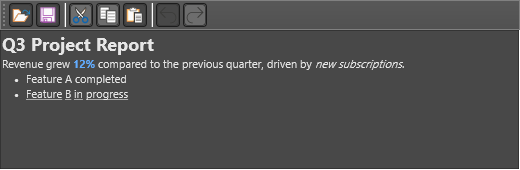
| Option | Button |
|---|---|
etoOpenFile, etoSaveFile |
Open and save document |
etoCut, etoCopy, etoPaste |
Clipboard commands |
etoUndo, etoRedo |
Undo and redo |
Tracking commands
Each button raises a plain TNotifyEvent when clicked: OnOpenFile, OnSaveFile, OnCut, OnCopy, OnPaste, OnUndo, and OnRedo. As with the format toolbar, these fire after the toolbar has performed the action on the bound editor, so they are the right place to update a title bar, clear or set a modified flag, or refresh a recent-files list.
procedure TForm1.SetupEditToolBar;
begin
  TMSFNCRichEditorEditToolBar1.RichEditor := TMSFNCRichEditor1;

  // Clipboard and history only - no file open/save in this app.
  TMSFNCRichEditorEditToolBar1.Options :=
    [etoCut, etoCopy, etoPaste, etoUndo, etoRedo];

  // Keep a modified flag current from the commands that change content.
  TMSFNCRichEditorEditToolBar1.OnPaste := DoContentChanged;
  TMSFNCRichEditorEditToolBar1.OnCut   := DoContentChanged;
end;

procedure TForm1.DoContentChanged(Sender: TObject);
begin
  FModified := True;
  Caption := 'Modified';
end;
void __fastcall TForm1::SetupEditToolBar()
{
  TMSFNCRichEditorEditToolBar1->RichEditor = TMSFNCRichEditor1;

  // Clipboard and history only - no file open/save in this app.
  TMSFNCRichEditorEditToolBar1->Options =
    TTMSFNCRichEditorEditToolBarOptions() << TTMSFNCRichEditorEditToolBarOption::etoCut << TTMSFNCRichEditorEditToolBarOption::etoCopy << TTMSFNCRichEditorEditToolBarOption::etoPaste << TTMSFNCRichEditorEditToolBarOption::etoUndo << TTMSFNCRichEditorEditToolBarOption::etoRedo;

  // Keep a modified flag current from the commands that change content.
  TMSFNCRichEditorEditToolBar1->OnPaste = DoContentChanged;
  TMSFNCRichEditorEditToolBar1->OnCut   = DoContentChanged;
}

void __fastcall TForm1::DoContentChanged(TObject *Sender)
{
  FModified = true;
  Caption = "Modified";
}
The open and save buttons show the platform file dialog and load or store the document for you; the toolbar detects the file type from the chosen extension and reads or writes accordingly. Your OnOpenFile/OnSaveFile handlers run once that has completed.
Combining a restricted set with command tracking
The following setup pairs a trimmed button set (no file open/save, clipboard and history only) with handlers that keep a modified flag current — two features of this chapter working together:
procedure TForm1.FormCreate(Sender: TObject);
begin
  TMSFNCRichEditorEditToolBar1.RichEditor := TMSFNCRichEditor1;

  // Every edit command is a plain TNotifyEvent that fires when the button is
  // clicked. The toolbar has already run the open/save/clipboard action on the
  // bound editor by the time the handler is called.
  TMSFNCRichEditorEditToolBar1.OnOpenFile := DoDocumentOpened;
  TMSFNCRichEditorEditToolBar1.OnSaveFile := DoDocumentSaved;
  TMSFNCRichEditorEditToolBar1.OnPaste    := DoContentChanged;
end;

procedure TForm1.DoDocumentOpened(Sender: TObject);
begin
  Caption := 'Rich Editor - document loaded';
  FModified := False;
end;

procedure TForm1.DoDocumentSaved(Sender: TObject);
begin
  FModified := False;
  Caption := 'Saved';
end;

procedure TForm1.DoContentChanged(Sender: TObject);
begin
  FModified := True;
end;
void __fastcall TForm1::FormCreate(TObject *Sender)
{
  TMSFNCRichEditorEditToolBar1->RichEditor = TMSFNCRichEditor1;

  // Every edit command is a plain TNotifyEvent that fires when the button is
  // clicked. The toolbar has already run the open/save/clipboard action on the
  // bound editor by the time the handler is called.
  TMSFNCRichEditorEditToolBar1->OnOpenFile = DoDocumentOpened;
  TMSFNCRichEditorEditToolBar1->OnSaveFile = DoDocumentSaved;
  TMSFNCRichEditorEditToolBar1->OnPaste    = DoContentChanged;
}

void __fastcall TForm1::DoDocumentOpened(TObject *Sender)
{
  Caption = "Rich Editor - document loaded";
  FModified = false;
}

void __fastcall TForm1::DoDocumentSaved(TObject *Sender)
{
  FModified = false;
  Caption = "Saved";
}

void __fastcall TForm1::DoContentChanged(TObject *Sender)
{
  FModified = true;
}
Pitfalls
- Order the connection before assigning
Optionsin code is not required, but assignRichEditorbefore relying on command behaviour. An unbound toolbar shows its buttons but has no editor to act on, so nothing happens when they are clicked. OnPastefires for the toolbar's paste button, not forCtrl+Vinside the editor. Handle editor-level input on the editor itself if you need to catch every paste.