Ruler appearance and events
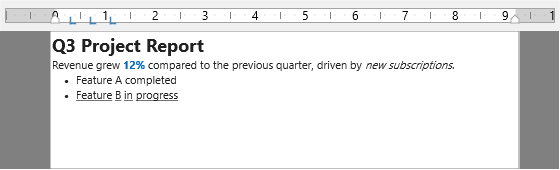
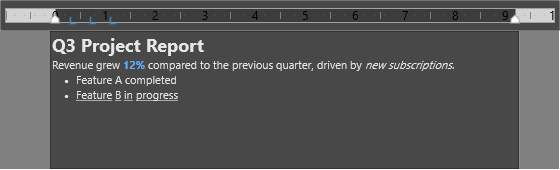
The horizontal ruler exposes separate appearance settings for the ruler body, page-margin fill, indent markers, tab stops, tick marks, and labels. It also raises live and committed change events so applications can update status text during a drag while deferring heavier work until the drag finishes.
Theme the ruler
Use Appearance when the ruler needs to match the editor surface or product theme. The fill, stroke, font, tab, and tick-mark settings can be changed independently.
procedure TForm1.ThemeRuler;
begin
  with TMSFNCRichEditorHorizontalRuler1.Appearance do
  begin
    // Ruler body and the shaded page-margin area.
    RulerFill.Kind   := gfkSolid;
    RulerFill.Color  := gcWhite;
    MarginFill.Kind  := gfkSolid;
    MarginFill.Color := gcLightgray;

    // Indent markers: fill plus outline stroke.
    IndentFill.Kind    := gfkSolid;
    IndentFill.Color   := gcSteelblue;
    IndentStroke.Kind  := gskSolid;
    IndentStroke.Color := gcDarkslategray;

    // Tab stops, tick marks, and the tick-label font.
    TabColor      := gcSteelblue;
    TabColorMoving := gcSilver;
    TickMarkColor := gcGray;
    Font.Name     := 'Segoe UI';
    Font.Color    := gcBlack;
  end;
end;
void __fastcall TForm1::ThemeRuler()
{
  TTMSFNCRichEditorHorizontalRulerAppearance *a = TMSFNCRichEditorHorizontalRuler1->Appearance;

  // Ruler body and the shaded page-margin area.
  a->RulerFill->Kind   = gfkSolid;
  a->RulerFill->Color  = gcWhite;
  a->MarginFill->Kind  = gfkSolid;
  a->MarginFill->Color = gcLightgray;

  // Indent markers: fill plus outline stroke.
  a->IndentFill->Kind    = gfkSolid;
  a->IndentFill->Color   = gcSteelblue;
  a->IndentStroke->Kind  = gskSolid;
  a->IndentStroke->Color = gcDarkslategray;

  // Tab stops, tick marks, and the tick-label font.
  a->TabColor       = gcSteelblue;
  a->TabColorMoving = gcSilver;
  a->TickMarkColor  = gcGray;
  a->Font->Name     = "Segoe UI";
  a->Font->Color    = gcBlack;
}
Track user changes
Margin and indent events come in live and committed forms. Use the live event for cheap feedback, such as a status-bar value, and the committed event for document state, persistence, or layout recalculation. Tab events report the affected tab index and indent.
procedure TForm1.FormCreate(Sender: TObject);
begin
  TMSFNCRichEditorHorizontalRuler1.RichEditor := TMSFNCRichEditor1;

  // *Change fires continuously while the user drags a marker; *Changed fires
  // once when the drag is committed. Use Changed for expensive work.
  TMSFNCRichEditorHorizontalRuler1.OnLeftMarginChange   := DoMarginDragging;
  TMSFNCRichEditorHorizontalRuler1.OnLeftMarginChanged  := DoMarginCommitted;

  // Tab events report the affected index and its indent position.
  TMSFNCRichEditorHorizontalRuler1.OnTabAdded := DoTabAdded;
end;

procedure TForm1.DoMarginDragging(Sender: TObject; Indent: Integer);
begin
  // Live preview while dragging - keep this handler cheap.
  Caption := Format('Left margin: %d', [Indent]);
end;

procedure TForm1.DoMarginCommitted(Sender: TObject; Indent: Integer);
begin
  // Final value once the user releases the marker.
  FDocumentDirty := True;
end;

procedure TForm1.DoTabAdded(Sender: TObject; Index: Integer; Indent: Integer);
begin
  Caption := Format('Tab %d at %d', [Index, Indent]);
end;
void __fastcall TForm1::FormCreate(TObject *Sender)
{
  TMSFNCRichEditorHorizontalRuler1->RichEditor = TMSFNCRichEditor1;

  // *Change fires continuously while the user drags a marker; *Changed fires
  // once when the drag is committed. Use Changed for expensive work.
  TMSFNCRichEditorHorizontalRuler1->OnLeftMarginChange   = DoMarginDragging;
  TMSFNCRichEditorHorizontalRuler1->OnLeftMarginChanged  = DoMarginCommitted;

  // Tab events report the affected index and its indent position.
  TMSFNCRichEditorHorizontalRuler1->OnTabAdded = DoTabAdded;
}

void __fastcall TForm1::DoMarginDragging(TObject *Sender, int Indent)
{
  // Live preview while dragging - keep this handler cheap.
  Caption = Format("Left margin: %d", ARRAYOFCONST((Indent)));
}

void __fastcall TForm1::DoMarginCommitted(TObject *Sender, int Indent)
{
  // Final value once the user releases the marker.
  FDocumentDirty = true;
}

void __fastcall TForm1::DoTabAdded(TObject *Sender, int Index, int Indent)
{
  Caption = Format("Tab %d at %d", ARRAYOFCONST((Index, Indent)));
}
Custom drawing
Handle the before-draw events when a marker needs custom visuals. Set ADefaultDraw to False after drawing the replacement so the ruler does not paint the built-in marker on top.
procedure TForm1.FormCreate(Sender: TObject);
begin
  TMSFNCRichEditorHorizontalRuler1.OnBeforeDrawLeftMargin := DoDrawLeftMargin;
end;

procedure TForm1.DoDrawLeftMargin(Sender: TObject; AGraphics: TTMSFNCGraphics;
  AType: TTMSFNCRichEditorRulerTabType; AMargin: Integer; ARect: TRectF;
  var AAllow: Boolean; var ADefaultDraw: Boolean);
begin
  // Paint a soft highlight band for the left margin area, then tell the ruler
  // to skip its own default drawing for this marker.
  AGraphics.Fill.Kind  := gfkSolid;
  AGraphics.Fill.Color := gcLightyellow;
  AGraphics.Stroke.Kind := gskSolid;
  AGraphics.Stroke.Color := gcSteelblue;
  AGraphics.DrawRectangle(ARect);

  ADefaultDraw := False;   // replace the built-in marker drawing
end;
void __fastcall TForm1::FormCreate(TObject *Sender)
{
  TMSFNCRichEditorHorizontalRuler1->OnBeforeDrawLeftMargin = DoDrawLeftMargin;
}

void __fastcall TForm1::DoDrawLeftMargin(TObject *Sender, TTMSFNCGraphics *AGraphics,
  TTMSFNCRichEditorRulerTabType AType, int AMargin, const TRectF &ARect,
  bool &AAllow, bool &ADefaultDraw)
{
  // Paint a soft highlight band for the left margin area, then tell the ruler
  // to skip its own default drawing for this marker.
  AGraphics->Fill->Kind  = gfkSolid;
  AGraphics->Fill->Color = gcLightyellow;
  AGraphics->Stroke->Kind = gskSolid;
  AGraphics->Stroke->Color = gcSteelblue;
  AGraphics->DrawRectangle(ARect);

  ADefaultDraw = false;   // replace the built-in marker drawing
}
Combining styling and events
Styling the ruler and listening to it usually happen in the same place, because both belong to the one-time setup of the control. Combining them keeps the visual theme and the behaviour next to each other, which makes it easy to see that, for instance, a themed moving-tab colour pairs with a handler that only does work when a drag is committed. Use this approach in the form start-up code or a theme-application routine. The example themes the ruler fills and tab colours and then subscribes to the committed left-margin event to update the surrounding UI.
procedure TForm1.ThemeAndTrackRuler;
begin
  TMSFNCRichEditorHorizontalRuler1.RichEditor := TMSFNCRichEditor1;

  TMSFNCRichEditorHorizontalRuler1.Appearance.RulerFill.Kind  := gfkSolid;
  TMSFNCRichEditorHorizontalRuler1.Appearance.RulerFill.Color := gcWhite;
  TMSFNCRichEditorHorizontalRuler1.Appearance.TabColor        := gcSteelblue;
  TMSFNCRichEditorHorizontalRuler1.Appearance.TabColorMoving  := gcSilver;

  // The committed event runs once per drag, so it is the right place to
  // update surrounding UI.
  TMSFNCRichEditorHorizontalRuler1.OnLeftMarginChanged := DoMarginCommitted;
end;

procedure TForm1.DoMarginCommitted(Sender: TObject; Indent: Integer);
begin
  Caption := Format('Left margin: %d', [Indent]);
end;
void __fastcall TForm1::ThemeAndTrackRuler()
{
  TMSFNCRichEditorHorizontalRuler1->RichEditor = TMSFNCRichEditor1;

  TMSFNCRichEditorHorizontalRuler1->Appearance->RulerFill->Kind  = gfkSolid;
  TMSFNCRichEditorHorizontalRuler1->Appearance->RulerFill->Color = gcWhite;
  TMSFNCRichEditorHorizontalRuler1->Appearance->TabColor         = gcSteelblue;
  TMSFNCRichEditorHorizontalRuler1->Appearance->TabColorMoving   = gcSilver;

  // The committed event runs once per drag, so it is the right place to
  // update surrounding UI.
  TMSFNCRichEditorHorizontalRuler1->OnLeftMarginChanged = DoMarginCommitted;
}

void __fastcall TForm1::DoMarginCommitted(TObject *Sender, int Indent)
{
  Caption = Format("Left margin: %d", ARRAYOFCONST((Indent)));
}
Pitfalls
- Keep live-change handlers cheap. Drag events can fire many times while the pointer is moving.
- Only suppress default drawing after rendering a replacement. Leaving both custom drawing and default drawing enabled can make markers look doubled or unclear.