Configuring Task Dialog Content
Task dialogs work best when the most important decision is visible immediately and secondary details stay available without taking over the form. Configure the title, instruction, content, footer, optional verification text, and expanded text before calling Execute.
Command Links and Expanded Text
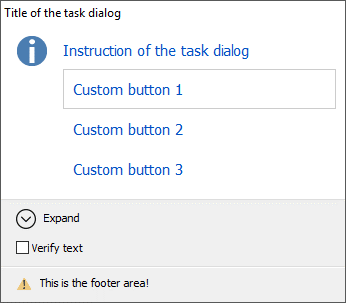
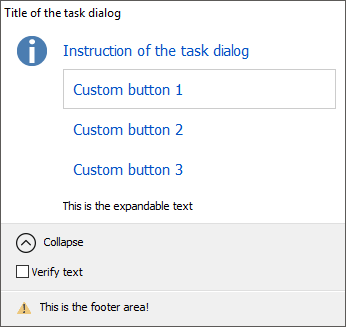
Use CustomButtons with tdoCommandLinks when every option needs its own descriptive row. ExpandedText, ExpandControlText, and CollapseControlText keep troubleshooting or extra context one click away.
procedure TForm1.ConfigureTaskDialog;
begin
  TMSFNCTaskDialog1.Title := 'Save changes';
  TMSFNCTaskDialog1.Instruction := 'Choose how to continue before closing this project.';
  TMSFNCTaskDialog1.Content := 'Unsaved changes will be lost if you close without saving.';
  TMSFNCTaskDialog1.Icon := tdiInformation;
  TMSFNCTaskDialog1.Options := TMSFNCTaskDialog1.Options + [tdoCommandLinks, tdoCommandLinksNoIcon];
  TMSFNCTaskDialog1.CustomButtons.Clear;
  TMSFNCTaskDialog1.CustomButtons.Add('Save and close');
  TMSFNCTaskDialog1.CustomButtons.Add('Close without saving');
  TMSFNCTaskDialog1.CustomButtons.Add('Cancel');
  TMSFNCTaskDialog1.ExpandedText := 'The project file and all open documents are checked before closing.';
  TMSFNCTaskDialog1.ExpandControlText := 'Show details';
  TMSFNCTaskDialog1.CollapseControlText := 'Hide details';
  TMSFNCTaskDialog1.Footer := 'You can change this behavior in application options.';
  TMSFNCTaskDialog1.FooterIcon := tdiWarning;
  TMSFNCTaskDialog1.VerifyText := 'Do not ask again for this project';
  TMSFNCTaskDialog1.Execute;
end;
void __fastcall TForm1::ConfigureTaskDialog()
{
  TMSFNCTaskDialog1->Title = "Save changes";
  TMSFNCTaskDialog1->Instruction = "Choose how to continue before closing this project.";
  TMSFNCTaskDialog1->Content = "Unsaved changes will be lost if you close without saving.";
  TMSFNCTaskDialog1->Icon = tdiInformation;
  TMSFNCTaskDialog1->Options = TMSFNCTaskDialog1->Options << tdoCommandLinks << tdoCommandLinksNoIcon;
  TMSFNCTaskDialog1->CustomButtons->Clear();
  TMSFNCTaskDialog1->CustomButtons->Add("Save and close");
  TMSFNCTaskDialog1->CustomButtons->Add("Close without saving");
  TMSFNCTaskDialog1->CustomButtons->Add("Cancel");
  TMSFNCTaskDialog1->ExpandedText = "The project file and all open documents are checked before closing.";
  TMSFNCTaskDialog1->ExpandControlText = "Show details";
  TMSFNCTaskDialog1->CollapseControlText = "Hide details";
  TMSFNCTaskDialog1->Footer = "You can change this behavior in application options.";
  TMSFNCTaskDialog1->FooterIcon = tdiWarning;
  TMSFNCTaskDialog1->VerifyText = "Do not ask again for this project";
  TMSFNCTaskDialog1->Execute();
}
Custom Input Controls
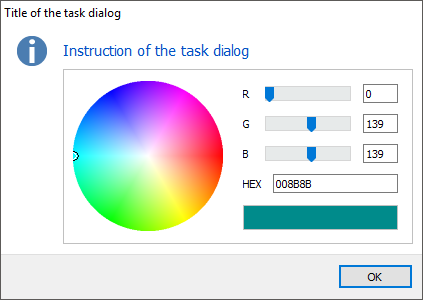
Set InputType to titCustom and assign InputControl when the dialog needs an editor that is richer than the built-in text and list inputs. Initialize the embedded control in OnDialogCreated, when the dialog has created the host surface.
procedure TForm1.ShowColorTaskDialog;
begin
  TMSFNCTaskDialog1.Title := 'Pick a highlight color';
  TMSFNCTaskDialog1.Instruction := 'Choose the color used for highlighted rows.';
  TMSFNCTaskDialog1.Icon := tdiInformation;
  TMSFNCTaskDialog1.InputType := titCustom;
  TMSFNCTaskDialog1.InputControl := TMSFNCColorWheel1;
  TMSFNCTaskDialog1.Execute;
end;

procedure TForm1.TMSFNCTaskDialog1DialogCreated(Sender: TObject);
begin
  TTMSFNCColorWheel(TMSFNCTaskDialog1.InputControl).SelectedColor := gcDarkcyan;
end;
void __fastcall TForm1::ShowColorTaskDialog()
{
  TMSFNCTaskDialog1->Title = "Pick a highlight color";
  TMSFNCTaskDialog1->Instruction = "Choose the color used for highlighted rows.";
  TMSFNCTaskDialog1->Icon = tdiInformation;
  TMSFNCTaskDialog1->InputType = titCustom;
  TMSFNCTaskDialog1->InputControl = TMSFNCColorWheel1;
  TMSFNCTaskDialog1->Execute();
}

void __fastcall TForm1::TMSFNCTaskDialog1DialogCreated(TObject *Sender)
{
  static_cast<TTMSFNCColorWheel *>(TMSFNCTaskDialog1->InputControl)->SelectedColor = gcDarkcyan;
}
Appearance and Closing Rules
Use Appearance for dialog colors and typography when the dialog needs to match an application theme. DefaultButton selects the initially focused button, and OnBeforeCloseDialog can prevent the dialog from closing until required input is present.
Choosing the Default Button
Set DefaultButton when a dialog's buttons should not default to the first one — for example, to keep a destructive or hard-to-reverse choice from responding to a stray Enter key press. The index is zero-based and counts only the buttons actually shown: with CommonButtons, buttons are counted in declaration order (tcbOK, tcbYes, tcbNo, tcbCancel, tcbRetry, tcbClose), skipping any not included in the set; when command links are not used, CustomButtons entries continue that same index sequence after the common buttons. DefaultButton has no effect while a custom input control is assigned to InputControl.
procedure TForm1.ShowCloseConfirmation;
begin
  TMSFNCTaskDialog1.Title := 'Close without saving?';
  TMSFNCTaskDialog1.Instruction := 'You have unsaved changes.';
  TMSFNCTaskDialog1.Content := 'Choose whether to discard your changes or return to the document.';

  // CommonButtons are indexed in declaration order: tcbOK, tcbYes, tcbNo,
  // tcbCancel, tcbRetry, tcbClose. Only the buttons included in the set count,
  // so [tcbYes, tcbCancel] makes tcbYes index 0 and tcbCancel index 1.
  TMSFNCTaskDialog1.CommonButtons := [tcbYes, tcbCancel];

  // Focus Cancel (index 1) instead of the first button, so the destructive
  // "Yes" choice is never the one that responds to a stray Enter key press.
  TMSFNCTaskDialog1.DefaultButton := 1;

  TMSFNCTaskDialog1.Execute;
end;
void __fastcall TForm1::ShowCloseConfirmation()
{
  TMSFNCTaskDialog1->Title = "Close without saving?";
  TMSFNCTaskDialog1->Instruction = "You have unsaved changes.";
  TMSFNCTaskDialog1->Content = "Choose whether to discard your changes or return to the document.";

  // CommonButtons are indexed in declaration order: tcbOK, tcbYes, tcbNo,
  // tcbCancel, tcbRetry, tcbClose. Only the buttons included in the set count,
  // so [tcbYes, tcbCancel] makes tcbYes index 0 and tcbCancel index 1.
  TMSFNCTaskDialog1->CommonButtons = TTMSFNCTaskDialogCommonButtons() << tcbYes << tcbCancel;

  // Focus Cancel (index 1) instead of the first button, so the destructive
  // "Yes" choice is never the one that responds to a stray Enter key press.
  TMSFNCTaskDialog1->DefaultButton = 1;

  TMSFNCTaskDialog1->Execute();
}
Canceling a Close
Wire OnBeforeCloseDialog when the dialog must validate state before it is allowed to close — most commonly, checking that required input was provided. The event fires for every close path (common buttons, custom buttons, and command links) and passes a single var AAllow: Boolean parameter that defaults to True; set it to False to keep the dialog open. Since the handler fires after the triggering button has already set the dialog's ModalResult, read ModalResult inside the handler to only validate the paths that should be blocked (for example, block an OK-style close but always allow Cancel).
procedure TForm1.ShowRequiredInputDialog;
begin
  TMSFNCTaskDialog1.Title := 'Name the export file';
  TMSFNCTaskDialog1.Instruction := 'Enter a file name before continuing.';
  TMSFNCTaskDialog1.CommonButtons := [tcbOk, tcbCancel];
  TMSFNCTaskDialog1.InputType := titEdit;
  TMSFNCTaskDialog1.OnBeforeCloseDialog := DoBeforeCloseDialog;
  TMSFNCTaskDialog1.Execute;
end;

procedure TForm1.DoBeforeCloseDialog(Sender: TObject; var AAllow: Boolean);
begin
  // Only block the close when the user tried to accept the dialog with
  // an empty input; Cancel and other paths should always be allowed to close.
  if TMSFNCTaskDialog1.ModalResult = mrOk then
    AAllow := TMSFNCTaskDialog1.InputText <> '';
end;
void __fastcall TForm1::ShowRequiredInputDialog()
{
  TMSFNCTaskDialog1->Title = "Name the export file";
  TMSFNCTaskDialog1->Instruction = "Enter a file name before continuing.";
  TMSFNCTaskDialog1->CommonButtons = TTMSFNCTaskDialogCommonButtons() << tcbOK << tcbCancel;
  TMSFNCTaskDialog1->InputType = titEdit;
  TMSFNCTaskDialog1->OnBeforeCloseDialog = DoBeforeCloseDialog;
  TMSFNCTaskDialog1->Execute();
}

void __fastcall TForm1::DoBeforeCloseDialog(TObject *Sender, bool &AAllow)
{
  // The dialog component does not expose the pending ModalResult here, so the
  // close is allowed only when the built-in input has text.
  AAllow = TMSFNCTaskDialog1->InputText != "";
}
Combining command links, custom input, and closing rules
Build a dialog that uses command links, embeds a custom control, and prevents closing until the required field is filled:
procedure TForm1.ShowConfigDialog;
begin
  TMSFNCTaskDialog1.Title       := 'Export Settings';
  TMSFNCTaskDialog1.Instruction := 'Choose an export format and enter a file name.';

  // Command links for each format option
  TMSFNCTaskDialog1.Options := TMSFNCTaskDialog1.Options + [tdoCommandLinks];
  TMSFNCTaskDialog1.CustomButtons.Clear;
  TMSFNCTaskDialog1.CustomButtons.Add('PDF');
  TMSFNCTaskDialog1.CustomButtons.Add('Excel');

  // Custom edit control for the file name
  TMSFNCTaskDialog1.InputType    := titCustom;
  TMSFNCTaskDialog1.InputControl := EditFileName;
  TMSFNCTaskDialog1.OnDialogCreated := DoDialogCreated;

  // Expanded section with format notes
  TMSFNCTaskDialog1.ExpandedText       := 'PDF output requires a PDF reader. Excel output requires Office 2016 or later.';
  TMSFNCTaskDialog1.ExpandControlText  := 'Show format notes';
  TMSFNCTaskDialog1.CollapseControlText := 'Hide format notes';

  // Prevent close if no file name entered
  TMSFNCTaskDialog1.OnBeforeCloseDialog := DoBeforeClose;

  TMSFNCTaskDialog1.Execute;
end;

procedure TForm1.DoDialogCreated(Sender: TObject);
begin
  EditFileName.Text := 'output';
  EditFileName.SetFocus;
end;

procedure TForm1.DoBeforeClose(Sender: TObject; var AAllow: Boolean);
begin
  AAllow := EditFileName.Text <> '';
  if not AAllow then
    ShowMessage('Enter a file name before closing.');
end;