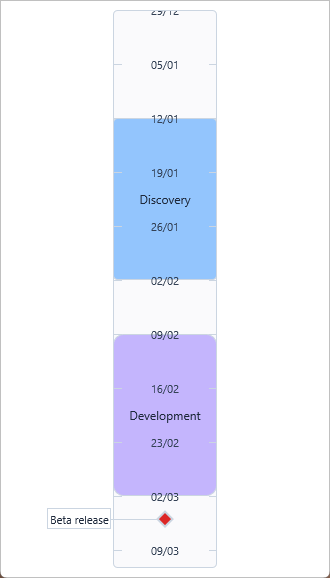
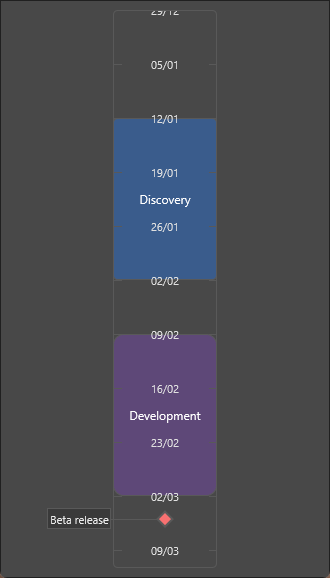
Configuration: Range, Layout, Division, and Interaction
This guide covers the structural settings of TTMSFNCTimeline — the time range it displays, the orientation and size of the bar, how the division marks are rendered, and what the user can interact with.
Range
The Range sub-object defines the span of time visible in the timeline.
| Property | Description |
|---|---|
RangeType |
Time unit per division: tlrDay, tlrMonth, tlrYear, tlrHour, tlrMinute, tlrSecond, tlrMilliSecond, tlrValue (numeric). Default: tlrDay. |
MinimumDate / MaximumDate |
Start and end of the displayable range as TDateTime. |
MinimumValue / MaximumValue |
Same bounds as numeric doubles (linked to date properties). |
DivisionSpace |
Pixels between division tick marks at zoom factor 1. Default: 40. |
DivisionSpan |
How many time units each division represents. E.g. DivisionSpan = 7 with tlrDay gives weekly marks. |
uses
  System.SysUtils, FMX.TMSFNCTimeline;

procedure TFormMain.ConfigureDateRange;
begin
  // Show January 2025 with one division per day, 60 px wide.
  TMSFNCTimeline1.Range.MinimumDate := EncodeDate(2025, 1, 1);
  TMSFNCTimeline1.Range.MaximumDate := EncodeDate(2025, 1, 31);
  TMSFNCTimeline1.Range.RangeType := tlrDay;
  TMSFNCTimeline1.Range.DivisionSpace := 60;
end;
void __fastcall TFormMain::ConfigureDateRange()
{
  // Show January 2025 with one division per day, 60 px wide.
  TMSFNCTimeline1->Range->MinimumDate = EncodeDate(2025, 1, 1);
  TMSFNCTimeline1->Range->MaximumDate = EncodeDate(2025, 1, 31);
  TMSFNCTimeline1->Range->RangeType = tlrDay;
  TMSFNCTimeline1->Range->DivisionSpace = 60;
}
Numeric ranges
Set RangeType := tlrValue and assign MinimumValue / MaximumValue directly for non-date data (e.g. version numbers, engineering values):
uses
  FMX.TMSFNCTimeline;

procedure TFormMain.ConfigureNumericRange;
begin
  TMSFNCTimeline1.Range.RangeType := tlrValue;
  TMSFNCTimeline1.Range.MinimumValue := 0;
  TMSFNCTimeline1.Range.MaximumValue := 100;
  TMSFNCTimeline1.Range.DivisionSpace := 40;
end;
void __fastcall TFormMain::ConfigureNumericRange()
{
  TMSFNCTimeline1->Range->RangeType = tlrValue;
  TMSFNCTimeline1->Range->MinimumValue = 0;
  TMSFNCTimeline1->Range->MaximumValue = 100;
  TMSFNCTimeline1->Range->DivisionSpace = 40;
}
Layout
Layout controls the orientation, size, and presentation of the timeline bar.
| Property | Description |
|---|---|
Orientation |
tloHorizontal (default) or tloVertical. |
Position |
Where the timeline bar sits: tlpMiddle (default), tlpTopLeft, tlpBottomRight. |
Size |
Thickness of the timeline bar in pixels. Default: 32. |
FullSize |
True makes the bar fill the full available width/height. |
Margins |
Padding around the control content. |
ZoomFactor |
Zoom multiplier (1.0 = 100%). Affects the effective DivisionSpace. |
ShowScrollBar |
Whether the scroll bar is visible when content overflows. |
MultiSelect |
Allow selecting multiple indicators and sections simultaneously. Default: False. |
IndicatorAnnotationSpacing |
Gap between adjacent annotations when they stack. |
IndicatorHoverBehavior |
tlibBoth — hover shows both indicator and annotation; tlibAlwaysItem — always show indicator; tlibAlwaysAnnotation — always show annotation; tlibSeperate — independent hover for each. |
DrawSectionsBeneathDivisions |
Render sections below the division label area when True. Default: False. |
OverlapSections |
When True, sections can overlap; otherwise they share the space equally. |
ShowHoveredItems |
Highlight items when the cursor is over them. |
Zoom control
uses
  FMX.TMSFNCTimeline;

procedure TFormMain.ZoomExamples;
begin
  TMSFNCTimeline1.SetZoomFactor(1.5);     // 150% zoom
  TMSFNCTimeline1.IncreaseZoomFactor(10); // +10%
  TMSFNCTimeline1.DecreaseZoomFactor(10); // -10%
  TMSFNCTimeline1.ResetZoomFactor;        // back to 100%
end;
void __fastcall TFormMain::ZoomExamples()
{
  TMSFNCTimeline1->SetZoomFactor(1.5);     // 150% zoom
  TMSFNCTimeline1->IncreaseZoomFactor(10); // +10%
  TMSFNCTimeline1->DecreaseZoomFactor(10); // -10%
  TMSFNCTimeline1->ResetZoomFactor();      // back to 100%
}
Scrolling to a value
uses
  System.SysUtils, FMX.TMSFNCTimeline;

procedure TFormMain.ScrollExamples;
begin
  // Center the view on a date.
  TMSFNCTimeline1.CenterValue(Now);

  // Scroll so a date appears at the start / end of the view.
  TMSFNCTimeline1.ValueVisibleStart(EncodeDate(2025, 6, 1));
  TMSFNCTimeline1.ValueVisibleEnd(EncodeDate(2025, 6, 30));

  // Only scroll when the date is not already visible.
  if not TMSFNCTimeline1.IsValueVisible(EncodeDate(2025, 6, 15)) then
    TMSFNCTimeline1.CenterValue(EncodeDate(2025, 6, 15));
end;
void __fastcall TFormMain::ScrollExamples()
{
  // Center the view on a date.
  TMSFNCTimeline1->CenterValue(Now());

  // Scroll so a date appears at the start / end of the view.
  TMSFNCTimeline1->ValueVisibleStart(EncodeDate(2025, 6, 1));
  TMSFNCTimeline1->ValueVisibleEnd(EncodeDate(2025, 6, 30));

  // Only scroll when the date is not already visible.
  if (!TMSFNCTimeline1->IsValueVisible(EncodeDate(2025, 6, 15)))
    TMSFNCTimeline1->CenterValue(EncodeDate(2025, 6, 15));
}
Division
The Division sub-object configures the tick marks and labels drawn along the timeline.
| Property | Description |
|---|---|
Position |
tlpTopLeft, tlpMiddle (default), tlpBottomRight — which side of the bar the division sits on. |
Size |
Height of the division area. -1 = automatic. |
DrawText |
Show date/value labels. |
DrawTickMark |
Show tick marks. |
TickMarkSize |
Tick mark height in pixels. Default: 8. |
TextFormat |
Format string for division labels (e.g. 'dd/mm', 'MMM yyyy'). |
TextPosition |
gtaLeft, gtaCenter (default), gtaRight. |
TextWordWrap |
Wrap long labels. |
TextOrientation |
Rotate label text: tltoHorizontal, tltoLeft, tltoRight, tltoUpsideDown. |
Custom label text — override via OnGetValueText:
uses
  System.SysUtils, FMX.TMSFNCTimeline;

procedure TFormMain.TMSFNCTimeline1GetValueText(Sender: TObject;
  AValue: Double; ARangeType: TTMSFNCTimelineRangeType; var AText: string);
begin
  // Show only the day-of-week abbreviation.
  AText := FormatDateTime('ddd', AValue);
end;
void __fastcall TFormMain::TMSFNCTimeline1GetValueText(TObject *Sender,
  double AValue, TTMSFNCTimelineRangeType ARangeType, System::UnicodeString &AText)
{
  // Show only the day-of-week abbreviation.
  AText = FormatDateTime("ddd", AValue);
}
Interaction
Interaction controls what the user can do with items and the timeline scrolling.
| Property | Description |
|---|---|
CanMoveIndicator |
Allow dragging indicators. |
CanMoveIndicatorWithAnnotation |
Allow dragging via the annotation label. |
CanMoveSection |
Allow moving sections (shifts start and end together). |
CanSizeSectionStart |
Allow resizing the section's start boundary. |
CanSizeSectionEnd |
Allow resizing the section's end boundary. |
InvertedMouseScroll |
Reverse mouse-wheel scroll direction. |
InvertedMouseDrag |
Reverse mouse-drag scroll direction. |
Constraining movement
Use OnIndicatorMove and OnSectionMove to validate or cancel a move before it commits:
uses
  System.SysUtils, FMX.TMSFNCTimeline;

// Snap an indicator drag to the nearest whole day.
procedure TFormMain.TMSFNCTimeline1IndicatorMove(Sender: TObject;
  AIndicator: TTMSFNCTimelineIndicator;
  var AMoveParams: TTMSFNCTimelineIndicatorMoveParameters; var AAllow: Boolean);
begin
  AMoveParams.NewTimelineValue := Trunc(AMoveParams.NewTimelineValue);
end;

// Prevent moving a section past the start of the range.
procedure TFormMain.TMSFNCTimeline1SectionMove(Sender: TObject;
  ASection: TTMSFNCTimelineSection;
  var AMoveParams: TTMSFNCTimelineSectionMoveParameters; var AAllow: Boolean);
begin
  if AMoveParams.NewStartValue < TMSFNCTimeline1.Range.MinimumValue then
    AAllow := False;
end;
// Snap an indicator drag to the nearest whole day.
void __fastcall TFormMain::TMSFNCTimeline1IndicatorMove(TObject *Sender,
  TTMSFNCTimelineIndicator *AIndicator,
  TTMSFNCTimelineIndicatorMoveParameters &AMoveParams, bool &AAllow)
{
  AMoveParams.NewTimelineValue = std::floor(AMoveParams.NewTimelineValue);
}

// Prevent moving a section past the start of the range.
void __fastcall TFormMain::TMSFNCTimeline1SectionMove(TObject *Sender,
  TTMSFNCTimelineSection *ASection,
  TTMSFNCTimelineSectionMoveParameters &ASectionParams, bool &AAllow)
{
  if (ASectionParams.NewStartValue < TMSFNCTimeline1->Range->MinimumValue)
    AAllow = false;
}
Appearance
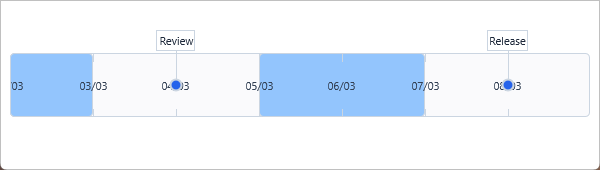
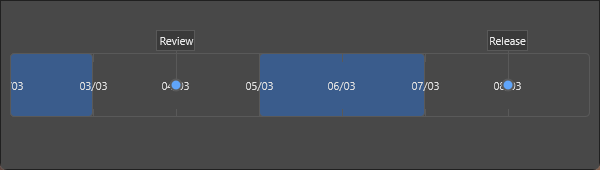
A solid TimelineFill with a rounded border from TimelineStroke and
Rounding, division labels styled through DivisionFont, and tick marks
drawn with DivisionTickmarkStroke:
Appearance covers the default visual style for the timeline bar and its items.
| Property | Description |
|---|---|
TimelineFill |
Background fill of the timeline bar. |
TimelineStroke |
Border of the timeline bar. |
DivisionFont |
Font for division labels. |
DivisionTickmarkStroke |
Stroke style of tick marks. |
Rounding |
Corner radius of the timeline bar. |
DefaultIndicatorAppearance |
Default shape, fill, stroke, and size for all new indicators. |
DefaultAnnotationAppearance |
Default font, fill, and stroke for all new annotations. |
DefaultSectionAppearance |
Default fill, stroke, and text settings for all new sections. |
The sections and indicators in the capture inherit
DefaultSectionAppearance and DefaultIndicatorAppearance. Note
Layout.DrawSectionsBeneathDivisions there as well: sections normally paint
over the bar and would hide the division labels, so drawing them beneath keeps
the labels readable.
Combining configuration, items, and appearance
The example below builds a vertical project timeline: a quarter-long range with one division per week, movable and resizable phase sections, a pinned milestone indicator, and the shared appearance defaults.
uses
  System.SysUtils, FMX.TMSFNCTimeline;

// Combined: date range, vertical layout, interactive sections,
// scrolling to today, and OnSectionMove constraint.
procedure TFormMain.BuildProjectTimeline;
var
  sec: TTMSFNCTimelineSection;
  ind: TTMSFNCTimelineIndicator;
begin
  TMSFNCTimeline1.BeginUpdate;

  // Range — Q1 2025, one division per week
  TMSFNCTimeline1.Range.MinimumDate := EncodeDate(2025, 1, 1);
  TMSFNCTimeline1.Range.MaximumDate := EncodeDate(2025, 3, 31);
  TMSFNCTimeline1.Range.RangeType := tlrDay;
  TMSFNCTimeline1.Range.DivisionSpan := 7;    // 7 days per division mark
  TMSFNCTimeline1.Range.DivisionSpace := 100;

  // Layout — vertical, full size
  TMSFNCTimeline1.Layout.Orientation := tloVertical;
  TMSFNCTimeline1.Layout.FullSize := True;
  TMSFNCTimeline1.Layout.MultiSelect := True;

  // Interaction — allow moving sections, not indicators
  TMSFNCTimeline1.Interaction.CanMoveSection := True;
  TMSFNCTimeline1.Interaction.CanMoveIndicator := False;
  TMSFNCTimeline1.Interaction.CanSizeSectionStart := True;
  TMSFNCTimeline1.Interaction.CanSizeSectionEnd := True;

  // Sections (project phases)
  sec := TMSFNCTimeline1.Sections.Add;
  sec.StartTimelineDate := EncodeDate(2025, 1, 6);
  sec.EndTimelineDate := EncodeDate(2025, 1, 31);
  sec.Text := 'Discovery';
  sec.Appearance.Fill.Color := gcCornflowerBlue;
  sec.Appearance.Fill.ColorTo := gcRoyalBlue;

  sec := TMSFNCTimeline1.Sections.Add;
  sec.StartTimelineDate := EncodeDate(2025, 2, 3);
  sec.EndTimelineDate := EncodeDate(2025, 2, 28);
  sec.Text := 'Development';
  sec.Appearance.Fill.Color := gcMediumSeaGreen;

  // Milestone indicator
  ind := TMSFNCTimeline1.Indicators.Add;
  ind.TimelineDate := EncodeDate(2025, 3, 14);
  ind.Annotation.Text := 'Beta release';
  ind.Appearance.Shape := tlisDiamond;
  ind.Appearance.Fill.Color := gcOrange;
  ind.Fixed := True;

  TMSFNCTimeline1.OnSectionMove := SectionMoveConstraint;
  TMSFNCTimeline1.OnIndicatorSelectionChanged := IndicatorSelected;

  TMSFNCTimeline1.EndUpdate;

  // Scroll to today
  TMSFNCTimeline1.CenterValue(Now);
end;

procedure TFormMain.SectionMoveConstraint(Sender: TObject;
  ASection: TTMSFNCTimelineSection;
  var AMoveParams: TTMSFNCTimelineSectionMoveParameters; var AAllow: Boolean);
begin
  // Keep sections within the configured range
  if AMoveParams.NewStartValue < TMSFNCTimeline1.Range.MinimumValue then
    AAllow := False;
  if AMoveParams.NewEndValue > TMSFNCTimeline1.Range.MaximumValue then
    AAllow := False;
end;

procedure TFormMain.IndicatorSelected(Sender: TObject;
  AIndicator: TTMSFNCTimelineIndicator;
  ASelectionParameters: TTMSFNCTimelineIndicatorSelectionParameters);
begin
  if ASelectionParameters.Selected then
    StatusBar1.SimpleText := 'Selected: ' + AIndicator.Annotation.Text;
end;
// Combined: date range, vertical layout, interactive sections,
// scrolling to today, and OnSectionMove constraint.
void __fastcall TFormMain::BuildProjectTimeline()
{
  TTMSFNCTimelineSection *sec;
  TTMSFNCTimelineIndicator *ind;

  TMSFNCTimeline1->BeginUpdate();

  // Range - Q1 2025, one division per week
  TMSFNCTimeline1->Range->MinimumDate = EncodeDate(2025, 1, 1);
  TMSFNCTimeline1->Range->MaximumDate = EncodeDate(2025, 3, 31);
  TMSFNCTimeline1->Range->RangeType = tlrDay;
  TMSFNCTimeline1->Range->DivisionSpan = 7;    // 7 days per division mark
  TMSFNCTimeline1->Range->DivisionSpace = 100;

  // Layout - vertical, full size
  TMSFNCTimeline1->Layout->Orientation = TTMSFNCTimelineOrientation::tloVertical;
  TMSFNCTimeline1->Layout->FullSize = true;
  TMSFNCTimeline1->Layout->MultiSelect = true;

  // Interaction - allow moving sections, not indicators
  TMSFNCTimeline1->Interaction->CanMoveSection = true;
  TMSFNCTimeline1->Interaction->CanMoveIndicator = false;
  TMSFNCTimeline1->Interaction->CanSizeSectionStart = true;
  TMSFNCTimeline1->Interaction->CanSizeSectionEnd = true;

  // Sections (project phases)
  sec = TMSFNCTimeline1->Sections->Add();
  sec->StartTimelineDate = EncodeDate(2025, 1, 6);
  sec->EndTimelineDate = EncodeDate(2025, 1, 31);
  sec->Text = "Discovery";
  sec->Appearance->Fill->Color = gcCornflowerblue;
  sec->Appearance->Fill->ColorTo = gcRoyalblue;

  sec = TMSFNCTimeline1->Sections->Add();
  sec->StartTimelineDate = EncodeDate(2025, 2, 3);
  sec->EndTimelineDate = EncodeDate(2025, 2, 28);
  sec->Text = "Development";
  sec->Appearance->Fill->Color = gcMediumseagreen;

  // Milestone indicator
  ind = TMSFNCTimeline1->Indicators->Add();
  ind->TimelineDate = EncodeDate(2025, 3, 14);
  ind->Annotation->Text = "Beta release";
  ind->Appearance->Shape = tlisDiamond;
  ind->Appearance->Fill->Color = gcOrange;
  ind->Fixed = true;

  TMSFNCTimeline1->OnSectionMove = SectionMoveConstraint;
  TMSFNCTimeline1->OnIndicatorSelectionChanged = IndicatorSelected;

  TMSFNCTimeline1->EndUpdate();

  // Scroll to today
  TMSFNCTimeline1->CenterValue(Now());
}

void __fastcall TFormMain::SectionMoveConstraint(TObject *Sender,
  TTMSFNCTimelineSection *ASection,
  TTMSFNCTimelineSectionMoveParameters &AMoveParams, bool &AAllow)
{
  // Keep sections within the configured range
  if (AMoveParams.NewStartValue < TMSFNCTimeline1->Range->MinimumValue)
    AAllow = false;
  if (AMoveParams.NewEndValue > TMSFNCTimeline1->Range->MaximumValue)
    AAllow = false;
}

void __fastcall TFormMain::IndicatorSelected(TObject *Sender,
  TTMSFNCTimelineIndicator *AIndicator,
  TTMSFNCTimelineIndicatorSelectionParameters ASelectionParameters)
{
  if (ASelectionParameters.Selected)
    StatusLabel->Text = "Selected: " + AIndicator->Annotation->Text;
}