Database Adapter
TTMSFNCTimelineDatabaseAdapter is a non-visual component that connects TTMSFNCTimeline to any TDataSource-backed dataset. Once connected and activated, the timeline loads its indicators and sections automatically from the database and keeps them in sync.
Setup
- Drop a
TTMSFNCTimelineDatabaseAdapteronto the form. - Assign it to
TMSFNCTimeline1.Adapter. - Configure
Itemto map database fields. - Set
Active := Trueto load items.
uses
  FMX.TMSFNCTimeline, FMX.TMSFNCTimelineDatabaseAdapter;

// Minimal setup — connect and activate.
procedure TFormMain.ConnectTimelineAdapter;
begin
  TMSFNCTimeline1.Adapter := TimelineAdapter;
  TimelineAdapter.Item.DataSource := DataSource1;
  // DBKey is mandatory: activating without it raises
  // 'DBKey and StartDate or StartValue are not set in
  //  TTMSFNCTimelineDatabaseAdapter item source.'
  TimelineAdapter.Item.DBKey := 'Id';
  TimelineAdapter.Item.StartDate := 'EventDate';
  TimelineAdapter.Item.Text := 'EventTitle';
  TimelineAdapter.Active := True;
end;
// Minimal setup - connect and activate.
void __fastcall TFormMain::ConnectTimelineAdapter()
{
  TMSFNCTimeline1->Adapter = TimelineAdapter;
  TimelineAdapter->Item->DataSource = DataSource1;
  // DBKey is mandatory: activating without it raises
  // 'DBKey and StartDate or StartValue are not set in
  //  TTMSFNCTimelineDatabaseAdapter item source.'
  TimelineAdapter->Item->DBKey = "Id";
  TimelineAdapter->Item->StartDate = "EventDate";
  TimelineAdapter->Item->Text = "EventTitle";
  TimelineAdapter->Active = true;
}
Field mapping
The Item property (TTMSFNCTimelineDatabaseAdapterItemSource) maps dataset columns to timeline properties.
| Field | Description |
|---|---|
DataSource |
The TDataSource connected to the dataset. |
DBKey |
Field containing the unique record identifier. Required — the adapter refuses to activate without it, together with either StartDate or StartValue. |
StartDate |
Field with the event start date/time (for indicators and sections). |
EndDate |
Field with the event end date/time. When empty or equal to StartDate, the record creates an indicator; otherwise a section. |
StartValue |
Alternative to StartDate using numeric values. When both are set, StartValue takes priority. |
EndValue |
Alternative to EndDate using numeric values. |
Text |
Field whose value becomes the annotation text (indicator) or section label. |
Fixed |
Boolean field: whether the item can be moved by the user. |
Selectable |
Boolean field: whether the item can be selected. |
AutoIncrementDBKey |
When True (default), a new GUID is generated for each inserted record. |
Indicators vs sections
The adapter determines the item type from the field values at load time:
EndDateis empty or equalsStartDate→ indicatorEndDateis afterStartDate→ section
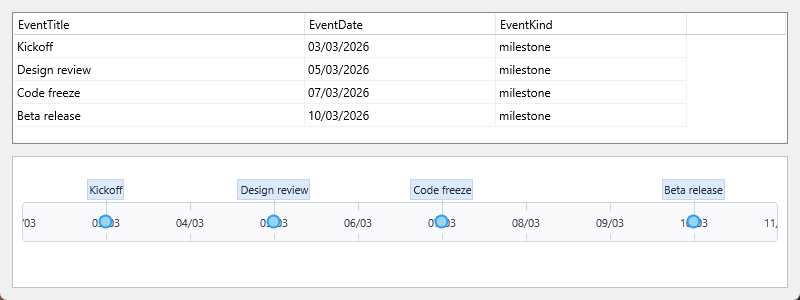
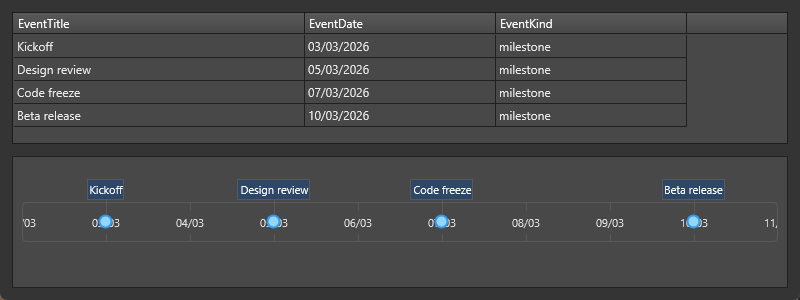
The composite below shows the mapping in both directions: the source rows on
top, and beneath them the timeline the adapter produced from exactly those
rows. EventDate became each indicator's position and EventTitle its
annotation text; because no EndDate is mapped, every row became an indicator
rather than a section.
Items arrive selected, and an annotation is drawn with its
SelectedFill/SelectedFont while its indicator is selected — so style those
members of Appearance.DefaultAnnotationAppearance, not only Fill and
Font, when theming an adapter-fed timeline. The adapter also loads lazily:
Timeline.Indicators is still empty immediately after setting Active, so
per-item work belongs in OnItemsLoaded rather than in the line after
activation.
Methods
| Method | Description |
|---|---|
LoadItems |
Clears existing items and reloads from the dataset. |
GetItems(PeriodFrom, PeriodTo) |
Loads items within a date range (non-destructive for items outside the range). |
InsertItem(AIndicator) |
Writes a new indicator to the database. |
InsertItem(ASection) |
Writes a new section to the database. |
UpdateItem(AIndicator) |
Updates an existing indicator record. |
UpdateItem(ASection) |
Updates an existing section record. |
DeleteItem(AIndicator) |
Removes the indicator's record. |
DeleteItem(ASection) |
Removes the section's record. |
ReadItem(AIndicator) |
Reads a single indicator record from the database. |
SelectItem(AIndicator) |
Selects a record in the underlying dataset. |
Events
The adapter events fall into three groups: mapping events that translate
between record fields and timeline items, key events that decide how a new
record is identified, and notification events that fire after a database
round-trip completed. Reach for the mapping events when the schema does not
match the Item field names, for the key events when the database owns its own
identifier scheme instead of GUIDs, and for the notification events to refresh
surrounding UI once the timeline is in sync.
| Event | Description |
|---|---|
OnIndicatorToFields |
Manually write indicator properties to database fields. |
OnFieldsToIndicator |
Manually read database fields into indicator properties. |
OnSectionToFields |
Manually write section properties to database fields. |
OnFieldsToSection |
Manually read database fields into section properties. |
OnSetFieldFromIndicatorDate |
Manipulate the value stored in the date field on write. |
OnSetIndicatorDateFromField |
Manipulate the value read from the date field. |
OnSetFieldFromSectionStartDate / OnSetFieldFromSectionEndDate |
Override section start/end date on write. |
OnSetSectionStartDateFromField / OnSetSectionEndDateFromField |
Override section start/end date on read. |
OnIndicatorLocate / OnSectionLocate |
Override how a record is located (default: by DBKey). |
OnIndicatorCreateDBKey / OnSectionCreateDBKey |
Override the key generated for new records (default: GUID). |
OnIndicatorInserted / OnSectionInserted |
Called after a record was inserted. |
OnIndicatorUpdated / OnSectionUpdated |
Called after a record was updated. |
OnIndicatorRead / OnSectionRead |
Called after a record was read. |
OnItemsLoaded |
Called when LoadItems or GetItems completes. |
The example below issues readable sequential keys instead of GUIDs and reports each insert and each completed load:
uses
  System.SysUtils, FMX.TMSFNCTimeline, FMX.TMSFNCTimelineDatabaseAdapter;

procedure TFormMain.WireTimelineAdapterEvents;
begin
  TimelineAdapter.OnIndicatorCreateDBKey := TimelineAdapterIndicatorCreateDBKey;
  TimelineAdapter.OnIndicatorInserted := TimelineAdapterIndicatorInserted;
  TimelineAdapter.OnItemsLoaded := TimelineAdapterItemsLoaded;
end;

// Replaces the default GUID with a readable, sequential key.
procedure TFormMain.TimelineAdapterIndicatorCreateDBKey(Sender: TObject;
  AIndicator: TTMSFNCTimelineIndicator; var ADBKey: string);
begin
  Inc(FNextEventNumber);
  ADBKey := Format('EVT-%.6d', [FNextEventNumber]);
end;

// Raised after the record has been written to the dataset.
procedure TFormMain.TimelineAdapterIndicatorInserted(Sender: TObject;
  AIndicator: TTMSFNCTimelineIndicator);
begin
  lblStatus.Text := Format('Stored "%s" as %s',
    [AIndicator.Annotation.Text, AIndicator.DBKey]);
end;

// Raised once, after LoadItems or GetItems finished filling the timeline.
procedure TFormMain.TimelineAdapterItemsLoaded(Sender: TObject);
begin
  lblStatus.Text := Format('%d indicator(s) and %d section(s) loaded',
    [TMSFNCTimeline1.Indicators.Count, TMSFNCTimeline1.Sections.Count]);
end;
void __fastcall TFormMain::WireTimelineAdapterEvents()
{
  TimelineAdapter->OnIndicatorCreateDBKey = TimelineAdapterIndicatorCreateDBKey;
  TimelineAdapter->OnIndicatorInserted = TimelineAdapterIndicatorInserted;
  TimelineAdapter->OnItemsLoaded = TimelineAdapterItemsLoaded;
}

// Replaces the default GUID with a readable, sequential key.
void __fastcall TFormMain::TimelineAdapterIndicatorCreateDBKey(TObject *Sender,
  TTMSFNCTimelineIndicator *AIndicator, System::UnicodeString &ADBKey)
{
  FNextEventNumber++;
  ADBKey = Format("EVT-%.6d", ARRAYOFCONST((FNextEventNumber)));
}

// Raised after the record has been written to the dataset.
void __fastcall TFormMain::TimelineAdapterIndicatorInserted(TObject *Sender,
  TTMSFNCTimelineIndicator *AIndicator)
{
  lblStatus->Text = Format("Stored \"%s\" as %s",
    ARRAYOFCONST((AIndicator->Annotation->Text, AIndicator->DBKey)));
}

// Raised once, after LoadItems or GetItems finished filling the timeline.
void __fastcall TFormMain::TimelineAdapterItemsLoaded(TObject *Sender)
{
  lblStatus->Text = Format("%d indicator(s) and %d section(s) loaded",
    ARRAYOFCONST((TMSFNCTimeline1->Indicators->Count, TMSFNCTimeline1->Sections->Count)));
}
OnIndicatorCreateDBKey runs before the record is written, so ADBKey must
be unique — the adapter stores the value it returns in the indicator's DBKey
and uses it to locate the record again on later updates and deletes. Assign the
handlers before setting Active := True, otherwise the initial load happens
without them.
Custom field mapping
Use OnFieldsToIndicator when the dataset schema does not map cleanly to the standard fields:
uses
  Data.DB, FMX.TMSFNCTimeline, FMX.TMSFNCTimelineDatabaseAdapter;

procedure TFormMain.TimelineAdapterFieldsToIndicator(Sender: TObject;
  AFields: TFields; AIndicator: TTMSFNCTimelineIndicator;
  var ADefaultSet: TTMSFNCTimelineDatabaseAdapterIndicatorFieldsParams);
begin
  AIndicator.TimelineDate := AFields.FieldByName('ScheduledAt').AsDateTime;
  AIndicator.Annotation.Text := AFields.FieldByName('Title').AsString;
  AIndicator.Tag := AFields.FieldByName('ID').AsInteger;
end;
void __fastcall TFormMain::TimelineAdapterFieldsToIndicator(TObject *Sender,
  TFields *AFields, TTMSFNCTimelineIndicator *AIndicator,
  TTMSFNCTimelineDatabaseAdapterIndicatorFieldsParams &ADefaultSet)
{
  AIndicator->TimelineDate = AFields->FieldByName("ScheduledAt")->AsDateTime;
  AIndicator->Annotation->Text = AFields->FieldByName("Title")->AsString;
  AIndicator->Tag = AFields->FieldByName("ID")->AsInteger;
}
Combining field mapping, custom reads, and load events
The example below wires the whole adapter path in one place: the mandatory
field mapping, a custom read through OnFieldsToIndicator for a column the
standard mapping does not cover, and OnItemsLoaded to do the per-item work
that cannot run right after activation.
uses
  Data.DB,
  FMX.TMSFNCTypes, FMX.TMSFNCGraphics, FMX.TMSFNCGraphicsTypes,
  FMX.TMSFNCTimeline, FMX.TMSFNCTimelineDatabaseAdapter;

// The whole adapter path in one place: mapping, a custom read for a column the
// standard mapping does not cover, and load-time work.
procedure TFormMain.ConfigureTimelineAdapter;
begin
  TMSFNCTimeline1.Adapter := TimelineAdapter;

  // Mandatory mapping. Activating without DBKey, and without either StartDate
  // or StartValue, raises in the adapter's item source.
  TimelineAdapter.Item.DataSource := DataSource1;
  TimelineAdapter.Item.DBKey := 'Id';
  TimelineAdapter.Item.StartDate := 'EventDate';
  TimelineAdapter.Item.EndDate := 'EventEnd';   // set => sections, empty => indicators
  TimelineAdapter.Item.Text := 'EventTitle';

  TimelineAdapter.OnFieldsToIndicator := AdapterFieldsToIndicator;
  TimelineAdapter.OnItemsLoaded := AdapterItemsLoaded;

  TimelineAdapter.Active := True;
end;

// Reads a column the standard mapping has no slot for. Clearing a flag in
// ADefaultSet tells the adapter not to overwrite what this handler assigned.
procedure TFormMain.AdapterFieldsToIndicator(Sender: TObject; AFields: TFields;
  AIndicator: TTMSFNCTimelineIndicator;
  var ADefaultSet: TTMSFNCTimelineDatabaseAdapterIndicatorFieldsParams);
var
  kind: string;
begin
  kind := AFields.FieldByName('EventKind').AsString;

  // Shape carries the record's category, which no mapped field can express.
  if SameText(kind, 'release') then
    AIndicator.Appearance.Shape := tlisDiamond
  else
    AIndicator.Appearance.Shape := tlisCircle;

  // Build the label here instead of letting Item.Text set it verbatim.
  AIndicator.Annotation.Text := Format('%s (%s)',
    [AFields.FieldByName('EventTitle').AsString, kind]);
  ADefaultSet.Text := False;
end;

// Items are loaded lazily, so Timeline.Indicators is still empty right after
// Active := True. This is where per-item work belongs.
procedure TFormMain.AdapterItemsLoaded(Sender: TObject);
var
  i: Integer;
  ind: TTMSFNCTimelineIndicator;
begin
  TMSFNCTimeline1.BeginUpdate;
  try
    for i := 0 to TMSFNCTimeline1.Indicators.Count - 1 do
    begin
      ind := TMSFNCTimeline1.Indicators[i];
      // Adapter-loaded items arrive selected, so alternate labels above and
      // below the bar only after clearing that state.
      ind.Selected := False;
      if Odd(i) then
        ind.Annotation.Position := tlapBottomRight
      else
        ind.Annotation.Position := tlapTopLeft;
    end;
  finally
    TMSFNCTimeline1.EndUpdate;
  end;

  LabelStatus.Text := Format('%d items loaded',
    [TMSFNCTimeline1.Indicators.Count + TMSFNCTimeline1.Sections.Count]);
end;
// The whole adapter path in one place: mapping, a custom read for a column the
// standard mapping does not cover, and load-time work.
void __fastcall TFormMain::ConfigureTimelineAdapter()
{
  TMSFNCTimeline1->Adapter = TimelineAdapter;

  // Mandatory mapping. Activating without DBKey, and without either StartDate
  // or StartValue, raises in the adapter's item source.
  TimelineAdapter->Item->DataSource = DataSource1;
  TimelineAdapter->Item->DBKey = "Id";
  TimelineAdapter->Item->StartDate = "EventDate";
  TimelineAdapter->Item->EndDate = "EventEnd";   // set => sections, empty => indicators
  TimelineAdapter->Item->Text = "EventTitle";

  TimelineAdapter->OnFieldsToIndicator = AdapterFieldsToIndicator;
  TimelineAdapter->OnItemsLoaded = AdapterItemsLoaded;

  TimelineAdapter->Active = true;
}

// Reads a column the standard mapping has no slot for. Clearing a flag in
// ADefaultSet tells the adapter not to overwrite what this handler assigned.
void __fastcall TFormMain::AdapterFieldsToIndicator(TObject *Sender, TFields *AFields,
  TTMSFNCTimelineIndicator *AIndicator,
  TTMSFNCTimelineDatabaseAdapterIndicatorFieldsParams &ADefaultSet)
{
  System::UnicodeString kind = AFields->FieldByName("EventKind")->AsString;

  // Shape carries the record's category, which no mapped field can express.
  if (SameText(kind, "release"))
    AIndicator->Appearance->Shape = tlisDiamond;
  else
    AIndicator->Appearance->Shape = tlisCircle;

  // Build the label here instead of letting Item.Text set it verbatim.
  AIndicator->Annotation->Text = Format("%s (%s)",
    ARRAYOFCONST((AFields->FieldByName("EventTitle")->AsString, kind)));
  ADefaultSet.Text = false;
}

// Items are loaded lazily, so Timeline.Indicators is still empty right after
// Active := True. This is where per-item work belongs.
void __fastcall TFormMain::AdapterItemsLoaded(TObject *Sender)
{
  TMSFNCTimeline1->BeginUpdate();
  try
  {
    for (int i = 0; i < TMSFNCTimeline1->Indicators->Count; i++)
    {
      TTMSFNCTimelineIndicator *ind = TMSFNCTimeline1->Indicators->Items[i];
      // Adapter-loaded items arrive selected, so alternate labels above and
      // below the bar only after clearing that state.
      ind->Selected = false;
      if (i % 2 == 1)
        ind->Annotation->Position = tlapBottomRight;
      else
        ind->Annotation->Position = tlapTopLeft;
    }
  }
  __finally
  {
    TMSFNCTimeline1->EndUpdate();
  }

  LabelStatus->Text = Format("%d items loaded",
    ARRAYOFCONST((TMSFNCTimeline1->Indicators->Count + TMSFNCTimeline1->Sections->Count)));
}