Generating barcodes
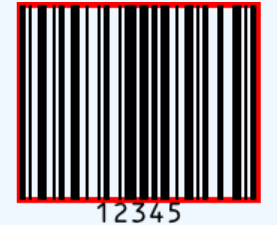
TTMSFNCWXBarcode turns a string of data into a rendered barcode. You drop the
control, choose a symbology through BarcodeType, and assign the data to Text;
the control renders the barcode itself. This chapter covers creating a barcode,
choosing a symbology, and reacting to generation.
Creating a barcode
Set BarcodeType to the symbology you need and Text to the data to encode. The
control renders once it has a parent, so create it, parent it, then set the type
and text.
procedure TForm1.GenerateBarcode(const AData: string);
begin
  FBarcode := TTMSFNCWXBarcode.Create(Self);
  FBarcode.Parent := Self; // the control renders its image once parented
  FBarcode.Align := TAlignLayout.Client;

  FBarcode.BarcodeType := bciCode128; // the symbology to encode with
  FBarcode.Text := AData;             // the data placed in the barcode
end;
void __fastcall TForm1::GenerateBarcode(const System::UnicodeString AData)
{
  FBarcode = new TTMSFNCWXBarcode(this);
  FBarcode->Parent = this; // the control renders its image once parented
  FBarcode->Align = TAlignLayout::Client;

  FBarcode->BarcodeType = TTMSFNCWXBarcodeType::bciCode128; // the symbology to encode with
  FBarcode->Text = AData;                                   // the data placed in the barcode
}
Choosing a symbology
BarcodeType is a TTMSFNCWXBarcodeType with a broad set of symbologies —
linear codes such as bciCode128, bciCode39, bciCode93, and bciCode2of5,
postal codes such as bciAusPost, and 2D codes such as bciPDF417 and
bciAztecCode. Pick the symbology your downstream scanner expects; the same data
encodes differently (and to different lengths) per symbology. For QR codes
specifically, the dedicated TTMSFNCWXQRCode component is the simpler choice.
Generation callbacks
The control renders asynchronously in an embedded web view, so two events report
its progress: OnInitialized fires once the control is ready to render, and
OnGetBarcode delivers the generated barcode image when it is available. Use
OnGetBarcode when you need the rendered image (for example to save or print it)
rather than only displaying it.
Pitfalls
- Parent the control before expecting output. It renders into its host view, so an unparented instance produces nothing.
- Match the symbology to your data. Some symbologies accept only digits or a
limited character set and raise when given invalid data — guard
Textassignment. - Rendering is asynchronous. The image is not guaranteed the instant you set
Text; useOnGetBarcodewhen you need the result.
See also
- Appearance and sizing — colors, scale, and text options.
- API reference — full class reference.