Fonts, CSS, and display modes
Beyond the standard editing surface, the editor lets you tailor the fonts it offers, the unit those font sizes use, the CSS applied inside the editing frame, and several behavioral modes. Reach for this chapter when you want the editor to match your application's typography and branding, or to switch it into a read-only viewer.
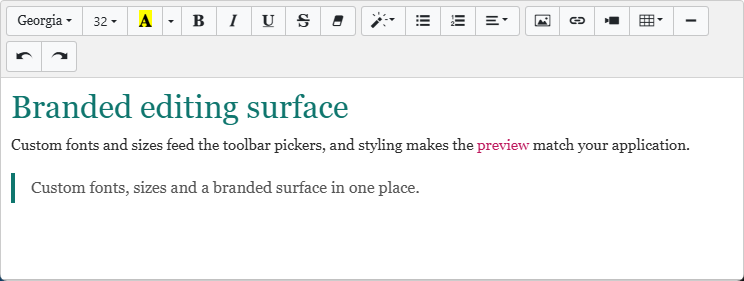
Custom fonts and font sizes
CustomFonts and CustomFontSizes are both TStrings. Anything you add to them appears in the toolbar's font-name and font-size pickers, on top of the editor's built-in list. Use them to surface the corporate fonts your documents actually use rather than the generic defaults.
The font-size unit
FontSizeUnit is a TTMSFNCWXHTMLMemoFontSizeUnit and controls how sizes are interpreted, both in the toolbar and in SetFontSize:
| Value | Meaning |
|---|---|
mfuDefault |
The editor's default unit. |
mfuPx |
Font sizes are expressed in pixels. |
mfuPt |
Font sizes are expressed in points. |
Injecting CSS
CustomCSS is a string of CSS rules injected into the editor frame. Use it to set a base font, paragraph spacing, link color, or any other styling of the editing surface, so the in-editor preview matches how the content will eventually be rendered.
Behavioral modes
| Property | Default | Effect |
|---|---|---|
ReadOnly |
False |
When True, the content is shown for viewing only and cannot be edited — turning the editor into an HTML viewer. |
SpellCheck |
True |
Enables the browser's spell-checking inside the editing area. |
AllowDrop |
True |
Allows content to be dropped into the editor from an external source. |
Combining a branded look with a read-only viewer
A common combination is to inject CustomCSS for a branded surface and set ReadOnly := True to present finished content as a styled, non-editable preview — for example showing a generated invoice or article exactly as it will look, without letting the user change it. The snippet below applies custom fonts and sizes, the font-size unit, branded CSS, and the display modes together, batched between BeginUpdate and EndUpdate so the editor frame rebuilds only once:
procedure TForm1.ConfigureAppearance;
begin
  TMSFNCWXHTMLMemo1.BeginUpdate;
  try
    { Add font families to the toolbar font picker. }
    TMSFNCWXHTMLMemo1.CustomFonts.Add('Inter');
    TMSFNCWXHTMLMemo1.CustomFonts.Add('Roboto Mono');

    { Add sizes to the font-size picker and choose the unit they are expressed in. }
    TMSFNCWXHTMLMemo1.CustomFontSizes.Add('10');
    TMSFNCWXHTMLMemo1.CustomFontSizes.Add('12');
    TMSFNCWXHTMLMemo1.CustomFontSizes.Add('14');
    TMSFNCWXHTMLMemo1.FontSizeUnit := mfuPt;

    { Inject CSS into the editor frame to brand the editing surface. }
    TMSFNCWXHTMLMemo1.CustomCSS :=
      'body { font-family: Inter, Arial, sans-serif; font-size: 14px; }' +
      'p { margin: 0.5em 0; }';

    { Display options. }
    TMSFNCWXHTMLMemo1.SpellCheck := True;
    TMSFNCWXHTMLMemo1.AllowDrop  := True;
    TMSFNCWXHTMLMemo1.ReadOnly   := False;
  finally
    TMSFNCWXHTMLMemo1.EndUpdate;
  end;
end;
void __fastcall TForm1::ConfigureAppearance()
{
  TMSFNCWXHTMLMemo1->BeginUpdate();
  try
  {
    // Add font families to the toolbar font picker.
    TMSFNCWXHTMLMemo1->CustomFonts->Add("Inter");
    TMSFNCWXHTMLMemo1->CustomFonts->Add("Roboto Mono");

    // Add sizes to the font-size picker and choose the unit they are expressed in.
    TMSFNCWXHTMLMemo1->CustomFontSizes->Add("10");
    TMSFNCWXHTMLMemo1->CustomFontSizes->Add("12");
    TMSFNCWXHTMLMemo1->CustomFontSizes->Add("14");
    TMSFNCWXHTMLMemo1->FontSizeUnit = TTMSFNCWXHTMLMemoFontSizeUnit::mfuPt;

    // Inject CSS into the editor frame to brand the editing surface.
    TMSFNCWXHTMLMemo1->CustomCSS =
      "body { font-family: Inter, Arial, sans-serif; font-size: 14px; }"
      "p { margin: 0.5em 0; }";

    // Display options.
    TMSFNCWXHTMLMemo1->SpellCheck = true;
    TMSFNCWXHTMLMemo1->AllowDrop = true;
    TMSFNCWXHTMLMemo1->ReadOnly = false;
  }
  __finally
  {
    TMSFNCWXHTMLMemo1->EndUpdate();
  }
}
Pitfalls
- Setting
FontSizeUnitto a string. It is an enumeration (mfuPt,mfuPx,mfuDefault), not a string like'pt'. - Expecting
CustomCSSto style saved output.CustomCSSstyles the editing frame only; it is not embedded into the HTML you save. Persist styling as inline markup or a stylesheet on the consuming side. - Many appearance changes without batching. As with the toolbar, wrap multiple property changes in
BeginUpdate/EndUpdate.
See also
- Configuring the toolbar — the pickers these fonts and sizes appear in.
- Programmatic formatting —
SetFontSizehonoursFontSizeUnit. TTMSFNCWXHTMLMemoAPI reference