Programmatic formatting
Every formatting action the toolbar performs is also a public method on the editor. This is the chapter to read when you want to apply formatting from code — to offer keyboard shortcuts, to format content during an import, or to build your own toolbar instead of (or alongside) the built-in one. The methods act on the current selection or, when nothing is selected, at the caret position, exactly as the equivalent toolbar buttons do.
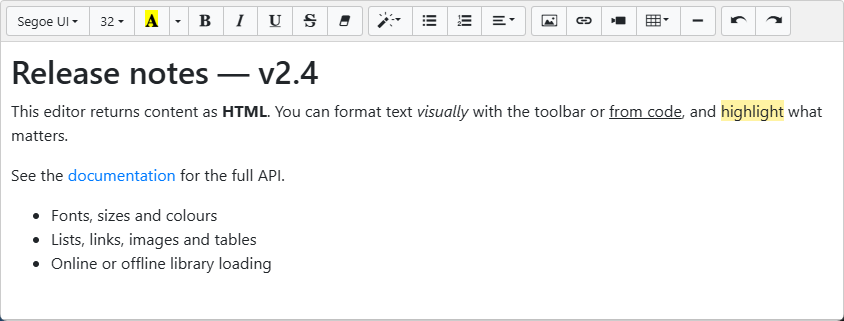
Character formatting
TextBold, TextItalic, TextUnderline, and TextStrikeThrough each toggle a character style. RemoveFormat strips all character formatting from the selection, and SetFontName / SetFontSize set the font family and size. Font size is interpreted in the active font-size unit.
Paragraph and layout
Alignment is handled by JustifyLeft, JustifyRight, JustifyCenter, and JustifyFull. Indent and Outdent change the indentation level, SetLineHeight sets line spacing as a multiple of the font size, and FormatToParagraphs wraps the selection in paragraph elements.
Inserting structure
InsertList(AOrdered: Boolean) inserts a numbered list when AOrdered is True and a bulleted list when False. InsertParagraph adds a paragraph break, InsertText inserts a plain-text run, and PasteHTML inserts a formatted HTML fragment at the caret.
Undo, redo, and code view
Undo and Redo walk the editor's edit history. ToggleCodeview switches between the visual editing surface and the raw HTML source, letting power users edit markup directly.
procedure TForm1.ApplyFormatting;
begin
  { Character formatting toggles the style on the current selection or caret. }
  TMSFNCWXHTMLMemo1.TextBold;
  TMSFNCWXHTMLMemo1.TextItalic;
  TMSFNCWXHTMLMemo1.TextUnderline;
  TMSFNCWXHTMLMemo1.TextStrikeThrough;

  { Apply a font family and size (size is expressed in the active FontSizeUnit). }
  TMSFNCWXHTMLMemo1.SetFontName('Georgia');
  TMSFNCWXHTMLMemo1.SetFontSize(14);

  { Paragraph layout. }
  TMSFNCWXHTMLMemo1.JustifyCenter;
  TMSFNCWXHTMLMemo1.SetLineHeight(2);
  TMSFNCWXHTMLMemo1.Indent;

  { Insert structure: True = ordered (numbered) list, False = bulleted list. }
  TMSFNCWXHTMLMemo1.InsertList(True);
  TMSFNCWXHTMLMemo1.InsertText('A plain-text run');
  TMSFNCWXHTMLMemo1.PasteHTML('<mark>highlighted fragment</mark>');

  { Clear all character formatting from the selection. }
  TMSFNCWXHTMLMemo1.RemoveFormat;
end;

procedure TForm1.btnUndoClick(Sender: TObject);
begin
  TMSFNCWXHTMLMemo1.Undo;
end;

procedure TForm1.btnRedoClick(Sender: TObject);
begin
  TMSFNCWXHTMLMemo1.Redo;
end;
void __fastcall TForm1::ApplyFormatting()
{
  // Character formatting toggles the style on the current selection or caret.
  TMSFNCWXHTMLMemo1->TextBold();
  TMSFNCWXHTMLMemo1->TextItalic();
  TMSFNCWXHTMLMemo1->TextUnderline();
  TMSFNCWXHTMLMemo1->TextStrikeThrough();

  // Apply a font family and size (size is expressed in the active FontSizeUnit).
  TMSFNCWXHTMLMemo1->SetFontName("Georgia");
  TMSFNCWXHTMLMemo1->SetFontSize(14);

  // Paragraph layout.
  TMSFNCWXHTMLMemo1->JustifyCenter();
  TMSFNCWXHTMLMemo1->SetLineHeight(2);
  TMSFNCWXHTMLMemo1->Indent();

  // Insert structure: true = ordered (numbered) list, false = bulleted list.
  TMSFNCWXHTMLMemo1->InsertList(true);
  TMSFNCWXHTMLMemo1->InsertText("A plain-text run");
  TMSFNCWXHTMLMemo1->PasteHTML("<mark>highlighted fragment</mark>");

  // Clear all character formatting from the selection.
  TMSFNCWXHTMLMemo1->RemoveFormat();
}

void __fastcall TForm1::btnUndoClick(TObject *Sender)
{
  TMSFNCWXHTMLMemo1->Undo();
}

void __fastcall TForm1::btnRedoClick(TObject *Sender)
{
  TMSFNCWXHTMLMemo1->Redo();
}
Combining programmatic formatting with a hidden toolbar
The most common reason to format from code is to replace the built-in toolbar with your own. Hide the toolbar with Toolbar.Visible := False and call these methods from your buttons; use OnStyleTextUpdate to reflect the caret's current style back onto your UI. The Building a custom toolbar chapter walks through the full pattern end to end.
Pitfalls
- Calling formatting methods before
OnInit. The methods are forwarded to the embedded editor; calling them before it has initialized has no effect. Drive code-only formatting from a button click (after the user has interacted) or fromOnInit. - Font size in the wrong unit.
SetFontSizeuses the value in the currentFontSizeUnit. A size of14means 14pt undermfuPtand 14px undermfuPx.
See also
- Configuring the toolbar — the built-in equivalents of these methods.
- Building a custom toolbar — a worked combination example.
TTMSFNCWXHTMLMemoAPI reference