Events
The editor raises four events that let your application react to its lifecycle and to user editing. Read this chapter when you need to know when the editor is ready to accept content, keep a word count or dirty flag up to date, respond to focus, or mirror the formatting at the caret onto your own UI. Because the editor renders asynchronously in an embedded web control, the OnInit event in particular is important — it is the signal that the editor is ready for programmatic interaction.
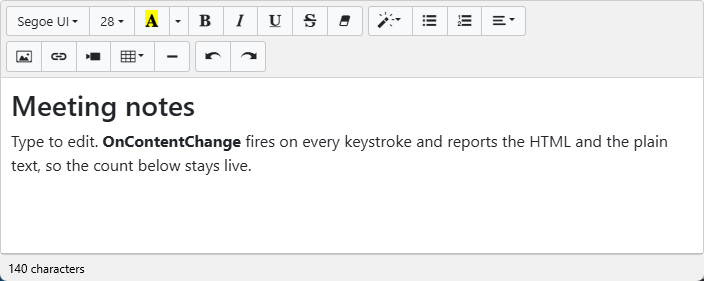
The snippet below wires all four events; the sections that follow explain when each one fires and how to use it.
procedure TForm1.WireEvents;
begin
  TMSFNCWXHTMLMemo1.OnInit            := HTMLMemoInit;
  TMSFNCWXHTMLMemo1.OnContentChange   := HTMLMemoContentChange;
  TMSFNCWXHTMLMemo1.OnFocus           := HTMLMemoFocus;
  TMSFNCWXHTMLMemo1.OnStyleTextUpdate := HTMLMemoStyleTextUpdate;
end;

procedure TForm1.HTMLMemoInit(Sender: TObject);
begin
  { The embedded editor loads asynchronously. Wait for OnInit before calling
    formatting methods or assigning content from code. }
  TMSFNCWXHTMLMemo1.HTML.Text := '<p>Editor is ready.</p>';
end;

procedure TForm1.HTMLMemoContentChange(Sender: TObject;
  HTMLContent, ContentPlainText: string);
begin
  lblWordCount.Text := Format('%d characters', [Length(ContentPlainText)]);
end;

procedure TForm1.HTMLMemoFocus(Sender: TObject);
begin
  StatusBar1.Text := 'Editing...';
end;

procedure TForm1.HTMLMemoStyleTextUpdate(Sender: TObject;
  IsBold, IsItalic, IsUnderline, IsStrikeThrough: Boolean;
  FontName: string; FontSize: Integer;
  ForeColor, BackColor: TTMSFNCGraphicsColor);
begin
  { Keep external indicators in sync with the caret's current style. }
  btnBold.IsPressed      := IsBold;
  btnItalic.IsPressed    := IsItalic;
  btnUnderline.IsPressed := IsUnderline;
end;
void __fastcall TForm1::WireEvents()
{
  TMSFNCWXHTMLMemo1->OnInit = HTMLMemoInit;
  TMSFNCWXHTMLMemo1->OnContentChange = HTMLMemoContentChange;
  TMSFNCWXHTMLMemo1->OnFocus = HTMLMemoFocus;
  TMSFNCWXHTMLMemo1->OnStyleTextUpdate = HTMLMemoStyleTextUpdate;
}

void __fastcall TForm1::HTMLMemoInit(TObject *Sender)
{
  // The embedded editor loads asynchronously. Wait for OnInit before calling
  // formatting methods or assigning content from code.
  TMSFNCWXHTMLMemo1->HTML->Text = "<p>Editor is ready.</p>";
}

void __fastcall TForm1::HTMLMemoContentChange(TObject *Sender,
  System::UnicodeString HTMLContent, System::UnicodeString ContentPlainText)
{
  lblWordCount->Text = Format("%d characters", ARRAYOFCONST((ContentPlainText.Length())));
}

void __fastcall TForm1::HTMLMemoFocus(TObject *Sender)
{
  StatusBar1->Text = "Editing...";
}

void __fastcall TForm1::HTMLMemoStyleTextUpdate(TObject *Sender,
  bool IsBold, bool IsItalic, bool IsUnderline, bool IsStrikeThrough,
  System::UnicodeString FontName, int FontSize,
  TTMSFNCGraphicsColor ForeColor, TTMSFNCGraphicsColor BackColor)
{
  // Keep external indicators in sync with the caret's current style.
  btnBold->IsPressed = IsBold;
  btnItalic->IsPressed = IsItalic;
  btnUnderline->IsPressed = IsUnderline;
}
Reacting when the editor is ready — OnInit
OnInit fires once, after the embedded editor has finished loading and is ready for interaction. This is the earliest safe point to assign content or call formatting methods from code. Assigning content before OnInit can be lost, because the editor is still initializing.
Tracking content changes — OnContentChange
OnContentChange is typed as TTMSFNCWXHTMLMemoChangeContent and fires after every edit. It hands you both HTMLContent (the markup) and ContentPlainText (the same content with tags removed), so you can update a word count, mark the document dirty, or push changes to a model without reading the content back. The handler observes the change; it cannot cancel it.
Detecting focus — OnFocus
OnFocus fires when the editing area receives input focus. Use it to update a status indicator or to activate a context-specific ribbon when the user starts editing.
Synchronizing toolbar state — OnStyleTextUpdate
OnStyleTextUpdate is typed as TTMSFNCWXHTMLMemoStyleTextUpdate and fires when the formatting at the caret or selection changes — for example when the user clicks into bold text. It reports the active IsBold, IsItalic, IsUnderline, and IsStrikeThrough flags plus FontName, FontSize, and the fore/back colors. It is the key to keeping a custom toolbar in step with the cursor. Like the other events, it reports state and does not change formatting.
Combining OnInit and OnContentChange for safe live feedback
A robust pattern combines two events: seed the editor and reset your dirty flag from OnInit (so you only ever touch a ready editor), then keep a live character count and dirty state from OnContentChange. The snippet at the top of this page shows both wired on the same form — OnInit assigns the initial content and OnContentChange updates the count on every keystroke — so the UI never reads from an uninitialized editor yet still reflects edits immediately.
Pitfalls
- Assuming the editor is ready in
FormCreate. It is not — wait forOnInit. - Doing heavy work in
OnContentChange. It fires on every edit; keep the handler light or debounce expensive work such as saving or re-parsing.
See also
- Building a custom toolbar —
OnStyleTextUpdatein a full example. - Loading and saving HTML — use
ModifiedalongsideOnContentChange. TTMSFNCWXHTMLMemoAPI reference