TMS FNC WX HTML Memo
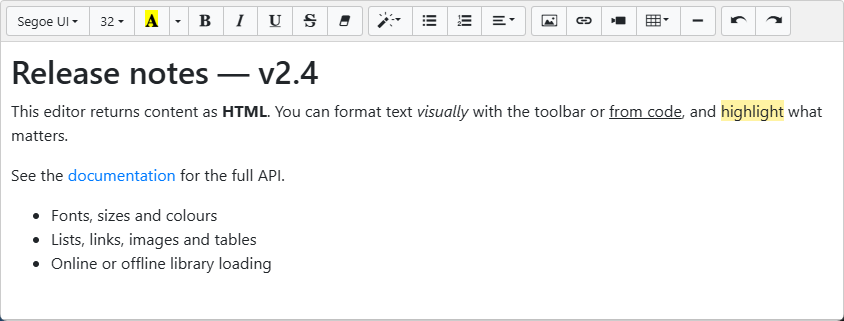
TTMSFNCWXHTMLMemo is a WYSIWYG HTML editor built on the Summernote library. It offers a configurable formatting toolbar with font, paragraph, list, link, image, video, and table support, exposes every formatting command as a Pascal method so you can drive it from code or build your own toolbar, and exchanges content as HTML with a tag-free plain-text view alongside it.
Documentation
| Start here | Use when |
|---|---|
| Get started | You want an editable HTML memo on a form in a few steps. |
| Guides | You want task-oriented chapters on content I/O, formatting, the toolbar, fonts/CSS, events, and deployment. |
| API reference | You want class, property, method, and event details. |
Key classes
| Class | Description |
|---|---|
TTMSFNCWXHTMLMemo |
Main rich-text HTML editor component. |
TTMSFNCWXHTMLMemoToolbar |
Toolbar visibility and the grouped button settings. |
TTMSFNCWXHTMLMemoButtons |
Aggregates the four toolbar button groups. |
TTMSFNCWXHTMLMemoFontButtons |
Font and character-formatting button visibility. |
TTMSFNCWXHTMLMemoParagraphButtons |
Paragraph-formatting button visibility (style, lists, alignment). |
TTMSFNCWXHTMLMemoInsertButtons |
Insert-action button visibility (picture, link, video, table, rule). |
TTMSFNCWXHTMLMemoMiscButtons |
Miscellaneous button visibility (undo, redo, code view). |
Frameworks
The component is available for FMX, VCL, and TMS WEB Core. Because it hosts the Summernote library in an embedded web control, it requires the TMS FNC Core web-control infrastructure and, by default, an internet connection to load the library — see Library location and deployment for the offline option.