Getting started with TMS FNC WX HTML Memo
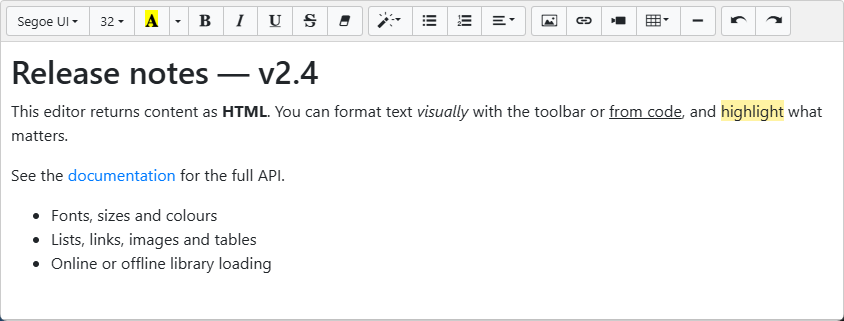
TTMSFNCWXHTMLMemo gives you a complete WYSIWYG HTML editor — a formatting toolbar plus an editing surface — on a form in a few steps. This page covers the minimal setup; the guides go deeper into each area.
Prerequisites
- TMS FNC Core installed and the runtime package added to the project.
- TMS FNC WX Pack installed.
Add the component
- Drop
TTMSFNCWXHTMLMemofrom the component palette onto a form. - Optionally assign initial markup through
HTML.Text(theHTMLproperty is aTStrings). - Handle
OnContentChangeto be notified when the content changes.
Seed content and react to edits
procedure TForm1.FormCreate(Sender: TObject);
begin
  { HTML is a TStrings: assign markup through its Text property. }
  TMSFNCWXHTMLMemo1.HTML.Text :=
    '<h2>Release notes</h2>' +
    '<p>Type here to edit. Use the toolbar or the keyboard shortcuts.</p>';

  TMSFNCWXHTMLMemo1.OnContentChange := HTMLMemoContentChange;
end;

procedure TForm1.HTMLMemoContentChange(Sender: TObject;
  HTMLContent, ContentPlainText: string);
begin
  { Fires after every edit. HTMLContent is the markup; ContentPlainText is
    the same content with all tags stripped. }
  StatusBar1.Text := Format('%d characters', [Length(ContentPlainText)]);
end;
void __fastcall TForm1::FormCreate(TObject *Sender)
{
  // HTML is a TStrings: assign markup through its Text property.
  TMSFNCWXHTMLMemo1->HTML->Text =
    "<h2>Release notes</h2>"
    "<p>Type here to edit. Use the toolbar or the keyboard shortcuts.</p>";

  TMSFNCWXHTMLMemo1->OnContentChange = HTMLMemoContentChange;
}

void __fastcall TForm1::HTMLMemoContentChange(TObject *Sender,
  System::UnicodeString HTMLContent, System::UnicodeString ContentPlainText)
{
  // Fires after every edit. HTMLContent is the markup; ContentPlainText is
  // the same content with all tags stripped.
  StatusBar1->Text = Format("%d characters", ARRAYOFCONST((ContentPlainText.Length())));
}
Important
HTML is a TStrings. Assign markup with HTMLMemo1.HTML.Text := '<p>…</p>' and read it back with HTMLMemo1.HTML.Text — a direct HTMLMemo1.HTML := '…' does not compile. For tag-free text, read the PlainText property.
Next steps
- Loading and saving HTML — get content in and out.
- Configuring the toolbar — tailor which buttons appear.
- Library location and deployment — make the editor work offline.
- API reference — full class reference.