TMS FNC Blox Navigator — Guides
TTMSFNCBloxNavigator is a thumbnail overview of a TTMSFNCBloxControl
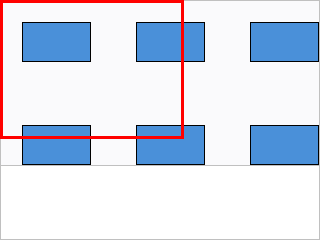
diagram. It renders the whole diagram in miniature, draws a highlight rectangle
over the area currently visible in the main control, and lets the user pan (and
optionally zoom) the main view by dragging that rectangle. Reach for it whenever
a diagram is larger than its viewport and users need a quick way to see where
they are and jump elsewhere. This guide covers linking, highlight styling, the
thumbnail block style, and zoom.
Linking to a Blox Control
Assign BloxControl to the TTMSFNCBloxControl whose diagram the navigator
should mirror — at design time via the Object Inspector, or at runtime. Once
linked, the navigator tracks all element additions, removals, moves, and
repaints automatically.
procedure TForm1.FormCreate(Sender: TObject);
begin
  BloxNavigator1.BloxControl := BloxControl1;
end;
void __fastcall TForm1::FormCreate(TObject *Sender)
{
  BloxNavigator1->BloxControl = BloxControl1;
}
Highlight rectangle
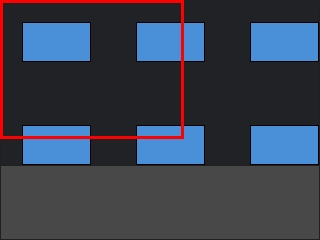
The navigator draws a highlight rectangle over the region currently visible in
the main control's viewport. HighlightWidth sets its border thickness, and
BackgroundColor / Color set the thumbnail surface so the rectangle stands out
against your diagram and theme:
procedure TForm1.StyleNavigator;
begin
  BloxNavigator1.HighlightWidth := 3;                              { highlight border thickness }
  BloxNavigator1.BackgroundColor := MakeGraphicsColor(250, 250, 252);
  BloxNavigator1.Color := MakeGraphicsColor(235, 238, 242);        { thumbnail surface }
end;
void __fastcall TForm1::StyleNavigator()
{
  BloxNavigator1->HighlightWidth = 3;                              // highlight border thickness
  BloxNavigator1->BackgroundColor = MakeGraphicsColor(250, 250, 252);
  BloxNavigator1->Color = MakeGraphicsColor(235, 238, 242);        // thumbnail surface
}
Thumbnail block style
BlockShape controls how blocks are represented in the thumbnail:
TTMSFNCBloxNavigatorBlockShape |
Renders blocks as |
|---|---|
nbsOriginal |
Their real shapes — a faithful miniature. |
nbsRectangle |
Plain rectangles — clearer when the diagram is dense. |
PaintLines toggles whether connectors are drawn in the thumbnail, and
BackgroundColor / Color set the thumbnail surface.
Enabling zoom
With EnableZoom := True, dragging the highlight rectangle's edges zooms the
main control as well as panning it, giving a single overview control for both
operations. This example links the navigator, themes the highlight, picks a
readable block style, and turns on zoom together:
procedure TForm1.ConfigureNavigator;
begin
  BloxNavigator1.BloxControl := BloxControl1;
  BloxNavigator1.HighlightWidth := 3;
  BloxNavigator1.BackgroundColor := MakeGraphicsColor(250, 250, 252);
  BloxNavigator1.BlockShape := nbsRectangle;  { clearer for dense diagrams }
  BloxNavigator1.PaintLines := True;
  BloxNavigator1.EnableZoom := True;          { drag edges to zoom the main view }
end;
void __fastcall TForm1::ConfigureNavigator()
{
  BloxNavigator1->BloxControl = BloxControl1;
  BloxNavigator1->HighlightWidth = 3;
  BloxNavigator1->BackgroundColor = MakeGraphicsColor(250, 250, 252);
  BloxNavigator1->BlockShape = Fmx::Tmsfncbloxnavigator::nbsRectangle;  // clearer for dense diagrams
  BloxNavigator1->PaintLines = true;
  BloxNavigator1->EnableZoom = true;          // drag edges to zoom the main view
}
Pitfalls
- The navigator does nothing until
BloxControlis assigned. An unlinked navigator renders empty. EnableZoomchanges the drag behaviour. When off, dragging only pans; document the difference if users expect to resize the region.