Sections and needles
Two features turn the gauge from a plain dial into a rich instrument: colored sections that band the scale into zones (green/amber/red), and extra needles that mark additional values alongside the main one. This chapter covers adding sections and adding needles.
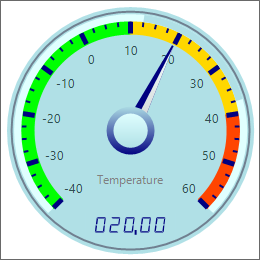
Colored sections
Sections is a collection of value bands. Add one with Sections.Add, set its
StartValue/EndValue (in scale units) and Color, and choose a SectionType
(for example stBorder to draw the band on the rim). Wrap multiple adds in
BeginUpdate/EndUpdate so the gauge repaints once. A green/amber/red set is the
classic "safe / warning / danger" instrument. This example bands the temperature
scale and adds a target needle.
procedure TForm1.AddGaugeSectionsAndNeedle;
var
  Section: TTMSFNCWidgetGaugeSection;
  Needle: TTMSFNCWidgetGaugeNeedleItem;
begin
  FGauge.Sections.BeginUpdate;
  try
    Section := FGauge.Sections.Add;
    Section.StartValue := -40;
    Section.EndValue := 10;
    Section.Color := gcLime;
    Section.SectionType := stBorder;

    Section := FGauge.Sections.Add;
    Section.StartValue := 10;
    Section.EndValue := 40;
    Section.Color := gcGold;
    Section.SectionType := stBorder;

    Section := FGauge.Sections.Add;
    Section.StartValue := 40;
    Section.EndValue := 60;
    Section.Color := gcOrangeRed;
    Section.SectionType := stBorder;
  finally
    FGauge.Sections.EndUpdate;
  end;

  // A second needle marks a target value alongside the main needle.
  Needle := FGauge.ExtraNeedles.Add;
  Needle.ShineColor := gcRed;
  Needle.ShineColorTo := gcOrangeRed;
  Needle.Value := 45;
end;
void __fastcall TForm1::AddGaugeSectionsAndNeedle()
{
  TTMSFNCWidgetGaugeSection *Section;
  TTMSFNCWidgetGaugeNeedleItem *Needle;

  FGauge->Sections->BeginUpdate();
  __try
  {
    Section = FGauge->Sections->Add();
    Section->StartValue = -40;
    Section->EndValue = 10;
    Section->Color = gcLime;
    Section->SectionType = TTMSFNCWidgetGaugeSectionType::stBorder;

    Section = FGauge->Sections->Add();
    Section->StartValue = 10;
    Section->EndValue = 40;
    Section->Color = gcGold;
    Section->SectionType = TTMSFNCWidgetGaugeSectionType::stBorder;

    Section = FGauge->Sections->Add();
    Section->StartValue = 40;
    Section->EndValue = 60;
    Section->Color = gcOrangered;
    Section->SectionType = TTMSFNCWidgetGaugeSectionType::stBorder;
  }
  __finally
  {
    FGauge->Sections->EndUpdate();
  }

  // A second needle marks a target value alongside the main needle.
  Needle = FGauge->ExtraNeedles->Add();
  Needle->ShineColor = gcRed;
  Needle->ShineColorTo = gcOrangered;
  Needle->Value = 45;
}
Extra needles
The gauge always has its main needle (driven by Value and styled through
Needle). ExtraNeedles.Add adds more — each a TTMSFNCWidgetGaugeNeedleItem
with its own Value and ShineColor/ShineColorTo. Use a second needle to mark
a setpoint, a target, or a previous reading against the live value.
Pitfalls
- Section values are in scale units, not percentages.
StartValue/EndValueare read againstMinimumValue/MaximumValue, so set the range first. - Wrap section edits in
BeginUpdate/EndUpdate. Without it the gauge repaints on everyAdd, which flickers and is slow. - Too many extra needles confuse the reading. Keep to one or two beyond the main needle.
See also
- Showing a value — range, value, and readout.
- Dial and scale — divisions, arc span, and rings.
- API reference — full class reference.