Showing a value
TTMSFNCWidgetGauge is a circular dial gauge: a needle points to a value on a
scale you define, with a labelled dial and an optional digital readout. You set
the range and value, label the dial, and the gauge draws the needle and scale.
This chapter covers the range and value, the dial label, and the value readout.
Range and value
Define the scale with MinimumValue and MaximumValue, then set Value to
position the needle. Unlike the progress and arrow widgets, the gauge has a real
range, so Value is in your own units (temperature, speed, load), not a fixed
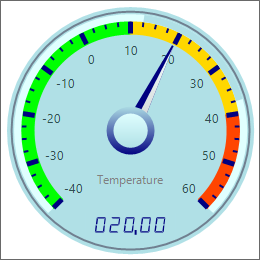
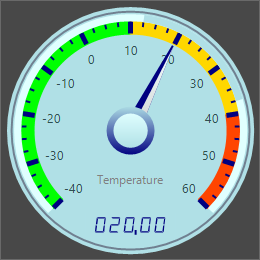
0..100. The demo measures temperature from -40 to 60.
procedure TForm1.SetupGauge;
begin
  FGauge := TTMSFNCWidgetGauge.Create(Self);
  FGauge.Parent := Self;
  FGauge.SetBounds(20, 20, 260, 260);

  FGauge.MinimumValue := -40; // scale lower bound
  FGauge.MaximumValue := 60;  // scale upper bound
  FGauge.Value := 20;         // needle position within the range
  FGauge.DialText := 'Temperature';
end;
void __fastcall TForm1::SetupGauge()
{
  FGauge = new TTMSFNCWidgetGauge(this);
  FGauge->Parent = this;
  FGauge->SetBounds(20, 20, 260, 260);

  FGauge->MinimumValue = -40; // scale lower bound
  FGauge->MaximumValue = 60;  // scale upper bound
  FGauge->Value = 20;         // needle position within the range
  FGauge->DialText = "Temperature";
}
Labelling the dial
DialText prints a label on the face (the demo shows "Temperature"), and Font
styles it. Use it to name the measured quantity or its unit.
The scale numbers and the digital readout
The gauge prints numbers in two distinct places, each with its own switch and its own format string:
- The numbers around the scale.
ShowValuestoggles them,ValueFontstyles them, andGaugeValuesFormatformats them.OnGetValueTextgets the last word on each label, so you can append a unit or relabel just the end points. - The digital readout in the middle of the dial.
Digit.Visibleswitches it on,Digit.Color/Digit.BackGroundColorstyle it,ValueFormatformats it, andValuePosition(vpToporvpBottom, defaultvpBottom) places it relative to the center point.
Both format strings are FormatFloat pictures, not Format strings:
GaugeValuesFormat defaults to '0' and ValueFormat to '000.00'. Hide the
readout for a purely visual gauge, or show it when the exact figure matters.
procedure TForm1.SetupGaugeReadout;
begin
  FGauge.MinimumValue := -40;
  FGauge.MaximumValue := 60;
  FGauge.Value := 20;

  { The numbers printed around the scale. ShowValues toggles them, ValueFont
    styles them, and GaugeValuesFormat is a FormatFloat picture - the default
    '0' prints whole degrees, '0.0' would print one decimal. }
  FGauge.ShowValues := True;
  FGauge.GaugeValuesFormat := '0';
  FGauge.ValueFont.Size := 10;

  { The digital readout in the middle of the dial. Digit.Visible switches it on,
    ValueFormat is its own FormatFloat picture (default '000.00'), and
    ValuePosition puts it above or below the center point. }
  FGauge.Digit.Visible := True;
  FGauge.ValueFormat := '0.0';
  FGauge.ValuePosition := vpTop;

  FGauge.OnGetValueText := GaugeGetValueText;
end;

procedure TForm1.GaugeGetValueText(Sender: TObject; value: Double;
  var str: String);
begin
  { OnGetValueText overrides one scale label after GaugeValuesFormat has been
    applied - useful for adding a unit or relabelling the end points. }
  if value = FGauge.MaximumValue then
    str := str + Char($00B0) + 'C';
end;
void __fastcall TForm1::SetupGaugeReadout()
{
  FGauge->MinimumValue = -40;
  FGauge->MaximumValue = 60;
  FGauge->Value = 20;

  // The numbers printed around the scale. ShowValues toggles them, ValueFont
  // styles them, and GaugeValuesFormat is a FormatFloat picture - the default
  // '0' prints whole degrees, '0.0' would print one decimal.
  FGauge->ShowValues = true;
  FGauge->GaugeValuesFormat = "0";
  FGauge->ValueFont->Size = 10;

  // The digital readout in the middle of the dial. Digit.Visible switches it on,
  // ValueFormat is its own FormatFloat picture (default '000.00'), and
  // ValuePosition puts it above or below the center point.
  FGauge->Digit->Visible = true;
  FGauge->ValueFormat = "0.0";
  FGauge->ValuePosition = TTMSFNCWidgetGaugeValuePosition::vpTop;

  FGauge->OnGetValueText = GaugeGetValueText;
}

void __fastcall TForm1::GaugeGetValueText(TObject *Sender, double value, System::UnicodeString &str)
{
  // OnGetValueText overrides one scale label after GaugeValuesFormat has been
  // applied - useful for adding a unit or relabelling the end points.
  if (value == FGauge->MaximumValue)
    str = str + System::UnicodeString(System::WideChar(0x00B0)) + "C";
}
Pitfalls
Valueis in your scale's units. It is clamped toMinimumValue..MaximumValue, so set the range before the value.ValueFormatandGaugeValuesFormatareFormatFloatpictures, notFormatstrings. Use'0.0'or'0"%"', not'%.1f'- a%has no special meaning and%.1fis printed literally.- Set the range before sections and needles. Their values are read against the
current
MinimumValue/MaximumValue(see Sections and needles).
See also
- Dial and scale — divisions, colors, and the rings.
- Sections and needles — colored bands and extra needles.
- API reference — full class reference.