Dependencies
A dependency constrains when a task can start or finish relative to another
task. When you link tasks, the project's scheduler cascades dates automatically:
move or resize the predecessor and every dependent task reschedules. This is
what separates a Gantt project from a flat task list. This chapter covers the
four dependency types, adding dependencies to an existing task, applying a lag
(delay), and the one-call AddDependentTask helper that creates a task and its
link together.
Dependency types
TTMSFNCGanttTaskDependencyType defines the relationship between a task and the
task it depends on:
| Value | Meaning |
|---|---|
gtdFinishToStart |
The dependent task starts after the other task finishes (most common) |
gtdStartToStart |
The dependent task starts when the other task starts |
gtdFinishToFinish |
The dependent task finishes when the other task finishes |
gtdStartToFinish |
The dependent task finishes when the other task starts |
Linking tasks
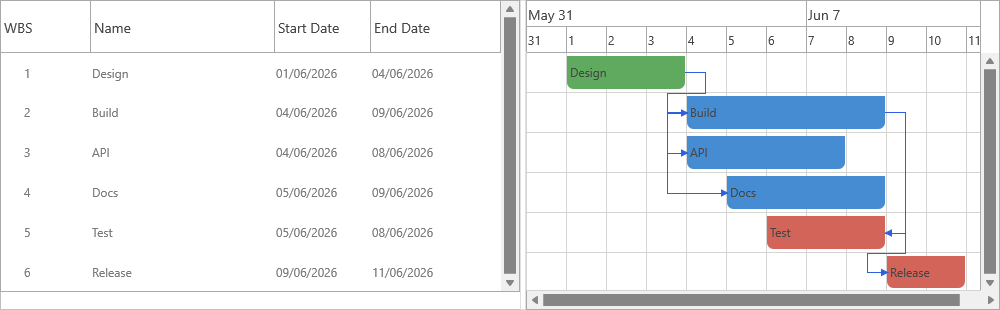
Each task owns a TaskDependencies collection. AddDependency links the task to
a predecessor with a dependency type and an optional lag expressed as a duration
value and unit. The snippet links Build after Design (finish-to-start) and starts
Test two working days after Build starts (start-to-start with a lag):
procedure TForm1.LinkTasks;
var
  Design, Build, Test: TTMSFNCGanttTask;
  Dep: TTMSFNCGanttTaskDependency;
begin
  GanttProject1.BeginUpdate;
  try
    GanttProject1.ClearTasks;
    Design := GanttProject1.AddTask('Design', '', Now, 3, gdtWorkDays);
    Build  := GanttProject1.AddTask('Build', '', 0, 5, gdtWorkDays);
    Test   := GanttProject1.AddTask('Test', '', 0, 2, gdtWorkDays);

    // Build cannot start until Design finishes.
    Build.TaskDependencies.AddDependency(Design, gtdFinishToStart);

    // Test starts when Build starts, but two working days later (lag).
    Dep := Test.TaskDependencies.AddDependency(Build, gtdStartToStart, 2, gdtWorkDays);
    Dep.Tag := 1;
  finally
    GanttProject1.EndUpdate;
  end;
end;

procedure TForm1.AddDependentInOneCall;
var
  Build: TTMSFNCGanttTask;
begin
  Build := GanttProject1.GetTaskByTaskName('Build');
  if Assigned(Build) then
    // Creates the task AND the finish-to-start dependency in one step.
    Build.AddDependentTask('Deploy', 'Release to production',
      gtdFinishToStart, 1, gdtWorkDays);
end;
void __fastcall TForm1::LinkTasks()
{
  TTMSFNCGanttTask *Design, *Build, *Test;
  TTMSFNCGanttTaskDependency *Dep;

  GanttProject1->BeginUpdate();
  try
  {
    GanttProject1->ClearTasks();
    Design = GanttProject1->AddTask("Design", "", Now(), 3, gdtWorkDays);
    Build  = GanttProject1->AddTask("Build", "", 0.0, 5, gdtWorkDays);
    Test   = GanttProject1->AddTask("Test", "", 0.0, 2, gdtWorkDays);

    // Build cannot start until Design finishes.
    Build->TaskDependencies->AddDependency(Design, gtdFinishToStart);

    // Test starts when Build starts, but two working days later (lag).
    Dep = Test->TaskDependencies->AddDependency(Build, gtdStartToStart, 2, gdtWorkDays);
    Dep->Tag = 1;
  }
  __finally
  {
    GanttProject1->EndUpdate();
  }
}

void __fastcall TForm1::AddDependentInOneCall()
{
  TTMSFNCGanttTask *Build;

  Build = GanttProject1->GetTaskByTaskName("Build");
  if (Build != nullptr)
    // Creates the task AND the finish-to-start dependency in one step.
    Build->AddDependentTask("Deploy", "Release to production",
      gtdFinishToStart, 1, gdtWorkDays);
}
Delays (lag and lead)
The ADelayValue / ADelayType arguments add a lag after the dependency
constraint — 2, gdtWorkDays means "two working days after". The created
TTMSFNCGanttTaskDependency exposes Delay (a TTMSFNCGanttDuration),
DependencyType, DependsOnTask, and Active (whether it currently affects
scheduling) for later inspection or adjustment.
Creating a task and its dependency together
Task.AddDependentTask is a shortcut: it creates a new task and a dependency
from the source task in one call. The second procedure in the snippet adds a
"Deploy" task that finish-to-start depends on "Build". Use it when each new task
follows the previous one — it keeps linear plans concise.
Putting it together
Combine the dependency types: link Build after Design (finish-to-start), start
Test with Build but two days later (start-to-start with a lag), then read the
cascaded ScheduledStart:
procedure TForm1.ChainAndInspect;
var
  Design, Build, Test: TTMSFNCGanttTask;
begin
  GanttProject1.BeginUpdate;
  try
    GanttProject1.ClearTasks;
    Design := GanttProject1.AddTask('Design', '', Now, 3, gdtWorkDays);
    Build  := GanttProject1.AddTask('Build', '', 0, 5, gdtWorkDays);
    Test   := GanttProject1.AddTask('Test', '', 0, 2, gdtWorkDays);

    // Linking: finish-to-start, plus a start-to-start link with a two-day lag.
    Build.TaskDependencies.AddDependency(Design, gtdFinishToStart);
    Test.TaskDependencies.AddDependency(Build, gtdStartToStart, 2, gdtWorkDays);
  finally
    GanttProject1.EndUpdate;
  end;

  // The schedule cascades; read the dependent task's calculated start.
  Caption := 'Test starts ' + DateToStr(Test.ScheduledStart);
end;
void __fastcall TForm1::ChainAndInspect()
{
  TTMSFNCGanttTask *Design, *Build, *Test;

  GanttProject1->BeginUpdate();
  try
  {
    GanttProject1->ClearTasks();
    Design = GanttProject1->AddTask("Design", "", Now(), 3, gdtWorkDays);
    Build  = GanttProject1->AddTask("Build", "", 0.0, 5, gdtWorkDays);
    Test   = GanttProject1->AddTask("Test", "", 0.0, 2, gdtWorkDays);

    // Linking: finish-to-start, plus a start-to-start link with a two-day lag.
    Build->TaskDependencies->AddDependency(Design, gtdFinishToStart);
    Test->TaskDependencies->AddDependency(Build, gtdStartToStart, 2, gdtWorkDays);
  }
  __finally
  {
    GanttProject1->EndUpdate();
  }

  // The schedule cascades; read the dependent task's calculated start.
  Caption = "Test starts " + DateToStr(Test->ScheduledStart);
}
Pitfalls
- Use
TaskDependencies(the task's own collection). It is not namedDependencies, and the linked task isDependsOnTask, notDependencyTask. - A dependency only reschedules a task when it is
Active— a link whose target task was removed becomes inactive. - Circular dependencies cannot be satisfied; the scheduler ignores the part of a cycle it cannot resolve. Model real precedence, not loops.
Related API
TTMSFNCGanttTask—TaskDependencies,AddDependentTaskTTMSFNCGanttTaskDependency—DependencyType,Delay,DependsOnTask,Active
See also
- Tasks & hierarchy — the tasks you link together
- Work-time calendar — how a lag in working days is measured