Work-time calendar
The work-time calendar turns durations into real dates. When a task is scheduled
with a working-time policy, the project counts only working days and working
hours and skips holidays — so "3 working days" starting Friday lands the finish
on the following Wednesday rather than Monday. The calendar lives on
Project.WorkTime and is shared by every task. This chapter covers configuring
working days, working hours, and holidays, and how each task's WorkTimePolicy
decides which of those rules apply.
Working days, hours, and holidays
WorkTime exposes three pieces: WorkingDays (a set of gdMonday…gdSunday),
WorkingHours (a collection of daily intervals via AddTimeSpan), and
Holidays (date ranges via AddHoliday). Configure them inside a
BeginUpdate/EndUpdate pair so the project recalculates once:
procedure TForm1.ConfigureCalendar;
begin
  GanttProject1.BeginUpdate;
  try
    // Working days: Monday through Friday.
    GanttProject1.WorkTime.WorkingDays :=
      [gdMonday, gdTuesday, gdWednesday, gdThursday, gdFriday];

    // Working hours: 09:00–12:00 and 13:00–17:00.
    GanttProject1.WorkTime.WorkingHours.Clear;
    GanttProject1.WorkTime.WorkingHours.AddTimeSpan(EncodeTime(9, 0, 0, 0),
      EncodeTime(12, 0, 0, 0));
    GanttProject1.WorkTime.WorkingHours.AddTimeSpan(EncodeTime(13, 0, 0, 0),
      EncodeTime(17, 0, 0, 0));

    // A company holiday excluded from scheduling.
    GanttProject1.WorkTime.Holidays.Clear;
    GanttProject1.WorkTime.Holidays.AddHoliday(EncodeDate(2026, 12, 25));
  finally
    GanttProject1.EndUpdate;
  end;

  // Tasks added with whWorkTimeAndDays now skip weekends, off-hours, and holidays.
  GanttProject1.AddTask('Kickoff', 'Project start',
    EncodeDate(2026, 12, 24), 3, gdtWorkDays, whWorkTimeAndDays);
end;
void __fastcall TForm1::ConfigureCalendar()
{
  GanttProject1->BeginUpdate();
  try
  {
    // Working days: Monday through Friday.
    GanttProject1->WorkTime->WorkingDays =
      TTMSFNCGanttDays() << gdMonday << gdTuesday << gdWednesday << gdThursday << gdFriday;

    // Working hours: 09:00-12:00 and 13:00-17:00.
    GanttProject1->WorkTime->WorkingHours->Clear();
    GanttProject1->WorkTime->WorkingHours->AddTimeSpan(EncodeTime(9, 0, 0, 0),
      EncodeTime(12, 0, 0, 0));
    GanttProject1->WorkTime->WorkingHours->AddTimeSpan(EncodeTime(13, 0, 0, 0),
      EncodeTime(17, 0, 0, 0));

    // A company holiday excluded from scheduling.
    GanttProject1->WorkTime->Holidays->Clear();
    GanttProject1->WorkTime->Holidays->AddHoliday(EncodeDate(2026, 12, 25));
  }
  __finally
  {
    GanttProject1->EndUpdate();
  }

  // Tasks added with whWorkTimeAndDays now skip weekends, off-hours, and holidays.
  GanttProject1->AddTask("Kickoff", "Project start",
    EncodeDate(2026, 12, 24), 3, gdtWorkDays, whWorkTimeAndDays);
}
Work-time policies
Each task's WorkTimePolicy selects which calendar rules apply when its schedule
is calculated:
| Value | Schedules using |
|---|---|
whWorkTimeAndDays |
Working hours and working days (skips off-hours, weekends, holidays) |
whWorkTimeOnly |
Working hours on any day |
whWorkDaysOnly |
Whole working days, ignoring working-hour ranges |
whAllTime |
Continuous calendar time, no restrictions |
Pass the policy as an argument to AddTask/AddSubTask, or set Task.WorkTimePolicy
afterward. Use whWorkTimeAndDays for office work, whAllTime for machine or
elapsed-time tasks.
Querying the calendar
WorkTime also answers calendar questions directly: IsWorkDay, IsWorkTime,
IsHoliday, and WorkDayStart / WorkDayEnd. These are useful when you place
tasks at the start of a working day, as the demos do with
WorkTime.WorkDayStart.
Putting it together — calendar, hierarchy, and a dependency
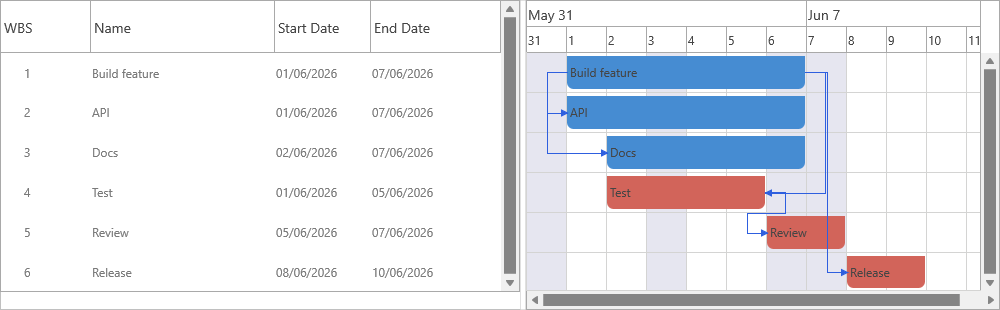
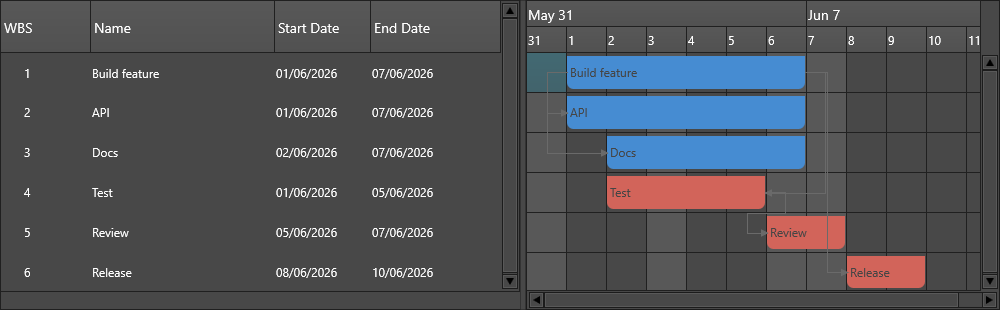
A realistic project combines all three areas: a weekday calendar, a task hierarchy, and a dependency, then renders through a chart. This is the setup the screenshots above are captured from:
procedure TForm1.BuildScheduledProject;
var
  Design, Build, Sub: TTMSFNCGanttTask;
begin
  GanttChart1.Project := GanttProject1;

  GanttProject1.BeginUpdate;
  try
    GanttProject1.ClearTasks;

    // 1. Calendar: weekdays only, 9–17.
    GanttProject1.WorkTime.WorkingDays :=
      [gdMonday, gdTuesday, gdWednesday, gdThursday, gdFriday];
    GanttProject1.WorkTime.WorkingHours.Clear;
    GanttProject1.WorkTime.WorkingHours.AddTimeSpan(EncodeTime(9, 0, 0, 0),
      EncodeTime(17, 0, 0, 0));

    // 2. Hierarchy: a phase with two subtasks.
    Design := GanttProject1.AddTask('Design', 'Visual design',
      Now, 3, gdtWorkDays, whWorkTimeAndDays, 100);
    Sub := Design.AddSubTask('Wireframes', '', Now, 1, gdtWorkDays,
      whWorkTimeAndDays, 100);
    Sub := Design.AddSubTask('Mockups', '', 0, 2, gdtWorkDays,
      whWorkTimeAndDays, 50);

    // 3. Dependency: Build follows Design.
    Build := GanttProject1.AddTask('Build', 'Implementation',
      0, 5, gdtWorkDays);
    Build.TaskDependencies.AddDependency(Design, gtdFinishToStart);
  finally
    GanttProject1.EndUpdate;
  end;
end;
void __fastcall TForm1::BuildScheduledProject()
{
  TTMSFNCGanttTask *Design, *Build, *Sub;

  GanttChart1->Project = GanttProject1;

  GanttProject1->BeginUpdate();
  try
  {
    GanttProject1->ClearTasks();

    // 1. Calendar: weekdays only, 9-17.
    GanttProject1->WorkTime->WorkingDays =
      TTMSFNCGanttDays() << gdMonday << gdTuesday << gdWednesday << gdThursday << gdFriday;
    GanttProject1->WorkTime->WorkingHours->Clear();
    GanttProject1->WorkTime->WorkingHours->AddTimeSpan(EncodeTime(9, 0, 0, 0),
      EncodeTime(17, 0, 0, 0));

    // 2. Hierarchy: a phase with two subtasks.
    Design = GanttProject1->AddTask("Design", "Visual design",
      Now(), 3, gdtWorkDays, whWorkTimeAndDays, 100);
    Sub = Design->AddSubTask("Wireframes", "", Now(), 1, gdtWorkDays,
      whWorkTimeAndDays, 100);
    Sub = Design->AddSubTask("Mockups", "", 0.0, 2, gdtWorkDays,
      whWorkTimeAndDays, 50);

    // 3. Dependency: Build follows Design.
    Build = GanttProject1->AddTask("Build", "Implementation",
      0.0, 5, gdtWorkDays);
    Build->TaskDependencies->AddDependency(Design, gtdFinishToStart);
  }
  __finally
  {
    GanttProject1->EndUpdate();
  }
}
Pitfalls
- A duration in
gdtWorkDaysis only meaningful when a working-time policy is active. WithwhAllTime, "3 work days" is treated as continuous calendar time. - Clear
WorkingHoursbefore adding spans if you are replacing the defaults —AddTimeSpanappends. - Holidays added with
UseTime := Falsecover the whole day; setUseTimeto restrict a holiday to a time range.
Related API
TTMSFNCGanttWorkTime—WorkingDays,WorkingHours,Holidays,IsWorkDayTTMSFNCGanttProject—WorkTime,CalculateTasks
See also
- Tasks & hierarchy — durations and planned dates
- Dependencies — how a lag is measured in working days